



 本文介绍了解决Gradle依赖缓存可能被破坏的问题,通常发生在网络连接超时后。通过修改gradle-wrapper.properties文件中的Gradle版本,可以解决错误提示'Failed to open zip file',并成功重新编译项目。
错误提示:
ERROR: Failed to open zip file.
Gradle's dependency cache may be corrupt (this sometimes occurs after a network connection timeout.)
Re-download dependencies and sync project (requires network)
Re-download dependencies and sync project (requires network)
一般导入别人demo不需要更改什么,但是aandroidstudio会智能判断是否需要对build gradle setting之类的文件进行修改。
一般修改项目中gradle目录下的子目录wrapper中的gradle-wrapper.properties文件
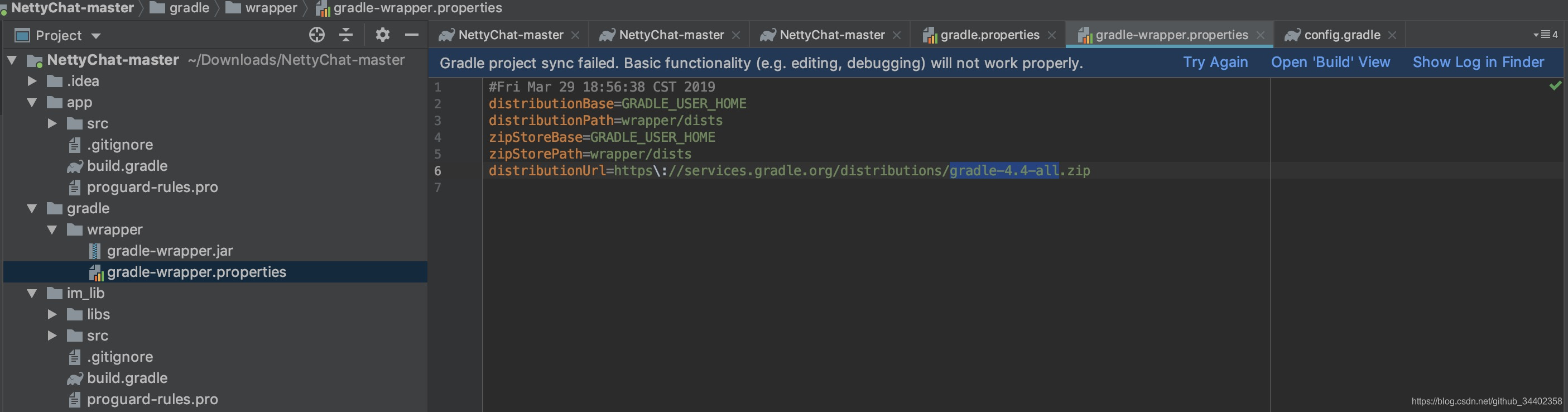
因为本人本地的gradle版本是gradle-4.10.3-all而不是gradle-4.4-all,所以需要修改他的版本号,然后重新编译。OK,成功了!!!!





 扫一扫
扫一扫


 1万+
1万+

 被折叠的 条评论
为什么被折叠?
被折叠的 条评论
为什么被折叠?
 到【灌水乐园】发言





