



 本文详细介绍了在PyTorch中创建张量的各种方法,包括从NumPy数组、列表创建张量,按指定维度初始化张量,进行随机初始化,使用相同元素构建张量等。此外还介绍了如何通过指定均值和标准差来生成正态分布的张量,以及一些特殊张量如对角阵、全零张量和全一张量的创建。
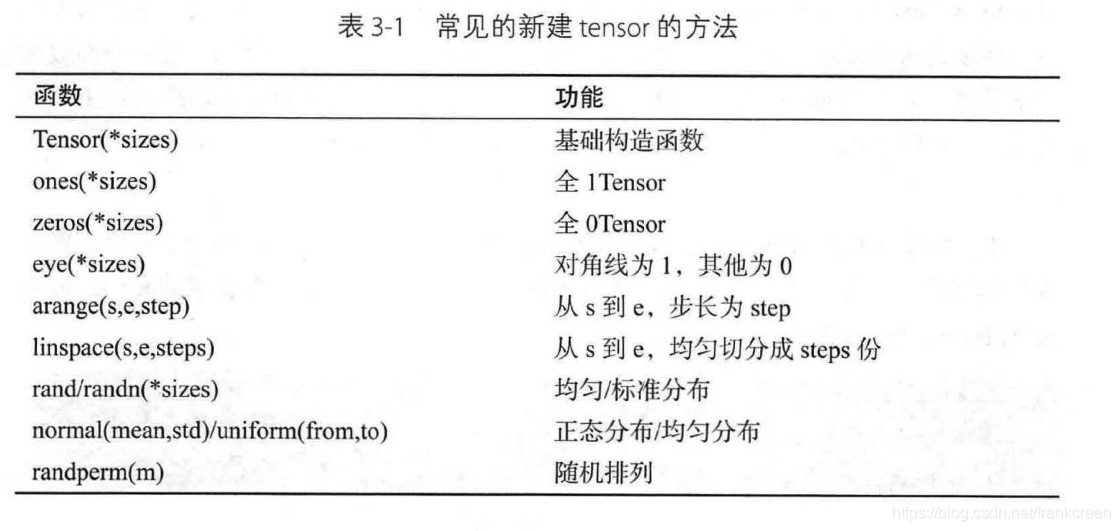
1.从numpy创建
https://pytorch.org/docs/stable/generated/torch.from_numpy.html
2.从list创建
3.指定维度的初始化
# 生成2行3列的数据
a = torch.empty(2, 3)
b = torch.FloatTensor(2, 3)
c = torch.IntTensor(2, 3)
4.随机初始化
# 采样自0~1均匀分布
a = torch.rand(3, 3)

# 形如*_like接受一个Tensor,将这个Tensor的shape读取出来之后在送入*所表示的函数
# 下面的rand_like(a)即将a的shape=3,3读出来传给torch.rand()函数
b = torch.rand_like(a)  # 相当于执行了torch.rand(3,3)

# 在区间[1,10)上随机采样,生成shape=2,2的LongTensor
c = torch.randint(1, 10, [2, 2])

# 采样自N(0,1)
d = torch.randn(3, 3)
随机变量正态分布:https://pytorch.org/docs/stable/generated/torch.randn.html
5.使用相同元素构建
# shape=2,3,所使用的相同的元素为7
b = torch.full([2, 3], 7)
6.指定参数的正态分布
# 指定均值和标准差
a = torch.normal(mean=torch.full([10], 0), std=torch.arange(1, 0, -0.1))
7.linespace
https://pytorch.org/docs/stable/generated/torch.linspace.html
8.logspace
https://pytorch.org/docs/stable/generated/torch.logspace.html
9.全0
a = torch.zeros([3, 4])
10.全
b = torch.ones([3, 4])
11.对角阵
https://pytorch.org/docs/stable/generated/torch.eye.html
12.randperm
>>> torch.randperm(4)
tensor([2, 1, 0, 3])
https://pytorch.org/docs/stable/generated/torch.randperm.html
参考:
https://blog.youkuaiyun.com/SHU15121856/article/details/87731878





 扫一扫
扫一扫


 1629
1629

 被折叠的 条评论
为什么被折叠?
被折叠的 条评论
为什么被折叠?
 到【灌水乐园】发言





