


 本文介绍如何在Databricks环境中加载MySQL数据库的数据,并演示了数据处理过程,包括创建临时视图、修改列名、表连接及排序等操作。
databricks加载MySQL数据,需要先安装MySQL的驱动包。可以从集群的Libraries安装。上传jar包即可。
查询如下
driver = "com.mysql.jdbc.Driver"
url = dbutils.secrets.get(scope = "db_test", key = "url")
user = dbutils.secrets.get(scope = "db_test", key = "username")
password = dbutils.secrets.get(scope = "db_test", key = "password")
obj = spark.read.format("jdbc").option("driver", driver).\
option("url", url).option("user", user).option("password", password)

table_sql = "(select * from students) tmp"
df_students = obj.option("dbtable", table_sql).load()
display(df_students)
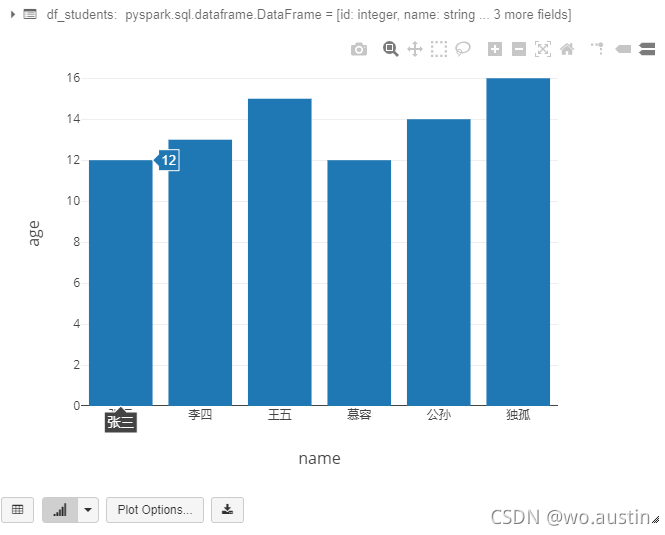
创建临时表
df_students.createOrReplaceTempView("test_student")
修改列名
df_students_new = df_students.withColumnRenamed("name","student_name" )
表连接
#全连接
df_union1 = df_students_new.join(df_students,"id","full")
#左外连接
df_union2 = df_students_new.join(df_students,"id","left_outer")
#右外连接
df_union3 = df_students_new.join(df_students,"id","right_outer")
排序
df_union1 = df_union1.sort("age")
转Pandas
df_union1 = df_union1.toPandas()





 扫一扫
扫一扫


 1633
1633

 被折叠的 条评论
为什么被折叠?
被折叠的 条评论
为什么被折叠?
 到【灌水乐园】发言





