


 本文详细介绍了在Vue项目中遇到的图标显示问题及解决方案,包括如何在main.js中正确引入iconfont.js,以及通过封装SvgIcon组件实现图标全局注册和使用的具体步骤。
引入过程中出现的问题:页面没有出现图标,原因:在main.js中没有引入iconfont.js
1、阿里demo中的引入方式:
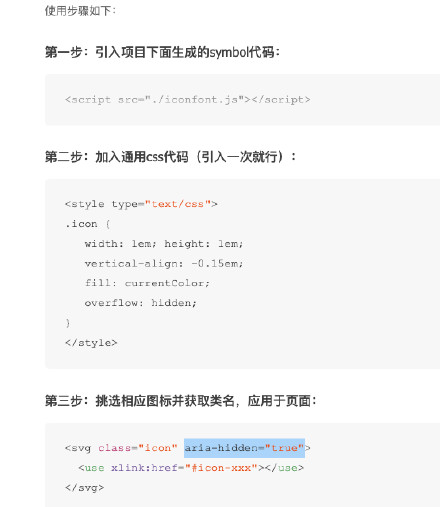
2、我的引入方式(参考别人的项目)
上图中的引入方式,在iconfonts.js中注册了标签
我的方式是在上面的基础上封装了一层,每次使用的时候可以不用写
我的目录结构:
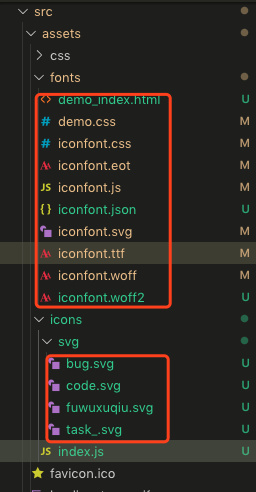
icons/svg中放所有的图标文件
1)index.js中代码功能,注册全局标签,并获取所有的svg文件,index.js中的代码如下:
import Vue
from
'vue'
import SvgIcon
from
'../../components/SvgIcon'
// svg component
// register globally
Vue.
component(
'svg-icon', SvgIcon)
const req
= require.
context(
'./svg',
false,
/
\.
svg
$
/)
const
requireAll
=
requireContext
=> requireContext.
keys().
map(requireContext)
requireAll(req)
2)SvgIcon组件中的代码,主要共功能将引入图标的代码封装到组件中,并注册为全局标签使用
<<span style="color: #f92672;">template>
<<span style="color: #f92672;">div
v-if="isExternal" :
style="styleExternalIcon"
class=
"svg-external-icon svg-icon"
v-on="$listeners" />
<<span style="color: #f92672;">svg
v-else :
class="svgClass"
aria-hidden=
"true"
v-on="$listeners">
<<span style="color: #f92672;">use :
href="iconName" />
</<span style="color: #f92672;">svg>
</<span style="color: #f92672;">template>
<<span style="color: #f92672;">script>
// doc: https://panjiachen.github.io/vue-element-admin-site/feature/component/svg-icon.html#usage
import { isExternal }
from
'../utils/validate'
export
default {
name:
'SvgIcon',
props: {
iconClass: {
type:
String,
required:
true
},
className: {
type:
String,
default:
''
}
},
computed: {
isExternal() {
return
isExternal(
this.iconClass)
},
iconName() {
return
`#icon-
${
this.iconClass
}
`
},
svgClass() {
if (
this.className) {
return
'svg-icon '
+
this.className
}
else {
return
'svg-icon'
}
},
styleExternalIcon() {
return {
mask:
`url(
${
this.iconClass
}
) no-repeat 50% 50%`,
'-webkit-mask':
`url(
${
this.iconClass
}
) no-repeat 50% 50%`
}
}
}
}
</<span style="color: #f92672;">script>
<<span style="color: #f92672;">style
scoped>
.svg-icon {
width:
1
em;
height:
1
em;
vertical-align:
-0.15
em;
fill:
currentColor;
overflow:
hidden;
}
.svg-external-icon {
background-color:
currentColor;
mask-size:
cover
!important;
display:
inline-block;
}
</<span style="color: #f92672;">style>
3)在main.js中引入即可
import
'./assets/icons'
import
'./assets/fonts/iconfont.js'





 扫一扫
扫一扫


 662
662

 被折叠的 条评论
为什么被折叠?
被折叠的 条评论
为什么被折叠?
 到【灌水乐园】发言





