

EasyUI easyui-datagrid 实现一列显示多个字段的数据(回显多字段、一列显示多列、单元格显示多字段)

本文介绍如何使用EasyUI的datagrid组件通过formatter方法将后台返回的一行记录中的多个字段显示在同一列中,详细阐述了formatter的用法及其在HTML中的增强功能,示例展示了将take_time和landing_time字段合并显示的效果。
部署运行你感兴趣的模型镜像

主要代码

//1.获取表单数据

var val=$("#ff").serialize();

console.info(val);

//2.把查询的值给easyui中的table表格

$("#tab").empty();var tarObject=$("#tab").append('<table id="dg" class="easyui-datagrid" style="width:850px;height:350px"'+

          'url="findSel?'+val+'"'+

           ' title="航班查询"'+

           'singleSelect="true" fitColumns="true">'+

       '<thead>'+

           '<tr>'+

               '<th field="airline" width="80" data-options="formatter:airlineformat">航空公司/航班机型</th>'+

               '<th field="type" width="80" hidden="true" >航班机型</th>'+//'<th field="take_time" width="100" hidden="true">起飞时间</th>'+

               '<th field="landing_time" align="right" width="80" data-options="formatter:takelandingformat">起降时间</th>'+

               '<th field="airport_name1" align="right" width="80">机场</th>'+

               '<th field="flight_time" width="220" data-options="formatter:flighttimeformat">飞行时长</th>'+

               '<th field="stop_airport" width="60" align="center" data-options="formatter:stopformat">经停</th>'+

               '<th field="reference_price" width="60" align="center" data-options="formatter:priceformat">参考报价</th>'+

           '</tr>'+

       '</thead>'+

   '</table>');


//不用再解析,下面datagrid方法已经解析了一遍,如果再解析就会发送两次请求

 /* $.parser.parse(tarObject);   */


$('#dg').datagrid({

             view: detailview,

             detailFormatter:function(index,row){

                 return '<div style="padding:2px;position:relative;"><table class="ddv"></table></div>';

             },

             onExpandRow: function(index,row){

                console.info(typeof index);

                console.info(typeof row);

                 var ddv = $(this).datagrid('getRowDetail',index).find('table.ddv');

                 ddv.datagrid({

                     url:'findSelByFlightTickets?flight_id='+row.id,

                     fitColumns:true,

                     singleSelect:true,

                     rownumbers:true,

                     loadMsg:'',

                     height:'auto',

                     columns:[[

                         {field:'sell_company',title:'售票单位',width:200},

                         {field:'ticket_price',title:'票价',width:100,align:'right'}

                     ]],

                     onResize:function(){

                         $('#dg').datagrid('fixDetailRowHeight',index);                                                                                                                                                                                                                                                                                                                                                                                                                                                                                                                                                                                                                                                                                                                                                                                                                                                                                                                                                                                                                                                                                                                                                                                                                                                                                                                                                                                                                                                                                                                                                                                                                                                                                                                                                                                                                                                                                                                                                                                                                                                                                                                                                                                                                                                          

                     },

                     onLoadSuccess:function(){

                         setTimeout(function(){

                             $('#dg').datagrid('fixDetailRowHeight',index);

                         },0);

                     }

                 });

                 $('#dg').datagrid('fixDetailRowHeight',index);

             }

 });


js代码

//起降时间

function takelandingformat(val,row){

    val=row.take_time+"</br>"+val;

    return val;

}


//航空公司/航班机型

function airlineformat(val,row){

    val=val+"</br>"+row.type;

    return val;

}

formatter和jqeury的html()差不多,相当于对html()进行了增强。

formatter可以解析HTML标签。

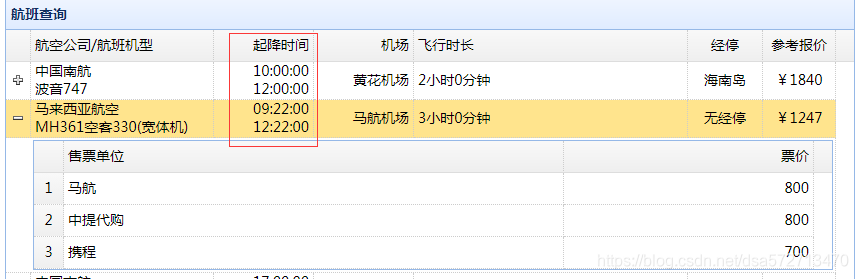
formatter在这里实现了把后台传过来的这一行的记录中的take_timelanding_time显示在了一列上。


row不是代表页面中的这一行,而是后台传过来的这一行的json对象。

所以,航班机型列去掉和保留效果是一样的,不影响。
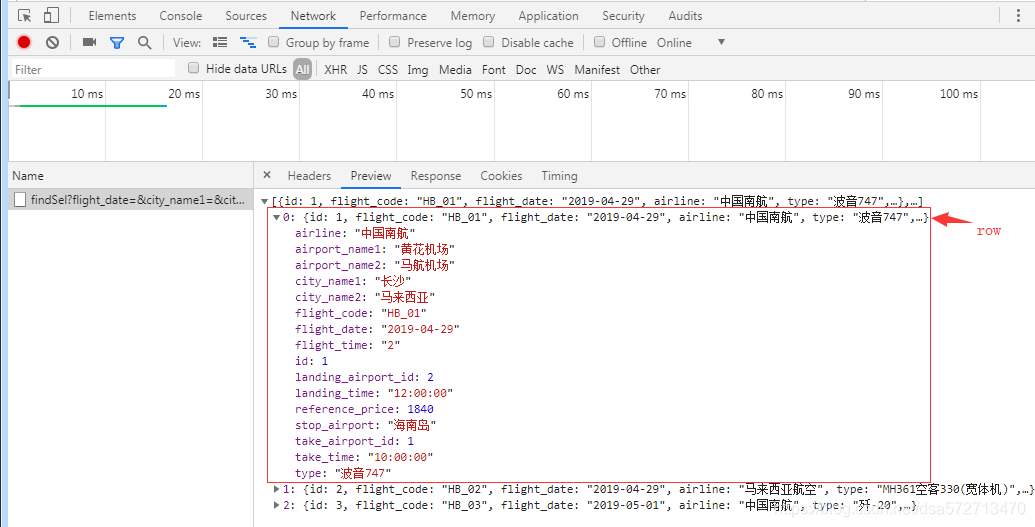
 

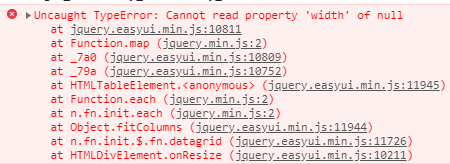
field必须要有值,不然报错。
 

效果
 

HTML代码示例:

       <div id="tab">

         <!--  <table id="dg" class="easyui-datagrid" style="width:850px;height:350px"

                  url="findSel"

                  title="航班查询"

                  singleSelect="true" fitColumns="true">

              <thead>

                  <tr>

                      <th field="airline" width="80">航空公司</th>

                      <th field="type" width="80">航班机型</th>

                      <th field="take_time" width="100">起飞时间</th>

                      <th field="landing_time" align="right" width="80">降落时间</th>

                      <th field="airport_name1" align="right" width="80">机场</th>

                      <th field="flight_time" width="220">飞行时长</th>

                      <th field="stop_airport" width="60" align="center">经停</th>

                      <th field="reference_price" width="60" align="center">参考报价</th>

                  </tr>

              </thead>

          </table>  -->


       </div>


您可能感兴趣的与本文相关的镜像

Stable-Diffusion-3.5

Stable-Diffusion-3.5

图片生成
Stable-Diffusion

Stable Diffusion 3.5 (SD 3.5) 是由 Stability AI 推出的新一代文本到图像生成模型,相比 3.0 版本,它提升了图像质量、运行速度和硬件效率

评论
添加红包

请填写红包祝福语或标题

红包个数最小为10个

红包金额最低5元

当前余额3.43前往充值 >
需支付:10.00
成就一亿技术人!
领取后你会自动成为博主和红包主的粉丝 规则
hope_wisdom
发出的红包
实付
使用余额支付
点击重新获取
扫码支付
钱包余额 0

抵扣说明:

1.余额是钱包充值的虚拟货币,按照1:1的比例进行支付金额的抵扣。
2.余额无法直接购买下载,可以购买VIP、付费专栏及课程。

余额充值



