


String类的声名:
public final class String
    implements java.io.Serializable, Comparable<String>, CharSequence,
               Constable, ConstantDesc{
}
“第一,String类是final的,意味着它不能被子类继承。”
“第二,String类实现了Serializable接口,意味着它可以序列化。”
“第三,String类实现了Comparable接口,意味着最好不要使用'=='来比较两个字符串是否相等,而应该用compareTo()方法去比较。”
因为 == 是用来比较两个对象的地址,如果只是比较字符串内容的话,可以使用String类的equals方法。
“第四,String和StringBuffer、StringBuilder一样,都实现了CharSequence接口,所以是一家人。由于String是不可变的,所以遇到字符串拼接的时候就可以考虑一下String的另外两个好兄弟,StringBuffer和StringBuilder,他们俩是可变的。
String底层为什么由char数组优化为byte数组?
private final char[] value;
“第五,Java9之前,String是使用char型数组实现的,之后改为byte型的数组实现,并增加了coder来表示编码。这样做的好处是在Latin1字符为主的程序里,可以把String占用的内存减少一半。当然,这个改进在节省内存的同时引入了编码检测的开销。”
Latin1(Latin-1)是一种单字节字符集(即每个字符只使用一个字节的编码方式),也称为 ISO-8859-1(国际标准化组织 8859-1),它包含了西欧语言中使用的所有字符,包括英语、法语、德语、西班牙语、葡萄牙语、意大利语等等。在 Latin1 编码中,每个字符使用一个 8 位(即一个字节)的编码,可以表示 256 种不同的字符,其中包括 ASCII 字符集中的所有字符,即 0x00 到 0x7F,以及其他西欧语言中的特殊字符,例如 é、ü、ñ 等等。由于 Latin1 只使用一个字节表示一个字符,因此在存储和传输文本时具有较小的存储空间和较快的速度
下面是JDK17版本中的String类源码,注意和JDK8的不同。
public final class String
    implements java.io.Serializable, Comparable<String>, CharSequence {
    @Stable
    private final byte[] value;
    private final byte coder;
    private int hash;
}
从char[]到byte[],最主要的就是节省字符串占用的内存空间。内存占用减少带来的另一个好处,就是GC次数也会减少。
小知识:
jmap -histo:live pid | head -n 10 命令就可以查看到堆内对象示例的统计信息、ClassLoader 的信息以及 finalizer 队列等。
Java的对象基本都在堆上,这里pid是进程号,可以通过ps -ef | grep java命令查看。
优化String节省内存空间是非常有必要的。如果去优化一个使用频率没有那么高的类,就没有什么必要。
众所周知,char 类型的数据在 JVM 中是占用两个字节的,并且使用的是 UTF-8 编码,其值范围在 '\u0000'(0)和 '\uffff'(65,535)(包含)之间。
也就是说,使用 char[] 来表示 String 就会导致,即使 String 中的字符只用一个字节就能表示,也得占用两个字节。
PS:在计算机中,单字节字符通常指的是一个字节(8 位)可以表示的字符,而双字节字符则指需要两个字节(16 位)才能表示的字符。单字节字符和双字节字符的定义是相对的,不同的编码方式对应的单字节和双字节字符集也不同。常见的单字节字符集有 ASCII(美国信息交换标准代码)、ISO-8859(国际标准化组织标准编号 8859)、GBK(汉字内码扩展规范)、GB2312(中国国家标准,现在已经被 GBK 取代),像拉丁字母、数字、标点符号、控制字符都是单字节字符。双字节字符集包括 Unicode、UTF-8、GB18030(中国国家标准),中文、日文、韩文、拉丁文扩展字符属于双字节字符。
当然了,仅仅将 char[] 优化为 byte[] 是不够的,还要配合 Latin-1 的编码方式,该编码方式是用单个字节来表示字符的,这样就比 UTF-8 编码节省了更多的空间。
换句话说,对于:
String name = "jack";这样的,使用Latin-1编码,占用4个字节就够了。
但对于:
String name = "小二";
这种,没有办法,只能使用UTF16来进行编码。
针对JDK9的String源码,为了区别编码方式,追加了一个coder字段来进行区分。
    /**
     * The identifier of the encoding used to encode the bytes in
     * {@code value}. The supported values in this implementation are
     *
     * LATIN1
     * UTF16
     *
     * @implNote This field is trusted by the VM, and is a subject to
     * constant folding if String instance is constant. Overwriting this
     * field after construction will cause problems.
     */
    private final byte coder;
简单翻译一下:用于对value中的字节进行编码的编码标识符。此视线中支持的值是LATIN1 和UTF16.
此字段受VM信任,如果String实例是常量,则会进行常量折叠。施工后覆盖此字段可能会导致问题。
Java会根据字符串的内容自动设置为相应的编码,要么Latin-1要么UTF16.
也就是说,从char[]到byte[],中文是两个字节,纯英文是一个字节,再次之前呢,中文是两个字节,英文也是两个字节。
在 UTF-8 中,0-127 号的字符用 1 个字节来表示,使用和 ASCII 相同的编码。只有 128 号及以上的字符才用 2 个、3 个或者 4 个字节来表示。
- 如果只有一个字节,那么最高的比特位为 0;
- 如果有多个字节,那么第一个字节从最高位开始,连续有几个比特位的值为 1,就使用几个字节编码,剩下的字节均以 10 开头。
具体的表现形式为:
- 0xxxxxxx:一个字节;
- 110xxxxx 10xxxxxx:两个字节编码形式(开始两个 1);
- 1110xxxx 10xxxxxx 10xxxxxx:三字节编码形式(开始三个 1);
- 11110xxx 10xxxxxx 10xxxxxx 10xxxxxx:四字节编码形式(开始四个 1)。
也就是说,UTF-8 是变长的,那对于 String 这种有随机访问方法的类来说,就很不方便。所谓的随机访问,就是 charAt、subString 这种方法,随便指定一个数字,String 要能给出结果。如果字符串中的每个字符占用的内存是不定长的,那么进行随机访问的时候,就需要从头开始数每个字符的长度,才能找到你想要的字符。
那你可能会问,UTF-16 也是变长的呢?一个字符还可能占用 4 个字节呢?
的确,UTF-16 使用 2 个或者 4 个字节来存储字符。
- 对于 Unicode 编号范围在 0 ~ FFFF 之间的字符,UTF-16 使用两个字节存储。
- 对于 Unicode 编号范围在 10000 ~ 10FFFF 之间的字符,UTF-16 使用四个字节存储,具体来说就是:将字符编号的所有比特位分成两部分,较高的一些比特位用一个值介于 D800~DBFF 之间的双字节存储,较低的一些比特位(剩下的比特位)用一个值介于 DC00~DFFF 之间的双字节存储。
但是在 Java 中,一个字符(char)就是 2 个字节,占 4 个字节的字符,在 Java 里也是用两个 char 来存储的,而 String 的各种操作,都是以 Java 的字符(char)为单位的,charAt 是取得第几个 char,subString 取的也是第几个到第几个 char 组成的子串,甚至 length 返回的都是 char 的个数。
所以 UTF-16 在 Java 的世界里,就可以视为一个定长的编码。
String类的hashCode方法
“第六,每一个字符串都会有一个hash值,这个hash值在很大概率是不会重复的。因此String很适合最为HashMap的键值。”
    /**
     * Returns a hash code for this string. The hash code for a
     * {@code String} object is computed as
     * <blockquote><pre>
     * s[0]*31^(n-1) + s[1]*31^(n-2) + ... + s[n-1]
     * </pre></blockquote>
     * using {@code int} arithmetic, where {@code s[i]} is the
     * <i>i</i>th character of the string, {@code n} is the length of
     * the string, and {@code ^} indicates exponentiation.
     * (The hash value of the empty string is zero.)
     *
     * @return  a hash code value for this object.
     */
    public int hashCode() {
        // The hash or hashIsZero fields are subject to a benign data race,
        // making it crucial to ensure that any observable result of the
        // calculation in this method stays correct under any possible read of
        // these fields. Necessary restrictions to allow this to be correct
        // without explicit memory fences or similar concurrency primitives is
        // that we can ever only write to one of these two fields for a given
        // String instance, and that the computation is idempotent and derived
        // from immutable state
        int h = hash;
        if (h == 0 && !hashIsZero) {
            h = isLatin1() ? StringLatin1.hashCode(value)
                           : StringUTF16.hashCode(value);
            if (h == 0) {
                hashIsZero = true;
            } else {
                hash = h;
            }
        }
        return h;
    }

    //这里是StringLatin1.hashCode
    public static int hashCode(byte[] value) {
        int h = 0;
        for (byte v : value) {
            h = 31 * h + (v & 0xff);
        }
        return h;
    }
    //这里是StringUTF16.hashCode
    public static int hashCode(byte[] value) {
        int h = 0;
        int length = value.length >> 1;
        for (int i = 0; i < length; i++) {
            h = 31 * h + getChar(value, i);
        }
        return h;
    }
hashCode方法首先检查是否已经计算过哈希码,如果已经计算过,则直接返回缓存的哈希码。否则,方法将使用一个循环遍历字符串的所有字符,并使用一个乘法和加法的组合计算哈希码。
这种计算方法被称为31倍哈希法。计算完成后,将得到的哈希值存储在hash成员变量中,以便下一次调用时直接返回该值,而不需要重新计算。这是一种缓存优化,称为”惰性计算“。
31倍哈希法是一种简单有效的字符串哈希算法,常用于对字符串进行哈希处理。该算法的基本思想是将字符串中的每个字符乘一个固定质数31的幂次方,并将它们相加得到哈希值。具体地,假设字符串为s,长度为n。则31倍哈希值计算公式如下:(这里从源码的注释也是可以看到滴)
H(s) = (s[0] * 31^(n-1)) + (s[1] * 31^(n-2)) + ... + (s[n-1] * 31^0)
其中,s[i]表示字符串 s 中第 i 个字符的 ASCII 码值,^表示幂运算。
31倍哈希法的优点在于简单易实现,计算速度块,同时也比较均匀的分布在哈希表中。
可以通过以下方法来模拟String的hashCode方法:
public class HashCodeExample {
    public static void main(String[] args) {
        String text = "hack";
        int hashCode = computeHashCode(text);
        System.out.println("字符串 \"" + text + "\" 的哈希码是: " + hashCode);

        System.out.println("String 的 hashCode " + text.hashCode());
    }

    public static int computeHashCode(String text) {
        int h = 0;
        for (int i = 0; i < text.length(); i++) {
            h = 31 * h + text.charAt(i);
        }
        return h;
    }
}
看下结果: 可以看到结果是一样的。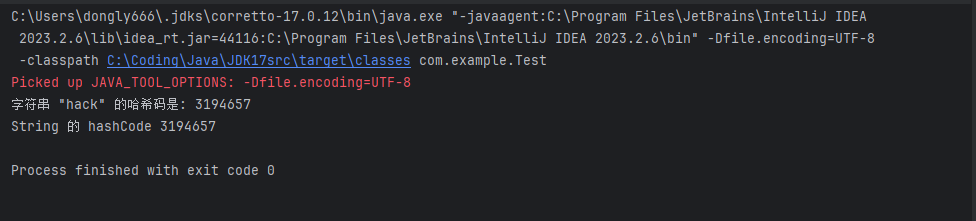
String类的substring方法:
String类中还有一个比较常用的subString,用来截取字符串的,来看看源码。
    /**
     * Returns a string that is a substring of this string. The
     * substring begins at the specified {@code beginIndex} and
     * extends to the character at index {@code endIndex - 1}.
     * Thus the length of the substring is {@code endIndex-beginIndex}.
     * <p>
     * Examples:
     * <blockquote><pre>
     * "hamburger".substring(4, 8) returns "urge"
     * "smiles".substring(1, 5) returns "mile"
     * </pre></blockquote>
     *
     * @param      beginIndex   the beginning index, inclusive.
     * @param      endIndex     the ending index, exclusive.
     * @return     the specified substring.
     * @throws     IndexOutOfBoundsException  if the
     *             {@code beginIndex} is negative, or
     *             {@code endIndex} is larger than the length of
     *             this {@code String} object, or
     *             {@code beginIndex} is larger than
     *             {@code endIndex}.
     */
    public String substring(int beginIndex, int endIndex) {
        int length = length();
        checkBoundsBeginEnd(beginIndex, endIndex, length);
        if (beginIndex == 0 && endIndex == length) {
            return this;
        }
        int subLen = endIndex - beginIndex;
        return isLatin1() ? StringLatin1.newString(value, beginIndex, subLen)
                          : StringUTF16.newString(value, beginIndex, subLen);
    }
翻译一下:返回一个字符串,该字符串是此字符串的子字符串。子字符串是指定的beginIndex 延伸到索引 endIndex-1处的字符。因此,子字符串的长度为endIndex-beginIndex。
例如:
“hamburger“.substring(4,8)returns ”urge“
”smiles“ .substring(1, 5) returns "mile"
substring 方法首先检查参数的有效性,如果参数无效,则抛出StringIndexOutOfBoundsException异常。
如果beginIndex为0,说明子串与原字符串相同,直接返回原字符串。否则,使用value数组的一部分,new一个新的String对象并返回。
下面是几个使用 substring 方法的示例:
①、提取字符串中的一段子串:
String str = "Hello, world!";
String subStr = str.substring(7, 12);  // 从第7个字符(包括)提取到第12个字符(不包括)
System.out.println(subStr);  // 输出 "world"
②、提取字符串中的前缀或后缀:
String str = "Hello, world!";
String prefix = str.substring(0, 5);  // 提取前5个字符,即 "Hello"
String suffix = str.substring(7);     // 提取从第7个字符开始的所有字符,即 "world!"
③、处理字符串中的空格和分隔符:
String str = "   Hello,   world!  ";
String trimmed = str.trim();                  // 去除字符串开头和结尾的空格
String[] words = trimmed.split("\\s+");       // 将字符串按照空格分隔成单词数组
String firstWord = words[0].substring(0, 1);  // 提取第一个单词的首字母
System.out.println(firstWord);                // 输出 "H"
④、处理字符串中的数字和符号:
String str = "1234-5678-9012-3456";
String[] parts = str.split("-");             // 将字符串按照连字符分隔成四个部分
String last4Digits = parts[3].substring(1);  // 提取最后一个部分的后三位数字
System.out.println(last4Digits);             // 输出 "456"
substring方法可以根据需求灵活的提取字符串中的子串,为字符串处理提供了便利。
String类的indexOf方法:
indexOf方法用于查找一个子字符串在原字符串中第一次出现的位置,并返回该位置的索引。来看看该方法的源码:
/*
 * 查找字符数组 target 在字符数组 source 中第一次出现的位置。
 * sourceOffset 和 sourceCount 参数指定 source 数组中要搜索的范围,
 * targetOffset 和 targetCount 参数指定 target 数组中要搜索的范围,
 * fromIndex 参数指定开始搜索的位置。
 * 如果找到了 target 数组,则返回它在 source 数组中的位置索引(从0开始),
 * 否则返回-1。
 */
static int indexOf(char[] source, int sourceOffset, int sourceCount,
        char[] target, int targetOffset, int targetCount,
        int fromIndex) {
    // 如果开始搜索的位置已经超出 source 数组的范围,则直接返回-1(如果 target 数组为空,则返回 sourceCount)
    if (fromIndex >= sourceCount) {
        return (targetCount == 0 ? sourceCount : -1);
    }
    // 如果开始搜索的位置小于0,则从0开始搜索
    if (fromIndex < 0) {
        fromIndex = 0;
    }
    // 如果 target 数组为空,则直接返回开始搜索的位置
    if (targetCount == 0) {
        return fromIndex;
    }

    // 查找 target 数组的第一个字符在 source 数组中的位置
    char first = target[targetOffset];
    int max = sourceOffset + (sourceCount - targetCount);

    // 循环查找 target 数组在 source 数组中的位置
    for (int i = sourceOffset + fromIndex; i <= max; i++) {
        /* Look for first character. */
        // 如果 source 数组中当前位置的字符不是 target 数组的第一个字符,则在 source 数组中继续查找 target 数组的第一个字符
        if (source[i] != first) {
            while (++i <= max && source[i] != first);
        }

        /* Found first character, now look at the rest of v2 */
        // 如果在 source 数组中找到了 target 数组的第一个字符,则继续查找 target 数组的剩余部分是否匹配
        if (i <= max) {
            int j = i + 1;
            int end = j + targetCount - 1;
            for (int k = targetOffset + 1; j < end && source[j]
                    == target[k]; j++, k++);

            // 如果 target 数组全部匹配,则返回在 source 数组中的位置索引
            if (j == end) {
                /* Found whole string. */
                return i - sourceOffset;
            }
        }
    }
    // 没有找到 target 数组,则返回-1
    return -1;
}
①、示例 1:查找子字符串的位置
②、示例 2:查找字符串中某个字符的位置
③、示例 3:查找子字符串的位置(从指定位置开始查找)
④、示例 4:查找多个子字符串
String类的其他方法:
length()用于返回字符串长度。
isEmpty()用于判断字符串是否为空。
charAt()用于返回指定索引处的字符。
valueOf()用于将其他类型的数据站换位字符串
valueOf方法背后其实是包装器类的toString方法,比如说整数转为字符串调用的是Integer类的toString方法。
    public static String valueOf(int i) {
        return Integer.toString(i);
    }
而Integer类的toString方法又调用了Integer类的静态方法toString(int)
    @IntrinsicCandidate
    public static String toString(int i) {
        int size = stringSize(i);
        if (COMPACT_STRINGS) {
            byte[] buf = new byte[size];
            getChars(i, size, buf);
            return new String(buf, LATIN1);
        } else {
            byte[] buf = new byte[size * 2];
            StringUTF16.getChars(i, size, buf);
            return new String(buf, UTF16);
        }
    }
至于getChars方法,就是把整数复制到字符数组的具体过程了。
⑥、比如说 getBytes() 用于返回字符串的字节数组,可以指定编码方式(也可以理解,因为前面就有这两种编码方式),比如说:
String text = "hack";
System.out.println(Arrays.toString(text.getBytes(StandardCharsets.UTF_8)));
⑦、比如说 trim() 用于去除字符串两侧的空白字符,来看源码:
    public String trim() {
        String ret = isLatin1() ? StringLatin1.trim(value)
                                : StringUTF16.trim(value);
        return ret == null ? this : ret;
    }
    //这里能看到是StringLatin1.trim
    public static String trim(byte[] value) {
        int len = value.length;
        int st = 0;
        while ((st < len) && ((value[st] & 0xff) <= ' ')) {
            st++;
        }
        while ((st < len) && ((value[len - 1] & 0xff) <= ' ')) {
            len--;
        }
        return ((st > 0) || (len < value.length)) ?
            newString(value, st, len - st) : null;
    }
    //这里是StringUTF16.trim
    public static String trim(byte[] value) {
        int length = value.length >> 1;
        int len = length;
        int st = 0;
        while (st < len && getChar(value, st) <= ' ') {
            st++;
        }
        while (st < len && getChar(value, len - 1) <= ' ') {
            len--;
        }
        return ((st > 0) || (len < length )) ?
            new String(Arrays.copyOfRange(value, st << 1, len << 1), UTF16) :
            null;
    }
⑧、比如说 toCharArray() 用于将字符串转换为字符数组。
除此之外,还有split、equals、join等方法。





 扫一扫
扫一扫


 被折叠的 条评论
为什么被折叠?
被折叠的 条评论
为什么被折叠?
 到【灌水乐园】发言





