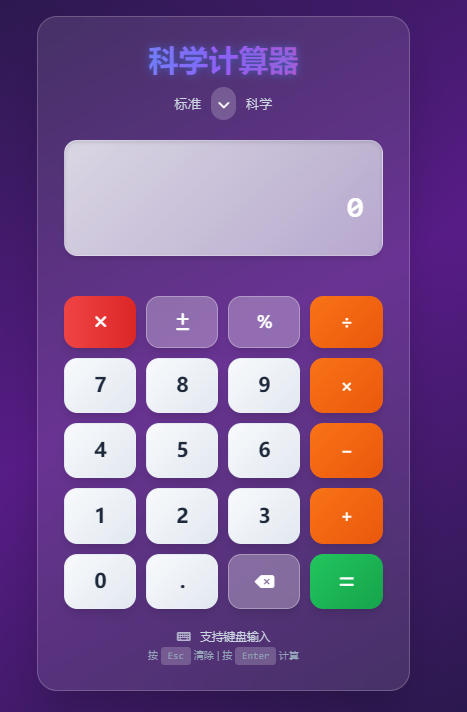
<!DOCTYPE html>
<html lang="zh-CN" data-theme="dark">
<head>
<meta charset="UTF-8">
<meta name="viewport" content="width=device-width, initial-scale=1.0, maximum-scale=1.0, user-scalable=no">
<meta name="theme-color" content="#1e293b">
<meta name="apple-mobile-web-app-capable" content="yes">
<meta name="apple-mobile-web-app-status-bar-style" content="black-translucent">
<title>科学计算器 Pro Max</title>
<link rel="icon" href="data:image/svg+xml,<svg xmlns='http://www.w3.org/2000/svg' viewBox='0 0 100 100'><text y='.9em' font-size='90'>🧮</text></svg>">
<script src="https://cdn.tailwindcss.com"></script>
<link href="https://cdn.bootcdn.net/ajax/libs/daisyui/4.12.10/full.min.css" rel="stylesheet">
<link href="https://cdn.bootcdn.net/ajax/libs/font-awesome/6.4.0/css/all.min.css" rel="stylesheet">
<link href="https://fonts.googleapis.com/css2?family=Inter:wght@300;400;500;600;700&family=JetBrains+Mono:wght@400;500;600&display=swap" rel="stylesheet">
<style>
/* 全局样式重置和优化 */
* {
box-sizing: border-box;
-webkit-tap-highlight-color: transparent;
-webkit-font-smoothing: antialiased;
-moz-osx-font-smoothing: grayscale;
}
body {
font-family: 'Inter', -apple-system, BlinkMacSystemFont, 'Segoe UI', Roboto, sans-serif;
font-feature-settings: 'tnum', 'lnum';
text-rendering: optimizeLegibility;
overflow-x: hidden;
background: linear-gradient(135deg, #0f172a 0%, #1e293b 50%, #334155 100%);
min-height: 100vh;
}
/* 粒子背景效果 */
.particles {
position: fixed;
top: 0;
left: 0;
width: 100%;
height: 100%;
pointer-events: none;
z-index: -1;
overflow: hidden;
}
.particle {
position: absolute;
width: 4px;
height: 4px;
background: rgba(59, 130, 246, 0.5);
border-radius: 50%;
animation: float 8s ease-in-out infinite;
}
@keyframes float {
0%, 100% {
transform: translateY(100vh) rotate(0deg);
opacity: 0;
}
10% { opacity: 1; }
90% { opacity: 1; }
50% {
transform: translateY(-100px) rotate(180deg);
opacity: 0.8;
}
}
/* 玻璃态效果增强 */
.glass-effect {
background: rgba(255, 255, 255, 0.1);
backdrop-filter: blur(25px) saturate(180%);
-webkit-backdrop-filter: blur(25px) saturate(180%);
border: 1px solid rgba(255, 255, 255, 0.2);
box-shadow: 0 8px 32px rgba(0, 0, 0, 0.1);
}
/* 计算器容器优化 */
.calculator-container {
background: rgba(255, 255, 255, 0.08);
backdrop-filter: blur(30px) saturate(180%);
-webkit-backdrop-filter: blur(30px) saturate(180%);
border: 1px solid rgba(255, 255, 255, 0.15);
box-shadow: 0 20px 40px rgba(0, 0, 0, 0.2);
border-radius: 3rem;
padding: 2.5rem;
max-width: 420px;
width: 100%;
position: relative;
overflow: hidden;
}
.calculator-container::before {
content: '';
position: absolute;
top: 0;
left: 0;
right: 0;
height: 1px;
background: linear-gradient(90deg, transparent, rgba(255,255,255,0.3), transparent);
}
/* 按钮样式优化 */
.calculator-btn {
transition: all 0.3s cubic-bezier(0.4, 0, 0.2, 1);
box-shadow: 0 4px 15px rgba(0, 0, 0, 0.2);
position: relative;
overflow: hidden;
will-change: transform;
-webkit-user-select: none;
user-select: none;
border-radius: 1.5rem;
border: none;
font-weight: 600;
}
.calculator-btn::before {
content: '';
position: absolute;
top: 0;
left: -100%;
width: 100%;
height: 100%;
background: linear-gradient(90deg, transparent, rgba(255,255,255,0.4), transparent);
transition: left 0.6s;
}
.calculator-btn:hover::before {
left: 100%;
}
.calculator-btn:hover {
transform: translateY(-3px) scale(1.05);
box-shadow: 0 12px 35px rgba(0, 0, 0, 0.3);
}
.calculator-btn:active {
transform: translateY(0) scale(0.95);
box-shadow: 0 2px 10px rgba(0, 0, 0, 0.2);
}
/* 显示区域优化 */
.display {
background: linear-gradient(135deg, rgba(248, 250, 252, 0.08) 0%, rgba(226, 232, 240, 0.04) 100%);
backdrop-filter: blur(15px) saturate(180%);
-webkit-backdrop-filter: blur(15px) saturate(180%);
box-shadow: inset 0 1px 0 rgba(255,255,255,0.1), 0 12px 40px rgba(0, 0, 0, 0.15);
border: 1px solid rgba(255, 255, 255, 0.1);
border-radius: 2rem;
padding: 1.5rem;
margin-bottom: 1.5rem;
}
#display {
font-family: 'JetBrains Mono', 'SF Mono', 'Monaco', 'Fira Code', monospace;
font-weight: 700;
font-size: 3rem;
color: #ffffff;
text-shadow: 0 0 15px rgba(255, 255, 255, 0.3);
letter-spacing: 0.02em;
line-height: 1.1;
word-break: break-all;
}
#expression {
font-family: 'JetBrains Mono', monospace;
font-weight: 400;
font-size: 1.125rem;
color: #94a3b8;
letter-spacing: 0.01em;
min-height: 1.5rem;
}
/* 渐变按钮样式 */
.btn-gradient-purple {
background: linear-gradient(135deg, #667eea 0%, #764ba2 100%);
background-size: 200% 200%;
animation: gradientShift 4s ease infinite;
}
.btn-gradient-indigo {
background: linear-gradient(135deg, #4f46e5 0%, #7c3aed 100%);
background-size: 200% 200%;
animation: gradientShift 4s ease infinite;
}
.btn-gradient-teal {
background: linear-gradient(135deg, #06b6d4 0%, #0891b2 100%);
background-size: 200% 200%;
animation: gradientShift 4s ease infinite;
}
.btn-gradient-pink {
background: linear-gradient(135deg, #ec4899 0%, #be185d 100%);
background-size: 200% 200%;
animation: gradientShift 4s ease infinite;
}
.btn-gradient-rose {
background: linear-gradient(135deg, #f43f5e 0%, #e11d48 100%);
background-size: 200% 200%;
animation: gradientShift 4s ease infinite;
}
.btn-gradient-orange {
background: linear-gradient(135deg, #f97316 0%, #ea580c 100%);
background-size: 200% 200%;
animation: gradientShift 4s ease infinite;
}
.btn-gradient-green {
background: linear-gradient(135deg, #22c55e 0%, #16a34a 100%);
background-size: 200% 200%;
animation: gradientShift 4s ease infinite;
}
.btn-number {
background: linear-gradient(135deg, rgba(248, 250, 252, 0.95) 0%, rgba(226, 232, 240, 0.9) 100%);
color: #1e293b;
border: 1px solid rgba(226, 232, 240, 0.2);
box-shadow: 0 4px 12px rgba(0, 0, 0, 0.1);
}
.btn-number:hover {
background: linear-gradient(135deg, rgba(226, 232, 240, 0.95) 0%, rgba(203, 213, 225, 0.9) 100%);
}
@keyframes gradientShift {
0% { background-position: 0% 50%; }
50% { background-position: 100% 50%; }
100% { background-position: 0% 50%; }
}
/* 科学面板动画 */
.scientific-panel {
max-height: 0;
overflow: hidden;
transition: all 0.5s cubic-bezier(0.4, 0, 0.2, 1);
opacity: 0;
transform: translateY(-20px);
will-change: max-height, opacity, transform;
}
.scientific-panel.active {
max-height: 500px;
opacity: 1;
transform: translateY(0);
}
/* 霓虹标题效果 */
.neon-title {
background: linear-gradient(135deg, #667eea 0%, #764ba2 50%, #f093fb 100%);
-webkit-background-clip: text;
-webkit-text-fill-color: transparent;
background-clip: text;
animation: neonPulse 3s ease-in-out infinite alternate;
font-weight: 800;
font-size: 2.5rem;
text-shadow: 0 0 30px rgba(102, 126, 234, 0.5);
}
@keyframes neonPulse {
from {
text-shadow: 0 0 30px rgba(102, 126, 234, 0.5);
}
to {
text-shadow: 0 0 50px rgba(102, 126, 234, 0.8), 0 0 70px rgba(118, 75, 162, 0.6);
}
}
/* 主题切换器 */
.theme-selector {
position: fixed;
top: 2rem;
left: 2rem;
z-index: 1001;
display: flex;
flex-direction: column;
gap: 0.5rem;
}
.theme-btn {
background: rgba(255, 255, 255, 0.1);
border: 1px solid rgba(255, 255, 255, 0.2);
color: white;
padding: 0.75rem;
border-radius: 50%;
cursor: pointer;
transition: all 0.3s ease;
width: 3rem;
height: 3rem;
display: flex;
align-items: center;
justify-content: center;
font-size: 1.25rem;
}
.theme-btn:hover {
background: rgba(255, 255, 255, 0.2);
transform: scale(1.1);
}
.theme-btn.active {
background: rgba(59, 130, 246, 0.8);
box-shadow: 0 0 20px rgba(59, 130, 246, 0.5);
}
/* 历史记录面板增强 */
.history-panel {
position: fixed;
top: 0;
right: -450px;
width: 450px;
height: 100vh;
background: rgba(15, 23, 42, 0.95);
backdrop-filter: blur(30px) saturate(180%);
-webkit-backdrop-filter: blur(30px) saturate(180%);
border-left: 1px solid rgba(255, 255, 255, 0.1);
transition: right 0.5s cubic-bezier(0.4, 0, 0.2, 1);
z-index: 1000;
overflow-y: auto;
will-change: right;
}
.history-panel.active {
right: 0;
}
.history-header {
padding: 2rem;
border-bottom: 1px solid rgba(255, 255, 255, 0.1);
display: flex;
justify-content: space-between;
align-items: center;
backdrop-filter: blur(15px);
}
.history-content {
padding: 1.5rem;
}
.history-item {
background: rgba(255, 255, 255, 0.08);
border-radius: 1.5rem;
padding: 1.5rem;
margin-bottom: 1rem;
border: 1px solid rgba(255, 255, 255, 0.1);
transition: all 0.4s cubic-bezier(0.4, 0, 0.2, 1);
cursor: pointer;
backdrop-filter: blur(10px);
-webkit-backdrop-filter: blur(10px);
}
.history-item:hover {
background: rgba(255, 255, 255, 0.12);
transform: translateX(-8px);
box-shadow: 0 8px 30px rgba(0, 0, 0, 0.2);
}
.history-expression {
font-family: 'JetBrains Mono', monospace;
font-size: 0.875rem;
color: #94a3b8;
margin-bottom: 0.5rem;
word-break: break-all;
line-height: 1.4;
}
.history-result {
font-size: 1.5rem;
font-weight: 700;
color: #22c55e;
margin-bottom: 0.5rem;
font-family: 'JetBrains Mono', monospace;
}
.history-time {
font-size: 0.875rem;
color: #64748b;
font-family: 'Inter', sans-serif;
}
.history-actions {
display: flex;
gap: 0.75rem;
margin-top: 1rem;
}
.history-btn {
padding: 0.5rem 0.75rem;
font-size: 0.875rem;
border-radius: 0.75rem;
border: none;
cursor: pointer;
transition: all 0.3s ease;
font-family: 'Inter', sans-serif;
font-weight: 500;
}
.history-btn:hover {
transform: scale(1.05);
box-shadow: 0 4px 15px rgba(0, 0, 0, 0.2);
}
/* 动画效果 */
@keyframes fadeInUp {
from {
opacity: 0;
transform: translateY(50px) scale(0.9);
}
to {
opacity: 1;
transform: translateY(0) scale(1);
}
}
.fade-in-up {
animation: fadeInUp 0.8s cubic-bezier(0.4, 0, 0.2, 1) forwards;
}
@keyframes resultGlow {
0% { text-shadow: 0 0 5px rgba(34, 197, 94, 0.3); }
50% { text-shadow: 0 0 25px rgba(34, 197, 94, 0.8), 0 0 40px rgba(34, 197, 94, 0.6); }
100% { text-shadow: 0 0 5px rgba(34, 197, 94, 0.3); }
}
.result-highlight {
animation: resultGlow 1.5s ease-in-out;
}
@keyframes shake {
0%, 100% { transform: translateX(0); }
25% { transform: translateX(-8px); }
75% { transform: translateX(8px); }
}
.error-shake {
animation: shake 0.6s ease-in-out;
}
/* 响应式设计 */
@media (max-width: 768px) {
.calculator-container {
margin: 1rem;
padding: 2rem;
border-radius: 2.5rem;
}
#display {
font-size: 2.5rem;
}
.theme-selector {
top: 1rem;
left: 1rem;
}
.theme-btn {
width: 2.5rem;
height: 2.5rem;
font-size: 1rem;
}
.history-panel {
width: 100%;
right: -100%;
}
}
@media (max-width: 480px) {
.calculator-container {
margin: 0.5rem;
padding: 1.5rem;
border-radius: 2rem;
}
#display {
font-size: 2rem;
}
.neon-title {
font-size: 2rem;
}
}
/* 减少动画偏好 */
@media (prefers-reduced-motion: reduce) {
* {
animation-duration: 0.01ms !important;
animation-iteration-count: 1 !important;
transition-duration: 0.01ms !important;
}
}
/* 自定义滚动条 */
::-webkit-scrollbar {
width: 8px;
}
::-webkit-scrollbar-track {
background: rgba(0,0,0,0.1);
border-radius: 4px;
}
::-webkit-scrollbar-thumb {
background: rgba(255,255,255,0.3);
border-radius: 4px;
}
::-webkit-scrollbar-thumb:hover {
background: rgba(255,255,255,0.5);
}
</style>
</head>
<body class="min-h-screen flex items-center justify-center p-4">
<!-- 粒子背景 -->
<div class="particles" id="particles"></div>
<!-- 主题切换器 -->
<div class="theme-selector">
<button class="theme-btn active" onclick="changeTheme('dark')" title="深色主题">
<i class="fas fa-moon"></i>
</button>
<button class="theme-btn" onclick="changeTheme('light')" title="浅色主题">
<i class="fas fa-sun"></i>
</button>
<button class="theme-btn" onclick="changeTheme('neon')" title="霓虹主题">
<i class="fas fa-bolt"></i>
</button>
</div>
<!-- 历史记录切换按钮 -->
<button class="history-toggle" onclick="toggleHistory()" title="计算历史">
<i class="fas fa-history"></i>
</button>
<!-- 历史记录面板 -->
<div id="historyPanel" class="history-panel">
<div class="history-header">
<h2 class="text-2xl font-bold text-white">计算历史</h2>
<div class="flex gap-2">
<button class="clear-history-btn bg-green-600 hover:bg-green-700" onclick="exportHistory()" title="导出历史">
<i class="fas fa-download"></i>
</button>
<button class="clear-history-btn" onclick="clearHistory()" title="清空历史">
<i class="fas fa-trash-alt"></i>
</button>
</div>
</div>
<div class="history-content" id="historyContent">
<div class="empty-history">
<i class="fas fa-calculator text-5xl mb-3 opacity-50"></i>
<p class="text-lg">暂无计算记录</p>
</div>
</div>
</div>
<div class="calculator-container fade-in-up">
<!-- 标题区域 -->
<div class="text-center mb-6">
<h1 class="neon-title mb-4">科学计算器 Pro</h1>
<div class="flex items-center justify-center gap-4">
<span class="text-slate-300 font-medium text-sm">标准模式</span>
<div class="mode-toggle bg-white/20 rounded-full p-2 cursor-pointer" onclick="toggleScientificMode()">
<i class="fas fa-chevron-down text-white text-sm transition-all duration-300"></i>
</div>
<span class="text-slate-300 font-medium text-sm">科学模式</span>
</div>
</div>
<!-- 显示区域 -->
<div class="display">
<div class="text-right">
<div id="expression" class="h-8 mb-2 overflow-hidden"></div>
<div id="display" class="h-14">0</div>
</div>
</div>
<!-- 科学计算面板 -->
<div id="scientificPanel" class="scientific-panel mb-6">
<div class="grid grid-cols-5 gap-2 mb-4">
<!-- 第一行:基础函数 -->
<button class="calculator-btn btn-gradient-purple text-white rounded-xl p-3 text-xs font-bold" onclick="scientificFunction('sin')">
<div class="flex flex-col items-center">
<span>sin</span>
<span class="text-xs opacity-75">正弦</span>
</div>
</button>
<button class="calculator-btn btn-gradient-purple text-white rounded-xl p-3 text-xs font-bold" onclick="scientificFunction('cos')">
<div class="flex flex-col items-center">
<span>cos</span>
<span class="text-xs opacity-75">余弦</span>
</div>
</button>
<button class="calculator-btn btn-gradient-purple text-white rounded-xl p-3 text-xs font-bold" onclick="scientificFunction('tan')">
<div class="flex flex-col items-center">
<span>tan</span>
<span class="text-xs opacity-75">正切</span>
</div>
</button>
<button class="calculator-btn btn-gradient-purple text-white rounded-xl p-3 text-xs font-bold" onclick="scientificFunction('log')">
<div class="flex flex-col items-center">
<span>log</span>
<span class="text-xs opacity-75">对数</span>
</div>
</button>
<button class="calculator-btn btn-gradient-purple text-white rounded-xl p-3 text-xs font-bold" onclick="scientificFunction('ln')">
<div class="flex flex-col items-center">
<span>ln</span>
<span class="text-xs opacity-75">自然对</span>
</div>
</button>
<!-- 第二行:反三角函数 -->
<button class="calculator-btn btn-gradient-indigo text-white rounded-xl p-3 text-xs font-bold" onclick="scientificFunction('asin')">asin</button>
<button class="calculator-btn btn-gradient-indigo text-white rounded-xl p-3 text-xs font-bold" onclick="scientificFunction('acos')">acos</button>
<button class="calculator-btn btn-gradient-indigo text-white rounded-xl p-3 text-xs font-bold" onclick="scientificFunction('atan')">atan</button>
<button class="calculator-btn btn-gradient-indigo text-white rounded-xl p-3 text-lg font-bold" onclick="scientificFunction('sqrt')">√</button>
<button class="calculator-btn btn-gradient-indigo text-white rounded-xl p-3 text-xs font-bold" onclick="scientificFunction('pow')">x²</button>
<!-- 第三行:指数和对数 -->
<button class="calculator-btn btn-gradient-teal text-white rounded-xl p-3 text-xs font-bold" onclick="scientificFunction('exp')">eˣ</button>
<button class="calculator-btn btn-gradient-teal text-white rounded-xl p-3 text-xs font-bold" onclick="scientificFunction('pow10')">10ˣ</button>
<button class="calculator-btn btn-gradient-teal text-white rounded-xl p-3 text-lg font-bold" onclick="appendToDisplay('Math.PI')">π</button>
<button class="calculator-btn btn-gradient-teal text-white rounded-xl p-3 text-lg font-bold" onclick="appendToDisplay('Math.E')">e</button>
<button class="calculator-btn btn-gradient-teal text-white rounded-xl p-3 text-xs font-bold" onclick="scientificFunction('fact')">n!</button>
<!-- 第四行:双曲函数 -->
<button class="calculator-btn btn-gradient-pink text-white rounded-xl p-3 text-xs font-bold" onclick="scientificFunction('sinh')">sinh</button>
<button class="calculator-btn btn-gradient-pink text-white rounded-xl p-3 text-xs font-bold" onclick="scientificFunction('cosh')">cosh</button>
<button class="calculator-btn btn-gradient-pink text-white rounded-xl p-3 text-xs font-bold" onclick="scientificFunction('tanh')">tanh</button>
<button class="calculator-btn btn-gradient-pink text-white rounded-xl p-3 text-xs font-bold" onclick="scientificFunction('asinh')">asinh</button>
<button class="calculator-btn btn-gradient-pink text-white rounded-xl p-3 text-xs font-bold" onclick="scientificFunction('acosh')">acosh</button>
<!-- 第五行:高级运算 -->
<button class="calculator-btn btn-gradient-rose text-white rounded-xl p-3 text-xs font-bold" onclick="scientificFunction('atanh')">atanh</button>
<button class="calculator-btn btn-gradient-rose text-white rounded-xl p-3 text-lg font-bold" onclick="scientificFunction('cbrt')">∛</button>
<button class="calculator-btn btn-gradient-rose text-white rounded-xl p-3 text-xs font-bold" onclick="scientificFunction('pow3')">x³</button>
<button class="calculator-btn btn-gradient-rose text-white rounded-xl p-3 text-xs font-bold" onclick="scientificFunction('powy')">xʸ</button>
<button class="calculator-btn btn-gradient-rose text-white rounded-xl p-3 text-lg font-bold" onclick="scientificFunction('abs')">|x|</button>
</div>
</div>
<!-- 按钮区域 -->
<div class="grid grid-cols-4 gap-3">
<!-- 第一行:控制按钮 -->
<button class="calculator-btn bg-gradient-to-r from-red-500 to-red-600 text-white rounded-2xl p-4 text-xl font-bold" onclick="clearAll()">
<i class="fas fa-times"></i>
</button>
<button class="calculator-btn bg-white/20 backdrop-blur text-white rounded-2xl p-4 text-xl font-bold border border-white/30" onclick="toggleSign()">
<i class="fas fa-plus-minus"></i>
</button>
<button class="calculator-btn bg-white/20 backdrop-blur text-white rounded-2xl p-4 text-xl font-bold border border-white/30" onclick="appendToDisplay('%')">%</button>
<button class="calculator-btn btn-gradient-orange text-white rounded-2xl p-4 text-xl font-bold" onclick="appendToDisplay('/')">÷</button>
<!-- 数字和运算符 -->
<button class="calculator-btn btn-number rounded-2xl p-4 text-2xl font-bold" onclick="appendToDisplay('7')">7</button>
<button class="calculator-btn btn-number rounded-2xl p-4 text-2xl font-bold" onclick="appendToDisplay('8')">8</button>
<button class="calculator-btn btn-number rounded-2xl p-4 text-2xl font-bold" onclick="appendToDisplay('9')">9</button>
<button class="calculator-btn btn-gradient-orange text-white rounded-2xl p-4 text-xl font-bold" onclick="appendToDisplay('*')">×</button>
<button class="calculator-btn btn-number rounded-2xl p-4 text-2xl font-bold" onclick="appendToDisplay('4')">4</button>
<button class="calculator-btn btn-number rounded-2xl p-4 text-2xl font-bold" onclick="appendToDisplay('5')">5</button>
<button class="calculator-btn btn-number rounded-2xl p-4 text-2xl font-bold" onclick="appendToDisplay('6')">6</button>
<button class="calculator-btn btn-gradient-orange text-white rounded-2xl p-4 text-xl font-bold" onclick="appendToDisplay('-')">−</button>
<button class="calculator-btn btn-number rounded-2xl p-4 text-2xl font-bold" onclick="appendToDisplay('1')">1</button>
<button class="calculator-btn btn-number rounded-2xl p-4 text-2xl font-bold" onclick="appendToDisplay('2')">2</button>
<button class="calculator-btn btn-number rounded-2xl p-4 text-2xl font-bold" onclick="appendToDisplay('3')">3</button>
<button class="calculator-btn btn-gradient-orange text-white rounded-2xl p-4 text-xl font-bold" onclick="appendToDisplay('+')">+</button>
<button class="calculator-btn btn-number rounded-2xl p-4 text-2xl font-bold" onclick="appendToDisplay('0')">0</button>
<button class="calculator-btn btn-number rounded-2xl p-4 text-2xl font-bold" onclick="appendToDisplay('.')">.</button>
<button class="calculator-btn bg-white/20 backdrop-blur text-white rounded-2xl p-4 text-xl font-bold border border-white/30" onclick="backspace()">
<i class="fas fa-backspace"></i>
</button>
<button class="calculator-btn btn-gradient-green text-white rounded-2xl p-4 text-xl font-bold" onclick="calculate()">
<i class="fas fa-equals"></i>
</button>
</div>
<!-- 键盘提示 -->
<div class="text-center mt-6 text-sm text-slate-300">
<i class="fas fa-keyboard mr-2 pulse"></i>
<span class="font-medium">支持键盘输入</span>
<div class="text-xs text-slate-400 mt-2 space-x-2">
<span><kbd class="bg-white/20 px-2 py-1 rounded text-xs">Esc</kbd> 清除</span>
<span><kbd class="bg-white/20 px-2 py-1 rounded text-xs">Enter</kbd> 计算</span>
<span><kbd class="bg-white/20 px-2 py-1 rounded text-xs">Ctrl+H</kbd> 历史</span>
</div>
</div>
</div>
<script>
// 全局变量
let display = document.getElementById('display');
let expression = document.getElementById('expression');
let currentInput = '0';
let currentExpression = '';
let shouldResetDisplay = false;
let isScientificMode = false;
let calculationHistory = [];
let currentTheme = 'dark';
let isHistoryOpen = false;
// 主题配置
const themes = {
dark: {
bg: 'linear-gradient(135deg, #0f172a 0%, #1e293b 50%, #334155 100%)',
text: '#ffffff',
glass: 'rgba(255, 255, 255, 0.1)'
},
light: {
bg: 'linear-gradient(135deg, #f1f5f9 0%, #e2e8f0 50%, #cbd5e1 100%)',
text: '#1e293b',
glass: 'rgba(0, 0, 0, 0.05)'
},
neon: {
bg: 'linear-gradient(135deg, #111827 0%, #7c3aed 50%, #ec4899 100%)',
text: '#00ffff',
glass: 'rgba(124, 58, 237, 0.2)'
}
};
// 初始化粒子背景
function initParticles() {
const particlesContainer = document.getElementById('particles');
for (let i = 0; i < 50; i++) {
const particle = document.createElement('div');
particle.className = 'particle';
particle.style.left = Math.random() * 100 + '%';
particle.style.animationDelay = Math.random() * 8 + 's';
particle.style.animationDuration = (Math.random() * 4 + 4) + 's';
particlesContainer.appendChild(particle);
}
}
// 主题切换
function changeTheme(theme) {
currentTheme = theme;
document.body.style.background = themes[theme].bg;
document.documentElement.style.setProperty('--text-color', themes[theme].text);
// 更新主题按钮状态
document.querySelectorAll('.theme-btn').forEach(btn => btn.classList.remove('active'));
event.target.classList.add('active');
localStorage.setItem('calculator-theme', theme);
}
// 显示更新函数
function updateDisplay() {
display.textContent = formatDisplayNumber(currentInput);
expression.textContent = currentExpression;
// 添加数字动画效果
display.classList.add('result-highlight');
setTimeout(() => {
display.classList.remove('result-highlight');
}, 1500);
}
// 格式化显示数字
function formatDisplayNumber(num) {
if (num === '错误' || num === 'Infinity' || num === '-Infinity' || num === 'NaN') {
display.classList.add('error-shake');
setTimeout(() => display.classList.remove('error-shake'), 600);
return num;
}
let number = parseFloat(num);
if (Math.abs(number) >= 1e15 || (Math.abs(number) < 1e-9 && number !== 0)) {
return number.toExponential(8);
}
let str = number.toString();
if (str.includes('.')) {
let [integer, decimal] = str.split('.');
if (decimal.length > 10) {
return parseFloat(number.toFixed(10)).toString();
}
}
return str;
}
// 添加到显示
function appendToDisplay(value) {
if (shouldResetDisplay) {
currentInput = '0';
shouldResetDisplay = false;
}
if (currentInput === '0' && value !== '.') {
currentInput = value;
} else if (value === '.' && currentInput.includes('.')) {
return;
} else if (value === 'Math.PI' || value === 'Math.E') {
let val = value === 'Math.PI' ? Math.PI : Math.E;
currentInput = val.toString();
currentExpression += val;
} else {
currentInput += value;
}
if (value !== 'Math.PI' && value !== 'Math.E') {
currentExpression += value;
}
updateDisplay();
}
// 清除所有
function clearAll() {
currentInput = '0';
currentExpression = '';
shouldResetDisplay = false;
updateDisplay();
// 添加清除动画
display.style.transform = 'scale(0.9)';
setTimeout(() => {
display.style.transform = 'scale(1)';
}, 200);
}
// 退格
function backspace() {
if (currentInput.length > 1) {
currentInput = currentInput.slice(0, -1);
currentExpression = currentExpression.slice(0, -1);
} else {
currentInput = '0';
currentExpression = currentExpression.slice(0, -1);
}
updateDisplay();
}
// 切换符号
function toggleSign() {
if (currentInput !== '0' && currentInput !== '错误') {
if (currentInput.startsWith('-')) {
currentInput = currentInput.substring(1);
} else {
currentInput = '-' + currentInput;
}
let lastNumber = currentExpression.match(/-?\d+\.?\d*$/);
if (lastNumber) {
let newNumber = currentInput;
currentExpression = currentExpression.substring(0, currentExpression.length - lastNumber[0].length) + newNumber;
}
updateDisplay();
}
}
// 计算结果
function calculate() {
try {
if (currentExpression.trim() === '') return;
let evalExpression = currentExpression
.replace(/×/g, '*')
.replace(/÷/g, '/')
.replace(/%/g, '/100*')
.replace(/Math\.PI/g, Math.PI)
.replace(/Math\.E/g, Math.E);
let result = eval(evalExpression);
if (isNaN(result) || !isFinite(result)) {
result = '错误';
} else {
result = parseFloat(result.toFixed(12));
}
if (result !== '错误') {
const historyItem = {
expression: currentExpression,
result: result.toString(),
timestamp: new Date().toLocaleTimeString('zh-CN', {
hour: '2-digit',
minute: '2-digit',
second: '2-digit'
})
};
calculationHistory.unshift(historyItem);
if (calculationHistory.length > 100) {
calculationHistory = calculationHistory.slice(0, 100);
}
saveHistory();
renderHistory();
}
currentInput = result.toString();
currentExpression += ' = ' + result;
shouldResetDisplay = true;
updateDisplay();
setTimeout(() => {
if (result !== '错误') {
currentExpression = result.toString();
} else {
currentExpression = '';
}
updateDisplay();
}, 2500);
} catch (error) {
currentInput = '错误';
currentExpression = '';
shouldResetDisplay = true;
updateDisplay();
setTimeout(() => {
clearAll();
}, 2000);
}
}
// 科学函数计算
function scientificFunction(func) {
try {
let value = parseFloat(currentInput);
if (isNaN(value)) {
currentInput = '错误';
updateDisplay();
return;
}
let result;
let funcName = '';
switch(func) {
case 'sin': result = Math.sin(value * Math.PI / 180); funcName = `sin(${value}°)`; break;
case 'cos': result = Math.cos(value * Math.PI / 180); funcName = `cos(${value}°)`; break;
case 'tan': result = Math.tan(value * Math.PI / 180); funcName = `tan(${value}°)`; break;
case 'asin': result = Math.asin(value) * 180 / Math.PI; funcName = `asin(${value})`; break;
case 'acos': result = Math.acos(value) * 180 / Math.PI; funcName = `acos(${value})`; break;
case 'atan': result = Math.atan(value) * 180 / Math.PI; funcName = `atan(${value})`; break;
case 'log': result = Math.log10(value); funcName = `log(${value})`; break;
case 'ln': result = Math.log(value); funcName = `ln(${value})`; break;
case 'sqrt': result = Math.sqrt(value); funcName = `√${value}`; break;
case 'pow': result = Math.pow(value, 2); funcName = `${value}²`; break;
case 'pow3': result = Math.pow(value, 3); funcName = `${value}³`; break;
case 'exp': result = Math.exp(value); funcName = `e^${value}`; break;
case 'pow10': result = Math.pow(10, value); funcName = `10^${value}`; break;
case 'fact':
if (value < 0 || !Number.isInteger(value)) {
result = '错误';
} else {
result = factorial(value);
funcName = `${value}!`;
}
break;
case 'sinh': result = Math.sinh(value); funcName = `sinh(${value})`; break;
case 'cosh': result = Math.cosh(value); funcName = `cosh(${value})`; break;
case 'tanh': result = Math.tanh(value); funcName = `tanh(${value})`; break;
case 'asinh': result = Math.asinh(value); funcName = `asinh(${value})`; break;
case 'acosh':
if (value < 1) {
result = '错误';
} else {
result = Math.acosh(value);
funcName = `acosh(${value})`;
}
break;
case 'atanh':
if (Math.abs(value) >= 1) {
result = '错误';
} else {
result = Math.atanh(value);
funcName = `atanh(${value})`;
}
break;
case 'cbrt': result = Math.cbrt(value); funcName = `∛${value}`; break;
case 'powy':
currentExpression = `${value}^`;
currentInput = '0';
updateDisplay();
return;
case 'abs': result = Math.abs(value); funcName = `|${value}|`; break;
}
if (result === '错误') {
currentInput = '错误';
} else {
currentInput = parseFloat(result.toFixed(12)).toString();
}
currentExpression = funcName;
shouldResetDisplay = true;
updateDisplay();
setTimeout(() => {
if (currentInput !== '错误') {
currentExpression = currentInput;
} else {
currentExpression = '';
}
updateDisplay();
}, 2500);
} catch (error) {
currentInput = '错误';
currentExpression = '';
shouldResetDisplay = true;
updateDisplay();
setTimeout(() => {
clearAll();
}, 2000);
}
}
// 阶乘计算
function factorial(n) {
if (n === 0 || n === 1) return 1;
let result = 1;
for (let i = 2; i <= n; i++) {
result *= i;
}
return result;
}
// 科学模式切换
function toggleScientificMode() {
isScientificMode = !isScientificMode;
const panel = document.getElementById('scientificPanel');
const toggle = document.querySelector('.mode-toggle');
if (isScientificMode) {
panel.classList.add('active');
toggle.classList.add('active');
toggle.querySelector('i').style.transform = 'rotate(180deg)';
} else {
panel.classList.remove('active');
toggle.classList.remove('active');
toggle.querySelector('i').style.transform = 'rotate(0deg)';
}
}
// 历史记录功能
function toggleHistory() {
isHistoryOpen = !isHistoryOpen;
const panel = document.getElementById('historyPanel');
const toggle = document.querySelector('.history-toggle');
if (isHistoryOpen) {
panel.classList.add('active');
toggle.classList.add('active');
toggle.style.transform = 'rotate(180deg)';
renderHistory();
} else {
panel.classList.remove('active');
toggle.classList.remove('active');
toggle.style.transform = 'rotate(0deg)';
}
}
function renderHistory() {
const content = document.getElementById('historyContent');
if (calculationHistory.length === 0) {
content.innerHTML = `
<div class="empty-history">
<i class="fas fa-calculator text-5xl mb-3 opacity-50"></i>
<p class="text-lg">暂无计算记录</p>
</div>
`;
return;
}
content.innerHTML = calculationHistory.map((item, index) => `
<div class="history-item history-item-new" style="animation-delay: ${index * 0.1}s">
<div class="history-time text-sm opacity-75">${item.timestamp}</div>
<div class="history-expression">${item.expression}</div>
<div class="history-result">${item.result}</div>
<div class="history-actions">
<button class="history-btn bg-blue-500 hover:bg-blue-600" onclick="useHistory(${index})" title="使用">
<i class="fas fa-redo"></i>
</button>
<button class="history-btn bg-green-500 hover:bg-green-600" onclick="copyHistory(${index})" title="复制">
<i class="fas fa-copy"></i>
</button>
<button class="history-btn bg-red-500 hover:bg-red-600" onclick="deleteHistory(${index})" title="删除">
<i class="fas fa-trash"></i>
</button>
</div>
</div>
`).join('');
}
function useHistory(index) {
const item = calculationHistory[index];
currentInput = item.result;
currentExpression = item.result;
shouldResetDisplay = false;
updateDisplay();
toggleHistory();
showToast('已加载历史计算结果');
}
function copyHistory(index) {
const item = calculationHistory[index];
navigator.clipboard.writeText(item.result).then(() => {
showToast('已复制到剪贴板');
});
}
function deleteHistory(index) {
calculationHistory.splice(index, 1);
saveHistory();
renderHistory();
showToast('已删除记录');
}
function clearHistory() {
if (confirm('确定要清空所有计算历史吗?此操作不可撤销。')) {
calculationHistory = [];
saveHistory();
renderHistory();
showToast('已清空历史记录');
}
}
function exportHistory() {
if (calculationHistory.length === 0) {
showToast('暂无历史记录可导出');
return;
}
const exportData = calculationHistory.map(item =>
`${item.timestamp}: ${item.expression} = ${item.result}`
).join('\n');
const blob = new Blob([exportData], { type: 'text/plain' });
const url = URL.createObjectURL(blob);
const a = document.createElement('a');
a.href = url;
a.download = `计算历史_${new Date().toLocaleDateString()}.txt`;
a.click();
URL.revokeObjectURL(url);
showToast('历史记录已导出');
}
function saveHistory() {
localStorage.setItem('calculator-history', JSON.stringify(calculationHistory));
}
function loadHistory() {
const saved = localStorage.getItem('calculator-history');
if (saved) {
try {
calculationHistory = JSON.parse(saved);
} catch (e) {
calculationHistory = [];
}
}
}
function showToast(message) {
const toast = document.createElement('div');
toast.className = 'fixed top-4 right-4 bg-blue-500 text-white px-4 py-3 rounded-lg shadow-lg z-50 text-sm font-medium';
toast.textContent = message;
document.body.appendChild(toast);
setTimeout(() => {
if (document.body.contains(toast)) {
document.body.removeChild(toast);
}
}, 3000);
}
// 键盘支持
document.addEventListener('keydown', function(event) {
if (event.repeat) return;
const key = event.key;
if (key >= '0' && key <= '9') {
appendToDisplay(key);
} else if (key === '.') {
appendToDisplay('.');
} else if (key === '+' || key === '-' || key === '*' || key === '/') {
appendToDisplay(key === '*' ? '×' : key === '/' ? '÷' : key);
} else if (key === 'Enter' || key === '=') {
calculate();
} else if (key === 'Escape' || key.toLowerCase() === 'c') {
clearAll();
} else if (key === 'Backspace') {
backspace();
} else if (key === '%') {
appendToDisplay('%');
} else if (event.ctrlKey && key === 'h') {
event.preventDefault();
toggleHistory();
}
});
// 初始化
function init() {
initParticles();
loadHistory();
updateDisplay();
// 恢复主题
const savedTheme = localStorage.getItem('calculator-theme') || 'dark';
changeTheme(savedTheme);
// 页面加载动画
document.body.style.opacity = '0';
setTimeout(() => {
document.body.style.transition = 'opacity 0.8s ease';
document.body.style.opacity = '1';
}, 100);
}
// 页面加载完成后初始化
document.addEventListener('DOMContentLoaded', init);
</script>
</body>
</html>





 扫一扫
扫一扫


 2013
2013

 被折叠的 条评论
为什么被折叠?
被折叠的 条评论
为什么被折叠?
 到【灌水乐园】发言





