


 这篇博客介绍了如何利用WPF的样式来实现同一组内的RadioButton、Button或其他控件互斥选中。通过改变样式,可以轻松创建互斥效果,提高用户体验。
这也是一篇关于纯样式解决复杂问题的例子。WPF使用RadioButton实现组内互斥,只要改变RadioButton的样式就可以实现其他控件的互斥功能,比如Button、Image等。实现效果如下图:
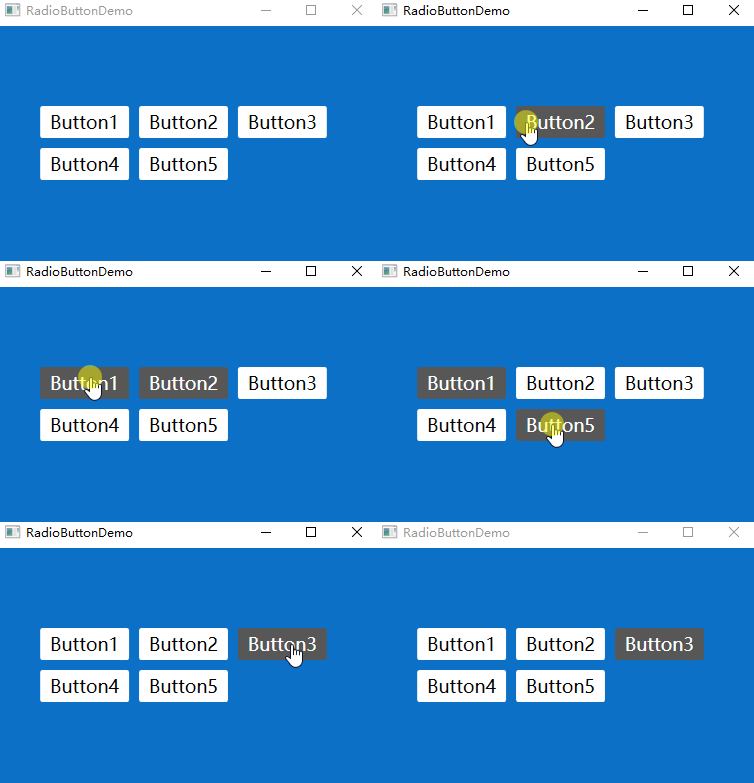
窗体xaml源码:
<Window x:Class="RadioButtonDemo.MainWindow"
xmlns="http://schemas.microsoft.com/winfx/2006/xaml/presentation"
xmlns:x="http://schemas.microsoft.com/winfx/2006/xaml"
xmlns:d="http://schemas.microsoft.com/expression/blend/2008"
xmlns:mc="http://schemas.openxmlformats.org/markup-compatibility/2006"
xmlns:local="clr-namespace:RadioButtonDemo"
mc:Ignorable="d" WindowStartupLocation="CenterScreen" Background="#FF0D70C7"
Title="RadioButtonDemo" Height="300" Width="400">
<Window.Resources>
<!--RadioButton按钮样式-->
<Style TargetType="{x:T 最低0.47元/天 解锁文章






 扫一扫
扫一扫


 4014
4014

 被折叠的 条评论
为什么被折叠?
被折叠的 条评论
为什么被折叠?
 到【灌水乐园】发言





