



jar包下载:https://github.com/ViceFantasyPlace/activate-power-mode/releases
然后选Preferences -> Plugins -> Install pliugin form disk -> 找到刚才下载的jar包-> OK -> restart IDEA 就好了 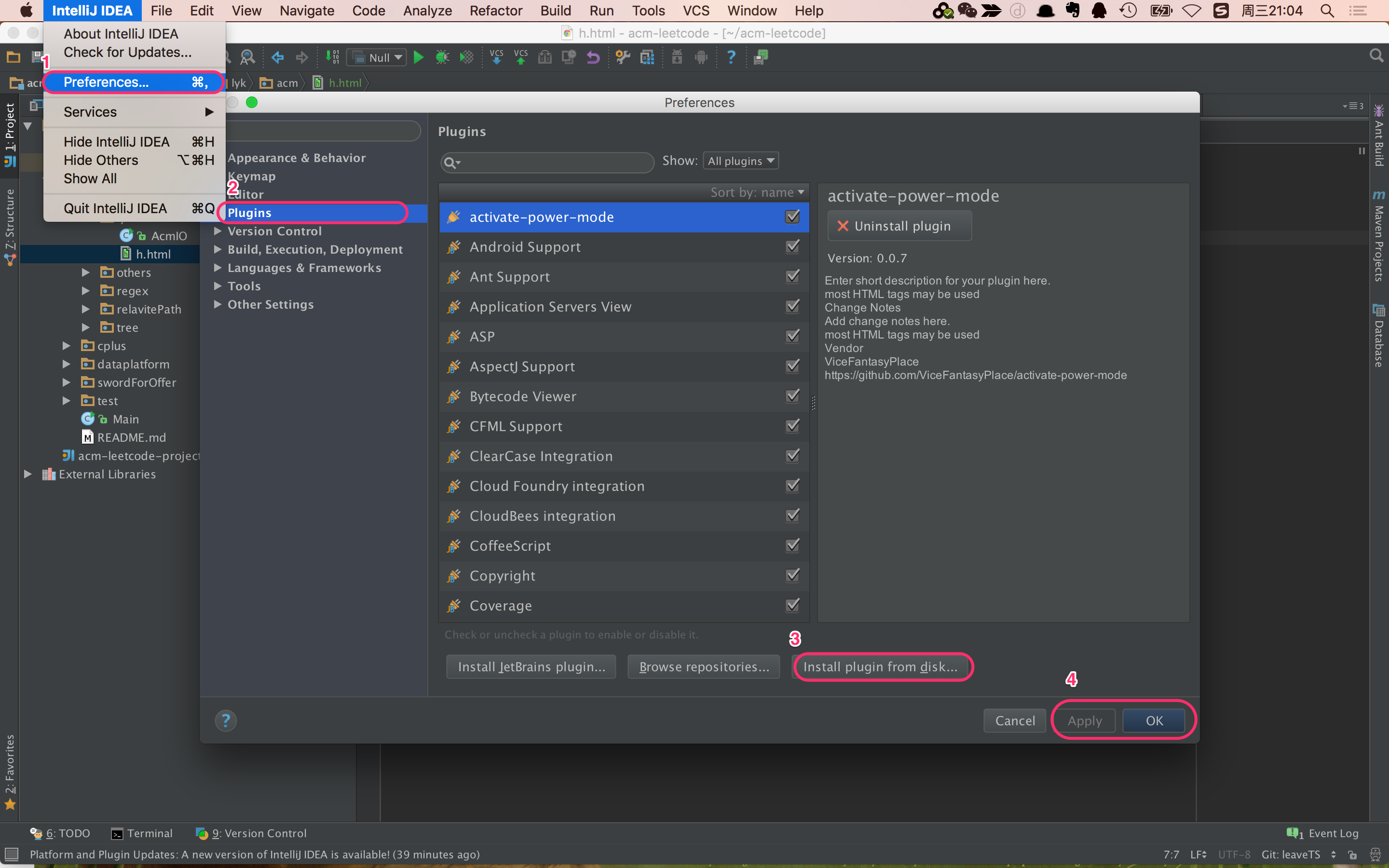
 本文介绍了如何在IntelliJ IDEA中安装外部插件的方法。首先从指定链接下载jar包,然后通过IDEA的偏好设置面板进行插件的本地安装,重启IDEA后即可使用新增的功能。
jar包下载:https://github.com/ViceFantasyPlace/activate-power-mode/releases
然后选Preferences -> Plugins -> Install pliugin form disk -> 找到刚才下载的jar包-> OK -> restart IDEA 就好了
 6192
1万+
1340
6192
1万+
1340

 被折叠的 条评论
为什么被折叠?
被折叠的 条评论
为什么被折叠?
 到【灌水乐园】发言








 扫一扫
扫一扫


