





一、背景
iOS指纹登录和面容登录其实是一个很简单也很成熟的功能了,很多年前就有做过。但是在目前的公司一直没有接入,最近才知道原来是产品和运营认为指纹登录或面容登录会采集用户的人脸或指纹信息,涉及到用户隐私,比较敏感,担心用户不能接受和使用,也担心操作不够简洁。所以一直没有推出。其实App只是使用系统录入的信息进行验证,只接收验证结果,并不会采集用户指纹/面容信息。于是我又重新整理和总结了一套比较简单的登录流程,整理记录下来。
二、流程
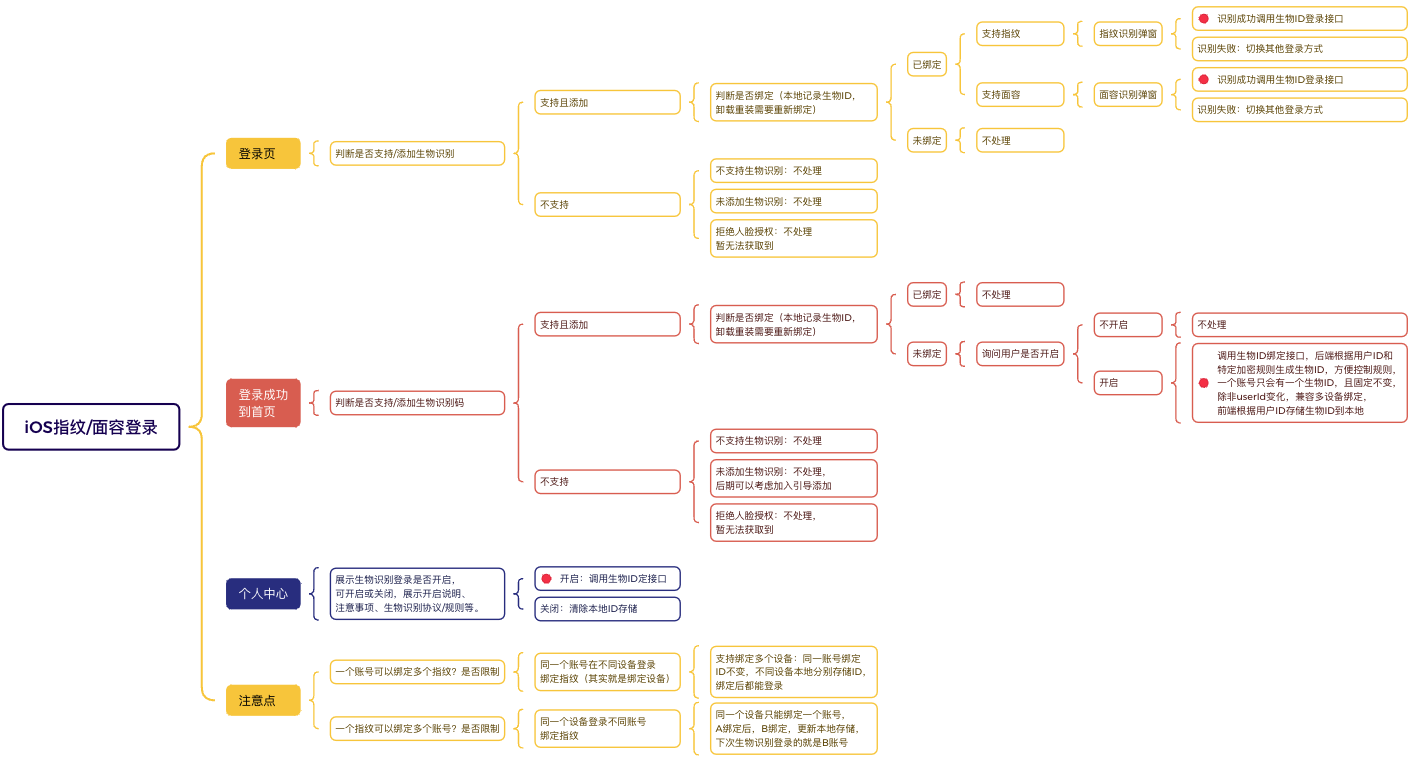
首先看一下流程图:
三、原理概括
基于简单简洁的原则,我们仅在用户登录完成后才提示用户用户绑定指纹/面容登录,提示前需要先判断设备是否支持指纹/面容识别且录入了对应信息,支持且录入则判断是否绑定过,未绑定才提示绑定,点击绑定直接调用后端绑定接口获取绑定ID,,存储到本地,标记为已绑定(这里不要求验证指纹/面容后才能绑定,也是为了简化用户操作,减少敏感度)。下次登录时优先弹出指纹/面容登录界面,识别后将本地存储的绑定ID传给后端获取用户信息完成登录。
对于绑定ID的生成和规则,最好是由后端控制,每个账号只能绑定一个ID且固定不变(可以是用户id+特定规则加密生成),那么不同设备登录同一个账号绑定指纹/面容后,才能保证两个设备都能使用指纹/面容登录且后端不需要生成多个绑定ID导致绑定ID一直增加;同一个设备登录不同账号绑定指纹,则更新本地缓存,下次登录则登录的是后绑定的设备,卸载重装后需要重新绑定,因绑定ID不变,所以也不会一直增加。
对于用户交互上,考虑到用户可能担心平台采集指纹/面容不安全,可以在绑定和登录时提示用户平台只接收验证结果,不采集用户信息,同时在个人中心设置页,增加入口和说明,支持用户关闭。
四、代码实现
这里我是直接封装成工具类方便调用
1、新建单例工具类BiometricTool,导入生物识别框架。
.h文件
#import <Foundation/Foundation.h>
//导入框架:生物识别登录(指纹/人脸)
#import <LocalAuthentication/LocalAuthentication.h>

NS_ASSUME_NONNULL_BEGIN

//生物识别类型
typedef NS_ENUM(NSInteger, BiometryType){
    BiometryType_Unsurported = 0,   //不支持生物识别
    BiometryType_AuthRefuse,        //拒绝授权(人脸)
    BiometryType_None,              //支持生物识别但没添加指纹/面容
    BiometryType_TouchID,           //指纹ID
    BiometryType_FaceID,            //面容ID
    BiometryType_Unknown,           //其他
};

@interface BiometricTool : NSObject

@property (nonatomic, assign) BiometryType biometryType;//支持的生物识别类型(指纹/面容)
@property (nonatomic, assign) BOOL hasBindBiometricId;//用户是否开启了生物识别登录
@property (nonatomic, copy) void(^authBlock)(BOOL success, NSString * errorMessage);//识别回调

#pragma mark - 初始化
+ (BiometricTool *)tool;

#pragma mark - 指纹/面容识别
- (void)startAuthenticationWithBlock:(void(^)(BOOL success, NSString * errorMessage))authBlock;

@end
.m文件
#import "BiometricTool.h"

@implementation BiometricTool

static BiometricTool *__oneTool;

#pragma mark - 初始化
+ (BiometricTool *)tool
{
    static dispatch_once_t oneToken;

    dispatch_once(&oneToken, ^{
        __oneTool = [[BiometricTool alloc]init];
    });

    return __oneTool;
}

#pragma mark - Getter
- (BiometryType)biometryType
{
    LAContext *context = [[LAContext alloc] init];
    NSError *error = nil;

    // 检查设备是否支持生物识别
    if ([context canEvaluatePolicy:LAPolicyDeviceOwnerAuthenticationWithBiometrics error:&error]) {
        // 支持生物识别且已录入:判断是 Face ID 还是 Touch ID
        if (context.biometryType == LABiometryTypeFaceID) {
                NSLog(@"设备支持 Face ID");
                return BiometryType_FaceID;

            } else if (context.biometryType == LABiometryTypeTouchID) {
                NSLog(@"设备支持 Touch ID");
                return BiometryType_TouchID;
            }
            return BiometryType_Unknown;

    } else {
        // 不支持生物识别或未录入生物识别
        NSLog(@"设备不支持或未录入生物识别或未授权等code:%ld errorInfo:%@", error.code, error.localizedDescription);
        if (error.code == LAErrorBiometryNotEnrolled) {
            NSLog(@"设备支持生物识别:但用户未录入指纹/面容");
            return BiometryType_None;

        }else if (error.code == LAErrorAuthenticationFailed) {
            NSLog(@"设备支持生物识别:但用户拒绝授权(面容)");
            return BiometryType_AuthRefuse;//拒绝后并未返回这个错误码,暂不清楚为何

        }else if (error.code == LAErrorBiometryNotAvailable) {
            NSLog(@"设备不支持生物识别");
            return BiometryType_Unsurported;
        }
        return BiometryType_Unsurported;
    }
}


//是否绑定
- (BOOL)hasBindBiometricId
{
    NSString * biometricId = [UserDefaultsFactory getStringForUserWithKey:UDKEY_BIOMETRIC_ID];
    if ([biometricId isNotEmpty]) {
        return YES;
    }
    return NO;
}

#pragma mark - 指纹/面容识别
- (void)startAuthenticationWithBlock:(void(^)(BOOL success, NSString * errorMessage))authBlock
{
    self.authBlock = authBlock;

    LAContext *context = [[LAContext alloc] init];
    NSString *reason = self.biometryType == BiometryType_FaceID ? @"通过面容识别验证登录" : @"通过Home键验证指纹登录";

    [context evaluatePolicy:LAPolicyDeviceOwnerAuthenticationWithBiometrics localizedReason:reason reply:^(BOOL success, NSError *error) {
        dispatch_async(dispatch_get_main_queue(), ^{
            if (success) {
                NSLog(@"验证成功");
                self.authBlock(YES, @"");
            } else {
                NSLog(@"验证失败: %@", error.localizedDescription);
                [self handleAuthenticationError:error];
            }
        });
    }];
}


//错误校验
- (void)handleAuthenticationError:(NSError *)error
{
    NSString *biometricTypeString = self.biometryType == BiometryType_FaceID ? @"面容ID" : @"指纹ID";
    switch (error.code) {
        case LAErrorAuthenticationFailed:
            NSLog(@"认证失败");
            self.authBlock(NO, @"验证失败");
            break;

        case LAErrorUserCancel:
            NSLog(@"用户取消认证");
            break;

        case LAErrorUserFallback:
            NSLog(@"用户选择使用备用方法:弹窗自动隐藏,显示密码登录");
//            [self showAlternativeLoginMethod];
            break;

        case LAErrorSystemCancel:
            NSLog(@"系统取消认证");
            break;

        case LAErrorPasscodeNotSet:
            NSLog(@"未设置密码");
            self.authBlock(NO, [NSString stringWithFormat:@"您还没有设置密码,请先到系统设置>%@与密码中设置密码", biometricTypeString]);
            break;

        case LAErrorBiometryNotAvailable:
            NSLog(@"生物识别不可用");
            self.authBlock(NO, @"生物识别不可用");
            break;

        case LAErrorBiometryNotEnrolled:
            NSLog(@"未录入生物识别信息");
            self.authBlock(NO, [NSString stringWithFormat:@"您还没有设置%@,请先到系统设置>%@与密码中录入信息",biometricTypeString, biometricTypeString]);
            break;

        case LAErrorBiometryLockout:
            NSLog(@"生物识别被锁定,需要输入密码");
            [self showDevicePasscodeAuthentication];
            break;

        default:
            NSLog(@"未知错误");
            self.authBlock(NO, @"未知错误");
            break;
    }
}

//验证设备密码
- (void)showDevicePasscodeAuthentication {
    LAContext *context = [[LAContext alloc] init];
    NSString *reason = @"验证设备密码";

    [context evaluatePolicy:LAPolicyDeviceOwnerAuthentication
           localizedReason:reason
                     reply:^(BOOL success, NSError *error) {
        dispatch_async(dispatch_get_main_queue(), ^{
            if (success) {
                NSLog(@"设备密码验证成功");
                self.authBlock(YES, @"");
            } else {
                NSLog(@"设备密码验证失败: %@", error.localizedDescription);
                self.authBlock(NO, @"未知错误");
            }
        });
    }];
}


@end
2、首页调用:检查生物识别状态 - 检查绑定状态 - 询问是否绑定 - 绑定成功 - 存储ID。
//检查生物识别状态
- (void)checkBiometricAuthenticationSupport
{
    if (![UserDefaultsFactory getBoolForPhoneWithKey:UDKEY_NEED_TIP_BIND_BIOMETRIC]) {
        return;
    }
    //获取生物识别类型
    BiometryType biometryType = [BiometricTool tool].biometryType;
    if (biometryType == BiometryType_FaceID || biometryType == BiometryType_TouchID) {
        //判断是已绑定生物识别
        if ([[BiometricTool tool] hasBindBiometricId]) {
            return;
        }
        //未绑定则询问用户是否绑定
        [self askUserToEnableBiometricLogin];
    }

}

//自定义开启生物识别登录弹窗
- (void)askUserToEnableBiometricLogin
{
    UIAlertController *alert = [UIAlertController alertControllerWithTitle:@"启用生物识别登录" message:[NSString stringWithFormat:@"是否启用%@登录?下次登录时可直接识别登录",[BiometricTool tool].biometryType == BiometryType_FaceID?@"面容":@"指纹"]  preferredStyle:UIAlertControllerStyleAlert];

    UIAlertAction *enableAction = [UIAlertAction actionWithTitle:@"启用" style:UIAlertActionStyleDefault handler:^(UIAlertAction * _Nonnull action) {
        //启用并绑定生物识别
        [self loadBindBiometricIdData];
    }];

    UIAlertAction *cancelAction = [UIAlertAction actionWithTitle:@"取消" style:UIAlertActionStyleCancel handler:nil];

    [alert addAction:enableAction];
    [alert addAction:cancelAction];

    [self presentViewController:alert animated:YES completion:nil];
}

//绑定设备
- (void)loadBindBiometricIdData
{
    [Utilities showClearStatus:NetWork_Loading];
    [[Api sharedJsonClient] loadBindBiometricCodeWithParams:nil success:^(id data, BOOL rel, NSString *messageError) {
        if (rel) {
            [Utilities showSuccessStatus:@"开启成功"];
            NSString * biometricId = (NSString *)data;
            //存储到本地
            [UserDefaultsFactory setStringForUserWithKey:UDKEY_BIOMETRIC_ID value:biometricId?:@""];

        }else{
            [Utilities showErrorStatus:messageError];
        }
    } failure:^(NSString *messageError) {
        [Utilities showErrorStatus:messageError];
    }];
}
3、登录页:检查生物识别状态 - 检查绑定状态 - 询问是否使用指纹/面容登录 - 开始指纹/面容识别 - 识别成功 - 登录。
//检查生物识别状态
- (void)checkBiometricAuthenticationSupport
{
    //获取生物识别类型
    BiometryType biometryType = [BiometricTool tool].biometryType;
    if (biometryType == BiometryType_FaceID || biometryType == BiometryType_TouchID) {
        //判断是已绑定生物识别
        if (![[BiometricTool tool] hasBindBiometricId]) {
            return;
        }
        //提醒使用生物识别登录
        YLOpenBiometricCodeView * view = (YLOpenBiometricCodeView *)[YLOpenBiometricCodeView viewWithNib];
        view.imageName = [BiometricTool tool].biometryType == BiometryType_FaceID ? @"biometric_faceid" : @"biometric_touchid";
        NSString * typeString = [BiometricTool tool].biometryType == BiometryType_FaceID?@"面容":@"指纹";
        view.message = [NSString stringWithFormat:@"点击确定进行%@登录?危化镖局仅接收%@ID验证结果,并不收集%@ID信息",typeString,typeString,typeString];
        view.sureTitle = @"确定";
        view.cancelTitle = @"取消";
        view.openBlock = ^{
            //开始生物识别
            [self startBiometriAuthentication];
        };
        view.cancelBlock = ^{

        };
        [KeyWindow addSubview:view];

    }
}

//开始生物识别
- (void)startBiometriAuthentication{
    //生物识别
    [[BiometricTool tool] startAuthenticationWithBlock:^(BOOL success, NSString * _Nonnull errorMessage) {
        if (success) {
            //验证成功
            [self loadLoginWithBiometricIdData];
        } else {
            //验证失败
            [Utilities showErrorStatus:errorMessage];
        }
    }];
}

- (void)loadLoginWithBiometricIdData
{
    NSDictionary * params = @{
        @"identificationCode":[UserDefaultsFactory getStringForUserWithKey:UDKEY_BIOMETRIC_ID]?:@"",
        @"signOnSource":@"iOS",//注册来源 安卓:ANDROID iOS:iOS h5 :WAP PC:PC
        @"signOnScene":@"APP_SELF",//注册场景
        @"signOnSceneId":@"",//注册场景id(如文章id)
        @"promoterUid":@"",//推广人uuid
    };

    [Utilities showClearStatus:NetWork_Loading];
    [[Api sharedJsonClient] loadLoginWithBiometricCodeWithParams:params success:^(id data, BOOL rel, NSString *messageError) {
        if (rel) {
            [Utilities showSuccessStatus:@"登录成功"];

            WHBJUserInfo * user = (WHBJUserInfo *)data;
            [self loginSuccessWithUserInfo:user loginType:LoginType_BiometricId];

        }else{
            [Utilities showErrorStatus:messageError];
        }
    } failure:^(NSString *messageError) {
        [Utilities showErrorStatus:messageError];
    }];
}





 扫一扫
扫一扫


 1708
1708

 被折叠的 条评论
为什么被折叠?
被折叠的 条评论
为什么被折叠?
 到【灌水乐园】发言





