



作者介绍:简历上没有一个精通的运维工程师。请点击上方的蓝色《运维小路》关注我,下面的思维导图也是预计更新的内容和当前进度(不定时更新)。
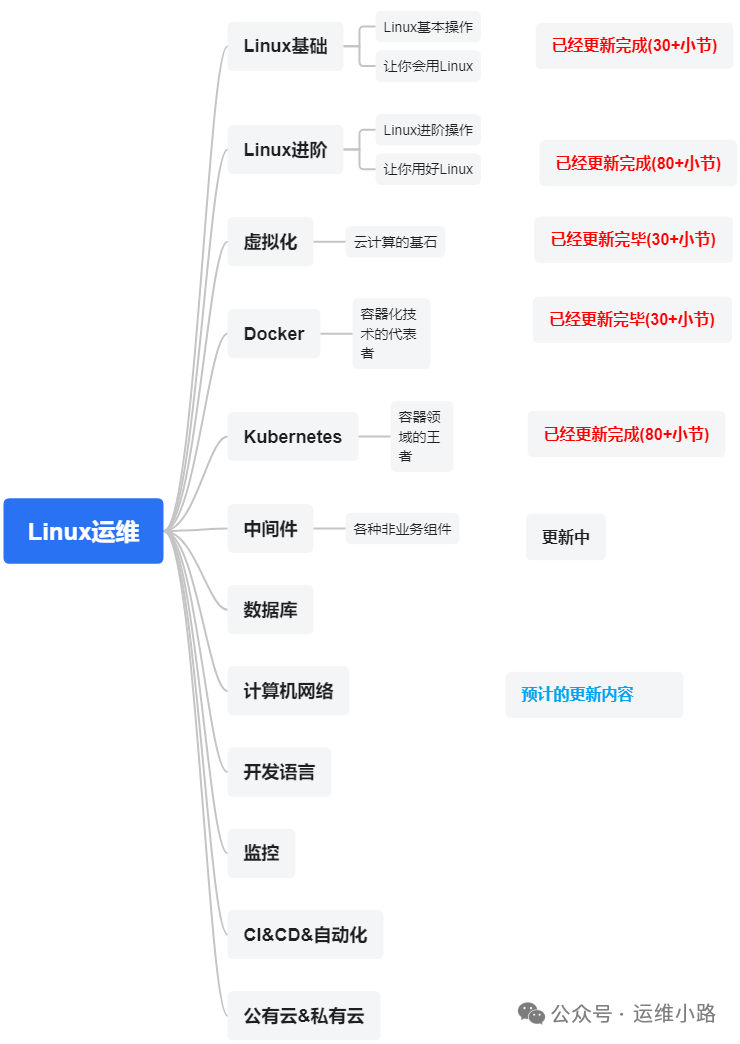
中间件,我给它的定义就是为了实现某系业务功能依赖的软件,包括如下部分:
Web服务器
代理服务器
ZooKeeper
Kafka
RabbitMQ
Hadoop HDFS
Elasticsearch ES (本章节)
Elasticsearch 的运维命令主要集中在使用其 RESTful API 上。这些命令可以通过任何 HTTP 客户端(如 curl、Kibana Dev Tools、Postman 等)来执行。
1. 集群健康与状态信息,这是运维中最常用的一组命令,用于快速了解集群的整体状态。
查看集群健康状态
curl -s -XGET "http://localhost:9200/_cluster/health?pretty"
查看集群详细状态(包含节点、索引信息)
curl -s -XGET "http://localhost:9200/_cluster/state?pretty"
查看节点信息(节点角色、负载等)
curl -s -XGET "http://localhost:9200/_cat/nodes?v&pretty"
查看所有节点统计信息(CPU,内存,磁盘等)
curl -s -XGET "http://localhost:9200/_nodes/stats?pretty"
关键指标解读:
-
status:green(健康),yellow(数据完整,但副本未分配),red(数据丢失或主分片缺失),只有一个索引出现red则集群就是red。 -
number_of_nodes: 集群中节点总数。 -
unassigned_shards: 未分配的分片数,yellow或red状态的直接原因,集群状态的修复,其实就是修复这里。
2. 索引管理
查看所有索引(包含文档数、存储大小等)
curl -s -XGET "http://localhost:9200/_cat/indices?v&pretty"
查看特定索引的状态
curl -s -XGET "http://localhost:9200/_cat/indices/my-index-2023.11?v&pretty"
查看索引的详细统计信息
curl -s -XGET "http://localhost:9200/my-index-2023.11/_stats?pretty"
查看索引的映射(mapping)
curl -s -XGET "http://localhost:9200/my-index-2023.11/_mapping?pretty"
查看索引的设置(settings)
curl -s -XGET "http://localhost:9200/my-index-2023.11/_settings?pretty"
创建索引(可指定分片和副本数)
curl -XPUT "http://localhost:9200/my_new_index" -H 'Content-Type: application/json' -d' { "settings": { "number_of_shards": 3, "number_of_replicas": 1 } } '
删除索引(危险操作!)
curl -XDELETE "http://localhost:9200/my_index_to_delete"
关闭索引(保留数据但不再读写,节省资源)
curl -XPOST "http://localhost:9200/my_old_index/_close"
打开索引
curl -XPOST "http://localhost:9200/my_old_index/_open"
修改索引配置(如动态修改副本数)
curl -XPUT "http://localhost:9200/my_index/_settings" -H 'Content-Type: application/json' -d' { "number_of_replicas": 2 } '
查看分片分配情况(非常重要!)
curl -s -XGET "http://localhost:9200/_cat/shards?v&pretty"
查看未分配的分片及原因
curl -s -XGET "http://localhost:9200/_cat/shards?v&h=index,shard,prirep,state,unassigned.reason&s=state&pretty"
清除节点的缓存
curl -XPOST "http://localhost:9200/my_index/_cache/clear"
将节点排除出集群(下线节点)
curl -XPUT "http://localhost:9200/_cluster/settings" -H 'Content-Type: application/json' -d' { "transient": { "cluster.routing.allocation.exclude._name": "node-name-to-remove" } } '
查看正在运行的任务(如 _forcemerge, reindex)
curl -s -XGET "http://localhost:9200/_cat/tasks?v&pretty"
查看热点线程(用于诊断性能问题)
curl -s -XGET "http://localhost:9200/_nodes/hot_threads?pretty"
查看集群设置
curl -s -XGET "http://localhost:9200/_cluster/settings?pretty"
3.快照与恢复(Snapshot & Restore)
创建仓库(必须先执行)
curl -XPUT "http://localhost:9200/_snapshot/my_backup_repo" -H 'Content-Type: application/json' -d' { "type": "fs", "settings": { "location": "/path/to/your/backup/location" } } '
创建快照
curl -XPUT "http://localhost:9200/_snapshot/my_backup_repo/snapshot_20231108?wait_for_completion=true"
查看快照信息
curl -XGET "http://localhost:9200/_snapshot/my_backup_repo/snapshot_20231108?pretty"
从快照恢复
curl -XPOST "http://localhost:9200/_snapshot/my_backup_repo/snapshot_20231108/_restore"
删除快照
curl -XDELETE "http://localhost:9200/_snapshot/my_backup_repo/snapshot_20231108"
4.实战技巧与注意事项
-
使用
_catAPI:_catAPI 返回的是文本格式,非常简洁,适合人类阅读和命令行操作。加上?v参数可以显示表头,?help可以查看可用字段。 -
使用
?pretty: 在 URL 后加上?pretty可以让返回的 JSON 格式更易读。 -
安全认证: 如果集群启用了安全功能(如 X-Pack),需要在命令中加入认证信息:
curl -u username:password -XGET ...
# 或者使用 API 密钥
curl -H "Authorization: ApiKey {your_api_key}" -XGET ...
4.谨慎操作: 尤其是 DELETE 操作(如删除索引),以及修改集群路由的操作(_cluster/reroute),一定要确认无误后再执行。
运维小路
一个不会开发的运维!一个要学开发的运维!一个学不会开发的运维!欢迎大家骚扰的运维!
关注微信公众号《运维小路》获取更多内容。





 扫一扫
扫一扫


 2146
2146

 被折叠的 条评论
为什么被折叠?
被折叠的 条评论
为什么被折叠?
 到【灌水乐园】发言





