



文章目录
手把手教你用HTML5 Canvas编写消消乐游戏
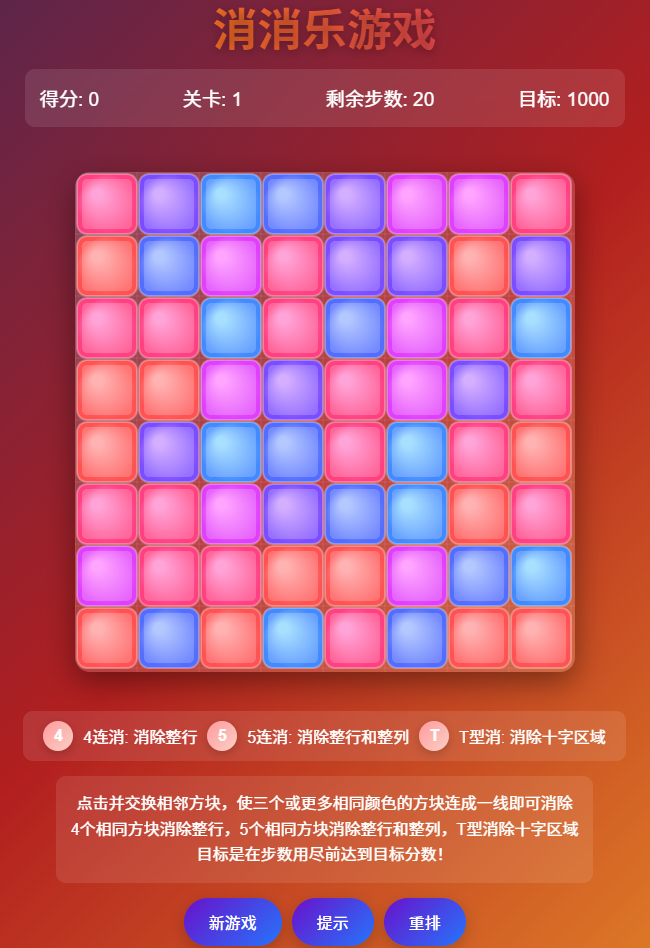
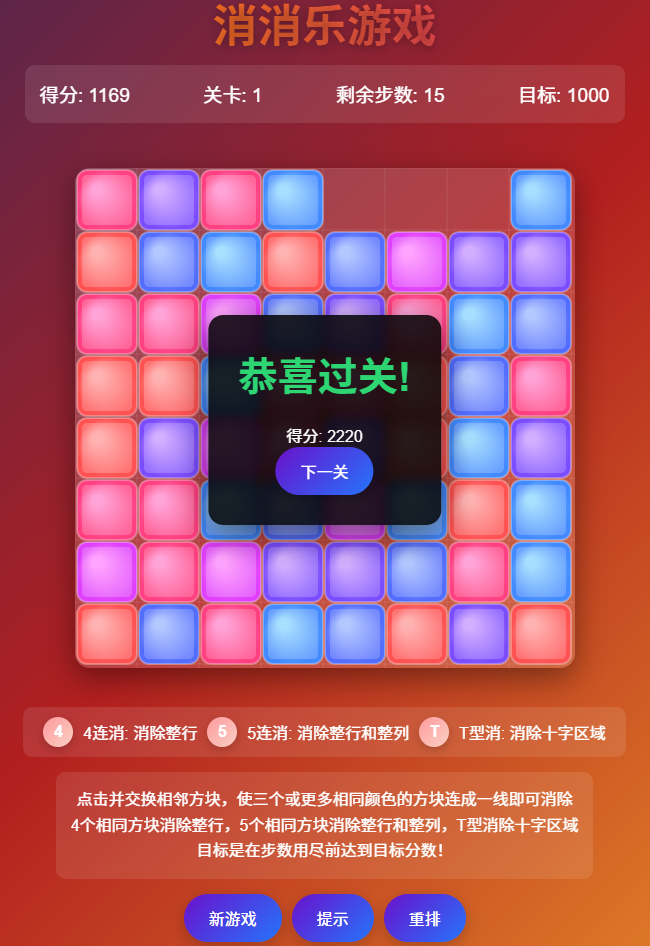
消消乐是一款经典的休闲游戏,核心玩法是交换相邻元素,形成三个或以上相同元素的连线并消除。本文将通过HTML5 Canvas和JavaScript从零实现一个简单的消消乐游戏,逐行解析代码逻辑,让你轻松掌握游戏开发要点。
一、基础HTML结构搭建
首先创建游戏的基础页面结构,包含游戏画布和分数显示区域。
<!DOCTYPE html>
<html lang="zh-CN">
<head>
    <meta charset="UTF-8">
    <title>Canvas消消乐</title>
    <link rel="stylesheet" href="style.css">
</head>
<body>
    <div class="game-container">
        <!-- 分数显示 -->
        <div class="score-panel">分数: <span id="score">0</span></div>
        <!-- 游戏画布 -->
        <canvas id="gameCanvas" width="400" height="400"></canvas>
    </div>
    <script src="game.js"></script>
</body>
</html>
<!DOCTYPE html>:声明HTML5文档类型game-container:游戏容器,用于布局分数面板和画布score-panel:显示当前游戏分数canvas:核心绘图区域,设置宽高为400x400像素- 引入外部CSS和JS文件,分离样式和逻辑
二、样式设计(CSS)
为游戏添加基础样式,美化界面并调整布局。
body {
    display: flex;
    flex-direction: column;
    align-items: center;
    background-color: #f0f0f0;
    font-family: Arial, sans-serif;
}

.game-container {
    margin-top: 20px;
    padding: 15px;
    background-color: #fff;
    border-radius: 10px;
    box-shadow: 0 0 10px rgba(0,0,0,0.2);
}

.score-panel {
    margin-bottom: 10px;
    font-size: 20px;
    font-weight: bold;
    color: #333;
}

#gameCanvas {
    border: 2px solid #333;
    background-color: #eee;
}
- body使用flex布局居中显示游戏容器
- 为容器添加阴影和圆角,增强视觉效果
- 画布添加边框和浅灰色背景,区分游戏区域
三、核心游戏逻辑(JavaScript)
这部分是游戏的核心,包含初始化、绘图、交互和游戏规则实现。
1. 初始化游戏参数
首先获取画布上下文并定义游戏基础参数。
// 获取画布和上下文
const canvas = document.getElementById('gameCanvas');
const ctx = canvas.getContext('2d');
const scoreElement = document.getElementById('score');

// 游戏参数
const gridSize = 8; // 8x8网格
const tileSize = 50; // 每个方块大小(像素)
let score = 0;
let board = []; // 存储游戏网格数据
let selectedTile = null; // 选中的方块位置
getContext('2d'):获取Canvas 2D绘图上下文,用于绘制图形gridSize:定义游戏网格为8x8(共64个方块)tileSize:每个方块的尺寸(50px),400px画布刚好容纳8个方块(8*50=400)board:二维数组,存储每个位置的方块颜色索引selectedTile:记录鼠标选中的方块位置(用于交换逻辑)
2. 生成随机游戏网格
初始化网格数据,确保初始状态没有可消除的方块(避免游戏一开始就自动消除)。
// 方块颜色数组
const colors = [
    '#ff6b6b', '#4ecdc4', '#45b7d1',
    '#ffcc5c', '#a77dc2', '#ff8b94'
];

// 初始化游戏板
function initBoard() {
    do {
        board = [];
        // 生成随机网格
        for (let y = 0; y < gridSize; y++) {
            const row = [];
            for (let x = 0; x < gridSize; x++) {
                // 随机选择颜色(排除与上方和左方相同的颜色,减少初始可消除组合)
                let colorIndex;
                do {
                    colorIndex = Math.floor(Math.random() * colors.length);
                } while (
                    (y > 0 && colorIndex === board[y-1][x]) || // 与上方相同
                    (x > 0 && colorIndex === row[x-1]) // 与左方相同
                );
                row.push(colorIndex);
            }
            board.push(row);
        }
    } while (hasMatches()); // 如果初始有可消除组合,重新生成
}
colors:定义6种方块颜色(用十六进制色值表示)initBoard:通过do-while循环生成网格,确保初始状态无消除组合- 内部循环生成每行数据时,通过do-while避免与上方和左方方块颜色相同,减少初始可消除概率
hasMatches():检查是否有可消除的方块组合(后面实现)
3. 绘制游戏界面
将网格数据绘制到Canvas上,包括方块和选中状态。
// 绘制游戏板
function drawBoard() {
    // 清空画布
    ctx.clearRect(0, 0, canvas.width, canvas.height);

    // 绘制所有方块
    for (let y = 0; y < gridSize; y++) {
        for (let x = 0; x < gridSize; x++) {
            const colorIndex = board[y][x];
            // 绘制方块
            ctx.fillStyle = colors[colorIndex];
            ctx.fillRect(x * tileSize, y * tileSize, tileSize - 2, tileSize - 2);

            // 如果是选中的方块,绘制边框
            if (selectedTile && selectedTile.x === x && selectedTile.y === y) {
                ctx.strokeStyle = '#ffffff';
                ctx.lineWidth = 3;
                ctx.strokeRect(x * tileSize, y * tileSize, tileSize - 2, tileSize - 2);
            }
        }
    }
}
drawBoard:核心绘图函数,每次游戏状态变化后调用clearRect:清空画布,避免重影- 双层循环绘制每个方块:使用
fillRect绘制带间隙的方块(tileSize - 2实现间隙) - 选中的方块通过白色边框标记,增强交互反馈
4. 处理鼠标交互
实现鼠标点击选中和交换方块的逻辑。
// 转换鼠标位置到网格坐标
function getTilePosition(mouseX, mouseY) {
    return {
        x: Math.floor(mouseX / tileSize),
        y: Math.floor(mouseY / tileSize)
    };
}

// 检查两个方块是否相邻
function isAdjacent(tile1, tile2) {
    const dx = Math.abs(tile1.x - tile2.x);
    const dy = Math.abs(tile1.y - tile2.y);
    // 相邻条件:x或y相差1,且不同时相差
    return (dx === 1 && dy === 0) || (dx === 0 && dy === 1);
}

// 交换两个方块
function swapTiles(tile1, tile2) {
    [board[tile1.y][tile1.x], board[tile2.y][tile2.x]] =
    [board[tile2.y][tile2.x], board[tile1.y][tile1.x]];
}

// 鼠标点击事件
canvas.addEventListener('click', (e) => {
    const rect = canvas.getBoundingClientRect();
    const mouseX = e.clientX - rect.left;
    const mouseY = e.clientY - rect.top;
    const tile = getTilePosition(mouseX, mouseY);

    // 检查点击位置是否在网格内
    if (tile.x < 0 || tile.x >= gridSize || tile.y < 0 || tile.y >= gridSize) {
        return;
    }

    // 第一次点击:选中方块
    if (!selectedTile) {
        selectedTile = tile;
    } else {
        // 第二次点击:如果相邻则交换
        if (isAdjacent(selectedTile, tile)) {
            swapTiles(selectedTile, tile);

            // 交换后检查是否有匹配,如果没有则交换回来
            if (!hasMatches()) {
                swapTiles(selectedTile, tile); // 无效交换,恢复原状
            } else {
                // 有效交换,处理消除逻辑
                processMatches();
            }
        }
        // 无论是否交换,都取消选中状态
        selectedTile = null;
    }
    // 重新绘制界面
    drawBoard();
});
getTilePosition:将鼠标点击的像素坐标转换为网格坐标(如(120, 80)转换为x=2, y=1)isAdjacent:判断两个方块是否上下或左右相邻(消消乐规则:只能交换相邻方块)swapTiles:使用ES6解构赋值交换两个方块的颜色索引- 点击事件处理:
- 第一次点击记录选中位置
- 第二次点击若相邻则交换,检查是否形成可消除组合
- 无效交换(无消除)则恢复原状,有效交换则进入消除流程
5. 消除逻辑实现
检测并消除符合条件的方块,计算分数并更新网格。
// 检查是否有可消除的方块
function hasMatches() {
    return getMatches().length > 0;
}

// 获取所有可消除的方块位置
function getMatches() {
    const matches = [];

    // 检查水平方向匹配(至少3个连续相同)
    for (let y = 0; y < gridSize; y++) {
        let x = 0;
        while (x < gridSize - 2) { // 预留至少2个位置检查
            const color = board[y][x];
            if (color === board[y][x+1] && color === board[y][x+2]) {
                // 找到匹配,记录所有连续相同的位置
                let endX = x + 2;
                while (endX + 1 < gridSize && board[y][endX + 1] === color) {
                    endX++;
                }
                // 添加匹配位置到数组
                for (let i = x; i <= endX; i++) {
                    matches.push({x: i, y: y});
                }
                x = endX + 1; // 跳过已匹配的位置
            } else {
                x++;
            }
        }
    }

    // 检查垂直方向匹配
    for (let x = 0; x < gridSize; x++) {
        let y = 0;
        while (y < gridSize - 2) {
            const color = board[y][x];
            if (color === board[y+1][x] && color === board[y+2][x]) {
                let endY = y + 2;
                while (endY + 1 < gridSize && board[endY + 1][x] === color) {
                    endY++;
                }
                for (let i = y; i <= endY; i++) {
                    matches.push({x: x, y: i});
                }
                y = endY + 1;
            } else {
                y++;
            }
        }
    }

    return matches;
}

// 处理消除并更新分数
function processMatches() {
    const matches = getMatches();
    if (matches.length === 0) return;

    // 计算分数(每个消除的方块得10分)
    score += matches.length * 10;
    scoreElement.textContent = score;

    // 清除匹配的方块(设置为null标记)
    matches.forEach(tile => {
        board[tile.y][tile.x] = null;
    });

    // 让方块下落填补空白
    dropTiles();

    // 填充新方块
    fillEmptyTiles();

    // 检查是否有新的匹配(连锁反应)
    if (hasMatches()) {
        // 延迟处理连锁消除,增强视觉效果
        setTimeout(processMatches, 500);
    }
}
getMatches:核心检测函数,分别检查水平和垂直方向的连续相同方块:- 水平检查:遍历每行,寻找至少3个连续相同颜色的方块
- 垂直检查:遍历每列,逻辑与水平检查类似
- 返回所有匹配方块的位置数组
processMatches:处理消除流程:- 计算分数(每个方块10分)并更新显示
- 将匹配的方块标记为
null(空白) - 调用
dropTiles让上方方块下落填补空白 - 调用
fillEmptyTiles在顶部生成新方块 - 处理连锁消除(通过setTimeout添加延迟,提升体验)
6. 方块下落与填充
实现消除后方块下落和顶部补充新方块的逻辑。
// 让方块下落填补空白
function dropTiles() {
    for (let x = 0; x < gridSize; x++) {
        let emptyCount = 0;
        // 从下往上处理列,让方块下落
        for (let y = gridSize - 1; y >= 0; y--) {
            if (board[y][x] === null) {
                emptyCount++;
            } else if (emptyCount > 0) {
                // 将当前方块下移到空白位置
                board[y + emptyCount][x] = board[y][x];
                board[y][x] = null;
            }
        }
    }
}

// 在顶部填充新方块
function fillEmptyTiles() {
    for (let x = 0; x < gridSize; x++) {
        for (let y = 0; y < gridSize; y++) {
            if (board[y][x] === null) {
                // 生成随机颜色(避免与下方方块颜色相同)
                let colorIndex;
                do {
                    colorIndex = Math.floor(Math.random() * colors.length);
                } while (y > 0 && colorIndex === board[y-1][x]);
                board[y][x] = colorIndex;
            }
        }
    }
}
dropTiles:处理下落逻辑(类似俄罗斯方块下落):- 按列处理,从底部向上遍历
- 统计空白位置数量(
emptyCount),将非空白方块下移填补
fillEmptyTiles:在顶部空白位置生成新方块:- 为每个空白位置生成随机颜色
- 避免与正下方方块颜色相同(减少无效组合)
7. 启动游戏
最后初始化并启动游戏。
// 启动游戏
function startGame() {
    score = 0;
    scoreElement.textContent = score;
    initBoard();
    drawBoard();
}

// 开始游戏
startGame();
startGame:初始化分数、网格并绘制界面- 页面加载后自动启动游戏
四、完整源码(复制粘贴即可运行)
<!DOCTYPE html>
<html lang="zh-CN">
<head>
<meta charset="UTF-8">
<meta name="viewport" content="width=device-width, initial-scale=1.0">
<title>消消乐游戏</title>
<style>
* {
margin: 0;
padding: 0;
box-sizing: border-box;
}
body {
display: flex;
flex-direction: column;
align-items: center;
justify-content: center;
min-height: 100vh;
background: linear-gradient(135deg, #1a2a6c, #b21f1f, #fdbb2d);
font-family: 'Arial Rounded MT Bold', 'Arial', sans-serif;
color: white;
overflow-x: hidden;
padding: 20px;
}
.game-container {
position: relative;
margin: 20px 0;
}
canvas {
background: rgba(255, 255, 255, 0.1);
border-radius: 15px;
box-shadow: 0 10px 30px rgba(0, 0, 0, 0.4);
backdrop-filter: blur(5px);
}
.game-header {
text-align: center;
margin-bottom: 15px;
}
h1 {
font-size: 2.8rem;
margin-bottom: 10px;
text-shadow: 0 2px 10px rgba(0, 0, 0, 0.3);
background: linear-gradient(to right, #ff8a00, #e52e71);
-webkit-background-clip: text;
-webkit-text-fill-color: transparent;
}
.stats {
display: flex;
justify-content: space-between;
width: 600px;
margin-bottom: 10px;
font-size: 1.2rem;
background: rgba(255, 255, 255, 0.1);
padding: 15px;
border-radius: 10px;
backdrop-filter: blur(5px);
}
.instructions {
margin-top: 15px;
text-align: center;
max-width: 600px;
line-height: 1.6;
background: rgba(255, 255, 255, 0.1);
padding: 15px;
border-radius: 10px;
backdrop-filter: blur(5px);
}
.controls {
display: flex;
gap: 10px;
margin-top: 15px;
flex-wrap: wrap;
justify-content: center;
}
button {
background: linear-gradient(135deg, #6a11cb 0%, #2575fc 100%);
border: none;
color: white;
padding: 12px 25px;
border-radius: 50px;
font-size: 1rem;
cursor: pointer;
transition: all 0.3s ease;
box-shadow: 0 5px 15px rgba(0, 0, 0, 0.2);
}
button:hover {
transform: translateY(-3px);
box-shadow: 0 8px 20px rgba(0, 0, 0, 0.3);
}
button:active {
transform: translateY(1px);
}
.combo-display {
position: absolute;
top: 50%;
left: 50%;
transform: translate(-50%, -50%);
font-size: 2.5rem;
font-weight: bold;
color: #ffeb3b;
text-shadow: 0 0 10px rgba(255, 235, 59, 0.7);
opacity: 0;
transition: opacity 0.3s;
pointer-events: none;
}
.level-complete {
position: absolute;
top: 50%;
left: 50%;
transform: translate(-50%, -50%);
background: rgba(0, 0, 0, 0.85);
padding: 30px;
border-radius: 15px;
text-align: center;
display: none;
backdrop-filter: blur(5px);
box-shadow: 0 10px 30px rgba(0, 0, 0, 0.5);
z-index: 10;
}
.level-complete h2 {
font-size: 2.5rem;
margin-bottom: 20px;
color: #2ed573;
}
.special-effects {
position: absolute;
top: 0;
left: 0;
width: 100%;
height: 100%;
pointer-events: none;
overflow: hidden;
border-radius: 15px;
}
.effect {
position: absolute;
border-radius: 50%;
background: radial-gradient(circle, rgba(255,255,255,0.8) 0%, rgba(255,255,255,0) 70%);
animation: float 1.5s ease-out forwards;
}
@keyframes float {
0% {
transform: translateY(0) scale(1);
opacity: 1;
}
100% {
transform: translateY(-100px) scale(0);
opacity: 0;
}
}
.power-up {
display: flex;
align-items: center;
gap: 10px;
margin-top: 15px;
background: rgba(255, 255, 255, 0.1);
padding: 10px 20px;
border-radius: 10px;
backdrop-filter: blur(5px);
}
.power-up-icon {
width: 30px;
height: 30px;
border-radius: 50%;
background: linear-gradient(135deg, #ff9a9e 0%, #fad0c4 100%);
display: flex;
align-items: center;
justify-content: center;
font-weight: bold;
box-shadow: 0 3px 10px rgba(0, 0, 0, 0.2);
}
</style>
</head>
<body>
<div class="game-header">
<h1>消消乐游戏</h1>
<div class="stats">
<div class="score">得分: <span id="score">0</span></div>
<div class="level">关卡: <span id="currentLevel">1</span></div>
<div class="moves">剩余步数: <span id="movesLeft">20</span></div>
<div class="target">目标: <span id="targetScore">1000</span></div>
</div>
</div>
<div class="game-container">
<canvas id="gameCanvas" width="500" height="500"></canvas>
<div class="special-effects" id="effects"></div>
<div class="combo-display" id="comboDisplay">连击!</div>
<div class="level-complete" id="levelComplete">
<h2>恭喜过关!</h2>
<div class="score">得分: <span id="levelScore">0</span></div>
<button id="nextLevelBtn">下一关</button>
</div>
</div>
<div class="power-up">
<div class="power-up-icon">4</div>
<div>4连消: 消除整行</div>
<div class="power-up-icon">5</div>
<div>5连消: 消除整行和整列</div>
<div class="power-up-icon">T</div>
<div>T型消: 消除十字区域</div>
</div>
<div class="instructions">
<p>点击并交换相邻方块,使三个或更多相同颜色的方块连成一线即可消除</p>
<p>4个相同方块消除整行,5个相同方块消除整行和整列,T型消除十字区域</p>
<p>目标是在步数用尽前达到目标分数!</p>
</div>
<div class="controls">
<button id="newGameBtn">新游戏</button>
<button id="hintBtn">提示</button>
<button id="shuffleBtn">重排</button>
</div>
<script>
// 获取Canvas和上下文
const canvas = document.getElementById('gameCanvas');
const ctx = canvas.getContext('2d');
const effectsContainer = document.getElementById('effects');
const comboDisplay = document.getElementById('comboDisplay');
// 游戏常量
const GRID_SIZE = 8;
const TILE_SIZE = 60;
const TILE_MARGIN = 2;
const ANIMATION_SPEED = 0.2;
const COLORS = [
'#FF5252', // 红色
'#FF4081', // 粉色
'#E040FB', // 紫色
'#7C4DFF', // 深紫
'#536DFE', // 蓝色
'#448AFF', // 亮蓝
'#40C4FF', // 天蓝
'#18FFFF', // 青色
'#64FFDA', // 青绿
'#69F0AE' // 绿色
];
// 游戏状态
let gameState = {
grid: [],
selectedTile: null,
score: 0,
level: 1,
movesLeft: 20,
targetScore: 1000,
isSwapping: false,
isAnimating: false,
combo: 0,
lastMatchTime: 0
};
// 初始化游戏
function initGame() {
gameState.grid = [];
gameState.selectedTile = null;
gameState.score = 0;
gameState.level = 1;
gameState.movesLeft = 20;
gameState.targetScore = 1000;
gameState.isSwapping = false;
gameState.isAnimating = false;
gameState.combo = 0;
gameState.lastMatchTime = 0;
// 创建初始网格
for (let row = 0; row < GRID_SIZE; row++) {
gameState.grid[row] = [];
for (let col = 0; col < GRID_SIZE; col++) {
gameState.grid[row][col] = {
type: Math.floor(Math.random() * 6), // 使用前6种颜色
row: row,
col: col,
x: col * (TILE_SIZE + TILE_MARGIN) + TILE_MARGIN,
y: row * (TILE_SIZE + TILE_MARGIN) + TILE_MARGIN,
scale: 1,
alpha: 1,
removing: false
};
}
}
// 确保初始网格没有匹配
while (findMatches().length > 0) {
shuffleGrid();
}
updateUI();
drawGame();
document.getElementById('levelComplete').style.display = 'none';
}
// 绘制游戏
function drawGame() {
ctx.clearRect(0, 0, canvas.width, canvas.height);
// 绘制网格背景
ctx.fillStyle = 'rgba(255, 255, 255, 0.05)';
ctx.fillRect(0, 0, canvas.width, canvas.height);
// 绘制网格线
ctx.strokeStyle = 'rgba(255, 255, 255, 0.1)';
ctx.lineWidth = 1;
for (let i = 0; i <= GRID_SIZE; i++) {
const pos = i * (TILE_SIZE + TILE_MARGIN);
ctx.beginPath();
ctx.moveTo(0, pos);
ctx.lineTo(canvas.width, pos);
ctx.stroke();
ctx.beginPath();
ctx.moveTo(pos, 0);
ctx.lineTo(pos, canvas.height);
ctx.stroke();
}
// 绘制方块
for (let row = 0; row < GRID_SIZE; row++) {
for (let col = 0; col < GRID_SIZE; col++) {
const tile = gameState.grid[row][col];
if (!tile) continue;
ctx.save();
// 应用动画效果
ctx.translate(tile.x + TILE_SIZE/2, tile.y + TILE_SIZE/2);
ctx.scale(tile.scale, tile.scale);
ctx.globalAlpha = tile.alpha;
// 绘制方块主体
const gradient = ctx.createRadialGradient(-10, -10, 5, 0, 0, TILE_SIZE/2);
gradient.addColorStop(0, lightenColor(COLORS[tile.type], 30));
gradient.addColorStop(1, COLORS[tile.type]);
ctx.fillStyle = gradient;
ctx.beginPath();
ctx.roundRect(-TILE_SIZE/2, -TILE_SIZE/2, TILE_SIZE, TILE_SIZE, 10);
ctx.fill();
// 绘制内部高光
ctx.fillStyle = 'rgba(255, 255, 255, 0.2)';
ctx.beginPath();
ctx.roundRect(-TILE_SIZE/2 + 5, -TILE_SIZE/2 + 5, TILE_SIZE - 10, TILE_SIZE - 10, 5);
ctx.fill();
// 绘制边框
ctx.strokeStyle = 'rgba(255, 255, 255, 0.3)';
ctx.lineWidth = 2;
ctx.beginPath();
ctx.roundRect(-TILE_SIZE/2, -TILE_SIZE/2, TILE_SIZE, TILE_SIZE, 10);
ctx.stroke();
// 绘制选中效果
if (gameState.selectedTile &&
gameState.selectedTile.row === row &&
gameState.selectedTile.col === col) {
ctx.strokeStyle = '#FFEB3B';
ctx.lineWidth = 4;
ctx.beginPath();
ctx.roundRect(-TILE_SIZE/2, -TILE_SIZE/2, TILE_SIZE, TILE_SIZE, 10);
ctx.stroke();
// 绘制脉动效果
const pulseSize = Math.sin(Date.now() / 200) * 5 + 10;
ctx.strokeStyle = 'rgba(255, 235, 59, 0.5)';
ctx.lineWidth = 2;
ctx.beginPath();
ctx.roundRect(-TILE_SIZE/2 - pulseSize/2, -TILE_SIZE/2 - pulseSize/2,
TILE_SIZE + pulseSize, TILE_SIZE + pulseSize, 10 + pulseSize/2);
ctx.stroke();
}
ctx.restore();
}
}
}
// 工具函数:颜色变亮
function lightenColor(color, percent) {
const num = parseInt(color.slice(1), 16);
const amt = Math.round(2.55 * percent);
const R = (num >> 16) + amt;
const G = (num >> 8 & 0x00FF) + amt;
const B = (num & 0x0000FF) + amt;
return "#" + (
0x1000000 +
(R < 255 ? R < 1 ? 0 : R : 255) * 0x10000 +
(G < 255 ? G < 1 ? 0 : G : 255) * 0x100 +
(B < 255 ? B < 1 ? 0 : B : 255)
).toString(16).slice(1);
}
// 查找匹配
function findMatches() {
const matches = [];
// 检查水平匹配
for (let row = 0; row < GRID_SIZE; row++) {
for (let col = 0; col < GRID_SIZE - 2; col++) {
const tile1 = gameState.grid[row][col];
const tile2 = gameState.grid[row][col + 1];
const tile3 = gameState.grid[row][col + 2];
if (tile1 && tile2 && tile3 &&
tile1.type === tile2.type && tile2.type === tile3.type) {
// 查找连续匹配
let matchLength = 3;
while (col + matchLength < GRID_SIZE &&
gameState.grid[row][col + matchLength] &&
gameState.grid[row][col + matchLength].type === tile1.type) {
matchLength++;
}
// 添加匹配
const match = [];
for (let i = 0; i < matchLength; i++) {
match.push({row: row, col: col + i});
}
matches.push(match);
col += matchLength - 1;
}
}
}
// 检查垂直匹配
for (let col = 0; col < GRID_SIZE; col++) {
for (let row = 0; row < GRID_SIZE - 2; row++) {
const tile1 = gameState.grid[row][col];
const tile2 = gameState.grid[row + 1][col];
const tile3 = gameState.grid[row + 2][col];
if (tile1 && tile2 && tile3 &&
tile1.type === tile2.type && tile2.type === tile3.type) {
// 查找连续匹配
let matchLength = 3;
while (row + matchLength < GRID_SIZE &&
gameState.grid[row + matchLength][col] &&
gameState.grid[row + matchLength][col].type === tile1.type) {
matchLength++;
}
// 添加匹配
const match = [];
for (let i = 0; i < matchLength; i++) {
match.push({row: row + i, col: col});
}
matches.push(match);
row += matchLength - 1;
}
}
}
return matches;
}
// 移除匹配的方块
function removeMatches(matches) {
if (matches.length === 0) return 0;
let removedCount = 0;
const removedTiles = [];
// 标记要移除的方块
matches.forEach(match => {
match.forEach(pos => {
const tile = gameState.grid[pos.row][pos.col];
if (tile && !tile.removing) {
tile.removing = true;
removedTiles.push(tile);
removedCount++;
// 创建消除特效
createRemoveEffect(tile.x + TILE_SIZE/2, tile.y + TILE_SIZE/2, COLORS[tile.type]);
}
});
});
// 计算得分
const baseScore = 10;
const matchScore = matches.reduce((total, match) => total + baseScore * match.length * match.length, 0);
const comboMultiplier = 1 + (gameState.combo * 0.2);
const totalScore = Math.floor(matchScore * comboMultiplier);
gameState.score += totalScore;
gameState.combo++;
gameState.lastMatchTime = Date.now();
// 显示连击效果
if (gameState.combo > 1) {
showCombo();
}
// 开始移除动画
animateRemoval(removedTiles, () => {
// 实际移除方块
matches.forEach(match => {
match.forEach(pos => {
gameState.grid[pos.row][pos.col] = null;
});
});
// 方块下落
dropTiles();
});
return removedCount;
}
// 创建消除特效
function createRemoveEffect(x, y, color) {
for (let i = 0; i < 8; i++) {
const effect = document.createElement('div');
effect.className = 'effect';
effect.style.left = x + 'px';
effect.style.top = y + 'px';
effect.style.width = '10px';
effect.style.height = '10px';
effect.style.background = `radial-gradient(circle, ${color} 0%, rgba(255,255,255,0) 70%)`;
effect.style.animationDelay = (i * 0.1) + 's';
effectsContainer.appendChild(effect);
// 动画结束后移除元素
setTimeout(() => {
if (effectsContainer.contains(effect)) {
effectsContainer.removeChild(effect);
}
}, 1500);
}
}
// 显示连击效果
function showCombo() {
comboDisplay.textContent = `${gameState.combo} 连击!`;
comboDisplay.style.opacity = '1';
setTimeout(() => {
comboDisplay.style.opacity = '0';
}, 1000);
}
// 方块下落
function dropTiles() {
let moved = false;
// 从底部向上处理每一列
for (let col = 0; col < GRID_SIZE; col++) {
let emptySpaces = 0;
for (let row = GRID_SIZE - 1; row >= 0; row--) {
if (gameState.grid[row][col] === null) {
emptySpaces++;
} else if (emptySpaces > 0) {
// 移动方块
const tile = gameState.grid[row][col];
gameState.grid[row][col] = null;
gameState.grid[row + emptySpaces][col] = tile;
tile.row = row + emptySpaces;
moved = true;
}
}
// 在顶部生成新方块
for (let row = 0; row < emptySpaces; row++) {
gameState.grid[row][col] = {
type: Math.floor(Math.random() * 6),
row: row,
col: col,
x: col * (TILE_SIZE + TILE_MARGIN) + TILE_MARGIN,
y: -TILE_SIZE, // 从上方进入
scale: 1,
alpha: 1,
removing: false
};
}
}
if (moved) {
animateDrop(() => {
// 检查新的匹配
const newMatches = findMatches();
if (newMatches.length > 0) {
removeMatches(newMatches);
} else {
gameState.isAnimating = false;
checkLevelComplete();
}
});
} else {
gameState.isAnimating = false;
checkLevelComplete();
}
}
// 动画移除
function animateRemoval(tiles, callback) {
let completed = 0;
tiles.forEach(tile => {
const startTime = Date.now();
const duration = 300;
function animate() {
const elapsed = Date.now() - startTime;
const progress = Math.min(elapsed / duration, 1);
tile.scale = 1 - progress;
tile.alpha = 1 - progress;
drawGame();
if (progress < 1) {
requestAnimationFrame(animate);
} else {
completed++;
if (completed === tiles.length) {
callback();
}
}
}
animate();
});
}
// 动画下落
function animateDrop(callback) {
const startTime = Date.now();
const duration = 500;
function animate() {
const elapsed = Date.now() - startTime;
const progress = Math.min(elapsed / duration, 1);
// 更新所有方块位置
for (let row = 0; row < GRID_SIZE; row++) {
for (let col = 0; col < GRID_SIZE; col++) {
const tile = gameState.grid[row][col];
if (!tile) continue;
const targetY = row * (TILE_SIZE + TILE_MARGIN) + TILE_MARGIN;
if (tile.y !== targetY) {
tile.y = tile.y + (targetY - tile.y) * ANIMATION_SPEED;
// 如果接近目标位置,直接设置
if (Math.abs(tile.y - targetY) < 0.5) {
tile.y = targetY;
}
}
}
}
drawGame();
if (progress < 1) {
requestAnimationFrame(animate);
} else {
callback();
}
}
animate();
}
// 交换方块
function swapTiles(tile1, tile2) {
if (gameState.isAnimating || gameState.isSwapping) return false;
// 检查是否相邻
const rowDiff = Math.abs(tile1.row - tile2.row);
const colDiff = Math.abs(tile1.col - tile2.col);
if ((rowDiff === 1 && colDiff === 0) || (rowDiff === 0 && colDiff === 1)) {
gameState.isSwapping = true;
// 交换网格中的位置
[gameState.grid[tile1.row][tile1.col], gameState.grid[tile2.row][tile2.col]] =
[gameState.grid[tile2.row][tile2.col], gameState.grid[tile1.row][tile1.col]];
// 交换行列信息
[tile1.row, tile2.row] = [tile2.row, tile1.row];
[tile1.col, tile2.col] = [tile2.col, tile1.col];
// 动画交换
animateSwap(tile1, tile2, () => {
gameState.isSwapping = false;
// 检查匹配
const matches = findMatches();
if (matches.length > 0) {
gameState.movesLeft--;
removeMatches(matches);
} else {
// 没有匹配,交换回来
[gameState.grid[tile1.row][tile1.col], gameState.grid[tile2.row][tile2.col]] =
[gameState.grid[tile2.row][tile2.col], gameState.grid[tile1.row][tile1.col]];
[tile1.row, tile2.row] = [tile2.row, tile1.row];
[tile1.col, tile2.col] = [tile2.col, tile1.col];
animateSwap(tile1, tile2, () => {
gameState.isAnimating = false;
});
}
updateUI();
});
return true;
}
return false;
}
// 动画交换
function animateSwap(tile1, tile2, callback) {
gameState.isAnimating = true;
const startTime = Date.now();
const duration = 300;
const startX1 = tile1.x;
const startY1 = tile1.y;
const startX2 = tile2.x;
const startY2 = tile2.y;
const targetX1 = tile1.col * (TILE_SIZE + TILE_MARGIN) + TILE_MARGIN;
const targetY1 = tile1.row * (TILE_SIZE + TILE_MARGIN) + TILE_MARGIN;
const targetX2 = tile2.col * (TILE_SIZE + TILE_MARGIN) + TILE_MARGIN;
const targetY2 = tile2.row * (TILE_SIZE + TILE_MARGIN) + TILE_MARGIN;
function animate() {
const elapsed = Date.now() - startTime;
const progress = Math.min(elapsed / duration, 1);
// 使用缓动函数
const easeProgress = easeOutCubic(progress);
tile1.x = startX1 + (targetX1 - startX1) * easeProgress;
tile1.y = startY1 + (targetY1 - startY1) * easeProgress;
tile2.x = startX2 + (targetX2 - startX2) * easeProgress;
tile2.y = startY2 + (targetY2 - startY2) * easeProgress;
drawGame();
if (progress < 1) {
requestAnimationFrame(animate);
} else {
tile1.x = targetX1;
tile1.y = targetY1;
tile2.x = targetX2;
tile2.y = targetY2;
gameState.isAnimating = false;
callback();
}
}
animate();
}
// 缓动函数
function easeOutCubic(t) {
return 1 - Math.pow(1 - t, 3);
}
// 检查关卡完成
function checkLevelComplete() {
if (gameState.score >= gameState.targetScore) {
document.getElementById('levelScore').textContent = gameState.score;
document.getElementById('levelComplete').style.display = 'block';
} else if (gameState.movesLeft <= 0) {
// 游戏结束
setTimeout(() => {
alert('游戏结束!你的得分: ' + gameState.score);
initGame();
}, 500);
}
}
// 更新UI
function updateUI() {
document.getElementById('score').textContent = gameState.score;
document.getElementById('currentLevel').textContent = gameState.level;
document.getElementById('movesLeft').textContent = gameState.movesLeft;
document.getElementById('targetScore').textContent = gameState.targetScore;
}
// 重排网格
function shuffleGrid() {
// 创建一个包含所有方块的数组
const allTiles = [];
for (let row = 0; row < GRID_SIZE; row++) {
for (let col = 0; col < GRID_SIZE; col++) {
if (gameState.grid[row][col]) {
allTiles.push(gameState.grid[row][col]);
}
}
}
// 随机打乱
for (let i = allTiles.length - 1; i > 0; i--) {
const j = Math.floor(Math.random() * (i + 1));
[allTiles[i], allTiles[j]] = [allTiles[j], allTiles[i]];
}
// 重新分配位置
let index = 0;
for (let row = 0; row < GRID_SIZE; row++) {
for (let col = 0; col < GRID_SIZE; col++) {
if (gameState.grid[row][col]) {
const tile = allTiles[index++];
tile.row = row;
tile.col = col;
tile.x = col * (TILE_SIZE + TILE_MARGIN) + TILE_MARGIN;
tile.y = row * (TILE_SIZE + TILE_MARGIN) + TILE_MARGIN;
gameState.grid[row][col] = tile;
}
}
}
drawGame();
}
// 提示功能
function showHint() {
// 查找可能的匹配
for (let row = 0; row < GRID_SIZE; row++) {
for (let col = 0; col < GRID_SIZE; col++) {
const tile = gameState.grid[row][col];
if (!tile) continue;
// 检查与右边方块的交换
if (col < GRID_SIZE - 1) {
const rightTile = gameState.grid[row][col + 1];
if (rightTile) {
// 模拟交换
[gameState.grid[row][col], gameState.grid[row][col + 1]] =
[gameState.grid[row][col + 1], gameState.grid[row][col]];
const matches = findMatches();
// 恢复交换
[gameState.grid[row][col], gameState.grid[row][col + 1]] =
[gameState.grid[row][col + 1], gameState.grid[row][col]];
if (matches.length > 0) {
// 高亮显示提示
tile.hint = true;
rightTile.hint = true;
setTimeout(() => {
tile.hint = false;
rightTile.hint = false;
drawGame();
}, 2000);
drawGame();
return;
}
}
}
// 检查与下方方块的交换
if (row < GRID_SIZE - 1) {
const bottomTile = gameState.grid[row + 1][col];
if (bottomTile) {
// 模拟交换
[gameState.grid[row][col], gameState.grid[row + 1][col]] =
[gameState.grid[row + 1][col], gameState.grid[row][col]];
const matches = findMatches();
// 恢复交换
[gameState.grid[row][col], gameState.grid[row + 1][col]] =
[gameState.grid[row + 1][col], gameState.grid[row][col]];
if (matches.length > 0) {
// 高亮显示提示
tile.hint = true;
bottomTile.hint = true;
setTimeout(() => {
tile.hint = false;
bottomTile.hint = false;
drawGame();
}, 2000);
drawGame();
return;
}
}
}
}
}
// 如果没有找到匹配,重排网格
alert('没有可用的移动,正在重排...');
shuffleGrid();
}
// 下一关
function nextLevel() {
gameState.level++;
gameState.movesLeft = 20 + gameState.level * 2;
gameState.targetScore = 1000 + gameState.level * 500;
gameState.score = 0;
gameState.combo = 0;
initGame();
}
// 鼠标事件处理
canvas.addEventListener('click', (e) => {
if (gameState.isAnimating || gameState.isSwapping) return;
const rect = canvas.getBoundingClientRect();
const x = e.clientX - rect.left;
const y = e.clientY - rect.top;
// 计算点击的网格位置
const col = Math.floor(x / (TILE_SIZE + TILE_MARGIN));
const row = Math.floor(y / (TILE_SIZE + TILE_MARGIN));
if (row >= 0 && row < GRID_SIZE && col >= 0 && col < GRID_SIZE) {
const tile = gameState.grid[row][col];
if (tile) {
if (gameState.selectedTile === null) {
// 第一次选择
gameState.selectedTile = tile;
} else {
// 第二次选择,尝试交换
if (gameState.selectedTile !== tile) {
if (swapTiles(gameState.selectedTile, tile)) {
gameState.selectedTile = null;
} else {
gameState.selectedTile = tile;
}
} else {
// 点击同一方块,取消选择
gameState.selectedTile = null;
}
}
drawGame();
}
}
});
// 按钮事件
document.getElementById('newGameBtn').addEventListener('click', initGame);
document.getElementById('hintBtn').addEventListener('click', showHint);
document.getElementById('shuffleBtn').addEventListener('click', shuffleGrid);
document.getElementById('nextLevelBtn').addEventListener('click', nextLevel);
// 初始化游戏
initGame();
</script>
</body>
</html>
五、游戏功能扩展建议
- 添加消除动画:使用Canvas过渡效果让消除的方块缩放或淡出
- 增加关卡系统:随分数提高增加网格大小或颜色种类
- 计时模式:限制时间内获取最高分
- 音效反馈:添加点击、消除、计分的音效
通过以上步骤,我们实现了一个基础的消消乐游戏,包含核心的选中、交换、消除、下落逻辑。Canvas提供了灵活的绘图能力,配合JavaScript事件处理,能轻松实现各类2D游戏。你可以基于这个框架继续扩展功能,打造更丰富的游戏体验。






 扫一扫
扫一扫


 被折叠的 条评论
为什么被折叠?
被折叠的 条评论
为什么被折叠?
 到【灌水乐园】发言





