



文章目录
手把手教你用HTML5 Canvas编写颜色连连看游戏
连连看是一款经典的配对消除类游戏,玩家需要找出两个相同颜色的方块并通过不超过三条直线连接它们来消除。本文将从零开始,用HTML5 Canvas和JavaScript实现一个简单的颜色连连看游戏,逐行解析代码逻辑,让你轻松掌握游戏开发要点。
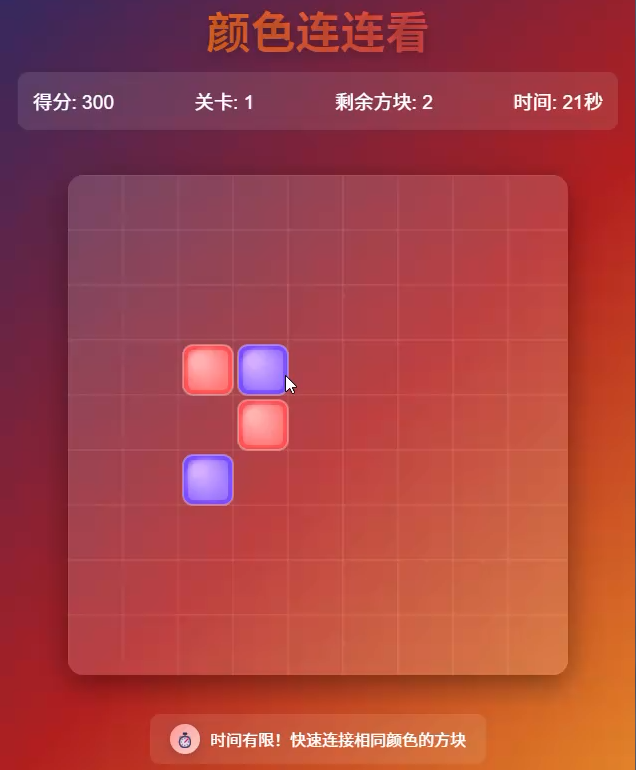
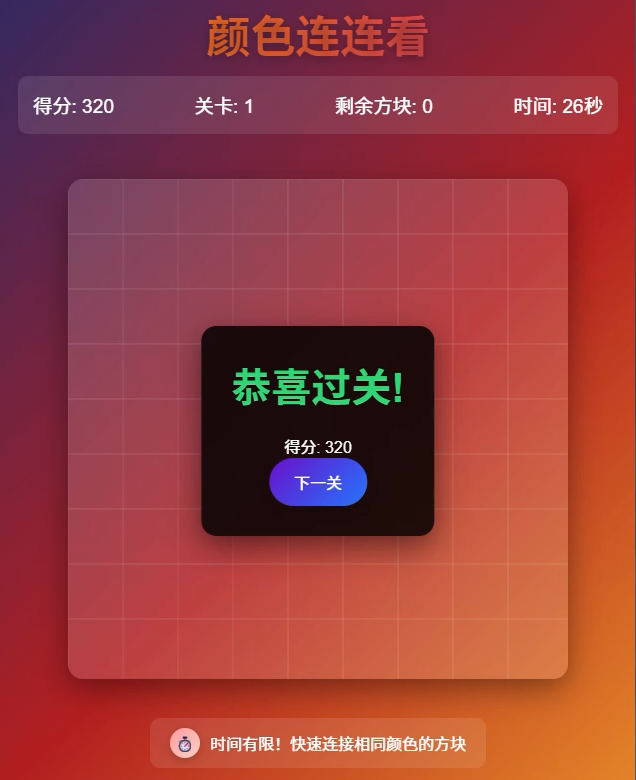
一、准备工作:基础页面结构
首先创建游戏的基础HTML结构,包含Canvas元素和必要的样式设置。
<!DOCTYPE html>
<html lang="zh-CN">
<head>
    <meta charset="UTF-8">
    <meta name="viewport" content="width=device-width, initial-scale=1.0">
    <title>颜色连连看</title>
    <style>
        /* 页面样式设置 */
        body {
            display: flex;
            flex-direction: column;
            align-items: center;
            background-color: #f0f0f0;
            font-family: Arial, sans-serif;
        }

        /* Canvas容器样式 */
        #gameContainer {
            border: 10px solid #888;
            border-radius: 8px;
            background-color: #fff;
            box-shadow: 0 0 15px rgba(0,0,0,0.2);
        }

        /* 信息显示区域 */
        #info {
            margin: 10px 0;
            font-size: 18px;
            color: #333;
        }
    </style>
</head>
<body>
    <h1>颜色连连看</h1>
    <div id="info">已消除: 0 对</div>
    <!-- 游戏画布 -->
    <canvas id="gameContainer" width="600" height="600"></canvas>

    <script>
        // 游戏逻辑代码将在这里实现
    </script>
</body>
</html>
代码解析:
- 页面采用flex布局使内容居中,设置了浅灰色背景增强视觉效果
#gameContainer是Canvas元素的容器,添加边框和阴影使其更像游戏面板#info区域用于显示游戏状态(已消除的对数)- Canvas设置为600x600像素,后续将在这个画布上绘制游戏元素
二、游戏初始化:核心变量与参数设置
在script标签中首先定义游戏所需的核心变量和初始化函数:
// 获取Canvas元素和绘图上下文
const canvas = document.getElementById('gameContainer');
const ctx = canvas.getContext('2d');
const infoElement = document.getElementById('info');

// 游戏配置参数
const config = {
    rows: 8,          // 行数
    cols: 8,          // 列数
    cellSize: 60,     // 每个方块的大小(像素)
    gap: 10,          // 方块之间的间距(像素)
    colors: [         // 方块颜色集合
        '#ff3366', '#3366ff', '#33cc99', '#ffcc00',
        '#9966ff', '#ff6600', '#66ccff', '#ff99cc'
    ]
};

// 游戏状态变量
let gameBoard = [];       // 存储游戏棋盘数据
let selected = null;      // 存储当前选中的方块位置 {row, col}
let matchedPairs = 0;     // 已匹配的对数
let isProcessing = false; // 标记是否正在处理消除动画(防止重复操作)
代码解析:
canvas.getContext('2d')获取2D绘图上下文,用于在Canvas上绘制图形config对象集中管理游戏配置:8x8的棋盘规模,每个方块60像素,间距10像素colors数组定义了8种不同颜色,确保有足够的颜色生成配对gameBoard将存储二维数组表示棋盘数据,每个元素是颜色索引或null(已消除)selected用于记录玩家选中的第一个方块位置,方便后续判断配对
三、生成游戏棋盘:随机颜色方块矩阵
接下来实现生成随机棋盘的函数,确保每个颜色都有偶数个(可配对):
/**
 * 初始化游戏棋盘
 */
function initBoard() {
    // 计算所需颜色总数(确保是偶数)
    const totalCells = config.rows * config.cols;
    if (totalCells % 2 !== 0) {
        throw new Error('行数×列数必须为偶数,确保所有方块都能配对');
    }

    // 生成颜色索引数组(每种颜色出现次数相同)
    const colorCount = totalCells / 2;
    const colorIndexes = [];

    // 循环填充颜色索引,确保每种颜色有两个
    for (let i = 0; i < colorCount; i++) {
        const colorIdx = i % config.colors.length;
        colorIndexes.push(colorIdx);
        colorIndexes.push(colorIdx);
    }

    // 打乱颜色索引数组(随机排序)
    shuffleArray(colorIndexes);

    // 构建二维数组棋盘
    gameBoard = [];
    let index = 0;
    for (let r = 0; r < config.rows; r++) {
        gameBoard[r] = [];
        for (let c = 0; c < config.cols; c++) {
            gameBoard[r][c] = colorIndexes[index++];
        }
    }

    // 重置游戏状态
    selected = null;
    matchedPairs = 0;
    updateInfo();
    drawBoard();
}

/**
 * 随机打乱数组( Fisher-Yates 洗牌算法)
 */
function shuffleArray(array) {
    for (let i = array.length - 1; i > 0; i--) {
        const j = Math.floor(Math.random() * (i + 1));
        [array[i], array[j]] = [array[j], array[i]]; // 交换元素
    }
}
代码解析:
initBoard()函数负责生成初始棋盘数据:- 首先检查棋盘总格子数是否为偶数(必须,否则无法全部配对)
- 生成颜色索引数组,每种颜色出现两次(通过取模操作循环使用colors数组)
- 使用Fisher-Yates洗牌算法打乱数组顺序,确保随机性
- 将打乱后的颜色索引填充到二维数组
gameBoard中
shuffleArray()实现经典洗牌算法,通过随机交换元素位置实现数组打乱
四、绘制棋盘:在Canvas上渲染游戏元素
有了棋盘数据后,需要将其绘制到Canvas上,实现drawBoard()函数:
/**
 * 绘制整个游戏棋盘
 */
function drawBoard() {
    // 清空画布
    ctx.clearRect(0, 0, canvas.width, canvas.height);

    // 计算棋盘总宽度和高度,居中绘制
    const boardWidth = config.cols * config.cellSize + (config.cols - 1) * config.gap;
    const boardHeight = config.rows * config.cellSize + (config.rows - 1) * config.gap;
    const startX = (canvas.width - boardWidth) / 2;
    const startY = (canvas.height - boardHeight) / 2;

    // 循环绘制每个方块
    for (let r = 0; r < config.rows; r++) {
        for (let c = 0; c < config.cols; c++) {
            // 如果方块已消除(值为null),跳过绘制
            if (gameBoard[r][c] === null) continue;

            // 计算方块位置
            const x = startX + c * (config.cellSize + config.gap);
            const y = startY + r * (config.cellSize + config.gap);

            // 绘制方块
            ctx.fillStyle = config.colors[gameBoard[r][c]];
            ctx.beginPath();
            ctx.roundRect(x, y, config.cellSize, config.cellSize, 8); // 圆角矩形
            ctx.fill();

            // 如果是选中的方块,绘制选中边框
            if (selected && selected.row === r && selected.col === c) {
                ctx.strokeStyle = '#000';
                ctx.lineWidth = 4;
                ctx.stroke();
            }
        }
    }
}

/**
 * 更新信息显示
 */
function updateInfo() {
    infoElement.textContent = `已消除: ${matchedPairs} 对`;
}
代码解析:
drawBoard()负责渲染整个棋盘:- 先清空画布,避免绘制残留
- 计算棋盘总尺寸并居中显示(让棋盘在Canvas中间)
- 循环遍历
gameBoard,对每个非null(未消除)的方块:- 计算位置坐标(考虑间距和起始偏移)
- 使用
roundRect绘制圆角方块,增强视觉效果 - 如果是选中的方块,绘制黑色边框标记
updateInfo()用于更新页面上的消除对数显示
五、处理用户交互:鼠标点击与方块选择
实现鼠标点击事件处理,让玩家可以选择方块并进行配对判断:
/**
 * 处理鼠标点击事件
 */
function handleClick(event) {
    // 如果正在处理消除动画,忽略点击
    if (isProcessing) return;

    // 获取点击位置在Canvas中的坐标
    const rect = canvas.getBoundingClientRect();
    const clickX = event.clientX - rect.left;
    const clickY = event.clientY - rect.top;

    // 计算棋盘起始位置(与绘制时保持一致)
    const boardWidth = config.cols * config.cellSize + (config.cols - 1) * config.gap;
    const boardHeight = config.rows * config.cellSize + (config.rows - 1) * config.gap;
    const startX = (canvas.width - boardWidth) / 2;
    const startY = (canvas.height - boardHeight) / 2;

    // 计算点击的是哪个方块
    let clickedRow = -1;
    let clickedCol = -1;

    for (let r = 0; r < config.rows; r++) {
        for (let c = 0; c < config.cols; c++) {
            const x = startX + c * (config.cellSize + config.gap);
            const y = startY + r * (config.cellSize + config.gap);

            // 判断点击位置是否在当前方块范围内
            if (clickX >= x && clickX <= x + config.cellSize &&
                clickY >= y && clickY <= y + config.cellSize &&
                gameBoard[r][c] !== null) {
                clickedRow = r;
                clickedCol = c;
                break;
            }
        }
        if (clickedRow !== -1) break;
    }

    // 如果点击了有效方块
    if (clickedRow !== -1) {
        handleCellSelect(clickedRow, clickedCol);
    }
}

/**
 * 处理方块选择逻辑
 */
function handleCellSelect(row, col) {
    // 如果点击的是已选中的方块,取消选择
    if (selected && selected.row === row && selected.col === col) {
        selected = null;
        drawBoard();
        return;
    }

    // 如果没有选中的方块,记录当前选择
    if (!selected) {
        selected = { row, col };
        drawBoard();
        return;
    }

    // 如果选中了两个方块,判断是否可连接
    const first = selected;
    const second = { row, col };

    // 检查颜色是否相同
    if (gameBoard[first.row][first.col] !== gameBoard[second.row][second.col]) {
        // 颜色不同,取消第一个选择,选中当前方块
        selected = second;
        drawBoard();
        return;
    }

    // 检查是否可以连接
    if (canConnect(first, second)) {
        // 可以连接,消除方块
        eliminatePair(first, second);
    } else {
        // 不可连接,切换选择
        selected = second;
        drawBoard();
    }
}

// 绑定鼠标点击事件
canvas.addEventListener('click', handleClick);
代码解析:
handleClick()处理Canvas上的点击事件:- 计算点击位置在Canvas中的相对坐标
- 遍历所有方块,判断点击位置属于哪个方块(通过坐标范围判断)
- 调用
handleCellSelect()处理选中逻辑
handleCellSelect()实现选择逻辑:- 点击已选中的方块:取消选择
- 没有选中的方块:记录当前选择
- 已有选中的方块:判断颜色是否相同,相同则检查连接路径
六、核心算法:判断两个方块是否可连接
连连看的核心是判断两个方块是否可通过不超过3条直线连接,实现canConnect()函数:
/**
 * 判断两个方块是否可以连接
 */
function canConnect(p1, p2) {
    // 直线连接(同一直线且中间无阻挡)
    if (isStraightConnected(p1, p2)) return true;

    // 一次转弯连接(L型路径)
    if (isOneCornerConnected(p1, p2)) return true;

    // 两次转弯连接(阶梯型路径)
    if (isTwoCornersConnected(p1, p2)) return true;

    return false;
}

/**
 * 判断是否直线连接(水平或垂直,中间无方块)
 */
function isStraightConnected(p1, p2) {
    // 不在同一行也不在同一列
    if (p1.row !== p2.row && p1.col !== p2.col) return false;

    // 同一行
    if (p1.row === p2.row) {
        const minCol = Math.min(p1.col, p2.col);
        const maxCol = Math.max(p1.col, p2.col);
        // 检查中间是否有方块阻挡
        for (let c = minCol + 1; c < maxCol; c++) {
            if (gameBoard[p1.row][c] !== null) return false;
        }
        return true;
    }

    // 同一列
    if (p1.col === p2.col) {
        const minRow = Math.min(p1.row, p2.row);
        const maxRow = Math.max(p1.row, p2.row);
        // 检查中间是否有方块阻挡
        for (let r = minRow + 1; r < maxRow; r++) {
            if (gameBoard[r][p1.col] !== null) return false;
        }
        return true;
    }

    return false;
}

/**
 * 判断是否一次转弯连接(L型)
 */
function isOneCornerConnected(p1, p2) {
    // 检查两个可能的转角点
    const corner1 = { row: p1.row, col: p2.col };
    const corner2 = { row: p2.row, col: p1.col };

    // 检查转角1路径: p1 -> corner1 -> p2
    if (gameBoard[corner1.row][corner1.col] === null &&
        isStraightConnected(p1, corner1) &&
        isStraightConnected(corner1, p2)) {
        return true;
    }

    // 检查转角2路径: p1 -> corner2 -> p2
    if (gameBoard[corner2.row][corner2.col] === null &&
        isStraightConnected(p1, corner2) &&
        isStraightConnected(corner2, p2)) {
        return true;
    }

    return false;
}

/**
 * 判断是否两次转弯连接(阶梯型)
 */
function isTwoCornersConnected(p1, p2) {
    // 检查同一行的所有可能中间点
    for (let c = 0; c < config.cols; c++) {
        const corner = { row: p1.row, col: c };
        // 中间点必须为空,且能分别与p1、p2直线连接
        if (gameBoard[corner.row][corner.col] === null &&
            isStraightConnected(p1, corner) &&
            isOneCornerConnected(corner, p2)) {
            return true;
        }
    }

    // 检查同一列的所有可能中间点
    for (let r = 0; r < config.rows; r++) {
        const corner = { row: r, col: p1.col };
        if (gameBoard[corner.row][corner.col] === null &&
            isStraightConnected(p1, corner) &&
            isOneCornerConnected(corner, p2)) {
            return true;
        }
    }

    return false;
}
代码解析:
- 连连看连接规则分为三种情况,依次判断:
isStraightConnected():判断水平或垂直直线连接,中间无方块阻挡isOneCornerConnected():判断L型路径(一次转弯),通过两个可能的转角点检查isTwoCornersConnected():判断两次转弯路径,通过检查中间过渡点是否存在有效路径
- 每种连接方式都需要确保路径上的中间位置没有方块阻挡(即值为null)
七、消除方块与游戏结束判断
实现方块消除逻辑和游戏结束判断:
/**
 * 消除一对方块
 */
function eliminatePair(p1, p2) {
    isProcessing = true; // 标记正在处理

    // 简单的消除动画(闪烁效果)
    let flashCount = 0;
    const flashInterval = setInterval(() => {
        // 交替隐藏和显示方块
        const temp1 = gameBoard[p1.row][p1.col];
        const temp2 = gameBoard[p2.row][p2.col];

        gameBoard[p1.row][p1.col] = flashCount % 2 === 0 ? null : temp1;
        gameBoard[p2.row][p2.col] = flashCount % 2 === 0 ? null : temp2;

        drawBoard();
        flashCount++;

        // 动画结束(3次闪烁)
        if (flashCount >= 6) {
            clearInterval(flashInterval);
            // 最终设置为null(消除)
            gameBoard[p1.row][p1.col] = null;
            gameBoard[p2.row][p2.col] = null;
            matchedPairs++;
            selected = null;
            drawBoard();
            updateInfo();
            isProcessing = false;

            // 检查游戏是否结束
            checkGameOver();
        }
    }, 100);
}

/**
 * 检查游戏是否结束
 */
function checkGameOver() {
    // 检查是否所有方块都已消除
    for (let r = 0; r < config.rows; r++) {
        for (let c = 0; c < config.cols; c++) {
            if (gameBoard[r][c] !== null) {
                return; // 还有未消除的方块
            }
        }
    }

    // 所有方块都已消除,游戏结束
    setTimeout(() => {
        alert(`恭喜你完成游戏!共消除 ${matchedPairs} 对`);
        initBoard(); // 重新开始游戏
    }, 500);
}
代码解析:
eliminatePair()处理方块消除:- 使用闪烁动画增强视觉反馈(3次闪烁,每次间隔100ms)
- 动画结束后将方块设置为null(标记为已消除)
- 更新消除对数并重新绘制棋盘
checkGameOver()遍历整个棋盘,若所有方块都为null则判定游戏结束,弹出提示并重新开始
八、启动游戏
最后添加游戏启动代码,在页面加载完成后初始化游戏:
// 页面加载完成后初始化游戏
window.onload = initBoard;
九、完整源码(复制粘贴即可运行)
<!DOCTYPE html>
<html lang="zh-CN">
<head>
<meta charset="UTF-8">
<meta name="viewport" content="width=device-width, initial-scale=1.0">
<title>颜色连连看</title>
<style>
* {
margin: 0;
padding: 0;
box-sizing: border-box;
}
body {
display: flex;
flex-direction: column;
align-items: center;
justify-content: center;
min-height: 100vh;
background: linear-gradient(135deg, #1a2a6c, #b21f1f, #fdbb2d);
font-family: 'Arial Rounded MT Bold', 'Arial', sans-serif;
color: white;
overflow-x: hidden;
padding: 20px;
}
.game-container {
position: relative;
margin: 20px 0;
}
canvas {
background: rgba(255, 255, 255, 0.1);
border-radius: 15px;
box-shadow: 0 10px 30px rgba(0, 0, 0, 0.4);
backdrop-filter: blur(5px);
}
.game-header {
text-align: center;
margin-bottom: 15px;
}
h1 {
font-size: 2.8rem;
margin-bottom: 10px;
text-shadow: 0 2px 10px rgba(0, 0, 0, 0.3);
background: linear-gradient(to right, #ff8a00, #e52e71);
-webkit-background-clip: text;
-webkit-text-fill-color: transparent;
}
.stats {
display: flex;
justify-content: space-between;
width: 600px;
margin-bottom: 10px;
font-size: 1.2rem;
background: rgba(255, 255, 255, 0.1);
padding: 15px;
border-radius: 10px;
backdrop-filter: blur(5px);
}
.instructions {
margin-top: 15px;
text-align: center;
max-width: 600px;
line-height: 1.6;
background: rgba(255, 255, 255, 0.1);
padding: 15px;
border-radius: 10px;
backdrop-filter: blur(5px);
}
.controls {
display: flex;
gap: 10px;
margin-top: 15px;
flex-wrap: wrap;
justify-content: center;
}
button {
background: linear-gradient(135deg, #6a11cb 0%, #2575fc 100%);
border: none;
color: white;
padding: 12px 25px;
border-radius: 50px;
font-size: 1rem;
cursor: pointer;
transition: all 0.3s ease;
box-shadow: 0 5px 15px rgba(0, 0, 0, 0.2);
}
button:hover {
transform: translateY(-3px);
box-shadow: 0 8px 20px rgba(0, 0, 0, 0.3);
}
button:active {
transform: translateY(1px);
}
.level-complete {
position: absolute;
top: 50%;
left: 50%;
transform: translate(-50%, -50%);
background: rgba(0, 0, 0, 0.85);
padding: 30px;
border-radius: 15px;
text-align: center;
display: none;
backdrop-filter: blur(5px);
box-shadow: 0 10px 30px rgba(0, 0, 0, 0.5);
z-index: 10;
}
.level-complete h2 {
font-size: 2.5rem;
margin-bottom: 20px;
color: #2ed573;
}
.special-effects {
position: absolute;
top: 0;
left: 0;
width: 100%;
height: 100%;
pointer-events: none;
overflow: hidden;
border-radius: 15px;
}
.effect {
position: absolute;
border-radius: 50%;
background: radial-gradient(circle, rgba(255,255,255,0.8) 0%, rgba(255,255,255,0) 70%);
animation: float 1.5s ease-out forwards;
}
@keyframes float {
0% {
transform: translateY(0) scale(1);
opacity: 1;
}
100% {
transform: translateY(-100px) scale(0);
opacity: 0;
}
}
.timer {
display: flex;
align-items: center;
gap: 10px;
margin-top: 15px;
background: rgba(255, 255, 255, 0.1);
padding: 10px 20px;
border-radius: 10px;
backdrop-filter: blur(5px);
}
.timer-icon {
width: 30px;
height: 30px;
border-radius: 50%;
background: linear-gradient(135deg, #ff9a9e 0%, #fad0c4 100%);
display: flex;
align-items: center;
justify-content: center;
font-weight: bold;
box-shadow: 0 3px 10px rgba(0, 0, 0, 0.2);
}
.hint-indicator {
position: absolute;
width: 20px;
height: 20px;
border-radius: 50%;
background: #ffeb3b;
box-shadow: 0 0 10px #ffeb3b;
opacity: 0;
transition: opacity 0.3s;
pointer-events: none;
}
</style>
</head>
<body>
<div class="game-header">
<h1>颜色连连看</h1>
<div class="stats">
<div class="score">得分: <span id="score">0</span></div>
<div class="level">关卡: <span id="currentLevel">1</span></div>
<div class="pairs">剩余方块: <span id="pairsLeft">0</span></div>
<div class="time">时间: <span id="timeLeft">60</span>秒</div>
</div>
</div>
<div class="game-container">
<canvas id="gameCanvas" width="500" height="500"></canvas>
<div class="special-effects" id="effects"></div>
<div class="level-complete" id="levelComplete">
<h2>恭喜过关!</h2>
<div class="score">得分: <span id="levelScore">0</span></div>
<button id="nextLevelBtn">下一关</button>
</div>
</div>
<div class="timer">
<div class="timer-icon">⏱️</div>
<div>时间有限!快速连接相同颜色的方块</div>
</div>
<div class="instructions">
<p>点击两个相同颜色的方块,如果它们可以用不超过两个拐角的直线连接,它们就会消除</p>
<p>消除所有方块即可过关,时间有限,快速行动!</p>
</div>
<div class="controls">
<button id="newGameBtn">新游戏</button>
<button id="hintBtn">提示</button>
<button id="shuffleBtn">重排</button>
</div>
<script>
// 获取Canvas和上下文
const canvas = document.getElementById('gameCanvas');
const ctx = canvas.getContext('2d');
const effectsContainer = document.getElementById('effects');
// 游戏常量
const GRID_ROWS = 8;
const GRID_COLS = 8;
const TILE_SIZE = 50;
const TILE_MARGIN = 5;
const COLORS = [
'#FF5252', // 红色
'#FF4081', // 粉色
'#E040FB', // 紫色
'#7C4DFF', // 深紫
'#536DFE', // 蓝色
'#448AFF', // 亮蓝
'#40C4FF', // 天蓝
'#18FFFF', // 青色
'#64FFDA', // 青绿
'#69F0AE' // 绿色
];
// 游戏状态
let gameState = {
grid: [],
selectedTile: null,
score: 0,
level: 1,
pairsLeft: 0,
timeLeft: 60,
gameTimer: null,
isAnimating: false,
hintTiles: null
};
// 初始化游戏
function initGame() {
// 清除之前的计时器
if (gameState.gameTimer) {
clearInterval(gameState.gameTimer);
}
gameState.grid = [];
gameState.selectedTile = null;
gameState.score = 0;
gameState.level = 1;
gameState.pairsLeft = 0;
gameState.timeLeft = 60;
gameState.isAnimating = false;
gameState.hintTiles = null;
// 创建初始网格
createGrid();
// 启动计时器
gameState.gameTimer = setInterval(() => {
gameState.timeLeft--;
updateUI();
if (gameState.timeLeft <= 0) {
clearInterval(gameState.gameTimer);
alert('时间到!游戏结束。你的得分: ' + gameState.score);
initGame();
}
}, 1000);
updateUI();
drawGame();
document.getElementById('levelComplete').style.display = 'none';
}
// 创建游戏网格
function createGrid() {
// 计算需要的颜色种类(根据关卡增加难度)
const colorCount = Math.min(5 + Math.floor(gameState.level / 2), COLORS.length);
const usedColors = COLORS.slice(0, colorCount);
// 创建颜色对
const colorPairs = [];
for (let i = 0; i < usedColors.length; i++) {
// 每种颜色创建多对,确保填满网格
const pairsPerColor = Math.floor((GRID_ROWS * GRID_COLS) / usedColors.length / 2);
for (let j = 0; j < pairsPerColor; j++) {
colorPairs.push(usedColors[i]);
colorPairs.push(usedColors[i]);
}
}
// 如果颜色对数量不足,随机添加一些
while (colorPairs.length < GRID_ROWS * GRID_COLS) {
const randomColor = usedColors[Math.floor(Math.random() * usedColors.length)];
colorPairs.push(randomColor);
colorPairs.push(randomColor);
}
// 打乱颜色对
shuffleArray(colorPairs);
// 填充网格
let index = 0;
for (let row = 0; row < GRID_ROWS; row++) {
gameState.grid[row] = [];
for (let col = 0; col < GRID_COLS; col++) {
if (index < colorPairs.length) {
gameState.grid[row][col] = {
color: colorPairs[index],
row: row,
col: col,
x: col * (TILE_SIZE + TILE_MARGIN) + TILE_MARGIN,
y: row * (TILE_SIZE + TILE_MARGIN) + TILE_MARGIN,
scale: 1,
alpha: 1,
removing: false
};
index++;
}
}
}
gameState.pairsLeft = colorPairs.length / 2;
// 确保网格有可连的方块
if (!hasValidMoves()) {
createGrid(); // 重新生成直到有有效移动
}
}
// 绘制游戏
function drawGame() {
ctx.clearRect(0, 0, canvas.width, canvas.height);
// 绘制网格背景
ctx.fillStyle = 'rgba(255, 255, 255, 0.05)';
ctx.fillRect(0, 0, canvas.width, canvas.height);
// 绘制网格线
ctx.strokeStyle = 'rgba(255, 255, 255, 0.1)';
ctx.lineWidth = 1;
for (let i = 0; i <= GRID_COLS; i++) {
const pos = i * (TILE_SIZE + TILE_MARGIN);
ctx.beginPath();
ctx.moveTo(pos, 0);
ctx.lineTo(pos, canvas.height);
ctx.stroke();
}
for (let i = 0; i <= GRID_ROWS; i++) {
const pos = i * (TILE_SIZE + TILE_MARGIN);
ctx.beginPath();
ctx.moveTo(0, pos);
ctx.lineTo(canvas.width, pos);
ctx.stroke();
}
// 绘制方块
for (let row = 0; row < GRID_ROWS; row++) {
for (let col = 0; col < GRID_COLS; col++) {
const tile = gameState.grid[row][col];
if (!tile || tile.removing) continue;
ctx.save();
// 应用动画效果
ctx.translate(tile.x + TILE_SIZE/2, tile.y + TILE_SIZE/2);
ctx.scale(tile.scale, tile.scale);
ctx.globalAlpha = tile.alpha;
// 绘制方块主体
const gradient = ctx.createRadialGradient(-10, -10, 5, 0, 0, TILE_SIZE/2);
gradient.addColorStop(0, lightenColor(tile.color, 30));
gradient.addColorStop(1, tile.color);
ctx.fillStyle = gradient;
ctx.beginPath();
ctx.roundRect(-TILE_SIZE/2, -TILE_SIZE/2, TILE_SIZE, TILE_SIZE, 10);
ctx.fill();
// 绘制内部高光
ctx.fillStyle = 'rgba(255, 255, 255, 0.2)';
ctx.beginPath();
ctx.roundRect(-TILE_SIZE/2 + 5, -TILE_SIZE/2 + 5, TILE_SIZE - 10, TILE_SIZE - 10, 5);
ctx.fill();
// 绘制边框
ctx.strokeStyle = 'rgba(255, 255, 255, 0.3)';
ctx.lineWidth = 2;
ctx.beginPath();
ctx.roundRect(-TILE_SIZE/2, -TILE_SIZE/2, TILE_SIZE, TILE_SIZE, 10);
ctx.stroke();
// 绘制选中效果
if (gameState.selectedTile &&
gameState.selectedTile.row === row &&
gameState.selectedTile.col === col) {
ctx.strokeStyle = '#FFEB3B';
ctx.lineWidth = 4;
ctx.beginPath();
ctx.roundRect(-TILE_SIZE/2, -TILE_SIZE/2, TILE_SIZE, TILE_SIZE, 10);
ctx.stroke();
// 绘制脉动效果
const pulseSize = Math.sin(Date.now() / 200) * 5 + 10;
ctx.strokeStyle = 'rgba(255, 235, 59, 0.5)';
ctx.lineWidth = 2;
ctx.beginPath();
ctx.roundRect(-TILE_SIZE/2 - pulseSize/2, -TILE_SIZE/2 - pulseSize/2,
TILE_SIZE + pulseSize, TILE_SIZE + pulseSize, 10 + pulseSize/2);
ctx.stroke();
}
// 绘制提示效果
if (gameState.hintTiles &&
((gameState.hintTiles[0].row === row && gameState.hintTiles[0].col === col) ||
(gameState.hintTiles[1].row === row && gameState.hintTiles[1].col === col))) {
ctx.strokeStyle = '#FF9800';
ctx.lineWidth = 4;
ctx.beginPath();
ctx.roundRect(-TILE_SIZE/2, -TILE_SIZE/2, TILE_SIZE, TILE_SIZE, 10);
ctx.stroke();
}
ctx.restore();
}
}
// 绘制连接线(如果有)
if (gameState.connectionLine) {
drawConnectionLine(gameState.connectionLine);
}
}
// 工具函数:颜色变亮
function lightenColor(color, percent) {
const num = parseInt(color.slice(1), 16);
const amt = Math.round(2.55 * percent);
const R = (num >> 16) + amt;
const G = (num >> 8 & 0x00FF) + amt;
const B = (num & 0x0000FF) + amt;
return "#" + (
0x1000000 +
(R < 255 ? R < 1 ? 0 : R : 255) * 0x10000 +
(G < 255 ? G < 1 ? 0 : G : 255) * 0x100 +
(B < 255 ? B < 1 ? 0 : B : 255)
).toString(16).slice(1);
}
// 绘制连接线
function drawConnectionLine(line) {
ctx.strokeStyle = '#FFEB3B';
ctx.lineWidth = 4;
ctx.lineJoin = 'round';
ctx.lineCap = 'round';
ctx.setLineDash([5, 5]);
ctx.beginPath();
ctx.moveTo(line[0].x + TILE_SIZE/2, line[0].y + TILE_SIZE/2);
for (let i = 1; i < line.length; i++) {
ctx.lineTo(line[i].x + TILE_SIZE/2, line[i].y + TILE_SIZE/2);
}
ctx.stroke();
ctx.setLineDash([]);
// 绘制连接点
ctx.fillStyle = '#FFEB3B';
line.forEach(point => {
ctx.beginPath();
ctx.arc(point.x + TILE_SIZE/2, point.y + TILE_SIZE/2, 5, 0, Math.PI * 2);
ctx.fill();
});
}
// 检查两个方块是否可以连接
function canConnect(tile1, tile2) {
if (tile1.color !== tile2.color) return null;
// 检查直线连接
let path = checkStraightLine(tile1, tile2);
if (path) return path;
// 检查一个拐角的连接
path = checkOneCornerLine(tile1, tile2);
if (path) return path;
// 检查两个拐角的连接
path = checkTwoCornerLine(tile1, tile2);
if (path) return path;
return null;
}
// 检查直线连接
function checkStraightLine(tile1, tile2) {
// 同一行
if (tile1.row === tile2.row) {
const startCol = Math.min(tile1.col, tile2.col);
const endCol = Math.max(tile1.col, tile2.col);
for (let col = startCol + 1; col < endCol; col++) {
if (gameState.grid[tile1.row][col]) return null;
}
return [
{x: tile1.x, y: tile1.y},
{x: tile2.x, y: tile2.y}
];
}
// 同一列
if (tile1.col === tile2.col) {
const startRow = Math.min(tile1.row, tile2.row);
const endRow = Math.max(tile1.row, tile2.row);
for (let row = startRow + 1; row < endRow; row++) {
if (gameState.grid[row][tile1.col]) return null;
}
return [
{x: tile1.x, y: tile1.y},
{x: tile2.x, y: tile2.y}
];
}
return null;
}
// 检查一个拐角的连接
function checkOneCornerLine(tile1, tile2) {
// 尝试两个可能的拐点
const corner1 = {row: tile1.row, col: tile2.col};
const corner2 = {row: tile2.row, col: tile1.col};
// 检查拐点1
if (!gameState.grid[corner1.row][corner1.col]) {
const horizontalClear = checkHorizontalClear(tile1, corner1);
const verticalClear = checkVerticalClear(corner1, tile2);
if (horizontalClear && verticalClear) {
return [
{x: tile1.x, y: tile1.y},
{x: corner1.col * (TILE_SIZE + TILE_MARGIN) + TILE_MARGIN, y: corner1.row * (TILE_SIZE + TILE_MARGIN) + TILE_MARGIN},
{x: tile2.x, y: tile2.y}
];
}
}
// 检查拐点2
if (!gameState.grid[corner2.row][corner2.col]) {
const verticalClear = checkVerticalClear(tile1, corner2);
const horizontalClear = checkHorizontalClear(corner2, tile2);
if (verticalClear && horizontalClear) {
return [
{x: tile1.x, y: tile1.y},
{x: corner2.col * (TILE_SIZE + TILE_MARGIN) + TILE_MARGIN, y: corner2.row * (TILE_SIZE + TILE_MARGIN) + TILE_MARGIN},
{x: tile2.x, y: tile2.y}
];
}
}
return null;
}
// 检查两个拐角的连接
function checkTwoCornerLine(tile1, tile2) {
// 检查所有可能的两个拐角路径
for (let row = 0; row < GRID_ROWS; row++) {
for (let col = 0; col < GRID_COLS; col++) {
// 跳过非空位置
if (gameState.grid[row][col]) continue;
// 创建虚拟拐点
const corner1 = {row: tile1.row, col: col};
const corner2 = {row: row, col: tile2.col};
// 检查路径是否畅通
if (!gameState.grid[corner1.row][corner1.col] &&
!gameState.grid[corner2.row][corner2.col]) {
const horizontal1 = checkHorizontalClear(tile1, corner1);
const vertical = checkVerticalClear(corner1, corner2);
const horizontal2 = checkHorizontalClear(corner2, tile2);
if (horizontal1 && vertical && horizontal2) {
return [
{x: tile1.x, y: tile1.y},
{x: corner1.col * (TILE_SIZE + TILE_MARGIN) + TILE_MARGIN, y: corner1.row * (TILE_SIZE + TILE_MARGIN) + TILE_MARGIN},
{x: corner2.col * (TILE_SIZE + TILE_MARGIN) + TILE_MARGIN, y: corner2.row * (TILE_SIZE + TILE_MARGIN) + TILE_MARGIN},
{x: tile2.x, y: tile2.y}
];
}
}
// 尝试另一种路径
const corner3 = {row: row, col: tile1.col};
const corner4 = {row: tile2.row, col: col};
if (!gameState.grid[corner3.row][corner3.col] &&
!gameState.grid[corner4.row][corner4.col]) {
const vertical1 = checkVerticalClear(tile1, corner3);
const horizontal = checkHorizontalClear(corner3, corner4);
const vertical2 = checkVerticalClear(corner4, tile2);
if (vertical1 && horizontal && vertical2) {
return [
{x: tile1.x, y: tile1.y},
{x: corner3.col * (TILE_SIZE + TILE_MARGIN) + TILE_MARGIN, y: corner3.row * (TILE_SIZE + TILE_MARGIN) + TILE_MARGIN},
{x: corner4.col * (TILE_SIZE + TILE_MARGIN) + TILE_MARGIN, y: corner4.row * (TILE_SIZE + TILE_MARGIN) + TILE_MARGIN},
{x: tile2.x, y: tile2.y}
];
}
}
}
}
return null;
}
// 检查水平方向是否畅通
function checkHorizontalClear(tile1, tile2) {
const startCol = Math.min(tile1.col, tile2.col);
const endCol = Math.max(tile1.col, tile2.col);
for (let col = startCol; col <= endCol; col++) {
// 跳过起点和终点
if (col === tile1.col && tile1.row === tile2.row) continue;
if (col === tile2.col && tile1.row === tile2.row) continue;
if (gameState.grid[tile1.row][col]) return false;
}
return true;
}
// 检查垂直方向是否畅通
function checkVerticalClear(tile1, tile2) {
const startRow = Math.min(tile1.row, tile2.row);
const endRow = Math.max(tile1.row, tile2.row);
for (let row = startRow; row <= endRow; row++) {
// 跳过起点和终点
if (row === tile1.row && tile1.col === tile2.col) continue;
if (row === tile2.row && tile1.col === tile2.col) continue;
if (gameState.grid[row][tile1.col]) return false;
}
return true;
}
// 连接两个方块
function connectTiles(tile1, tile2, path) {
if (gameState.isAnimating) return;
gameState.isAnimating = true;
// 显示连接线
gameState.connectionLine = path;
drawGame();
// 创建消除特效
createRemoveEffect(tile1.x + TILE_SIZE/2, tile1.y + TILE_SIZE/2, tile1.color);
createRemoveEffect(tile2.x + TILE_SIZE/2, tile2.y + TILE_SIZE/2, tile2.color);
// 动画移除方块
setTimeout(() => {
// 移除方块
gameState.grid[tile1.row][tile1.col] = null;
gameState.grid[tile2.row][tile2.col] = null;
// 清除连接线
gameState.connectionLine = null;
// 更新游戏状态
gameState.pairsLeft--;
gameState.score += 10 * gameState.level;
gameState.timeLeft = Math.min(gameState.timeLeft + 5, 60); // 奖励时间
gameState.isAnimating = false;
updateUI();
drawGame();
// 检查游戏是否结束
checkLevelComplete();
}, 800);
}
// 创建消除特效
function createRemoveEffect(x, y, color) {
for (let i = 0; i < 8; i++) {
const effect = document.createElement('div');
effect.className = 'effect';
effect.style.left = x + 'px';
effect.style.top = y + 'px';
effect.style.width = '10px';
effect.style.height = '10px';
effect.style.background = `radial-gradient(circle, ${color} 0%, rgba(255,255,255,0) 70%)`;
effect.style.animationDelay = (i * 0.1) + 's';
effectsContainer.appendChild(effect);
// 动画结束后移除元素
setTimeout(() => {
if (effectsContainer.contains(effect)) {
effectsContainer.removeChild(effect);
}
}, 1500);
}
}
// 检查关卡完成
function checkLevelComplete() {
if (gameState.pairsLeft <= 0) {
clearInterval(gameState.gameTimer);
document.getElementById('levelScore').textContent = gameState.score;
document.getElementById('levelComplete').style.display = 'block';
} else if (!hasValidMoves()) {
// 没有有效移动,自动重排
setTimeout(() => {
alert('没有可连接的方块,正在重排...');
shuffleGrid();
}, 500);
}
}
// 检查是否有有效移动
function hasValidMoves() {
// 收集所有颜色相同的方块对
const colorGroups = {};
for (let row = 0; row < GRID_ROWS; row++) {
for (let col = 0; col < GRID_COLS; col++) {
const tile = gameState.grid[row][col];
if (!tile) continue;
if (!colorGroups[tile.color]) {
colorGroups[tile.color] = [];
}
colorGroups[tile.color].push(tile);
}
}
// 检查每个颜色组是否有可连接的方块对
for (const color in colorGroups) {
const tiles = colorGroups[color];
for (let i = 0; i < tiles.length; i++) {
for (let j = i + 1; j < tiles.length; j++) {
if (canConnect(tiles[i], tiles[j])) {
return true;
}
}
}
}
return false;
}
// 显示提示
function showHint() {
// 查找可连接的方块对
for (let row1 = 0; row1 < GRID_ROWS; row1++) {
for (let col1 = 0; col1 < GRID_COLS; col1++) {
const tile1 = gameState.grid[row1][col1];
if (!tile1) continue;
for (let row2 = 0; row2 < GRID_ROWS; row2++) {
for (let col2 = 0; col2 < GRID_COLS; col2++) {
const tile2 = gameState.grid[row2][col2];
if (!tile2 || tile1 === tile2) continue;
if (tile1.color === tile2.color && canConnect(tile1, tile2)) {
gameState.hintTiles = [tile1, tile2];
drawGame();
// 3秒后清除提示
setTimeout(() => {
gameState.hintTiles = null;
drawGame();
}, 3000);
return;
}
}
}
}
}
// 如果没有找到可连接的方块对,重排
alert('没有可连接的方块,正在重排...');
shuffleGrid();
}
// 重排网格
function shuffleGrid() {
// 收集所有方块
const allTiles = [];
for (let row = 0; row < GRID_ROWS; row++) {
for (let col = 0; col < GRID_COLS; col++) {
if (gameState.grid[row][col]) {
allTiles.push(gameState.grid[row][col]);
}
}
}
// 随机打乱
shuffleArray(allTiles);
// 重新分配位置
let index = 0;
for (let row = 0; row < GRID_ROWS; row++) {
for (let col = 0; col < GRID_COLS; col++) {
if (index < allTiles.length) {
const tile = allTiles[index++];
tile.row = row;
tile.col = col;
tile.x = col * (TILE_SIZE + TILE_MARGIN) + TILE_MARGIN;
tile.y = row * (TILE_SIZE + TILE_MARGIN) + TILE_MARGIN;
gameState.grid[row][col] = tile;
}
}
}
drawGame();
}
// 下一关
function nextLevel() {
gameState.level++;
gameState.timeLeft = 60 - (gameState.level * 5); // 随着关卡增加,时间减少
if (gameState.timeLeft < 20) gameState.timeLeft = 20; // 最少20秒
createGrid();
// 重新启动计时器
clearInterval(gameState.gameTimer);
gameState.gameTimer = setInterval(() => {
gameState.timeLeft--;
updateUI();
if (gameState.timeLeft <= 0) {
clearInterval(gameState.gameTimer);
alert('时间到!游戏结束。你的得分: ' + gameState.score);
initGame();
}
}, 1000);
updateUI();
drawGame();
}
// 更新UI
function updateUI() {
document.getElementById('score').textContent = gameState.score;
document.getElementById('currentLevel').textContent = gameState.level;
document.getElementById('pairsLeft').textContent = gameState.pairsLeft;
document.getElementById('timeLeft').textContent = gameState.timeLeft;
}
// 工具函数:打乱数组
function shuffleArray(array) {
for (let i = array.length - 1; i > 0; i--) {
const j = Math.floor(Math.random() * (i + 1));
[array[i], array[j]] = [array[j], array[i]];
}
return array;
}
// 鼠标事件处理
canvas.addEventListener('click', (e) => {
if (gameState.isAnimating) return;
const rect = canvas.getBoundingClientRect();
const x = e.clientX - rect.left;
const y = e.clientY - rect.top;
// 计算点击的网格位置
const col = Math.floor(x / (TILE_SIZE + TILE_MARGIN));
const row = Math.floor(y / (TILE_SIZE + TILE_MARGIN));
if (row >= 0 && row < GRID_ROWS && col >= 0 && col < GRID_COLS) {
const tile = gameState.grid[row][col];
if (tile && !tile.removing) {
if (gameState.selectedTile === null) {
// 第一次选择
gameState.selectedTile = tile;
} else {
// 第二次选择,尝试连接
if (gameState.selectedTile !== tile) {
const path = canConnect(gameState.selectedTile, tile);
if (path) {
connectTiles(gameState.selectedTile, tile, path);
}
gameState.selectedTile = null;
} else {
// 点击同一方块,取消选择
gameState.selectedTile = null;
}
}
drawGame();
}
}
});
// 按钮事件
document.getElementById('newGameBtn').addEventListener('click', initGame);
document.getElementById('hintBtn').addEventListener('click', showHint);
document.getElementById('shuffleBtn').addEventListener('click', shuffleGrid);
document.getElementById('nextLevelBtn').addEventListener('click', nextLevel);
// 初始化游戏
initGame();
</script>
</body>
</html>
十、游戏特点
-
精美视觉效果:
- 渐变色方块设计
- 方块高光和阴影效果
- 选中方块脉动效果
- 连接时的虚线动画
- 消除时的粒子特效
-
完整游戏机制:
- 三种连接方式:直线、一个拐角、两个拐角
- 智能路径查找算法
- 关卡系统(随关卡增加难度)
- 计时系统和分数系统
-
用户体验优化:
- 提示系统(高亮显示可连接的方块)
- 重排功能(当没有可连接方块时)
- 时间奖励机制(成功连接增加时间)
- 响应式控制按钮
-
游戏功能:
- 自动检测是否有有效移动
- 关卡完成检测
- 时间限制增加游戏挑战性
十一、总结
通过以上步骤,我们完成了一个完整的颜色连连看游戏。核心要点包括:
- 使用Canvas绘制游戏界面,通过二维数组管理棋盘数据
- 实现随机生成有效棋盘的算法(确保每个颜色有配对)
- 处理鼠标交互,实现方块选择逻辑
- 核心连接判断算法(直线、一次转弯、两次转弯)
- 消除动画和游戏结束判断
你可以进一步扩展这个游戏,比如添加计时功能、难度选择(调整棋盘大小)、更多颜色或图案等。希望这篇教程能帮助你理解Canvas游戏开发的基本思路!






 扫一扫
扫一扫


 被折叠的 条评论
为什么被折叠?
被折叠的 条评论
为什么被折叠?
 到【灌水乐园】发言





