


文章目录
HTML5 Canvas游戏开发原理解析(移动、射击、碰撞和障碍物)
下面我将详细解析HTML5 Canvas中实现物体移动、射击、碰撞和障碍物等功能的原理,并提供通俗易懂的教程和代码示例。
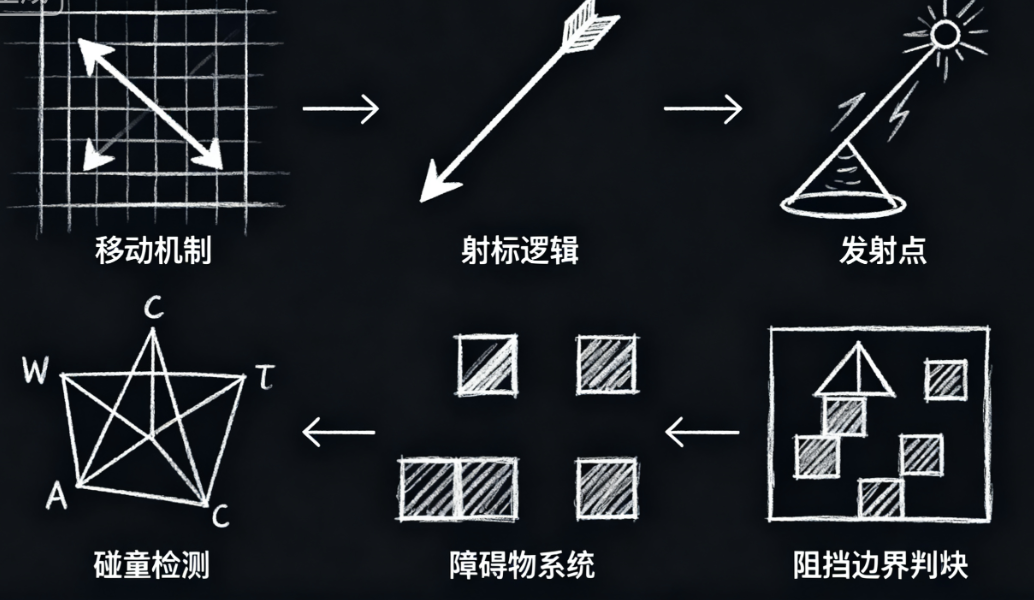
1. Canvas基础概念
什么是Canvas?
Canvas是HTML5提供的绘图区域,可以通过JavaScript动态绘制图形、动画和游戏。
基本设置
<canvas id="gameCanvas" width="800" height="600"></canvas>
<script>
  const canvas = document.getElementById('gameCanvas');
  const ctx = canvas.getContext('2d');
</script>
2. 物体移动原理与实现
移动的基本原理
在Canvas中移动物体,实际上是在每一帧中:
- 清除画布
- 更新物体位置
- 重新绘制物体
实现步骤
步骤1:定义物体属性
const player = {
  x: 100,        // X坐标
  y: 100,        // Y坐标
  width: 50,     // 宽度
  height: 50,    // 高度
  speed: 5,      // 移动速度
  color: 'blue'  // 颜色
};
步骤2:绘制物体
function drawPlayer() {
  ctx.fillStyle = player.color;
  ctx.fillRect(player.x, player.y, player.width, player.height);
}
步骤3:处理键盘输入
const keys = {};

window.addEventListener('keydown', (e) => {
  keys[e.key] = true;
});

window.addEventListener('keyup', (e) => {
  keys[e.key] = false;
});
步骤4:更新物体位置
function updatePlayer() {
  if (keys['ArrowUp'] || keys['w']) {
    player.y -= player.speed;
  }
  if (keys['ArrowDown'] || keys['s']) {
    player.y += player.speed;
  }
  if (keys['ArrowLeft'] || keys['a']) {
    player.x -= player.speed;
  }
  if (keys['ArrowRight'] || keys['d']) {
    player.x += player.speed;
  }

  // 限制在画布内
  player.x = Math.max(0, Math.min(canvas.width - player.width, player.x));
  player.y = Math.max(0, Math.min(canvas.height - player.height, player.y));
}
步骤5:游戏循环
function gameLoop() {
  // 清除画布
  ctx.clearRect(0, 0, canvas.width, canvas.height);

  // 更新和绘制
  updatePlayer();
  drawPlayer();

  // 继续循环
  requestAnimationFrame(gameLoop);
}

// 启动游戏循环
gameLoop();
3. 射击功能实现
射击系统组成
- 子弹数组
- 发射机制
- 子弹移动和绘制
实现步骤
步骤1:定义子弹
const bullets = [];
const bulletSpeed = 10;

function createBullet(x, y, direction) {
  return {
    x: x,
    y: y,
    width: 5,
    height: 5,
    speed: bulletSpeed,
    direction: direction, // 'up', 'down', 'left', 'right'
    color: 'red'
  };
}
步骤2:发射子弹
function shoot() {
  // 从玩家中心发射
  const centerX = player.x + player.width / 2;
  const centerY = player.y + player.height / 2;

  // 根据玩家方向发射
  bullets.push(createBullet(centerX, centerY, player.direction || 'up'));
}

// 监听空格键发射
window.addEventListener('keydown', (e) => {
  if (e.code === 'Space') {
    shoot();
  }
});
步骤3:更新和绘制子弹
function updateBullets() {
  for (let i = bullets.length - 1; i >= 0; i--) {
    const bullet = bullets[i];

    // 根据方向移动
    switch(bullet.direction) {
      case 'up': bullet.y -= bullet.speed; break;
      case 'down': bullet.y += bullet.speed; break;
      case 'left': bullet.x -= bullet.speed; break;
      case 'right': bullet.x += bullet.speed; break;
    }

    // 移除超出画布的子弹
    if (bullet.x < 0 || bullet.x > canvas.width ||
        bullet.y < 0 || bullet.y > canvas.height) {
      bullets.splice(i, 1);
    }
  }
}

function drawBullets() {
  bullets.forEach(bullet => {
    ctx.fillStyle = bullet.color;
    ctx.fillRect(bullet.x, bullet.y, bullet.width, bullet.height);
  });
}
步骤4:在游戏循环中添加
function gameLoop() {
  ctx.clearRect(0, 0, canvas.width, canvas.height);

  updatePlayer();
  updateBullets();

  drawPlayer();
  drawBullets();

  requestAnimationFrame(gameLoop);
}
4. 碰撞检测实现
碰撞检测类型
- 矩形碰撞(最常用)
- 圆形碰撞
- 像素级碰撞(最精确但性能开销大)
矩形碰撞检测实现
function checkCollision(rect1, rect2) {
  return rect1.x < rect2.x + rect2.width &&
         rect1.x + rect1.width > rect2.x &&
         rect1.y < rect2.y + rect2.height &&
         rect1.y + rect1.height > rect2.y;
}
应用碰撞检测
子弹与敌人碰撞
const enemies = [
  { x: 300, y: 200, width: 40, height: 40, color: 'green' }
];

function checkBulletEnemyCollisions() {
  for (let i = bullets.length - 1; i >= 0; i--) {
    for (let j = enemies.length - 1; j >= 0; j--) {
      if (checkCollision(bullets[i], enemies[j])) {
        // 移除子弹和敌人
        bullets.splice(i, 1);
        enemies.splice(j, 1);
        break;
      }
    }
  }
}
玩家与障碍物碰撞
const obstacles = [
  { x: 200, y: 150, width: 100, height: 30, color: 'gray' }
];

function checkPlayerObstacleCollision() {
  obstacles.forEach(obstacle => {
    if (checkCollision(player, obstacle)) {
      // 简单处理:将玩家推回上一位置
      player.x = player.prevX;
      player.y = player.prevY;
    }
  });
}
在游戏循环中添加碰撞检测
function gameLoop() {
  // 保存玩家上一帧位置
  player.prevX = player.x;
  player.prevY = player.y;

  ctx.clearRect(0, 0, canvas.width, canvas.height);

  updatePlayer();
  updateBullets();

  checkPlayerObstacleCollision();
  checkBulletEnemyCollisions();

  drawPlayer();
  drawBullets();
  drawObstacles();
  drawEnemies();

  requestAnimationFrame(gameLoop);
}
5. 障碍物设置
定义障碍物
const obstacles = [
  { x: 100, y: 100, width: 50, height: 200, color: 'brown' },
  { x: 300, y: 300, width: 200, height: 50, color: 'brown' },
  { x: 500, y: 150, width: 50, height: 150, color: 'brown' }
];

function drawObstacles() {
  obstacles.forEach(obstacle => {
    ctx.fillStyle = obstacle.color;
    ctx.fillRect(obstacle.x, obstacle.y, obstacle.width, obstacle.height);
  });
}
6. 完整示例代码
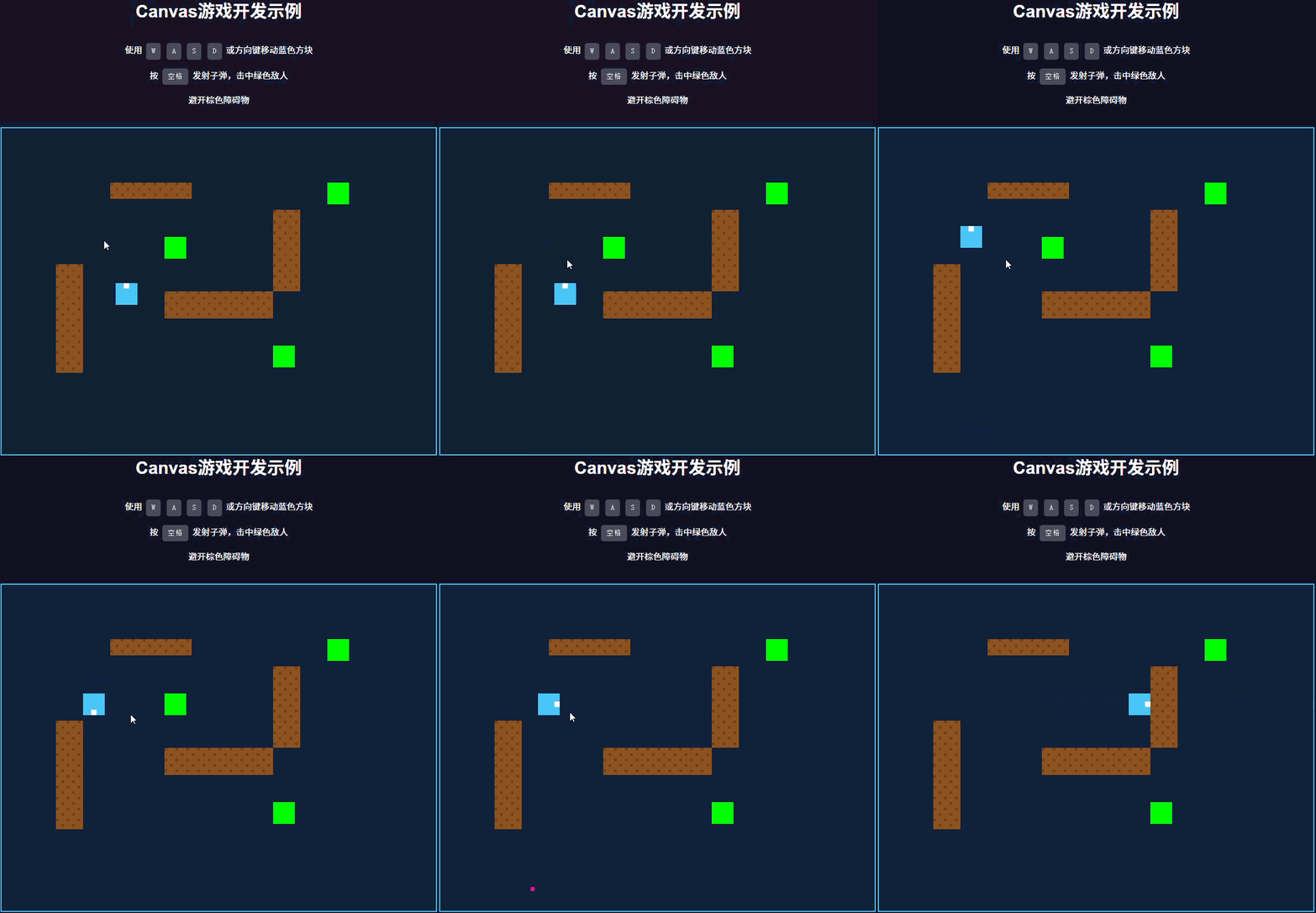
下面是一个整合了所有功能的完整示例:
<!DOCTYPE html>
<html lang="zh-CN">
<head>
    <meta charset="UTF-8">
    <meta name="viewport" content="width=device-width, initial-scale=1.0">
    <title>Canvas游戏开发示例</title>
    <style>
        body {
            margin: 0;
            padding: 20px;
            display: flex;
            flex-direction: column;
            align-items: center;
            background: #1a1a2e;
            color: white;
            font-family: Arial, sans-serif;
        }
        canvas {
            border: 2px solid #4cc9f0;
            background: #16213e;
            margin-top: 20px;
        }
        .instructions {
            max-width: 800px;
            text-align: center;
            line-height: 1.6;
        }
        .key {
            display: inline-block;
            background: rgba(255, 255, 255, 0.2);
            padding: 5px 10px;
            border-radius: 5px;
            margin: 0 3px;
            font-family: monospace;
        }
    </style>
</head>
<body>
    <h1>Canvas游戏开发示例</h1>
    <div class="instructions">
        <p>使用 <span class="key">W</span> <span class="key">A</span> <span class="key">S</span> <span class="key">D</span> 或方向键移动蓝色方块</p>
        <p>按 <span class="key">空格</span> 发射子弹,击中绿色敌人</p>
        <p>避开棕色障碍物</p>
    </div>
    <canvas id="gameCanvas" width="800" height="600"></canvas>

    <script>
        // 获取Canvas和上下文
        const canvas = document.getElementById('gameCanvas');
        const ctx = canvas.getContext('2d');

        // 玩家对象
        const player = {
            x: 100,
            y: 100,
            width: 40,
            height: 40,
            speed: 5,
            color: '#4cc9f0',
            prevX: 100,
            prevY: 100,
            direction: 'up'
        };

        // 子弹数组
        const bullets = [];
        const bulletSpeed = 10;

        // 敌人数组
        const enemies = [
            { x: 300, y: 200, width: 40, height: 40, color: '#00ff00' },
            { x: 500, y: 400, width: 40, height: 40, color: '#00ff00' },
            { x: 600, y: 100, width: 40, height: 40, color: '#00ff00' }
        ];

        // 障碍物数组
        const obstacles = [
            { x: 100, y: 250, width: 50, height: 200, color: '#8d5524' },
            { x: 300, y: 300, width: 200, height: 50, color: '#8d5524' },
            { x: 500, y: 150, width: 50, height: 150, color: '#8d5524' },
            { x: 200, y: 100, width: 150, height: 30, color: '#8d5524' }
        ];

        // 键盘状态
        const keys = {};

        // 键盘事件监听
        window.addEventListener('keydown', (e) => {
            keys[e.key] = true;

            // 发射子弹
            if (e.code === 'Space') {
                shoot();
            }
        });

        window.addEventListener('keyup', (e) => {
            keys[e.key] = false;
        });

        // 创建子弹
        function createBullet(x, y, direction) {
            return {
                x: x,
                y: y,
                width: 8,
                height: 8,
                speed: bulletSpeed,
                direction: direction,
                color: '#f72585'
            };
        }

        // 发射子弹
        function shoot() {
            const centerX = player.x + player.width / 2;
            const centerY = player.y + player.height / 2;

            bullets.push(createBullet(centerX, centerY, player.direction));
        }

        // 更新玩家位置
        function updatePlayer() {
            // 保存上一帧位置
            player.prevX = player.x;
            player.prevY = player.y;

            // 根据按键更新位置和方向
            if (keys['ArrowUp'] || keys['w']) {
                player.y -= player.speed;
                player.direction = 'up';
            }
            if (keys['ArrowDown'] || keys['s']) {
                player.y += player.speed;
                player.direction = 'down';
            }
            if (keys['ArrowLeft'] || keys['a']) {
                player.x -= player.speed;
                player.direction = 'left';
            }
            if (keys['ArrowRight'] || keys['d']) {
                player.x += player.speed;
                player.direction = 'right';
            }

            // 限制在画布内
            player.x = Math.max(0, Math.min(canvas.width - player.width, player.x));
            player.y = Math.max(0, Math.min(canvas.height - player.height, player.y));
        }

        // 更新子弹位置
        function updateBullets() {
            for (let i = bullets.length - 1; i >= 0; i--) {
                const bullet = bullets[i];

                // 根据方向移动
                switch(bullet.direction) {
                    case 'up': bullet.y -= bullet.speed; break;
                    case 'down': bullet.y += bullet.speed; break;
                    case 'left': bullet.x -= bullet.speed; break;
                    case 'right': bullet.x += bullet.speed; break;
                }

                // 移除超出画布的子弹
                if (bullet.x < 0 || bullet.x > canvas.width ||
                    bullet.y < 0 || bullet.y > canvas.height) {
                    bullets.splice(i, 1);
                }
            }
        }

        // 碰撞检测
        function checkCollision(rect1, rect2) {
            return rect1.x < rect2.x + rect2.width &&
                   rect1.x + rect1.width > rect2.x &&
                   rect1.y < rect2.y + rect2.height &&
                   rect1.y + rect1.height > rect2.y;
        }

        // 检查玩家与障碍物碰撞
        function checkPlayerObstacleCollision() {
            obstacles.forEach(obstacle => {
                if (checkCollision(player, obstacle)) {
                    // 将玩家推回上一位置
                    player.x = player.prevX;
                    player.y = player.prevY;
                }
            });
        }

        // 检查子弹与敌人碰撞
        function checkBulletEnemyCollisions() {
            for (let i = bullets.length - 1; i >= 0; i--) {
                for (let j = enemies.length - 1; j >= 0; j--) {
                    if (checkCollision(bullets[i], enemies[j])) {
                        // 移除子弹和敌人
                        bullets.splice(i, 1);
                        enemies.splice(j, 1);
                        break;
                    }
                }
            }
        }

        // 绘制玩家
        function drawPlayer() {
            ctx.fillStyle = player.color;
            ctx.fillRect(player.x, player.y, player.width, player.height);

            // 绘制方向指示器
            ctx.fillStyle = '#ffffff';
            switch(player.direction) {
                case 'up':
                    ctx.fillRect(player.x + player.width/2 - 5, player.y, 10, 10);
                    break;
                case 'down':
                    ctx.fillRect(player.x + player.width/2 - 5, player.y + player.height - 10, 10, 10);
                    break;
                case 'left':
                    ctx.fillRect(player.x, player.y + player.height/2 - 5, 10, 10);
                    break;
                case 'right':
                    ctx.fillRect(player.x + player.width - 10, player.y + player.height/2 - 5, 10, 10);
                    break;
            }
        }

        // 绘制子弹
        function drawBullets() {
            bullets.forEach(bullet => {
                ctx.fillStyle = bullet.color;
                ctx.beginPath();
                ctx.arc(bullet.x, bullet.y, bullet.width/2, 0, Math.PI * 2);
                ctx.fill();
            });
        }

        // 绘制敌人
        function drawEnemies() {
            enemies.forEach(enemy => {
                ctx.fillStyle = enemy.color;
                ctx.fillRect(enemy.x, enemy.y, enemy.width, enemy.height);
            });
        }

        // 绘制障碍物
        function drawObstacles() {
            obstacles.forEach(obstacle => {
                ctx.fillStyle = obstacle.color;
                ctx.fillRect(obstacle.x, obstacle.y, obstacle.width, obstacle.height);

                // 添加纹理
                ctx.fillStyle = 'rgba(0, 0, 0, 0.2)';
                for (let i = 0; i < obstacle.width; i += 10) {
                    for (let j = 0; j < obstacle.height; j += 10) {
                        if ((i + j) % 20 === 0) {
                            ctx.fillRect(obstacle.x + i, obstacle.y + j, 5, 5);
                        }
                    }
                }
            });
        }

        // 游戏循环
        function gameLoop() {
            // 清除画布
            ctx.clearRect(0, 0, canvas.width, canvas.height);

            // 更新游戏状态
            updatePlayer();
            updateBullets();

            // 碰撞检测
            checkPlayerObstacleCollision();
            checkBulletEnemyCollisions();

            // 绘制游戏元素
            drawObstacles();
            drawEnemies();
            drawPlayer();
            drawBullets();

            // 继续循环
            requestAnimationFrame(gameLoop);
        }

        // 启动游戏
        gameLoop();
    </script>
</body>
</html>
7. 关键要点总结
- 游戏循环:使用
requestAnimationFrame实现平滑动画 - 状态管理:使用对象存储游戏元素的状态
- 输入处理:使用键盘事件监听器捕获用户输入
- 碰撞检测:使用矩形碰撞检测算法
- 边界检查:确保游戏元素不会超出画布范围
8. 进阶优化建议
-
性能优化:
- 使用对象池管理子弹
- 减少不必要的绘制操作
-
游戏体验:
- 添加粒子效果
- 实现游戏音效
- 添加分数系统和关卡设计
-
代码结构:
- 使用面向对象编程组织代码
- 分离游戏逻辑和渲染逻辑
这个教程涵盖了Canvas游戏开发的核心概念,通过理解这些基本原理,你可以创建各种类型的2D游戏!





 扫一扫
扫一扫


 838
838

 被折叠的 条评论
为什么被折叠?
被折叠的 条评论
为什么被折叠?
 到【灌水乐园】发言





