





文章目录
- HTML5 Canvas小游戏开发的核心算法
HTML5 Canvas小游戏开发的核心算法
在HTML5 Canvas开发小游戏时,算法是实现核心玩法(如碰撞交互、AI行为、物理效果、动画过渡)的基础。以下是最常用的6类核心算法,包含原理、代码示例、使用场景、注意事项及总结。
一、碰撞检测算法(Collision Detection)
用途:判断游戏中两个物体(如角色与敌人、子弹与障碍物)是否接触,是交互逻辑的核心。
常见场景:角色受伤、道具拾取、边界限制。
1. 轴对齐矩形碰撞(Axis-Aligned Bounding Box, AABB)
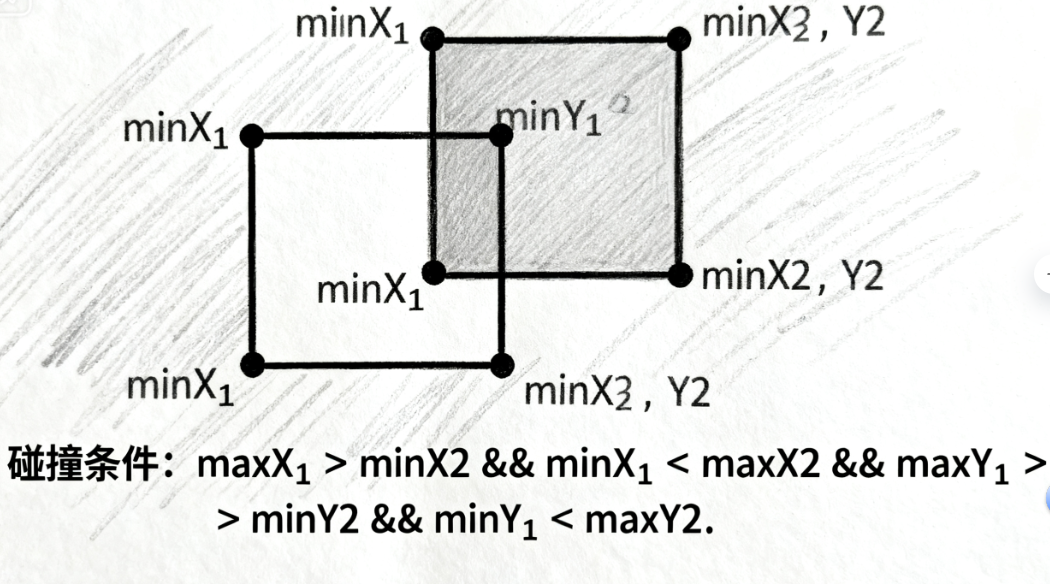
原理:两个矩形的边界完全分离则不碰撞,否则碰撞(适合方块、UI元素等规则形状)。
判断条件:
- 矩形A的右边界 ≤ 矩形B的左边界 → 不碰撞
- 矩形A的左边界 ≥ 矩形B的右边界 → 不碰撞
- 矩形A的下边界 ≤ 矩形B的上边界 → 不碰撞
- 矩形A的上边界 ≥ 矩形B的下边界 → 不碰撞
- 以上均不满足 → 碰撞
代码示例:
// 定义矩形:{x: 左上角x, y: 左上角y, width: 宽, height: 高}
function checkAABBCollision(rectA, rectB) {
  return (
    rectA.x < rectB.x + rectB.width &&  // A左 < B右
    rectA.x + rectA.width > rectB.x &&  // A右 > B左
    rectA.y < rectB.y + rectB.height && // A上 < B下
    rectA.y + rectA.height > rectB.y    // A下 > B上
  );
}

// 测试
const player = { x: 100, y: 100, width: 50, height: 50 };
const enemy = { x: 130, y: 130, width: 50, height: 50 };
console.log(checkAABBCollision(player, enemy)); // true(碰撞)
2. 圆形碰撞检测
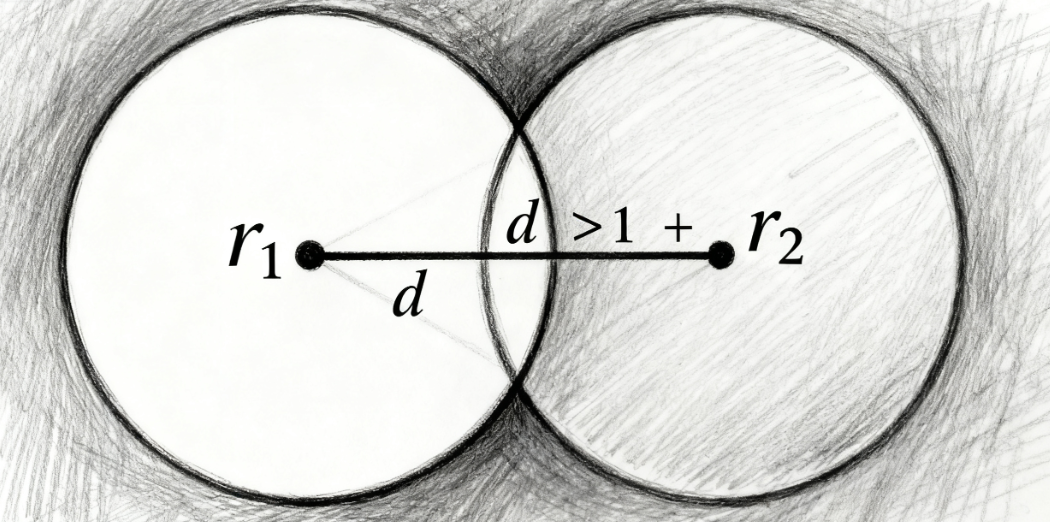
原理:两个圆形的圆心距离 ≤ 半径之和则碰撞(适合角色、子弹等圆形/近似圆形物体)。
判断条件:
- 计算两圆心距离的平方(避免开方运算,提升性能)
- 若距离平方 ≤ (半径A + 半径B)的平方 → 碰撞
代码示例:
// 定义圆形:{x: 圆心x, y: 圆心y, radius: 半径}
function checkCircleCollision(circleA, circleB) {
  const dx = circleA.x - circleB.x; // x方向距离
  const dy = circleA.y - circleB.y; // y方向距离
  const distanceSquared = dx * dx + dy * dy; // 距离平方(避免Math.sqrt)
  const radiusSum = circleA.radius + circleB.radius;
  return distanceSquared <= radiusSum * radiusSum;
}

// 测试
const bullet = { x: 200, y: 200, radius: 10 };
const enemy = { x: 205, y: 205, radius: 15 };
console.log(checkCircleCollision(bullet, enemy)); // true(碰撞)
3. 分离轴定理(Separating Axis Theorem, SAT)
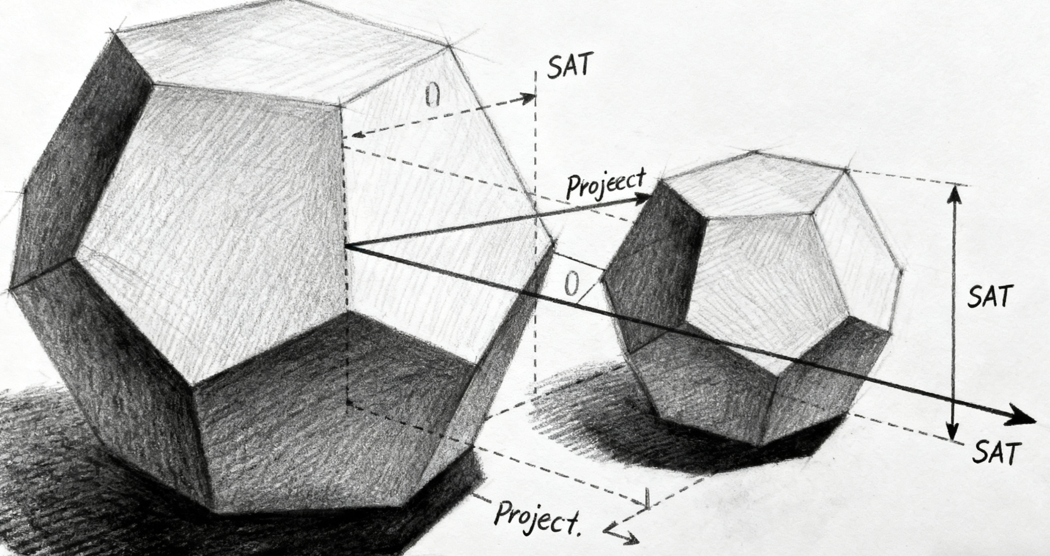
原理:判断任意凸多边形是否碰撞(通过检查是否存在一条轴,使两多边形在该轴上的投影不重叠)。适合三角形、六边形等不规则凸多边形(如游戏中的地形、复杂角色碰撞箱)。
代码示例(简化版,检测两个三角形碰撞):
// 计算多边形在轴上的投影(最小值和最大值)
function getProjection(polygon, axis) {
  let min = dotProduct(polygon[0], axis);
  let max = min;
  for (const point of polygon) {
    const p = dotProduct(point, axis);
    min = Math.min(min, p);
    max = Math.max(max, p);
  }
  return { min, max };
}

// 点积计算(用于投影)
function dotProduct(a, b) {
  return a.x * b.x + a.y * b.y;
}

// 检查两个投影是否重叠
function projectionsOverlap(p1, p2) {
  return !(p1.max < p2.min || p2.max < p1.min);
}

// SAT算法主函数(polygonA和polygonB为点数组,如[{x,y}, {x,y}, ...])
function checkSATCollision(polygonA, polygonB) {
  // 生成所有可能的分离轴(每个边的垂直向量)
  const axes = [];
  // 多边形A的边
  for (let i = 0; i < polygonA.length; i++) {
    const p1 = polygonA[i];
    const p2 = polygonA[(i + 1) % polygonA.length];
    const edge = { x: p2.x - p1.x, y: p2.y - p1.y };
    // 垂直于边的轴(法向量)
    const axis = { x: -edge.y, y: edge.x };
    axes.push(axis);
  }
  // 多边形B的边
  for (let i = 0; i < polygonB.length; i++) {
    const p1 = polygonB[i];
    const p2 = polygonB[(i + 1) % polygonB.length];
    const edge = { x: p2.x - p1.x, y: p2.y - p1.y };
    const axis = { x: -edge.y, y: edge.x };
    axes.push(axis);
  }

  // 检查所有轴的投影是否重叠
  for (const axis of axes) {
    const projA = getProjection(polygonA, axis);
    const projB = getProjection(polygonB, axis);
    if (!projectionsOverlap(projA, projB)) {
      return false; // 找到分离轴,不碰撞
    }
  }
  return true; // 所有轴投影都重叠,碰撞
}

// 测试:两个三角形
const triangleA = [{x:10,y:10}, {x:30,y:10}, {x:20,y:30}];
const triangleB = [{x:25,y:25}, {x:45,y:25}, {x:35,y:45}];
console.log(checkSATCollision(triangleA, triangleB)); // true(碰撞)
注意事项:
- 优先使用AABB或圆形碰撞(性能最优),复杂形状才用SAT(计算成本高);
- 大场景中可先通过AABB做“粗检测”,再用SAT做“精检测”(减少计算量);
- 非凸多边形需拆分为凸多边形后再用SAT检测。
二、路径寻找算法(Pathfinding)
用途:让AI角色(如敌人、NPC)自动找到从起点到终点的最优路径(避开障碍物)。
常见场景:策略游戏中单位移动、RPG中敌人追击玩家。
A* 算法(A-Star)
原理:基于“代价估计”的网格路径搜索,通过f(n) = g(n) + h(n)评估节点优先级:
g(n):从起点到当前节点的实际代价(已走步数);h(n):从当前节点到终点的估计代价(启发函数,如曼哈顿距离、欧氏距离);- 优先选择
f(n)最小的节点,最终找到最优路径。
代码示例(网格地图寻路):
// 网格节点类
class Node {
  constructor(x, y, isObstacle = false) {
    this.x = x; // 网格x坐标
    this.y = y; // 网格y坐标
    this.isObstacle = isObstacle; // 是否为障碍物
    this.g = 0; // 起点到当前节点的代价
    this.h = 0; // 当前节点到终点的估计代价
    this.f = 0; // f = g + h
    this.parent = null; // 父节点(用于回溯路径)
  }
}

// 生成网格地图(rows行,cols列,随机障碍物)
function createGrid(rows, cols) {
  const grid = [];
  for (let y = 0; y < rows; y++) {
    const row = [];
    for (let x = 0; x < cols; x++) {
      // 10%概率为障碍物
      const isObstacle = Math.random() < 0.1;
      row.push(new Node(x, y, isObstacle));
    }
    grid.push(row);
  }
  return grid;
}

// 启发函数:曼哈顿距离(适合网格,只允许上下左右移动)
function manhattanDistance(node, endNode) {
  return Math.abs(node.x - endNode.x) + Math.abs(node.y - endNode.y);
}

// A* 算法主函数
function aStarSearch(grid, startNode, endNode) {
  const openList = [startNode]; // 待检查节点
  const closedList = []; // 已检查节点

  while (openList.length > 0) {
    // 1. 从openList中找f值最小的节点
    let currentIndex = 0;
    for (let i = 0; i < openList.length; i++) {
      if (openList[i].f < openList[currentIndex].f) {
        currentIndex = i;
      }
    }
    const currentNode = openList.splice(currentIndex, 1)[0];
    closedList.push(currentNode);

    // 2. 找到终点,回溯路径
    if (currentNode === endNode) {
      const path = [];
      let temp = currentNode;
      while (temp) {
        path.push({ x: temp.x, y: temp.y });
        temp = temp.parent;
      }
      return path.reverse(); // 反转路径(从起点到终点)
    }

    // 3. 生成相邻节点(上下左右)
    const neighbors = [];
    const directions = [
      { x: 0, y: -1 }, // 上
      { x: 0, y: 1 },  // 下
      { x: -1, y: 0 }, // 左
      { x: 1, y: 0 }   // 右
    ];
    for (const dir of directions) {
      const x = currentNode.x + dir.x;
      const y = currentNode.y + dir.y;
      // 检查是否在网格内且非障碍物
      if (
        x >= 0 && x < grid[0].length &&
        y >= 0 && y < grid.length &&
        !grid[y][x].isObstacle
      ) {
        neighbors.push(grid[y][x]);
      }
    }

    // 4. 处理相邻节点
    for (const neighbor of neighbors) {
      if (closedList.includes(neighbor)) continue; // 已检查过,跳过

      // 计算临时g值(当前节点g + 1步代价)
      const tempG = currentNode.g + 1;
      let isNewPath = false;

      if (openList.includes(neighbor)) {
        // 已在待检查列表,判断新路径是否更优
        if (tempG < neighbor.g) {
          neighbor.g = tempG;
          isNewPath = true;
        }
      } else {
        // 不在待检查列表,加入并初始化
        neighbor.g = tempG;
        openList.push(neighbor);
        isNewPath = true;
      }

      // 若新路径更优,更新h、f和父节点
      if (isNewPath) {
        neighbor.h = manhattanDistance(neighbor, endNode);
        neighbor.f = neighbor.g + neighbor.h;
        neighbor.parent = currentNode;
      }
    }
  }

  // 没有找到路径
  return null;
}

// 测试
const grid = createGrid(10, 10); // 10x10网格
const start = grid[1][1];
const end = grid[8][8];
const path = aStarSearch(grid, start, end);
console.log('路径:', path); // 输出从(1,1)到(8,8)的坐标数组
注意事项:
- 启发函数需“可接受”(
h(n) ≤ 实际代价),否则可能找不到最优路径; - 大网格(如100x100)需优化:用哈希表存储
openList和closedList(替代数组,提升查找速度); - 允许斜向移动时,启发函数改用欧氏距离(
Math.hypot(dx, dy)),且g(n)增加√2代价。
三、物理模拟算法(Physics Simulation)
用途:模拟现实世界的物理规律(如重力、加速度、碰撞反弹),让游戏物体运动更自然。
常见场景:平台跳跃游戏(重力下落)、弹球类游戏(碰撞反弹)。
1. 基础运动模拟(速度与加速度)
原理:通过“时间步长”更新物体位置:
- 速度 = 速度 + 加速度 × 时间(
v = v0 + a × dt); - 位置 = 位置 + 速度 × 时间(
s = s0 + v × dt)。
代码示例(重力下落模拟):
// 游戏物体
const ball = {
  x: 100,    // x坐标
  y: 50,     // y坐标
  vx: 2,     // x方向速度
  vy: 0,     // y方向速度
  ax: 0,     // x方向加速度(此处为0)
  ay: 0.5,   // y方向加速度(重力)
  radius: 10
};

// Canvas渲染
const canvas = document.getElementById('gameCanvas');
const ctx = canvas.getContext('2d');

// 游戏循环(每帧更新)
function gameLoop(timestamp) {
  // 清除画布
  ctx.clearRect(0, 0, canvas.width, canvas.height);

  // 1. 更新物理状态(时间步长dt取16ms,约60帧/秒)
  const dt = 16;
  ball.vy += ball.ay * dt; // 更新y方向速度(重力加速)
  ball.x += ball.vx * dt;  // 更新x位置
  ball.y += ball.vy * dt;  // 更新y位置

  // 2. 边界碰撞(地面反弹)
  if (ball.y + ball.radius > canvas.height) {
    ball.y = canvas.height - ball.radius; // 防止穿出边界
    ball.vy = -ball.vy * 0.8; // 反弹(0.8为弹性系数,能量损耗)
  }

  // 3. 渲染球
  ctx.beginPath();
  ctx.arc(ball.x, ball.y, ball.radius, 0, Math.PI * 2);
  ctx.fillStyle = 'red';
  ctx.fill();

  requestAnimationFrame(gameLoop);
}

// 启动游戏循环
requestAnimationFrame(gameLoop);
2. 弹性碰撞模拟(动量守恒)
原理:两物体碰撞后,速度根据动量守恒和能量守恒更新(简化版:只考虑一维碰撞)。
代码示例(两个小球碰撞):
// 弹性碰撞公式(一维)
function resolveCollision(ballA, ballB) {
  // 计算碰撞前的速度差
  const vDiff = ballA.vx - ballB.vx;
  // 计算碰撞后的速度(假设质量相同)
  ballA.vx = ballB.vx;
  ballB.vx = ballA.vx + vDiff;
}

// 结合圆形碰撞检测和运动模拟,在碰撞时调用resolveCollision
注意事项:
- 时间步长(
dt)需固定(如用requestAnimationFrame的时间戳计算实际间隔),否则运动速度会随帧率波动; - 复杂物理(如旋转、摩擦力)可引入向量库(如
gl-matrix),避免重复开发; - 高性能需求(如1000+物体)需简化物理模型(如忽略小物体碰撞)。
四、动画插值算法(Animation Interpolation)
用途:实现物体平滑移动、缩放、旋转(如角色移动、UI过渡),避免“跳变”感。
线性插值(Linear Interpolation, Lerp)
原理:在两个值之间按比例计算中间值,公式:lerp(a, b, t) = a + (b - a) × t(t∈[0,1],0返回a,1返回b)。
代码示例(物体平滑移动到目标点):
// 线性插值函数
function lerp(a, b, t) {
  return a + (b - a) * t;
}

// 游戏物体
const box = {
  x: 100,    // 当前x
  y: 100,    // 当前y
  targetX: 300, // 目标x
  targetY: 200  // 目标y
};

// 渲染与更新
function update() {
  ctx.clearRect(0, 0, canvas.width, canvas.height);

  // 用lerp平滑移动(t=0.1,每次靠近目标10%)
  box.x = lerp(box.x, box.targetX, 0.1);
  box.y = lerp(box.y, box.targetY, 0.1);

  // 渲染矩形
  ctx.fillRect(box.x, box.y, 50, 50);
  requestAnimationFrame(update);
}

update();
缓动函数(Easing Functions)
原理:在Lerp基础上加入非线性变换(如先快后慢、弹跳),让动画更自然。常见缓动类型:easeOutQuad(二次方减速)、easeInOutCubic(三次方先加速后减速)。
代码示例(easeOutQuad缓动):
// easeOutQuad:t²减速(t∈[0,1])
function easeOutQuad(t) {
  return 1 - (1 - t) * (1 - t);
}

// 带缓动的移动
function updateWithEasing() {
  // 计算当前进度(0到1)
  const progress = Math.min(1, (box.x - 100) / (300 - 100)); // 假设从100到300
  const t = easeOutQuad(progress); // 应用缓动

  box.x = lerp(100, 300, t);
  // ... 渲染
}
注意事项:
- Lerp的
t值过大会导致“overshoot”(超过目标),需根据场景调整(如t=0.1适合平滑跟随); - 缓动函数可通过工具生成(如Easing Functions Cheat Sheet),避免重复编写。
五、粒子系统算法(Particle System)
用途:模拟大量微小物体的运动(如爆炸特效、烟雾、雨滴),增强游戏视觉效果。
核心逻辑:
- 粒子创建:初始化粒子的位置、速度、生命周期、大小、颜色;
- 粒子更新:每帧更新位置(受重力/风力影响)、减少生命周期、更新透明度/大小;
- 粒子渲染:绘制所有存活粒子;
- 粒子回收:移除生命周期结束的粒子(避免内存泄漏)。
代码示例(爆炸特效):
class Particle {
  constructor(x, y) {
    this.x = x;         // 初始位置(爆炸中心)
    this.y = y;
    this.life = 1;      // 生命周期(1为满,0为消失)
    this.lifeLoss = 0.02 + Math.random() * 0.03; // 每帧减少的生命周期
    // 随机速度(向四周扩散)
    const angle = Math.random() * Math.PI * 2;
    const speed = 1 + Math.random() * 3;
    this.vx = Math.cos(angle) * speed;
    this.vy = Math.sin(angle) * speed;
    this.size = 2 + Math.random() * 3; // 随机大小
    this.color = `hsl(${Math.random() * 60}, 100%, 50%)`; // 橙色系
  }

  update() {
    // 更新位置
    this.x += this.vx;
    this.y += this.vy;
    // 加入重力(y方向加速)
    this.vy += 0.05;
    // 减少生命周期
    this.life -= this.lifeLoss;
  }

  draw(ctx) {
    ctx.beginPath();
    ctx.arc(this.x, this.y, this.size, 0, Math.PI * 2);
    ctx.fillStyle = this.color;
    ctx.globalAlpha = this.life; // 随生命周期降低透明度
    ctx.fill();
    ctx.globalAlpha = 1; // 重置透明度
  }
}

// 粒子系统管理
class ParticleSystem {
  constructor() {
    this.particles = [];
  }

  // 发射粒子(x,y为中心,count为数量)
  emit(x, y, count) {
    for (let i = 0; i < count; i++) {
      this.particles.push(new Particle(x, y));
    }
  }

  updateAndDraw(ctx) {
    // 过滤存活粒子(life > 0)
    this.particles = this.particles.filter(p => p.life > 0);
    // 更新并绘制所有粒子
    for (const p of this.particles) {
      p.update();
      p.draw(ctx);
    }
  }
}

// 使用示例
const particleSystem = new ParticleSystem();
// 点击画布时发射粒子
canvas.addEventListener('click', (e) => {
  particleSystem.emit(e.offsetX, e.offsetY, 50); // 每次点击发射50个粒子
});

// 游戏循环中更新
function loop() {
  ctx.clearRect(0, 0, canvas.width, canvas.height);
  particleSystem.updateAndDraw(ctx);
  requestAnimationFrame(loop);
}
loop();
注意事项:
- 粒子数量过大会导致性能下降(建议单系统不超过500个粒子);
- 用对象池(Object Pool)复用粒子(避免频繁创建/删除对象),提升性能;
- 优化渲染:用
CanvasRenderingContext2D的fillRect替代arc(绘制矩形粒子更快)。
六、随机生成算法(Random Generation)
用途:随机生成地图、道具位置、敌人波次等,增加游戏可玩性。
1. 基础随机与种子随机
原理:用Math.random()生成随机数,但需注意:
- 普通随机每次运行结果不同;
- 种子随机(如
seedrandom库)可固定随机序列(便于复现bug或生成相同地图)。
代码示例(随机生成道具位置):
// 生成不重叠的随机道具位置
function generateItems(count, mapWidth, mapHeight, itemSize) {
  const items = [];
  while (items.length < count) {
    // 随机位置(避免超出地图)
    const x = Math.random() * (mapWidth - itemSize);
    const y = Math.random() * (mapHeight - itemSize);
    const newItem = { x, y, size: itemSize };
    // 检查是否与已有道具重叠
    const isOverlap = items.some(item =>
      checkAABBCollision(newItem, item)
    );
    if (!isOverlap) {
      items.push(newItem);
    }
  }
  return items;
}

// 生成5个道具(地图500x500,道具大小20)
const items = generateItems(5, 500, 500, 20);
2. Perlin噪声(用于自然地形生成)
原理:生成平滑的随机值(避免纯随机的“锯齿感”),适合模拟地形高度、云层密度等。
代码示例(用Perlin噪声生成地形):
// 简化版Perlin噪声(完整实现需参考算法细节)
function perlinNoise(x) {
  // 实际项目中建议使用成熟库(如noisejs)
  const x0 = Math.floor(x);
  const x1 = x0 + 1;
  const t = x - x0;
  const tSmooth = t * t * (3 - 2 * t); // 平滑插值
  return lerp(
    Math.sin(x0) * 0.5 + 0.5, // 随机值1
    Math.sin(x1) * 0.5 + 0.5, // 随机值2
    tSmooth
  );
}

// 生成地形
function drawTerrain() {
  ctx.beginPath();
  ctx.moveTo(0, canvas.height);
  for (let x = 0; x < canvas.width; x++) {
    // 用Perlin噪声计算y坐标(地形高度)
    const noise = perlinNoise(x * 0.02); // 缩放噪声频率
    const y = canvas.height - noise * 100; // 地形高度范围0-100
    ctx.lineTo(x, y);
  }
  ctx.lineTo(canvas.width, canvas.height);
  ctx.fillStyle = 'green';
  ctx.fill();
}

drawTerrain();
注意事项:
- 避免在循环中频繁调用
Math.random()(性能差),可预生成随机数数组; - 随机生成需控制“随机性”(如道具位置不能太密集,地形高度需在合理范围)。
总结
HTML5 Canvas小游戏开发的核心算法围绕“交互、运动、视觉、随机性”四大维度,选择算法时需平衡“效果”与“性能”:
- 优先级:碰撞检测(AABB/圆形)→ 动画插值(Lerp)→ 物理模拟 → 路径寻找 → 粒子系统 → 随机生成(按需使用);
- 性能优化:复杂算法(如SAT、A*)需结合“粗检测+精检测”,粒子系统用对象池,避免频繁DOM操作;
- 学习建议:先掌握基础算法(碰撞、Lerp),再逐步深入复杂算法(A*、Perlin噪声),结合实际项目(如开发一个简单的弹球游戏)练习。
这些算法是游戏逻辑的“骨架”,灵活组合可实现多样玩法,而优化细节(如减少计算量、复用资源)则决定了游戏的流畅度。





 扫一扫
扫一扫


 3万+
3万+

 被折叠的 条评论
为什么被折叠?
被折叠的 条评论
为什么被折叠?
 到【灌水乐园】发言





