


数据集合:列表和字典
数据集合需要高效的遍历【遍历是循环吗】
循环:检查条件——满足条件,执行一定语句


python社区
需学习章节:2,3,4,5,6,8
第二章 变量和简单的数据类型
变量:表示 数据类型
变量variable:变量名、值value
变量名
命名规则:1)字母,数字,下划线(不能数字开头)2)不能用空格,可以用下划线分隔单词3)尽量不要使用小写字母l和大写字母O
变量名全大写:全大写字母来指出应将某个变量视为常量
值:可以是文本(此时文本需要用双引号括起来【一定吗?单引号可以嘛?】)。如:“Hello world!” 。每个变量指向一个值(value)——与该变量相关联的信息。在这里,指向的值为文本 "Hello Python world!"。
可以随时修改值,python始终记录最新的变量值
字符串string
用单引号‘’或双引号“”括起来的一系列字符
大写、小写、首字母大写
f字符串:
- 直接输出
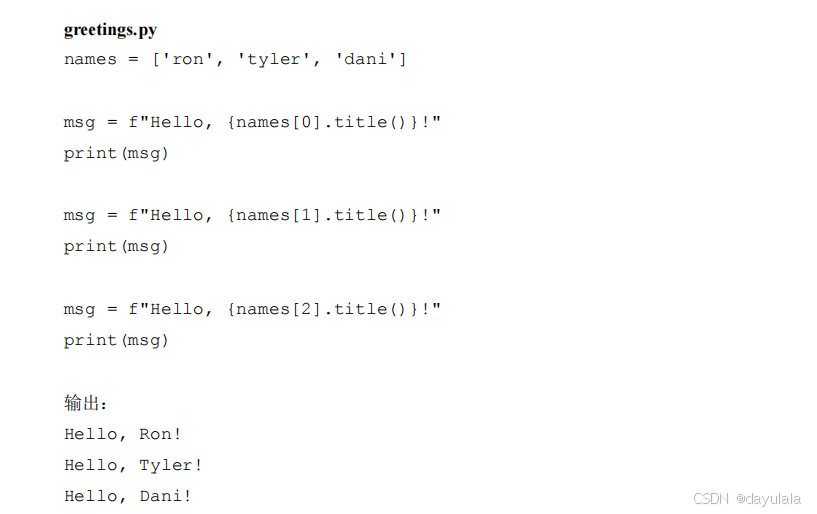
- 使用f字符串创建消息,赋给新的变量,再输出(使用 f 字符串根据列表中的值来创建消息)
在字符串中使用变量的值。如:你可能想使用两个变量分别表示名和姓,再合并这两个值以显示姓名。
这种字符串称为 f 字符串。f 是 format(设置格式)的简写,因为 Python 通过把花括号内的变量替换为其值来设置字符串的格式。
first_name = "ada"
last_name = "lovelace"
full_name = f"{first_name} {last_name}"
print(full_name)
print(full_name.title())
print(f"hello,{full_name.title()}")
first_name = "ada"
last_name = "lovelace"
full_name = f"{first_name} {last_name}"
message = f"hello,{full_name.title()}"
print(message)
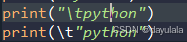
制表符\t,换行符\n
须在引号内使用
数Number
整数integer
浮点数float:小数(带小数点的数)
整数和浮点数
整数和浮点数运算,结果总是浮点数
同时给多个变量赋值
#%%
x,y,z =0,0,0
print(x,y,z)
常量
注释
如何编写注释
该编写什么样的注释
列表
列表list-----[元素1,元素2,元素3....]
对列表的操作
创建一个空列表
motorcycles = []
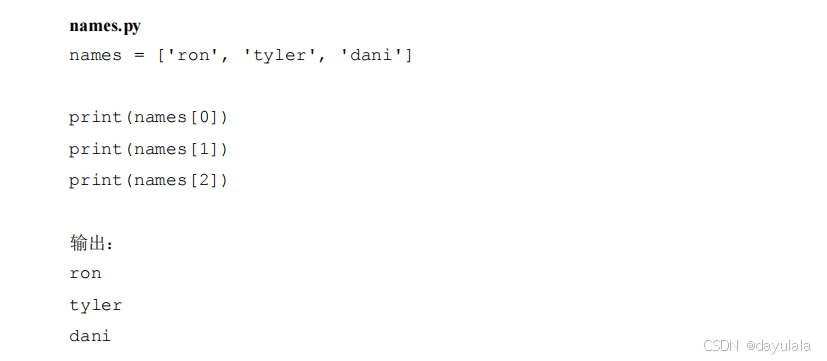
列表元素——访问列表list中的某一个元素(值)
bicycles = ['trek','cannondale','redline','specialized']
print(bicycles)
print(bicycles[0])
print(bicycles[0].title())
print(bicycles[1])
print(bicycles[-1])
列表元素——使用列表list中的各个值(元素)
列表中的元素当作变量:可以像使用其他变量一样使用列表中的各个值。例如,可以使用 f 字符串根据列表中的值来创建消息。
下面尝试从列表中提取第一款自行车,并使用这个值创建一条消息:



列表元素——修改
列表元素——添加---列表末尾
.append()
在列表添加新的元素:最常见的情况是先创建一个空的列表,然后使用.append()方法添加新的元素
#%%
motorcycles = []
motorcycles.append('1')
motorcycles.append('2')
motorcycles.append('3')
print(motorcycles)
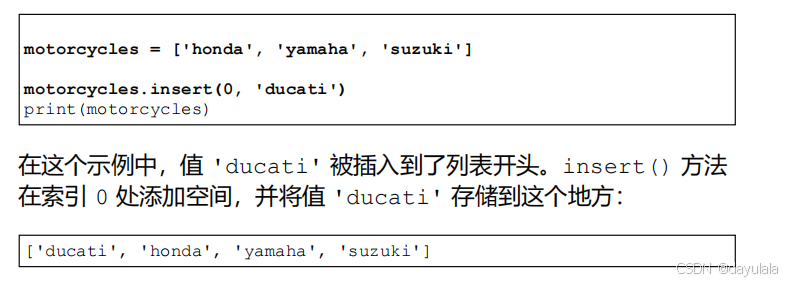
列表元素——添加---列表某个位置
.insert(要插入的索引值(要插入的位置),元素)
例题
列表元素——删除
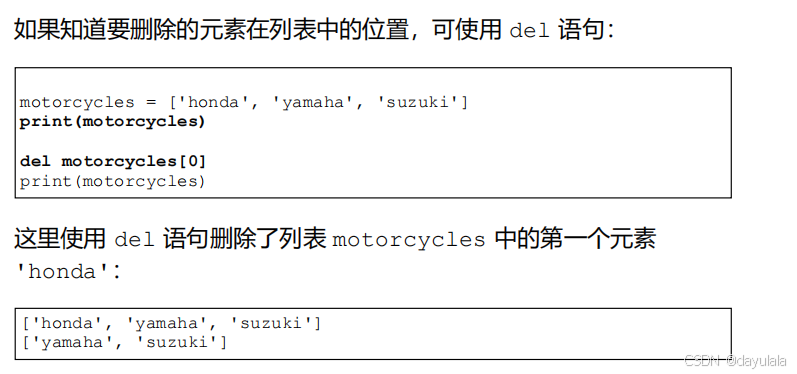
方法一:del语句——del 列表名[要删除元素的索引值(位置值)]
- 知道要删除元素的位置
- 永久性删除
方法二:pop方法(删除列表里面最后一个元素)——列表名.pop()
- 删除最后一个元素
- 时间性强
- .pop()方法里面没有参数【因为默认删除列表里面最后一个元素】
- 永久性删除:每次使用.pop()方法时,被弹出的元素就不再列表中了
例一:三辆按时间购买的自行车bicycle1,bicycle2,bicycle3。使用pop方法重新命名一个变量last_owned(表示最近购买的这辆自行车),输出“The last bicycle I owned was a {last_owned}”
#%%
bicycles = ['bicycle1','bicycle2','bicycle3']
last_bicycle = bicycles.pop()
print(f"The last bicycle I owned was {last_bicycle}")
例二
motorcycles = ['honda','yamaha','suzuki']
print(motorcycles)
popped_motorcycle = motorcycles.pop()
print(motorcycles)
print(popped_motorcycle)
pop()返回被删除的元素,所以可以存入一个新的变量(popped_motorcycle) ,以后仍然可以访问。
方法三:pop方法(删除列表里面任意一个位置的元素)——列表名.pop(元素的索引值)
例一:首先弹出列表中的第一款摩托车,然后打印一条有关这辆摩托车的消 息。输出是一个简单的句子,描述了我购买的第一辆摩托车:
#%%
motorcycles = ['honda','yamaha','suzuki']

first_owned = motorcycles[0]
print(f"The fisrt bicycle I owned was a {first_owned}")
方法四:remove方法(作用:不知道位置,但知道元素值)—列表名.remove(要删除的元素值)
- remove() 方法只删除第一个指定的值。如果要删除的值可能在列表中出现多次,就需要使用循环,确保将每个值都删除。这将在第 7 章介绍。
例一:
#%%
motorcycles = ['honda','yamaha','suzuki','ducati']
print(motorcycles)

too_expensive = 'ducati'
motorcycles.remove('ducati')

print(motorcycles)
print(f"\n A {too_expensive.title()} is too expensive for me")
管理列表
- 排序(按字母顺序)
- 反转列表
- 列表长度
列表—排序:按照字母顺序——.sort()方法
- sort() 方法能永久地修改列表元素的排列顺序。
例一:假设你有一个汽车列表,并要让其中的汽车按字母顺序排列。为了简化这项任务,假设该列表中的所有值都是全小写的。
#%%
cars = ['bmw','audi','toyota','subaru']
cars.sort()
print(cars)
列表——按照字母顺序相反的方向排序——.sort()方法
- 按与字母顺序相反的顺序排列列表元素,只需向 sort() 方法传递参数 reverse=True 即可。
#%%
cars = ['bms','audi','toyota','subaru']
cars.sort(reverse=True)
print(cars)
列表——临时排序sorted()函数
cars  = ['bms','audi','toyota','subaru']
a = sorted(cars)

print(a)

print(cars)
列表——反向打印列表:reverse()方法
- 反转列表元素的排列顺序
- 永久性
#%%
cars  = ['bms','audi','toyota','subaru']
cars.reverse()
print(cars)
列表长度--list长度即:元素个数——len()函数
- 列表长度即:list里面有多少个元素。和元素的索引不一样

遍历列表
例一:三个魔术师,通过for循环打印每个魔术师的名字
#%%
magicians = ['alice','david','carolina']
for magician in magicians:
    print(magician)
for a in 列表名: a可以是之前没有见过的、定义过的新变量名【编写 for 循环时,可以给将依次与列表中的每个值相关联的临时变量指定任意名称】
- a是临时变量,每次循环都会被赋予新的值
逻辑:1)先定义列表
2)接下来,定义一个 for 循环。这行代码让 Python 从列表 magicians 中取出一个名字,并将其与变量magician 相关联
3)最后,让 Python 打印前面赋给变量 magician 的名字
例二:扩展前面的示例,为每位魔术师打印一条消息,指出他/她的表演太精彩了(that was a great trick)。
#%%
magicians = ['alice','david','carolina']
for magician in magicians:
    print(f"{magician.title()}, that was a great trick!")
例三:下面再来添加一行代码,告诉每位魔术师,我们期待他/她的下一次表演:
magicians = ['alice','david','carolina']
for magician in magicians:
    print(f"{magician.title()}, that was a great trick!")
    print(f"I can't wait to see your next trick,{magician}\n")
数值列表
创建数值列表——for i in range(a,b)或者for i in range(a)
循环+range()函数——两种用法
用法一:一种参数——range(a,b)
for i in range(1,3):

for i in range 1,3):
- 这两行代码range后面有没有空格都一样
用法二:一种参数——range(a)
#%%
for i in range(3):
    print(i)
#输出:
0
1
2
创建数值列表——list()函数+range()函数
numbers = list(range(1,6))
print(numbers)
#输出:
[2, 4, 6, 8, 10]
range()函数
例一:输出(2,10)的偶数
#%%
even_numbers = list(range(2,11,2))
print(even_numbers)
例二:创建一个列表,其中包含前 10 个整数(1~10)的平方
#%%方法一:
squares = []
for value in range(1,11):
    square = value**2
    squares.append(square)
print(squares)

#%%方法二:
squares = []
for value in range(1,11):
    squares.append(value**2)
print(squares)

#方法三

squares = [value**2 for value in range(1,11)]
print(squares)
数值列表—统计操作
最值、平均值
#%%
digits = list(range(0,10))
min(digits)
max(digits)
sum(digits)
print(min(digits))
print(max(digits))
print(sum(digits))
列表推导式
squares = [value**2 for value in range(1,11)]
print(squares)
一行代码生成列表:将 for 循环和创建新元素的代码合并成一行,并自动追加新元素。
【特点】:
- 一个关于variable的表达式 +一个for循环
- for循环也有特点,只能生成range(),即一系列数

思路:
对于数值列表,打印数值列表的值有三种方式:
1)for循环+range()
2)先创建一个数值列表:列表名=list(range())
3) 使用列表推导式创建一个数值列表: 列表名=[表达式 for循环+range()]
#方法一
for i in range(1,21):
    print(i)

#方法二
numbers = list(range(1,21))
for number in numbers:
    print(number)

#方法三
numbers = [number*1 for number in range(1,21)]
for number in numbers:
    print(number)
切片---使用列表的一部分
- 切片slice——使用一部分列表的操作
- 切片:列表的一部分
- 语法:列表名[a:b]——输出:第a个元素到b-1个索引对应的元素(range()函数差不多)
- 表示切片的方括号内指定第三个值。这个值告诉 Python 在指定范围内每隔多少元素提取一个。
#%%
players = ['charles','martina','michael','florence','eli']
print(players[:3]) #输出前三名队员的名字
print(players[2:4])
print(players[:4]) #没有指定起始索引,Python 从列表开头开始提取
print(players[-3:]) #输出名单上最后三名队员的名字

#输出
['charles', 'martina', 'michael']
['michael', 'florence']
['charles', 'martina', 'michael', 'florence']
['michael', 'florence', 'eli']
切边--遍历切片
for循环:先定义列表,再for循环
例题:遍历前三名队员,并打印他们的名字
#%%
players = ['charles','martina','michael','florence','eli']
print("Here are the first three players:")
for player in players[:3]:
    print(player)
元组tuple
列表和元组的区别:
定义元组
元组名=()
- 圆括号而不是方括号来标识。定义元组后, 就可使用索引来访问其元素,就像访问列表元素一样
- 定义只包含一个元素的元组,必须在这个元素后面加上逗号
例题:有一个大小不应改变的矩形,可将其长度200和宽度50存储在一个元组中,从而确保它们是不能修改的
dimensions = (200,50)
print(dimensions[0])
print(dimensions[1])
- 元组的很大的一个意义在于:确保数值不会更改
遍历元组
dimensions = (200,50)
for dimension in dimensions:
    print(dimension)
修改元组变量
修改元组中某一个元组变量会报错
例如,要修改前述矩形的尺寸,可重新定义整个元组:
dimensions = (200,50)
print("original dimensions:")
for dimension in dimensions:
    print(dimensions)
dimensions =(400,100)
print("\nModified dimensions:")
for dimension in dimensions:
    print(dimension)

#输出:
original dimensions:
(200, 50)
(200, 50)

modified dimensions:
400
100
第五章
知识点荟萃
1.查看一个浮点数的数据类型
错误代码:
number = 4.5
print(numer.type())
应该使用 type() 函数,但不能用 numer.type()(因为 numer 只是一个普通变量,没有 .type() 方法)。
正确代码:
numer = 4.5
print(type(numer))  # 输出变量类型
2.type()
type()是函数,不是方法
知识点
注意:随时准备将简单的孤立的知识点穿起来
高亮:print()函数名称,显示为一种颜色
总结——方法【干中学】:
形式(三部分组成): . method ()
name = 'hello world'
print(name.title())
方法:大小写处理——将字符串改为全大写或全小写
方法:全大写——.upper()
方法:全小写——.lower()
方法:首字母大写——.title()
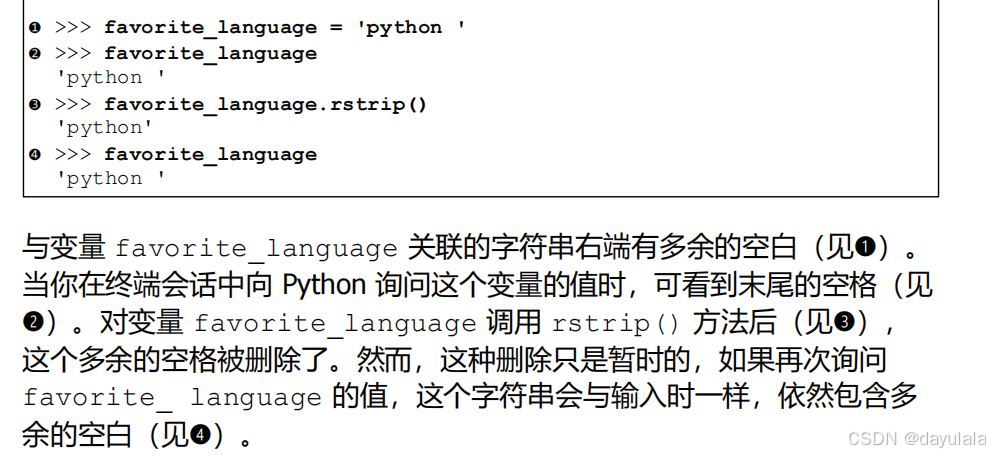
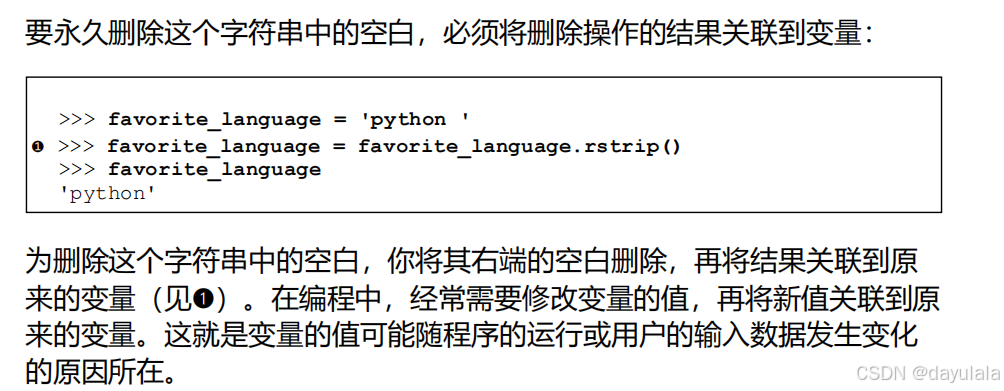
方法:删除字符串空白
删除左端空白方法——.lstrip() 方法
删除右端空白方法——.rstrip() 方法
删除两端空白方法——.strip() 方法
1.删除是暂时的
方法:删除前缀
.removeprefix()。括号内为要删除的字符(用引号括起来)。只要涉及到字符,都用引号括起来。
nostarch_url = 'https://nostarch.com'
print(nostarch_url.removeprefix('https://'))
方法:在列表里面添加新的元素
在列表添加新的元素:最常见的情况是先创建一个空的列表,然后使用.append()方法添加新的元素
#%%
motorcycles = []
motorcycles.append('1')
motorcycles.append('2')
motorcycles.append('3')
print(motorcycles)
方法:.pop()
方法:remove
#%%
motorcycles = ['honda','yamaha','suzuki','ducati']
print(motorcycles)

too_expensive = 'ducati'
motorcycles.remove('ducati')

print(motorcycles)
print(f"\n A {too_expensive.title()} is too expensive for me")
方法:.sort()
for循环
for循环格式一:
for magician in magicians:
- for 临时变量 in 列表名
好代码积累
print("\n")





 扫一扫
扫一扫


 被折叠的 条评论
为什么被折叠?
被折叠的 条评论
为什么被折叠?
 到【灌水乐园】发言





