



前言
在写 Linux 的 shell 脚本时,有个很好用的管道操作符 “|” , 在 python 的三方库中,也有一个可以让我们在写 Python 代码的时候像写 shell 脚本的一样写管道操作符的库,Pipe。
简单理解管道,顾名思义,管道,就像管子里流水一样,前一个管道操作的输出,就是后一个管道操作的输入。
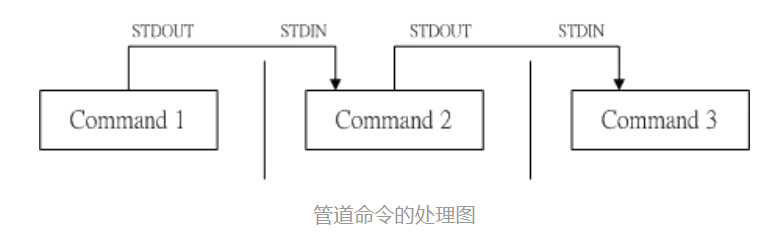
安装脚本
pip install pipe
文档说明
https://pypi.org/project/pipe/
Pipe中现有的部分管道
1.1 where
通过 where 管道后,返回符合给定条件的结果
list([1, 2, 3, 4] | where(lambda x: x % 2 == 0))
## 结果:[2, 4]
1.2 chain
chain 管道可以把可以迭代的对象连接起来
list([[1, 2], [3, 4], [5]] | chain)
## 结果:[1, 2, 3, 4, 5]
1.3 tail()
tail() 管道取出给定个数的尾部元素
list((1, 2, 3, 4, 5) | tail(3))
## 结果:[3, 4, 5]
1.4 rstrip
rstrip 管道去除右边的空格,支持传参数
'  abc   ' | rstrip
 ## 结果:'  abc'

'.,[abc] ] ' | rstrip('.,[] ')
 ## 结果:'.,[abc'
1.5 lstrip
'abc   ' | lstrip
## 结果:'abc   '
'.,[abc] ] ' | lstrip('.,[] ')
 ## 结果:'abc] ] '
还有不少管道操作,感兴趣可以自行去文档中看看
pipe支持自定义管道
2.1 方法一
## 自定义 stdout 管道
stdout = Pipe(lambda x: sys.stdout.write(str(x)))
2.2 方法二,用 @Pipe 装饰器
## 自定义 stdout 管道
@Pipe
def stdout(x):
    sys.stdout.write(str(x))
自定义后,使用起来跟Pipe内置的现有管道一样
## 使用自定义 stdout 管道

'abc'|stdout
## 结果:abc
PS:
今天的推文用 Chrome 的插件 Markdown Here 完成,感觉还可以。
在插件里面写完,调整好效果,直接复制粘贴到微信公众号后台。





 扫一扫
扫一扫


 2687
2687

 被折叠的 条评论
为什么被折叠?
被折叠的 条评论
为什么被折叠?
 到【灌水乐园】发言





