


 当您的Mac无法进入睡眠模式时,可能是由于文件传输、后台任务、活动应用或硬件设备等因素。您可以通过打开终端并运行特定命令来查看详细信息,如Process ID (PID) 和相关应用名称,以识别问题源头。若发现问题,可以关闭相关进程或更改设置来解决。如果无法识别,可以在线搜索获取帮助。

mac睡眠

It’s bad enough that your kid never goes to sleep, but now your Mac is doing the same thing! Sure, it may not be crying, but your Mac just sits there, awake, without giving you any indication as to why. What’s going on?
您的孩子永远不会入睡,这已经很糟糕了,但是现在您的Mac正在做同样的事情! 当然,它可能没有在哭,但是您的Mac只是醒着坐在那里,没有任何原因的指示。 这是怎么回事?
It could be anything. A file transfer or backup may be ongoing, or you might have prevented your Mac from sleeping only to forget later on. The only real way to find out is the open the Terminal, which you can find by using Spotlight or by heading to Applications > Utilities in the Finder.
可能是任何东西。 文件传输或备份可能正在进行中,或者您可能已阻止Mac进入睡眠状态,以便以后忘记。 找出问题的唯一真正方法是打开终端,您可以使用Spotlight或前往Finder中的“应用程序”>“实用程序”来找到终端。
From the Terminal prompt, run the following command:
在终端提示下,运行以下命令:
pmset -g assertions
Then hit Enter. The output comes in two parts. First, you’ll see a list of categories followed by a number.
然后按Enter。 输出分为两部分。 首先,您将看到一个类别列表,后跟一个数字。
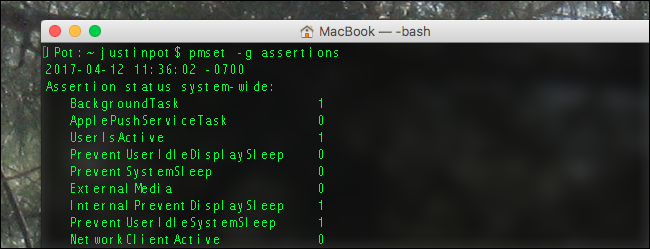
These are all kinds of things that can keep your Mac awake. A zero next to the category means it’s not currently active; a one means it is.
这些都是可以使Mac保持清醒状态的事物。 类别旁边的零表示该类别当前未激活; 一个意味着它是。
What these mean is largely self-explanatory. “BackgroundTask,” for example, means that your Mac is doing something like backing up to Time Machine or downloading an update—this prevents it from going to sleep. “UserIsActive” is pretty much always going to be active, because you just used the computer to type the command.
这些含义在很大程度上是不言而喻的。 例如,“ BackgroundTask”表示您的Mac正在执行诸如备份到Time Machine或下载更新的操作,这可以防止Mac进入睡眠状态。 “ UserIsActive”几乎总是处于活动状态,因为您只是使用计算机来键入命令。
Below this relatively straightforward list is some more convoluted language. For example, if Time Machine is running, you’ll see something like this:
在这个相对简单的列表下面是一些更复杂的语言。 例如,如果Time Machine正在运行,您将看到以下内容:

It’s a bit cryptic, but let’s break it down. First off, pid strands for Process ID, and it’s followed by a number representing the process. You can use this number to identify the process in Activity Monitor.
这有点神秘,但让我们分解一下。 首先,使用pid串表示进程ID,然后加上代表进程的数字。 您可以使用此数字在“活动监视器”中标识流程。
In brackets following the process ID number, you’ll see the name of the application in brackets. In the above example, this includes backupd and UserEventAgent, both processes related to Time Machine. This is followed by further identifying information, then a timestamp, then a bit more information regarding why the process is keeping your Mac awake. As you can see, a running Time Machine backup is relatively easy to identify.
在进程ID号后的方括号中,您将在方括号中看到应用程序的名称。 在上面的示例中,这包括备份和UserEventAgent,这两个过程都与Time Machine有关。 接下来是进一步的标识信息,然后是时间戳,然后是有关此过程为何使您的Mac保持清醒的更多信息。 如您所见,正在运行的Time Machine备份相对容易识别。
But there are many other reasons your Mac might be staying awake.
但是还有许多其他原因可能会导致您的Mac保持清醒状态。
If you have music playing, you’ll see something related to coreaudio preventing sleep. If you have a USB or Bluetooth device connected, you might see a note about those preventing sleep. And if you’re running an app like Amphetamine, which keeps your Mac from sleeping, you’ll see a note about that:
如果您正在播放音乐,则会看到与coreaudio相关的东西可以防止睡眠。 如果您连接了USB或蓝牙设备,则可能会看到有关防止睡眠的说明。 而且,如果您正在运行Amphetamine之类的应用程序,该应用程序可使Mac保持睡眠状态 ,那么您会看到以下说明:
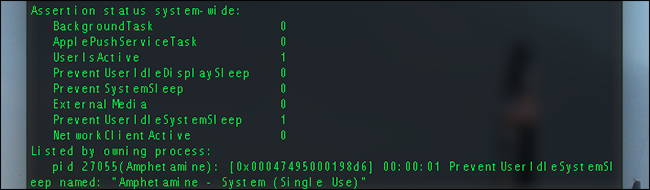
There’s no end to the potential causes of a Mac that won’t fall asleep, but running this command at least gives you a list of potential things to consider. If you recognize the cause of your Mac staying up, you’ll need to either shut down the process causing the problem or change its settings.
Mac不能入睡的潜在原因没有尽头,但是运行此命令至少可以为您提供潜在的考虑因素列表。 如果您知道Mac不能启动的原因,则需要关闭导致问题的进程或更改其设置。
If you don’t recognize something in the list, Google it. That may not seem like the most helpful advice, but there are simply too many possibly problems for us to list them all. Happily, the Internet is full of people just like you having problems, and in most cases some other very nice person has found a solution for them. Seek them out, and good luck!
如果您在列表中看不到任何内容,请对其进行搜索。 这似乎不是最有用的建议,但对于我们来说,将它们全部列出可能存在太多问题。 令人高兴的是,就像您遇到问题一样,Internet上到处都是人,在大多数情况下,其他一些非常友善的人也找到了解决方案。 找他们,祝你好运!
翻译自: https://www.howtogeek.com/302942/how-to-figure-out-whats-preventing-your-mac-from-sleeping/
mac睡眠





 扫一扫
扫一扫


 1万+
1万+

 被折叠的 条评论
为什么被折叠?
被折叠的 条评论
为什么被折叠?
 到【灌水乐园】发言





