


文章目录
在 CAD(计算机辅助设计)领域,AutoCAD 是最广泛使用的软件之一,其默认的文件格式包括 DWG 和 DXF。接下来将学习这两种格式的基本结构、特点以及相关的解析库,(网上相关的资料还是有些少,本文是一个非专业的角度进行学习总结的,并提供了一个python ezdxf解析的demo,帮助更好理解处理这些文件)
有问题,欢迎大家留言、进群讨论或私聊:【群号:392784757】
DWG 与 DXF 格式
DWG 是 AutoCAD 的原生二进制文件格式。它包含了图形对象(如线段、圆弧、文本等,也是我们重点解析的对象)、图层信息、颜色、线型等丰富的 CAD 数据。是专有的二进制格式,因此需要特定的库或工具来解析和编辑。
DXF(Drawing Exchange Format)是一种基于 ASCII 文本的开放数据交换格式。用于在不同 CAD 软件之间进行数据交换,支持跨平台共享。
相较于 DWG,DXF 文件更容易被第三方工具读取和解析,但可能会存在一定的信息丢失。
DWG 到 DXF:可以通过 AutoCAD 或其他工具将 DWG 文件转换为 DXF 文件。
信息损失:尽管 DXF 支持多种 CAD 数据,但由于其通用性,某些复杂的 DWG 特性可能无法完整保留。
相关的转换方式有
- 使用各种CAD 软件转换 将dwg 转换成 dxf
- ODK SDK 一个国外的解析SDK 收费,提供试用
- ODK Commadline tool 提供的一个工具,免费
- 一些可以支持读取dwg 然后转换到 dxf 的库 LibreDWG
- …
DXF 文件结构详解
AutoCAD官方 dxf 格式文档 https://documentation.help/AutoCAD-DXF-zh/WSfacf1429558a55de185c428100849a0ab7-5f35.htm
下图来自其他博客整理
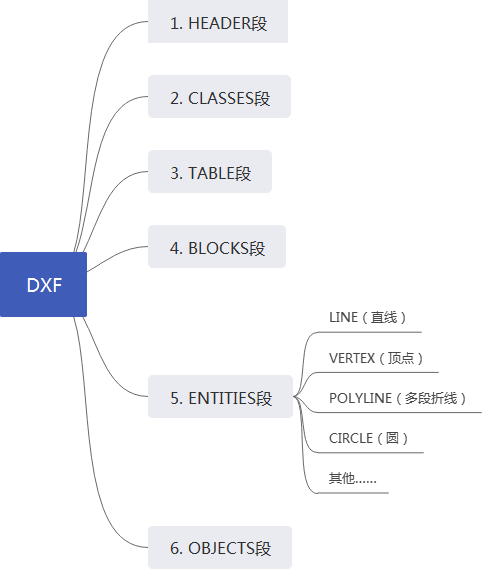
DXF 文件采用文本格式,以 组码(Group Code) 和 值(Value) 的形式组织数据。每个组码代表一个特定的属性或实体类型,而对应的值则是该属性的具体内容。
DXF 文件组成
- HEADER
- 包含绘图的基本信息,例如:
- 绘图范围(Limits)
- 当前视图模式
- 字体大小等
- 这些信息通常以
$开头定义,例如$EXTMIN和$EXTMAX表示绘图的最小和最大坐标。
- CLASSES
- 描述自定义类的定义,主要用于扩展功能。
- TABLES
- 包含各种表格,例如:
- 图层(Layer)
- 线型(Linetype)
- 字体样式(Text Style)
- 视口(Viewport)
- BLOCKS
- 定义可复用的图形块(Block),例如常见的符号或组件。
- 块可以包含多个实体,并通过插入点(Insert Point)进行引用。
- ENTITIES
- 存储所有图形实体(Entity),例如:
- LINE(直线)
- POLYLINE(多段线)
- CIRCLE(圆)
- ARC(圆弧)
- TEXT(单行文本)
- MTEXT(多行文本)
- 每个实体都有自己的属性,例如坐标、颜色、线型等。
- OBJECTS
- 存储非图形对象,例如字典(Dictionary)或布局(Layout)。
- THUMBNAILIMAGE
- 包含文件的缩略图预览。
DXF 文件典型结构
0
SECTION
2
HEADER
9
$EXTMIN
10
0.0
20
0.0
9
$EXTMAX
10
100.0
20
100.0
0
ENDSEC
上述dxf文件内容片段展示了 HEADER 部分的结构,其中 0 SECTION 表示开始一个新节,2 HEADER 表示 HEADER 节的名称,后续的 9 $EXTMIN 和 10 0.0 表示具体的变量及其值。
一份常规的dxf 文件行数在 几十万级别
DXF 解析核心概念
Group Code
可以理解为就是 类型
DXF 文件中的每定义一个类型都是 组码作为一行 然后下面展开 具体的内容
- 组码表示字段的含义,例如:
10,20,30:分别表示 X、Y、Z 坐标。11,21,31:表示第二个点的 X、Y、Z 坐标。
- 不同的组码对应不同的实体属性,解析时需要根据组码提取相关信息。
Entity
Entity 实体是 DXF 文件中最基本的图形元素,每种实体都有自己的结构。例如
LINE:线,包含起点和终点的坐标。
POLYLINE:多段线,包含一系列顶点和闭合标志。
TEXT:文本,包含位置、高度、旋转角度和文本内容。
MTEXT: 多行文本
CIRCLE: 圆
ARC:弧
ELLIPSE:椭圆
以及其他
一种在 dxf文件中常见的 实体名称表示
AcDbEntity
AcDbPolyline AcDbLine AcDbText AcDbTrace
Block & Insert
Block 块:用于将一组实体打包成可复用的对象。
Insert 引用:通过插入点引用已定义的块,从而在不同位置重复使用。
Layer
layer 层
一份图纸可能是多层layer堆叠,可以将不同的结构分布在不同的层上,比如签名,或者那种重复的边框 就可以在单独的层上进行定义,
也算是一种分离解耦
Style
样式描述了实体的外观,例如颜色、线型、字体等。在解析过程中,样式的处理对于还原图形的视觉效果至关重要。
工具与库
DXF 解析库
| 库/工具 | 语言 | 介绍 |
|---|---|---|
| ezdxf | python | 一个功能强大的 Python 库,支持 DXF 文件的读写和解析。 提供了简洁的 API 接口,适合快速开发。 |
| libdxfrw | cpp | 由 LibreCAD 项目作者开发,支持 DXF 文件的解析和导出。 可用于构建高性能的 CAD 工具。 |
| dxflib | cpp | 由 QCAD 项目提供,专注于 DXF 文件的解析。 |
| dxf-parser | js | 用于解析 DXF 文件并将其转换为 JSON 格式,便于前端处理。 |
| dxfReader | 提供简单的 DXF 解析功能,适合初学者学习和使用。 | |
| dxf-json | 将 DXF 文件转换为 JSON 格式,方便与其他系统集成。 |
CAD软件
-
AutoCAD
-
LibreCAD - Free Open Source 2D CAD 开源的 2D CAD 软件,支持 DWG 和 DXF 文件的编辑
-
QCAD - QCAD: 2D CAD 开源的 2D CAD 软件,支持 DWG 和 DXF 文件的编辑。 提供了丰富的功能,适合初学者和专业用户。
-
BRL-CAD: Open Source Solid Modeling 开源的 3D CAD 软件,支持 DWG 文件的解析和编辑。 适用于需要处理复杂三维模型的场景。
-
。。。
注意事项
在解析时需要注意CAD坐标系与绘制坐标系的转换,确保图形正确显示。
不同的解析库对 DXF 字段的支持可能存在差异,建议查阅官方文档以获取准确的信息。
对于大型 DXF 文件,解析速度可能会成为瓶颈。可以通过优化算法或使用多线程技术提高解析效率。
Demo
最近实现的一个基于python ezdxf包解析dxf的demo,还不完善,欢迎交流学习
有问题,欢迎大家留言、进群讨论或私聊:【群号:392784757】
import matplotlib.pyplot as plt
import ezdxf
from ezdxf.math import Matrix44, Vec3
from ezdxf.blkrefs import BlockReferenceCounter

import math
import numpy as np
from matplotlib.patches import Ellipse, Circle
plt.rcParams["font.sans-serif"]=["SimHei"] #设置字体
plt.rcParams["axes.unicode_minus"]=False #该语句解决图像中的“-”负号的乱码问题

''' layers 22  '''

layer_set = set()

def circle_array(xc,yc,r,start,end):
    #根据圆心、半径、起始角度、结束角度,生成圆弧的数据点
    phi1 = start*np.pi/180.0
    phi2 = end*np.pi/180.0
    dphi = (phi2-phi1)/np.ceil(200*np.pi*r*(phi2-phi1)) #根据圆弧周长设置等间距
    #array = np.arange(phi1, phi2+dphi, dphi) #生成双闭合区间(Python默认为左闭右开)
    #当dphi为无限小数时,上述方法可能由于小数精度问题,导致array多一个元素,将代码优化为下面两行
    array = np.arange(phi1, phi2, dphi)
    # array = np.append(array,array[-1]+dphi)#array在结尾等距增加一个元素
    return xc + r*np.cos(array),yc + r*np.sin(array)


def parse_dxf_and_plot(file_path,target_layer=None):
    doc = ezdxf.readfile(file_path)
    counter = BlockReferenceCounter(doc)
    count = counter.by_name("'A$C15069b24")
    print("A$C15069b24 use ",count ," times")
    msp = doc.modelspace()
    print("find ",len(doc.blocks)," blocks")

    print("find ",len(doc.block_records)," block_records")

    # 存储不同类型的几何数据
    lines = []
    polylines = []
    points = []
    circles = []
    arcs = []
    ellipses = []
    splines = []
    texts = []
    mtexts = []

    def process_entity(entity, transform=Matrix44(),layer=None):
        if entity.dxf.layer:
            layer_set.add(entity.dxf.layer)
            # print(entity)
            if layer is not None and entity.dxf.layer != layer:
                return
        if entity.dxftype() == 'BLOCK':
            print(entity.name)
        elif entity.dxftype() == 'LINE':
            start = transform.transform(entity.dxf.start)
            end = transform.transform(entity.dxf.end)
            lines.append((start, end))
        elif entity.dxftype() == 'LWPOLYLINE':
            polyline = [transform.transform((p[0],p[1],0)) for p in entity.get_points()]
            polylines.append(polyline)
        elif entity.dxftype() == 'CIRCLE':
            center = transform.transform(entity.dxf.center)
            radius = entity.dxf.radius
            circles.append((center, radius))
        elif entity.dxftype() == 'ARC':
            center = transform.transform(entity.dxf.center)
            radius = entity.dxf.radius
            start_angle = math.radians(entity.dxf.start_angle)
            end_angle = math.radians(entity.dxf.end_angle)
            arcs.append((center, radius, start_angle, end_angle))
        elif entity.dxftype() == 'ELLIPSE':
            center = transform.transform(entity.dxf.center)
            major_axis_vec = Vec3(entity.dxf.major_axis)

            # 正确变换方向向量(仅旋转和缩放,无平移)
            transformed_major_axis = transform.transform_direction(major_axis_vec)

            # 计算长轴长度和旋转角度
            major_len = transformed_major_axis.magnitude
            angle_rad = math.atan2(transformed_major_axis.y, transformed_major_axis.x)
            rotation_deg = math.degrees(angle_rad)

            ratio = entity.dxf.ratio
            ellipses.append((center, major_len, ratio, rotation_deg))
        elif entity.dxftype() == 'SPLINE':
            control_points = [transform.transform(p) for p in entity.control_points]
            fit_points = [transform.transform(p) for p in entity.fit_points]
            splines.append((control_points, fit_points))
        # elif entity.dxftype() == 'POINT':
        #     location = transform.transform(entity.dxf.location)
        #     points.append(location)
        elif entity.dxftype() == 'TEXT':
            text = entity.dxf.text
            insert = entity.dxf.insert
            height = entity.dxf.height
            rotation = math.radians(entity.dxf.rotation)  # 转换为弧度
            # 应用变换矩阵
            transformed_insert = transform.transform(insert)

            # 保存到texts列表
            texts.append((
                text,
                transformed_insert,
                height,
                rotation,
                entity.dxf.halign  # 水平对齐方式
            ))
        elif entity.dxftype() == 'MTEXT':
            insert = transform.transform(entity.dxf.insert)
            mtext = entity.text
            rotation = math.radians(entity.dxf.rotation)
            mtexts.append((insert, mtext, rotation))
        elif entity.dxftype() == 'INSERT':
            block_name = entity.dxf.name
            block_def = doc.blocks.get(block_name)
            if block_def:
                insert = entity.dxf.insert
                x_scale = entity.dxf.xscale
                y_scale = entity.dxf.yscale
                z_scale = entity.dxf.zscale
                rotation = math.radians(entity.dxf.rotation)

                translate = Matrix44.translate(*insert)
                scale = Matrix44.scale(x_scale, y_scale, z_scale)
                rotate = Matrix44.z_rotate(rotation)
                new_transform = translate * rotate * scale * transform

                for sub_entity in block_def:
                    process_entity(sub_entity, new_transform)

    for entity in msp:
        process_entity(entity,layer=target_layer)

    print("parse result")
    print(f"find {len(lines)} lines")
    print(f"find {len(polylines)} polylines")
    print(f"find {len(circles)} circles")
    print(f"find {len(arcs)} arcs")
    print(f"find {len(ellipses)} ellipses")
    print(f"find {len(splines)} splines")
    print(f"find {len(texts)} texts")
    print(f"find {len(mtexts)} mtexts")


    # 计算绘图范围
    # all_coords = []
    # for line in lines:
    #     all_coords.extend([line[0][:2], line[1][:2]])
    # for polyline in polylines:
    #     all_coords.extend([p[:2] for p in polyline])
    # for point in points:
    #     all_coords.append(point[:2])
    # for circle in circles:
    #     all_coords.append(circle[0][:2])
    # for arc in arcs:
    #     all_coords.append(arc[0][:2])
    # for ellipse in ellipses:
    #     all_coords.append(ellipse[0][:2])
    # for spline in splines:
    #     all_coords.extend([p[:2] for p in spline[0] + spline[1]])

    # if not all_coords:
    #     return

    # coords = np.array(all_coords)
    # x_min, y_min = coords.min(axis=0)
    # x_max, y_max = coords.max(axis=0)
    # padding = 0.1 * max(x_max - x_min, y_max - y_min)
    # x_min -= padding
    # x_max += padding
    # y_min -= padding
    # y_max += padding

    # from config
    x_min,y_min = -0.0000000496479515,-0.0000002921148052
    x_max,y_max = 4740.000000184406,1377.000000266989

    fig, ax = plt.subplots(figsize=(12*4, 8*4))
    ax.set_aspect('equal')
    ax.set_xlim(x_min, x_max)
    ax.set_ylim(y_min, y_max)

    # 绘制各种几何对象
    for line in lines:
        ax.plot([line[0][0], line[1][0]], [line[0][1], line[1][1]], color='blue', linewidth=0.5)

    # for polyline in polylines:
    #     xs = [p[0] for p in polyline]
    #     ys = [p[1] for p in polyline]
    #     ax.plot(xs, ys, color='red', linewidth=0.8)

    # for point in points:
    #     ax.scatter(point[0], point[1], color='green', s=5)

    # TypeError: an integer is required
    # for circle in circles:
    #     c = Circle((circle[0][0],circle[0][1]), circle[1], edgecolor='green', facecolor='none')
    #     ax.add_patch(c)

    # AttributeError: module 'matplotlib.pyplot' has no attribute 'Arc'
    # 没有弧 只能画圆
    # for arc in arcs:
    #   arc_x,arc_y = circle_array(arc[0][0],arc[0][1],arc[1],
    #                      start=math.degrees(arc[2]), end=math.degrees(arc[3]))
    #     # c = Circle((arc[0][0],arc[0][1]), 2*arc[1],
    #     #            theta1=math.degrees(arc[2]), theta2=math.degrees(arc[3]),
    #     #            edgecolor='orange', facecolor='none')
    #     # ax.add_patch(c)
    #   ax.scatter(arc_x,arc_y,c='orange')

    # AttributeError: module 'matplotlib.pyplot' has no attribute 'Ellipse'
    # for ellipse in ellipses:
    #     center, major_len, ratio, rotation_deg = ellipse

    #     # 确保ratio在有效范围
    #     valid_ratio = max(1e-10, abs(ratio))  # 处理极小值和负值

    #     # 创建椭圆
    #     e = Ellipse(
    #         (center.x, center.y),
    #         width=2 * major_len,
    #         height=2 * major_len * valid_ratio,
    #         angle=rotation_deg,
    #         edgecolor='purple',
    #         facecolor='none'
    #     )
    #     ax.add_patch(e)

    # for spline in splines:
    #     # 近似绘制样条曲线(需进一步优化)
    #     from matplotlib.path import Path
    #     from matplotlib.patches import PathPatch
    #     verts = [(p[0], p[1]) for p in spline[1]]
    #     codes = [Path.MOVETO] + [Path.LINETO]*(len(verts)-1)
    #     path = Path(verts, codes)
    #     patch = PathPatch(path, edgecolor='cyan', facecolor='none')
    #     ax.add_patch(patch)


    # text,
    # transformed_insert,
    # height,
    # rotation,
    # entity.dxf.halign  # 水平对齐方式
    # for text_data in texts:
    #   # insert = text_data['insert']
    #   # text = text_data['text']
    #   # height = text_data['height']
    #   # rotation = math.degrees(text_data['rotation'])  # matplotlib使用角度
    #   # alignment = text_data['alignment']
    #   insert = text_data[1]
    #   text = text_data[0]
    #   height = text_data[2]
    #   rotation = text_data[3]
    #   alignment = text_data[4]


    #   # 设置文本样式
    #   kwargs = {
    #       'rotation': rotation,
    #       'fontsize': height * 72 / fig.dpi,  # 将绘图单位转换为磅值
    #       'rotation_mode': 'anchor',
    #       'horizontalalignment': {
    #           0: 'left', 1: 'center', 2: 'right'
    #       }.get(alignment, 'left'),
    #       'verticalalignment': 'bottom'
    #   }
    #   # print(text)
    #   ax.text(insert[0], insert[1], text, **kwargs)

    # for mtext in mtexts:
    #     text = mtext[1].replace('\x00', '').strip()
    #     if text:
    #         # print(text)
    #         ax.text(mtext[0][0], mtext[0][1], text, rotation=mtext[2],
    #                verticalalignment='bottom', horizontalalignment='left',
    #                fontsize=2, color='gray')

    # plt.show()
    plt.savefig(f'line_{"layer_"+str(target_layer)+"_" if target_layer is not None else ""}fig.png')
    plt.close()

if __name__ == "__main__":
    import sys
    # if len(sys.argv) != 2:
    #     print("Usage: python script.py your_file.dwg")
    #     sys.exit(1)
    # parse_dxf_and_plot(sys.argv[1])
    dxf_path = './dwg_to_img/test.dxf'
    parse_dxf_and_plot(dxf_path)

    print(f"total {len(layer_set)} layers")

    # for layer in layer_set:
    #     parse_dxf_and_plot(dxf_path,target_layer=layer)






 扫一扫
扫一扫


 1万+
1万+

 被折叠的 条评论
为什么被折叠?
被折叠的 条评论
为什么被折叠?
 到【灌水乐园】发言





