


本次解决方法使用WebClient,WebClient是 Spring 推荐的响应式 HTTP 客户端,天然支持流式处理。
1、环境准备
- 本地已部署 Ollama,并且Ollama中有模型
- SpringBoot 项目的基础配置
2、添加依赖配置(pom.xml)
<!-- Spring Web 基础 -->
<dependency>
    <groupId>org.springframework.boot</groupId>
    <artifactId>spring-boot-starter-web</artifactId>
</dependency>

<!-- WebFlux 用于响应式编程(流式响应核心) -->
<dependency>
    <groupId>org.springframework.boot</groupId>
    <artifactId>spring-boot-starter-webflux</artifactId>
</dependency>

<!-- JSON 处理 -->
<dependency>
    <groupId>com.fasterxml.jackson.core</groupId>
    <artifactId>jackson-databind</artifactId>
</dependency>

<!-- 简化代码,使用注解来代替getter和setter -->
<dependency>
    <groupId>org.projectlombok</groupId>
    <artifactId>lombok</artifactId>
    <optional>true</optional>
</dependency>
3、定义数据模型
(1)请求模型(OllamaRequest.java)
import com.fasterxml.jackson.annotation.JsonProperty;
import lombok.Data;
import lombok.ToString;

import java.util.List;

@Data
@ToString
public class OllamaRequest {
    // 模型名称
    private String model;
    // 聊天消息列表
    private List<Message> messages;
    // 是否流式输出(false 表示一次性返回结果)
    @JsonProperty("stream")
    private boolean stream = true;

    // 消息结构
    @Data
    @ToString
    public static class Message {
        private String role; // 角色:"user"(用户)或 "assistant"(助手)
        private String content; // 消息内容

        public Message(String role, String content) {
            this.role = role;
            this.content = content;
        }

    }

    public OllamaRequest(String model, List<Message> messages) {
        this.model = model;
        this.messages = messages;
    }
}
(2)响应模型(OllamaResponse.java)
import lombok.Data;
import lombok.ToString;

@Data
@ToString
public class OllamaResponse {
    private String model;
    private String created_at;
    private Message message; // 助手返回的消息
    private boolean done;

    // 响应消息结构(同请求的 Message)
    @Data
    @ToString
    public static class Message {
        private String role;
        private String content;
    }
}
4、配置类
(1)RestTemplateConfig类,项目与 Ollama进行 HTTP 通信的基础设施配置。
import org.springframework.context.annotation.Bean;
import org.springframework.context.annotation.Configuration;
import org.springframework.web.client.RestTemplate;
import org.springframework.web.reactive.function.client.WebClient;

@Configuration
public class RestTemplateConfig {
    @Bean
    public RestTemplate restTemplate() {
        return new RestTemplate();
    }

    // WebClient Bean 配置
    @Bean
    public WebClient webClient() {
        return WebClient.builder()
                .baseUrl("http://localhost:11434") // Ollama 服务地址
                .build();
    }
}
(2)WebConfig类,主要用于调整 Spring MVC 的 web 层行为,防止后面响应消息在页面中出现乱码。
import org.springframework.context.annotation.Bean;
import org.springframework.context.annotation.Configuration;
import org.springframework.web.filter.CharacterEncodingFilter;
import org.springframework.web.servlet.config.annotation.WebMvcConfigurer;

@Configuration
public class WebConfig implements WebMvcConfigurer {
    @Bean
    public CharacterEncodingFilter characterEncodingFilter() {
        CharacterEncodingFilter filter = new CharacterEncodingFilter();
        filter.setEncoding("UTF-8");
        filter.setForceEncoding(true);// 强制覆盖请求和响应的编码
        return filter;
    }
}
5、服务层实现
OllamaService.java 实现调用逻辑,包含普通响应和流式响应两种方式。
import com.cg.ollamaspringboot1.request.OllamaRequest;
import com.cg.ollamaspringboot1.response.OllamaResponse;
import org.springframework.beans.factory.annotation.Autowired;
import org.springframework.http.HttpHeaders;
import org.springframework.http.MediaType;
import org.springframework.stereotype.Service;
import org.springframework.web.client.RestTemplate;
import org.springframework.web.reactive.function.client.WebClient;
import reactor.core.publisher.Flux;
import java.util.Arrays;
import java.util.List;

@Service
public class OllamaService {

    private static final String OLLAMA_API_URL = "/api/chat";

    @Autowired
    private RestTemplate restTemplate;

    //  WebClient 依赖注入
    @Autowired
    private WebClient webClient;

    //普通响应模式
    public String chatWithOllama(String model, String userMessage) {
        List<OllamaRequest.Message> messages = Arrays.asList(
                new OllamaRequest.Message("user", userMessage)
        );
        OllamaRequest request = new OllamaRequest(model, messages);
        request.setStream(false); // 设置为非流式

        try {
            // 调用 Ollama API 的聊天接口
            OllamaResponse response = restTemplate.postForObject(
                    "http://localhost:11434/api/chat", // 完整接口地址
                    request,
                    OllamaResponse.class
            );

            // 处理响应结果
            if (response != null && response.getMessage() != null) {
                return response.getMessage().getContent();
            } else {
                return "未获取到有效响应";
            }
        } catch (Exception e) {
            // 捕获异常并返回错误信息
            return "调用 Ollama 服务失败:" + e.getMessage();
        }
    }

    /**
     * 流式响应模式
     * 返回 Flux 的完全响应式方法(适合 WebFlux 环境)
     */
    public Flux<String> chatWithOllamaStreamReactive(String model, String userMessage) {
        // 构建请求消息
        List<OllamaRequest.Message> messages = Arrays.asList(
                new OllamaRequest.Message("user", userMessage)
        );
        OllamaRequest request = new OllamaRequest(model, messages);
        request.setStream(true);// 启用流式输出

        // 发送请求并处理流式响应
        return webClient.post()
                .uri(OLLAMA_API_URL)
                .header(HttpHeaders.CONTENT_TYPE, MediaType.APPLICATION_JSON_VALUE)
                .bodyValue(request)
                .retrieve()
                .bodyToFlux(OllamaResponse.class)
                .filter(response -> response != null && response.getMessage() != null)
                .map(response -> response.getMessage().getContent())
                .doOnNext(content -> System.out.print(content)) // 控制台实时输出
                .doOnComplete(() -> System.out.println("\n流式传输完成"));
    }
}
6、 控制器层
import com.cg.ollamaspringboot1.service.OllamaService;
import org.springframework.beans.factory.annotation.Autowired;
import org.springframework.http.MediaType;
import org.springframework.web.bind.annotation.GetMapping;
import org.springframework.web.bind.annotation.RequestParam;
import org.springframework.web.bind.annotation.RestController;
import reactor.core.publisher.Flux;

@RestController
public class OllamaController {
    @Autowired
    private OllamaService ollamaService;

    @GetMapping("/chat")
    public String chat(
            @RequestParam(defaultValue = "qwen3:0.6b") String model,//最好放在配置文件
            @RequestParam String message
    ) {
        return ollamaService.chatWithOllama(model, message);
    }


    // 完全响应式接口(返回 Flux)
    @GetMapping(value = "/chat/stream/reactive", produces = MediaType.TEXT_EVENT_STREAM_VALUE)
    public Flux<String> chatStreamReactive(
            @RequestParam(defaultValue = "qwen3:0.6b") String model,
            @RequestParam String message
    ) {
        return ollamaService.chatWithOllamaStreamReactive(model, message);
    }
}
模型访问地址:
流式响应格式:localhost:8080/chat/stream/reactive?message=输入内容
普通响应格式:localhost:8888/chat?message=你的问题
注意:
(1)本次访问模型为qwen3:0.6b
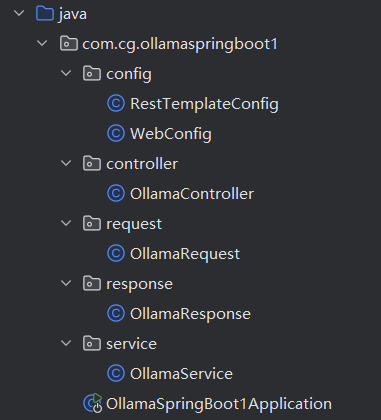
(2)该实现方法的部分项目结构







 扫一扫
扫一扫


 1404
1404

 被折叠的 条评论
为什么被折叠?
被折叠的 条评论
为什么被折叠?
 到【灌水乐园】发言





