6. 基础关卡-OpenCompass 评测书生大模型实践

硬件级Dalvik字节码粒度无痕HOOK及VMP取址码定位分析 2.通过硬件读写断点的输出信息 可知pc寄存器就是art解释器的取码地址 直接硬件执行断点在这个pc 即可直接trace所有的smali执行流 通杀所有机型系统。本文即将探讨的是 如何在硬件级别实现dalvik bytecode粒度的无痕拦截技术 并实现鼠标点击一键hook 指哪儿打哪儿 感受 button power 的强大魅力!4.由于硬件断点是同步的 断下后可随时硬件dump下这一瞬间的app内存映像 写入unicorn的内存模拟执行。解释器在解释执行前必会读取内存中的bytecode。 阅读详情

基础关卡-OpenCompass 评测书生大模型实践

基础任务(完成此任务即完成闯关)

  • 使用 OpenCompass 评测浦语 API 记录复现过程并截图。(注意:写博客提交作业时切记删除自己的 api_key!)
  • 使用 OpenCompass 评测 InternLM2.5-1.8B-Chat 模型在 ceval 数据集上的性能,记录复现过程并截图。(可选)

准备opencompass评测环境

本节课程聚焦于大语言模型的评测,在后续的课程中我们将介绍多模态大模型的评测方法。

OpenCompass 提供了 API 模式评测和本地直接评测两种方式。其中 API 模式评测针对那些以 API 服务形式部署的模型,而本地直接评测则面向那些可以获取到模型权重文件的情况。

我们首先在训练营提供的开发机上创建用于评测 conda 环境:

conda create -n opencompass python=3.10
conda activate opencompass

cd /root
git clone -b 0.3.3 https://github.com/open-compass/opencompass
cd opencompass
pip install -e .
pip install -r requirements.txt
pip install huggingface_hub==0.25.2

pip install importlib-metadata

更多使用说明,请参考 OpenCompass 官方文档。

基础任务1–评测浦语 API 模型

使用 OpenCompass 评测浦语 API 记录复现过程并截图。

  1. 设置浦语API Key

打开网站浦语官方地址 https://internlm.intern-ai.org.cn/api/document 获得 api key 并在开发及中设置为环境变量:

export INTERNLM_API_KEY=xxxxxxxxxxxxxxxxxxxxxxx # 填入你申请的 API Key
  1. 配置模型

配置模型: 在终端中运行 cd /root/opencompass/ 和 touch opencompass/configs/models/openai/puyu_api.py, 然后打开文件, 贴入以下代码:

import os
from opencompass.models import OpenAISDK


internlm_url = 'https://internlm-chat.intern-ai.org.cn/puyu/api/v1/' # 你前面获得的 api 服务地址
internlm_api_key = os.getenv('INTERNLM_API_KEY')

models = [
    dict(
        # abbr='internlm2.5-latest',
        type=OpenAISDK,
        path='internlm2.5-latest', # 请求服务时的 model name
        # 换成自己申请的APIkey
        key=internlm_api_key, # API key
        openai_api_base=internlm_url, # 服务地址
        rpm_verbose=True, # 是否打印请求速率
        query_per_second=0.16, # 服务请求速率
        max_out_len=1024, # 最大输出长度
        max_seq_len=4096, # 最大输入长度
        temperature=0.01, # 生成温度
        batch_size=1, # 批处理大小
        retry=3, # 重试次数
    )
]
  1. 配置数据集

在终端中运行 cd /root/opencompass/ 和touch opencompass/configs/datasets/demo/demo_cmmlu_chat_gen.py, 然后打开文件, 贴入以下代码:

from mmengine import read_base

with read_base():
    from ..cmmlu.cmmlu_gen_c13365 import cmmlu_datasets


# 每个数据集只取前2个样本进行评测
for d in cmmlu_datasets:
    d['abbr'] = 'demo_' + d['abbr']
    d['reader_cfg']['test_range'] = '[0:1]' # 这里每个数据集只取1个样本, 方便快速评测.

这样我们使用了 CMMLU Benchmark 的每个子数据集的 1 个样本进行评测.

  1. 运行评测任务

完成配置后, 在终端中运行: python run.py --models puyu_api.py --datasets demo_cmmlu_chat_gen.py --debug, 等待运行结果:

dataset                                           version    metric    mode      opencompass.models.OpenAISDK_opencompass_internlm2.5-latest
------------------------------------------------  ---------  --------  ------  -------------------------------------------------------------
demo_cmmlu-agronomy                               4c7f2c     accuracy  gen                                                             75.00
demo_cmmlu-anatomy                                ea09bf     accuracy  gen                                                             75.00
demo_cmmlu-ancient_chinese                        f7c97f     accuracy  gen                                                             75.00
demo_cmmlu-arts                                   dd77b8     accuracy  gen                                                            100.00
demo_cmmlu-astronomy                              1e49db     accuracy  gen                                                             50.00
demo_cmmlu-business_ethics                        dc78cb     accuracy  gen                                                            100.00
demo_cmmlu-chinese_civil_service_exam             1de82c     accuracy  gen                                                             75.00
demo_cmmlu-chinese_driving_rule                   b8a42b     accuracy  gen                                                             75.00
demo_cmmlu-chinese_food_culture                   2d568a     accuracy  gen                                                             50.00
demo_cmmlu-chinese_foreign_policy                 dc2427     accuracy  gen                                                            100.00
demo_cmmlu-chinese_history                        4cc7ed     accuracy  gen                                                             75.00
demo_cmmlu-chinese_literature                     af3c41     accuracy  gen                                                            100.00
demo_cmmlu-chinese_teacher_qualification          87de11     accuracy  gen                                                            100.00
demo_cmmlu-clinical_knowledge                     c55b1d     accuracy  gen                                                            100.00
demo_cmmlu-college_actuarial_science              d3c360     accuracy  gen                                                             50.00
demo_cmmlu-college_education                      df8790     accuracy  gen                                                             75.00
demo_cmmlu-college_engineering_hydrology          673f23     accuracy  gen                                                             50.00
demo_cmmlu-college_law                            524c3a     accuracy  gen                                                             75.00
demo_cmmlu-college_mathematics                    e4ebad     accuracy  gen                                                             50.00
demo_cmmlu-college_medical_statistics             55af35     accuracy  gen                                                            100.00
demo_cmmlu-college_medicine                       702f48     accuracy  gen                                                            100.00
demo_cmmlu-computer_science                       637007     accuracy  gen                                                            100.00
demo_cmmlu-computer_security                      932b6b     accuracy  gen                                                             75.00
demo_cmmlu-conceptual_physics                     cfc077     accuracy  gen                                                            100.00
demo_cmmlu-construction_project_management        968a4a     accuracy  gen                                                            100.00
demo_cmmlu-economics                              ddaf7c     accuracy  gen                                                             75.00
demo_cmmlu-education                              c35963     accuracy  gen                                                             50.00
demo_cmmlu-electrical_engineering                 70e98a     accuracy  gen                                                             75.00
demo_cmmlu-elementary_chinese                     cbcd6a     accuracy  gen                                                             75.00
demo_cmmlu-elementary_commonsense                 a67f37     accuracy  gen                                                            100.00
demo_cmmlu-elementary_information_and_technology  d34d2a     accuracy  gen                                                            100.00
demo_cmmlu-elementary_mathematics                 a9d403     accuracy  gen                                                             75.00
demo_cmmlu-ethnology                              31955f     accuracy  gen                                                             50.00
demo_cmmlu-food_science                           741d8e     accuracy  gen                                                             75.00
demo_cmmlu-genetics                               c326f7     accuracy  gen                                                             75.00
demo_cmmlu-global_facts                           0a1236     accuracy  gen                                                             75.00
demo_cmmlu-high_school_biology                    2be811     accuracy  gen                                                            100.00
demo_cmmlu-high_school_chemistry                  d63c05     accuracy  gen                                                             50.00
demo_cmmlu-high_school_geography                  5cd489     accuracy  gen                                                            100.00
demo_cmmlu-high_school_mathematics                6b2087     accuracy  gen                                                             25.00
demo_cmmlu-high_school_physics                    3df353     accuracy  gen                                                            100.00
demo_cmmlu-high_school_politics                   7a88d8     accuracy  gen                                                            100.00
demo_cmmlu-human_sexuality                        54ac98     accuracy  gen                                                             75.00
demo_cmmlu-international_law                      0f5d40     accuracy  gen                                                              0.00
demo_cmmlu-journalism                             a4f6a0     accuracy  gen                                                             75.00
demo_cmmlu-jurisprudence                          7843da     accuracy  gen                                                             75.00
demo_cmmlu-legal_and_moral_basis                  f906b0     accuracy  gen                                                            100.00
demo_cmmlu-logical                                15a71b     accuracy  gen                                                            100.00
demo_cmmlu-machine_learning                       bc6ad4     accuracy  gen                                                            100.00
demo_cmmlu-management                             e5e8db     accuracy  gen                                                             50.00
demo_cmmlu-marketing                              8b4c18     accuracy  gen                                                            100.00
demo_cmmlu-marxist_theory                         75eb79     accuracy  gen                                                             50.00
demo_cmmlu-modern_chinese                         83a9b7     accuracy  gen                                                             75.00
demo_cmmlu-nutrition                              adfff7     accuracy  gen                                                             75.00
demo_cmmlu-philosophy                             75e22d     accuracy  gen                                                             75.00
demo_cmmlu-professional_accounting                0edc91     accuracy  gen                                                            100.00
demo_cmmlu-professional_law                       d24af5     accuracy  gen                                                             75.00
demo_cmmlu-professional_medicine                  134139     accuracy  gen                                                             50.00
demo_cmmlu-professional_psychology                ec920e     accuracy  gen                                                            100.00
demo_cmmlu-public_relations                       70ee06     accuracy  gen                                                             25.00
demo_cmmlu-security_study                         45f96f     accuracy  gen                                                             75.00
demo_cmmlu-sociology                              485285     accuracy  gen                                                             25.00
demo_cmmlu-sports_science                         838cfe     accuracy  gen                                                            100.00
demo_cmmlu-traditional_chinese_medicine           3bbf64     accuracy  gen                                                             75.00
demo_cmmlu-virology                               8925bf     accuracy  gen                                                            100.00
demo_cmmlu-world_history                          57c97c     accuracy  gen                                                            100.00
demo_cmmlu-world_religions                        1d0f4b     accuracy  gen                                                            100.00
01/20 10:46:04 - OpenCompass - INFO - write summary to /root/0118/opencompass/outputs/default/20250120_101539/summary/summary_20250120_101539.txt
01/20 10:46:04 - OpenCompass - INFO - write csv to /root/0118/opencompass/outputs/default/20250120_101539/summary/summary_20250120_101539.csv

基础任务2–评测InternLM2.5-1.8B-Chat 模型在 ceval 数据集上的性能

如果你想要评测本地部署的大语言模型,首先需要获取到完整的模型权重文件。以开源模型为例,你可以从 Hugging Face 等平台下载模型文件。接下来,你需要准备足够的计算资源,比如至少一张显存够大的 GPU,因为模型文件通常都比较大。有了模型和硬件后,你需要在评测配置文件中指定模型路径和相关参数,然后评测框架就会自动加载模型并开始评测。这种评测方式虽然前期准备工作相对繁琐,需要考虑硬件资源,但好处是评测过程完全在本地完成,不依赖网络状态,而且你可以更灵活地调整模型参数,深入了解模型的性能表现。这种方式特别适合需要深入研究模型性能或进行模型改进的研发人员。

我们接下以评测 InternLM2.5-1.8B-Chat 在 C-Eval 数据集上的性能为例,介绍如何评测本地模型。

搭建评测环境

安装相关软件包:

cd /root/opencompass
conda activate opencompass
conda install pytorch==2.3.1 torchvision==0.18.1 torchaudio==2.3.1 pytorch-cuda=12.1 -c pytorch -c nvidia -y
apt-get update
apt-get install cmake
pip install protobuf==4.25.3
pip install huggingface-hub==0.23.2

为了解决一些本地评测时出现的报错问题,我们还需要重装一些 python 库:

pip uninstall numpy -y
pip install "numpy<2.0.0,>=1.23.4"
pip uninstall pandas -y
pip install "pandas<2.0.0"
pip install onnxscript
pip uninstall transformers -y
pip install transformers==4.39.0

为了方便评测,我们首先将数据集下载到本地:

cp /share/temp/datasets/OpenCompassData-core-20231110.zip /root/opencompass/
unzip OpenCompassData-core-20231110.zip

将会在 OpenCompass 下看到data文件夹。

加载本地模型进行评测

在 OpenCompass 中,模型和数据集的配置文件都存放在 configs 文件夹下。我们可以通过运行 list_configs 命令列出所有跟 InternLM 及 C-Eval 相关的配置。

python tools/list_configs.py internlm ceval

打开 opencompass 文件夹下 configs/models/hf_internlm/的 hf_internlm2_5_1_8b_chat.py 文件, 修改如下:

from opencompass.models import HuggingFacewithChatTemplate

models = [
    dict(
        type=HuggingFacewithChatTemplate,
        abbr='internlm2_5-1_8b-chat-hf',
        path='/share/new_models/Shanghai_AI_Laboratory/internlm2_5-1_8b-chat/',
        max_out_len=2048,
        batch_size=8,
        run_cfg=dict(num_gpus=1),
    )
]

# python run.py --datasets ceval_gen --models hf_internlm2_5_1_8b_chat --debug

可以通过以下命令评测 InternLM2.5-1.8B-Chat 模型在 C-Eval 数据集上的性能。由于 OpenCompass 默认并行启动评估过程,我们可以在第一次运行时以 --debug 模式启动评估,并检查是否存在问题。在 --debug 模式下,任务将按顺序执行,并实时打印输出。

python run.py --datasets ceval_gen --models hf_internlm2_5_1_8b_chat --debug
# 如果出现 rouge 导入报错, 请 pip uninstall rouge 之后再次安装 pip install rouge==1.0.1 可解决问题.

评测比较费时, 预计2~4个小时评测完成后,将会看到:
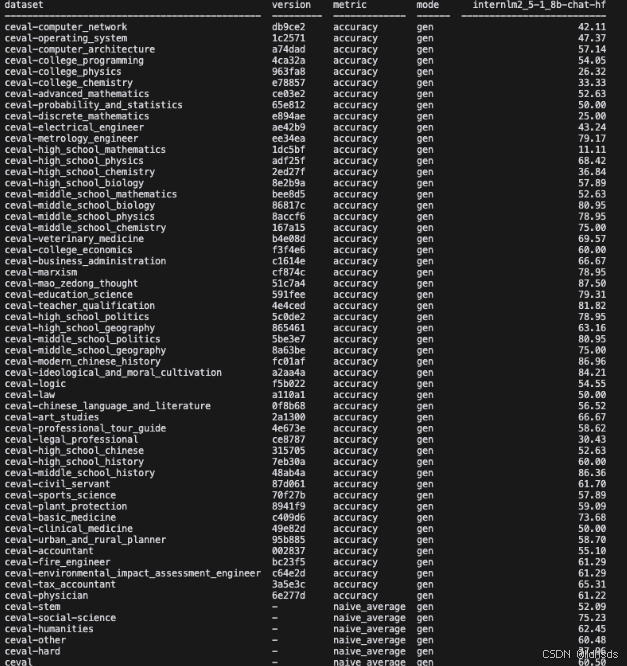
local-evaluation
我们也可以使用配置文件来指定数据集和模型,例如:

cd /root/opencompass/configs/
touch eval_tutorial_demo.py

打开 eval_tutorial_demo.py 贴入以下代码

from mmengine.config import read_base

with read_base():
    from .datasets.ceval.ceval_gen import ceval_datasets
    from .models.hf_internlm.hf_internlm2_5_1_8b_chat import models as hf_internlm2_5_1_8b_chat_models

datasets = ceval_datasets
models = hf_internlm2_5_1_8b_chat_models

这样我们指定了评测的模型和数据集,然后运行

python run.py configs/eval_tutorial_demo.py --debug 

问题记录

  1. 运行报错:ModuleNotFoundError: No module named 'rouge'
(opencompass) (list) root@intern-studio-50014188:~/0118/opencompass# python run.py --models puyu_api.py --datasets demo_cmmlu_chat_gen.py --debug
Traceback (most recent call last):
  File "/root/0118/opencompass/run.py", line 1, in <module>
    from opencompass.cli.main import main
  File "/root/0118/opencompass/opencompass/cli/main.py", line 16, in <module>
    from opencompass.utils.run import (fill_eval_cfg, fill_infer_cfg,
  File "/root/0118/opencompass/opencompass/utils/run.py", line 9, in <module>
    from opencompass.datasets.custom import make_custom_dataset_config
  File "/root/0118/opencompass/opencompass/datasets/__init__.py", line 71, in <module>
    from .longbench import *  # noqa: F401, F403
    ^^^^^^^^^^^^^^^^^^^^^^^^
  File "/root/0118/opencompass/opencompass/datasets/longbench/__init__.py", line 1, in <module>
    from .evaluators import LongBenchClassificationEvaluator  # noqa: F401, F403
    ^^^^^^^^^^^^^^^^^^^^^^^^^^^^^^^^^^^^^^^^^^^^^^^^^^^^^^^^
  File "/root/0118/opencompass/opencompass/datasets/longbench/evaluators.py", line 9, in <module>
    from rouge import Rouge
ModuleNotFoundError: No module named 'rouge'

解决方式,卸载重新安装rouge:

#先卸载
pip uninstall rouge
#再安装
pip install rouge
  1. 运行报错:ModuleNotFoundError: No module named 'h5py'
(opencompass) root@intern-studio-50014188:~/0118/opencompass# python run.py --models puyu_api.py --datasets demo_cmmlu_chat_gen.py --debug

Traceback (most recent call last):
  File "/root/0118/opencompass/run.py", line 1, in <module>
    from opencompass.cli.main import main
  File "/root/0118/opencompass/opencompass/cli/main.py", line 16, in <module>
    from opencompass.utils.run import (fill_eval_cfg, fill_infer_cfg,
  File "/root/0118/opencompass/opencompass/utils/run.py", line 9, in <module>
    from opencompass.datasets.custom import make_custom_dataset_config
  File "/root/0118/opencompass/opencompass/datasets/__init__.py", line 103, in <module>
    from .scicode import *  # noqa: F401, F403
  File "/root/0118/opencompass/opencompass/datasets/scicode.py", line 8, in <module>
    import h5py
ModuleNotFoundError: No module named 'h5py'

解决方式:

pip install h5py
  1. AssertionError: assert len(all_gpu_ids) >= num_gpus
(opencompass) root@intern-studio-50014188:~/opencompass# python run.py --datasets ceval_gen --models hf_internlm2_5_1_8b_chat --debug
...
01/20 13:24:07 - OpenCompass - INFO - Partitioned into 1 tasks.
Traceback (most recent call last):
  File "/root/opencompass/run.py", line 4, in <module>
    main()
  File "/root/opencompass/opencompass/cli/main.py", line 308, in main
    runner(tasks)
  File "/root/opencompass/opencompass/runners/base.py", line 38, in __call__
    status = self.launch(tasks)
  File "/root/opencompass/opencompass/runners/local.py", line 101, in launch
    assert len(all_gpu_ids) >= num_gpus
AssertionError
main()

File “/root/opencompass/opencompass/cli/main.py”, line 308, in main
runner(tasks)
File “/root/opencompass/opencompass/runners/base.py”, line 38, in call
status = self.launch(tasks)
File “/root/opencompass/opencompass/runners/local.py”, line 101, in launch
assert len(all_gpu_ids) >= num_gpus
AssertionError


PyTorch深度学习实战(29)——变分自编码器(Variational Autoencoder, VAE) 变分自编码器 (Variational Autoencoder, VAE) 是一种结合了自编码器和概率建模的生成模型,通过编码器将输入数据映射到潜在空间中的概率分布,并通过解码器将从潜在空间采样得到的潜在变量映射回原始数据空间,实现了数据的生成和特征学习。 阅读详情

相关推荐

手把手教你为RK3588开发板适配RTL8211F网卡:设备树配置与PHY驱动匹配全流程

本文详细介绍了在RK3588开发板上适配RTL8211F千兆以太网PHY芯片的全流程,包括硬件原理图确认、设备树配置与PHY驱动匹配。通过实战案例和调试技巧,帮助开发者解决常见问题并优化网络性能,适用于嵌入式Linux开发中的Ethernet网络功能实现。

weixin_29184075的博客 525

AssertionError: GPU不可用怎么解决

AssertionError: GPU不可用怎么解决

m0_61033026的博客 1172

WRF-BEM相关参数说明

本参数适用于WRF-BEM模拟武汉市气候。

m0_60013472的博客 1896

OpenCompass 大模型评测作业(lesson 7)

研究评测可以帮助我们更好地规划大型语言模型未来的发展,并预防未知和潜在的风险。随着大型语言模型的不断演进,其能力也在不断增强。通过合理科学的评测机制,我们能够从进化的角度评估模型的能力,并提前预测潜在的风险,这是至关重要的研究内容。

weixin_39291058的博客 1188

STM32G474片内运放实战:从独立模式到PGA与ADC采样链路

在嵌入式控制系统中,运放是连接模拟信号与数字处理的关键环节。传统方案依赖外部分立运放搭建放大电路,存在成本高、PCB布局敏感、一致性差等痛点。STM32G474在MCU内部集成多路可编程运放(OPAMP),支持独立模式、跟随器、PGA以及比较器模式,配合内部ADC和DMA可构成完整模拟采集链路。通过片内互联,信号路径大幅缩短,抗干扰性和通道一致性显著提升,尤其适用于电机电流采样、数字电源等场景。本文以STM32G474为例,详解从独立模式到PGA增益配置,再到ADC与DMA联动调试的完整过程,并给出采样时间

weixin_29194255的博客 246

KEPServerEX6教程:IoT Gateway与MQTT Client实现工业数据双向通信

工业物联网的核心挑战在于异构设备协议与云端平台之间的数据互通。Modbus、S7、OPC UA等现场协议纷繁复杂,而上层应用普遍偏好MQTT、REST等轻量接口,此时需要一个可靠的协议转换层。MQTT作为低带宽、高可靠的发布/订阅消息协议,天然适合工业数据采集与远程控制场景。KEPServerEX6作为工业网关软件,内置IoT Gateway与MQTT Client组件,分别承担数据上行发布与指令下行订阅的职责,形成完整的双向闭环。通过配置Modbus TCP设备驱动、创建Tag、设置MQTT Broker

weixin_33787529的博客 386

书生·浦语大模型实战营(第二期):OpenCompass司南大模型评测实战

上海人工智能实验室科学家团队正式发布了大模型开源开放评测体系 “司南” (OpenCompass2.0),用于为大语言模型、多模态模型等提供一站式评测服务。开源可复现:提供公平、公开、可复现的大模型评测方案全面的能力维度:五大维度设计,提供 70+ 个数据集约 40 万题的的模型评测方案,全面评估模型能力丰富的模型支持:已支持 20+ HuggingFace 及 API 模型分布式高效评测:一行命令实现任务分割和分布式评测,数小时即可完成千亿模型全量评测。

weixin_44288092的博客 986

AutoSAR RTE调度机制揭秘:从定时器事件到Runnable执行的完整流程

本文深入解析了AutoSAR RTE(运行时环境)的核心调度机制,详细阐述了从定时器事件触发到Runnable(可运行实体)执行的完整流程。通过剖析Rte_Start()函数、OS任务与警报的交互,以及事件驱动循环,揭示了RTE如何作为幕后指挥家,高效、可靠地协调软件组件间的周期性任务执行,是打通AutoSAR应用开发的关键。

weixin_29169899的博客 226

第六节笔记与作业:OpenCompass 大模型评测

为什么大模型需要评测,要评测哪些内容,怎么评测呢?

m0_75085274的博客 690

VSCode终端打不开?3分钟搞定Windows下Terminal配置(附最新JSON设置方法)

本文针对Windows系统下VSCode终端无法启动的常见问题,提供了详细的诊断与解决方案。核心在于更新已弃用的旧配置,采用最新的JSON设置方法,通过定义`terminal.integrated.profiles.windows`和指定`terminal.integrated.defaultProfile.windows`,快速修复并优化终端配置,实现三分钟内恢复正常使用。

flower的专栏 740

【华为OD机试真题】6、数组去重和排序 | 机试真题+思路参考+代码解析(C++、Java、Py、C语言、JS)

题目描述 >给定一个乱序的数组,删除所有的重复元素,使得每个元素只出现一次,并且按照出现的次数从高到低进行排序,相同出现次数按照第一次出现顺序进行先后排序

KJ.JK 3887

[linux] assert num_datasets == len(weights)AssertionError

是哪个数据集没有正确读进来。需要重新tokenize。

心宝的博客 279

手机相机Tuning专项调优(一):基础流程与图像主观评价标准建立实战解析

本篇为手机相机系统“Tuning专项调优”系列的开篇,深入剖析了当前手机相机Tuning的基本流程与图像主观评价标准的构建方法。结合实际工程经验与最新业界案例,详细介绍ISP调优和3A控制中涉及的主观评价标准,如锐度、色彩饱和度、噪声感知等,并提出一套可工程化落地的标准制定与评测实践体系,帮助工程师有效提升图像品质。

努力分享一些人工智能、计算机视觉、影像等相关的知识干货! 1933

基础关卡-第6关:OpenCompass评测书生大模型实践

这种评测方式虽然前期准备工作相对繁琐,需要考虑硬件资源,但好处是评测过程完全在本地完成,不依赖网络状态,而且你可以更灵活地调整模型参数,深入了解模型的性能表现。使用 OpenCompass 评测 internlm2.5-chat-1.8b 模型在 ceval 数据集上的性能,记录复现过程并截图。其中 API 模式评测针对那些以 API 服务形式部署的模型,而本地直接评测则面向那些可以获取到模型权重文件的情况。, 然后通过评测API服务的方式来评测本地模型。数据集上的性能为例,介绍如何评测本地模型。

weixin_44001574的博客 1222

C# WinForm 基于DirectShow.dll编写的程序,可边预览边保存视频,音频和图片

基于微软的DirectShow.dll的二次开发1.自动识别连接的摄像头跟麦克风且可以对其进行选择(默认选中第一个)2.可录制wmv和avi两种格式的视频并且都带有音频,avi可以录制的分辨率和帧数进行选择,wmv默认进行了淸晰度优化如不喜欢可去除代码中有相关提示3.可在预览点开之后进行拍照,也可边录制视频边拍照4.添加了视频和音频的压缩功能(酌情使用)这次二次开发发现C#对DirectShow的相关信息太少,这次做完也不敢藏私共享出来,还望大家指正

android 蓝牙通讯demo

android 下蓝牙通讯demo,实现了发现蓝牙,使能蓝牙,通过蓝牙发送消息。

书生大模型 基础关卡 --- 第6关:OpenCompass 评测书生大模型实践

书生大模型 基础关卡 --- 第6关:OpenCompass 评测书生大模型实践

vaylove的博客 792

计算机控制技术及应用

《计算机控制技术及应用》通过总结作者的科研成果和吸收国内外的先进理论、方法和技术,以计算机控制系统的网络化、开放化、智能化和集成化发展趋势为主线索,主要介绍计算机控制系统的基本概念和计算机控制系统的典型形式,计算机控制系统的数学描述与基本分析方法,以及数字PID控制器、最少拍控制系统、达林算法、状态变量设计法等设计方法及其各种改进算法。重点突出计算机控制系统输入输出通道接口的设计方法和典型控制系统的设计案例与实现方法等。

1.2. 基础关卡 - 第 6 关 OpenCompass 评测书生大模型实践

前面评测了 API 模型和本地模型, 现在将本地模型部署成 API 服务, 然后通过评测 API 服务的方式来评测本地模型. OpenCompass 通过其设计,不会真正区分开源模型和 API 模型。创建一个脚本:/root/opencompass/configs/models/hf_internlm/hf_internlm2_5_1_8b_chat_api.py。接下来以评测 InternLM2-Chat-1.8B 在 C-Eval 数据集上的性能为例,评测本地模型。

wxhbest的博客 833

书生大模型实战营-基础关卡-6-OpenCompass 评测 InternLM-1.8B 实践

列出所有跟 InternLM 及 C-Eval 相关的配置 测试过程挺慢的,为了防止超时,测试结果直接导出到日志 08/14 20:33:06 - OpenCompass - INFO - Loading ceval_gen: configs/datasets/ceval/ceval_gen.py 08/14 20:33:07 - OpenCompass - INFO - Loading hf_internlm2_chat_1_8b: configs/models/hf_internlm/h

微风❤水墨 447

上海人工智能实验室书生·浦语大模型基础岛关卡6-OpenCompass 评测 InternLM-1.8B 实践

打开 opencompass文件夹下configs/models/hf_internlm/的。运行以下指令解压评测数据集到。

RepenZ的博客 874

第三期书生大模型实战营(【基础岛】- 第6关 | OpenCompass 评测 InternLM-1.8B 实践)

基础岛通关奖励:结营证书,解锁全部 50% A100 权限,1688 算力点奖励助力项目申请和落地。

博客 928

书生大模型实战营--L1关卡-OpenCompass 评测 InternLM-1.8B 实践

3、再里面的 opencompass/configs/eval_internlm_chat_lmdeploy_apiserver.py增加1.8b调用地址。一、使用 OpenCompass 评测 internlm2-chat-1.8b 模型在 MMLU 数据集上的性能。1、使用lmdeploy部署 internlm2-chat-1.8b模型。2、根据OpenCompass官网教程安装并下载数据集。注意:评测mmlu的时候注释掉其他数据集。4、运行评测脚本---使用API调用。

cgq081616的专栏 1434

书生第三期实战营-基础岛

大型语言模型(LLMs)的发展,如ChatGPT和GPT-4,引发了人们对人工通用智能(AGI)的到来的讨论。然而,在开源模型中复制这种进展是具有挑战性的。本文介绍了InternLM2,一个开源的LLM,在6个维度和30个基准测试中胜过其前任,在长文本建模和开放式主观评估方面通过创新的预训练和优化技术。InternLM2的预训练过程被详细介绍,重点突出了对多种数据类型(文本、代码和长文本数据)的准备。

Goodman_____的博客 1368

(笔记+作业)第五期书生大模型实战营---L1G2000 OpenCompass 评测书生大模型实践

(笔记+作业)第五期书生大模型实战营---L1G2000 OpenCompass 评测书生大模型实践

haidizym的博客 1009

【书生大模型实战】L1-OpenCompass 评测 InternLM-1.8B 实践

OpenCompass2.0,又称“司南”,是由上海人工智能实验室科学家团队正式发布了大模型开源开放评测体系。其主要是用于为大语言模型、多模态模型等提供一站式评测服务。开源可复现:提供公平、公开、可复现的大模型评测方案全面的能力维度:五大维度设计,提供 70+ 个数据集约 40 万题的的模型评测方案,全面评估模型能力丰富的模型支持:已支持 20+ HuggingFace 及 API 模型分布式高效评测:一行命令实现任务分割和分布式评测,数小时即可完成千亿模型全量评测。

cjy_colorful0806的博客 1335

书生大模型实战营闯关关卡八

大模型评测体系,是由上海人工智能实验室研发的开源、高效、全面的大模型评测体系及开放平台,为AI从业者提供了便捷、准确的评测工具和服务。

Etherealland的博客 870

书生大模型关卡任务-OpenCompass 评测 InternLM-1.8B 实践

确保按照上述步骤正确安装 OpenCompass 并准备好数据集后,可以通过以下命令评测 InternLM2-Chat-1.8B 模型在 C-Eval 数据集上的性能。在 --debug 模式下,任务将按顺序执行,并实时打印输出。除了通过命令行配置实验外,OpenCompass 还允许用户在配置文件中编写实验的完整配置,并通过 run.py 直接运行它。运行以下代码,在configs文件夹下创建。在 OpenCompass 中评估一个模型通常包括以下几个阶段:配置 -> 推理 -> 评估 -> 可视化。

m0_75170107的博客 795

书生实战营(第三期)- 基础关卡 - 书生大模型全链路

2024/01/17 开源。可支持更加复杂的实用场景。用于轻量级的研究和应用。有高可塑性的基座模型。不同版本模型文件的大小(支持代码解释器等多种工具。

weixin_42689663的博客 771

(笔记+作业)书生大模型实战营春节卷王班---L1G6000 OpenCompass 评测书生大模型实践

(笔记+作业)书生大模型实战营春节卷王班---L1G6000 OpenCompass 评测书生大模型实践

haidizym的博客 325
上一篇: 6. 进阶关卡-MindSearch深度解析实践
下一篇: 5. 进阶关卡-茴香豆:企业级知识库问答工具
KongTY312
博客等级 码龄12年 2143粉丝 189原创
评论
成就一亿技术人!
拼手气红包6.0元
还能输入1000个字符
 
 条评论被折叠 查看
添加红包

请填写红包祝福语或标题

个

红包个数最小为10个

元

红包金额最低5元

当前余额3.43元 前往充值 >
需支付:10.00元
成就一亿技术人!
领取后你会自动成为博主和红包主的粉丝 规则
hope_wisdom
发出的红包

打赏作者

KongTY312

你的鼓励将是我创作的最大动力

¥1 ¥2 ¥4 ¥6 ¥10 ¥20
扫码支付:¥1
获取中
扫码支付

您的余额不足,请更换扫码支付或充值

打赏作者

实付元
使用余额支付
点击重新获取
扫码支付
钱包余额 0

抵扣说明:

1.余额是钱包充值的虚拟货币,按照1:1的比例进行支付金额的抵扣。
2.余额无法直接购买下载,可以购买VIP、付费专栏及课程。

余额充值