 WebLogic 12.2.1.4.0 控制台告警处理教程


 在安装了最新补丁的Oracle WebLogic 12.2.1.4.0中,控制台出现匿名IIOP和T3告警。通过WLST脚本关闭这些选项后,尽管激活时可能出现错误,但实际已成功禁用。在管理控制台中,需锁定并编辑,进入安全设置,取消远程匿名IIOP和T3访问的勾选,保存并激活更改。告警消除需重启管理服务。
Oracle WebLogic 12.2.1.4.0安装了2022年4月19日发布的最新补丁集后,创建应用域,登录到管理后台,会发现控制台页头会提示下面的红色提示:

点击红色链接,可以跳转到告警信息的详情页面,如下图所示:

点选任意一个选项,然后点击View Details,即可跳转到官方页面,在这个页面里面,会告知用户如何去解决这个告警。下面就以第一个为例,通过WLST脚本来关闭匿名的 IIOP 和 T3。

[app@ansible-awx ~]$ sh /weblogic/Oracle/Middleware/Oracle_Home/oracle_common/common/bin/wlst.sh

Initializing WebLogic Scripting Tool (WLST) ...

Welcome to WebLogic Server Administration Scripting Shell

Type help() for help on available commands

wls:/offline> connect('weblogic','YOUR_PASSWORD','t3://192.168.223.199:9600')
Connecting to t3://192.168.223.199:9600 with userid weblogic ...
Successfully connected to Admin Server "AdminServer" that belongs to domain "wls12cdomain".

Warning: An insecure protocol was used to connect to the server.
To ensure on-the-wire security, the SSL port or Admin port should be used instead.

wls:/wls12cdomain/serverConfig/> edit()
Location changed to edit tree.
This is a writable tree with DomainMBean as the root.
To make changes you will need to start an edit session via startEdit().
For more help, use help('edit').

wls:/wls12cdomain/edit/> startEdit()
Starting an edit session ...
Started edit session, be sure to save and activate your changes once you are done.
wls:/wls12cdomain/edit/ !> cd("SecurityConfiguration/wls12cdomain")
wls:/wls12cdomain/edit/SecurityConfiguration/wls12cdomain !> cmo.setRemoteAnonymousRMIIIOPEnabled(false)
wls:/wls12cdomain/edit/SecurityConfiguration/wls12cdomain !> cmo.setRemoteAnonymousRMIT3Enabled(false)
wls:/wls12cdomain/edit/SecurityConfiguration/wls12cdomain !> activate()
Activating all your changes, this may take a while ...
The edit lock associated with this edit session is released once the activation is completed.
WLST lost connection to the WebLogic Server that you were connected to.
This may happen if the server was shut down or partitioned.
You will have to re-connect to the server once the server is available.
Disconnected from weblogic server: AdminServer
Traceback (innermost last):
  File "<console>", line 1, in ?
  File "<iostream>", line 481, in activate
  File "<iostream>", line 553, in raiseWLSTException
WLSTException: Error occurred while performing disconnect : Error while Activating changes. : weblogic.rjvm.PeerGoneException: ; nested exception is:
        java.io.EOFException
Use dumpStack() to view the full stacktrace :
wls:/offline> exit()

Exiting WebLogic Scripting Tool.
虽然,最后执行activate()时候出现报错,但是通过控制台的核查,可以发现下面两个框的默认勾选已经被成功取消了。
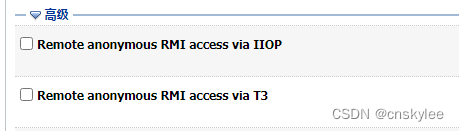
在控制台查看的步骤:
In the Change Center of the Administration Console, click Lock & Edit.
In the left pane of the console, under Domain Structure, select the domain name.
Select Security>General, then expand the Advanced node.
Clear the Remote anonymous RMI access via IIOP and Remote anonymous RMI access via T3 check boxes.
Click Save, then in the Change Center, click Activate Changes.
告警处理后,需要重启管理服务,才能将告警信息消除。
参考:
https://docs.oracle.com/en/middleware/fusion-middleware/weblogic-server/12.2.1.4/lockd/secure.html#GUID-D053EEFA-7461-4A22-865A-1180A49CACCD





 扫一扫
扫一扫


 1966
1966

 被折叠的 条评论
为什么被折叠?
被折叠的 条评论
为什么被折叠?
 到【灌水乐园】发言





