#import required librariesimport numpy as np
import pandas as pd
#import matplotlibimport matplotlib.pyplot as plt
#display plots in the notebook itself%matplotlib inline
2.Matplotlib basics
# set plot size
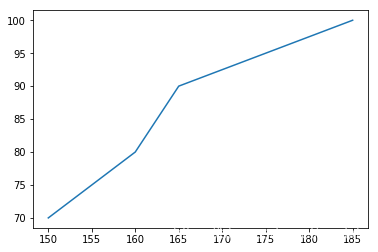
height =[150,160,165,185]
weight =[70,80,90,100]#draw the plot
plt.plot(height,weight)#out<<
#draw the plot
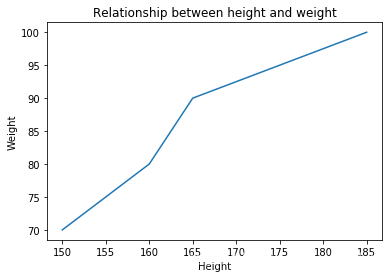
plt.plot(height,weight)# add title
plt.title("Relationship between height and weight")#labels x axis
plt.xlabel("Height")#label y axis
plt.ylabel("Weight")#out<<
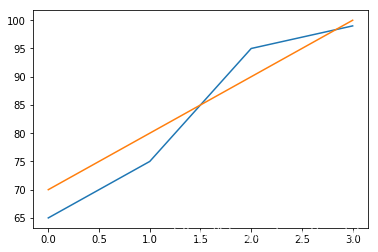
calories_burnt =[65,75,95,99]#draw the plot for calories burnt
plt.plot(calories_burnt)#draw the plot for weight
plt.plot(weight)#out<<
# draw the plot for calories burnt
plt.plot(calories_burnt)# draw the plot for weight
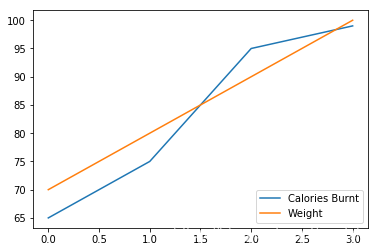
plt.plot(weight)#add lengend int the lower right part of the figure
plt.lengend(labels =['Calories Burnt','Weight'],loc ='lower right')#out<<
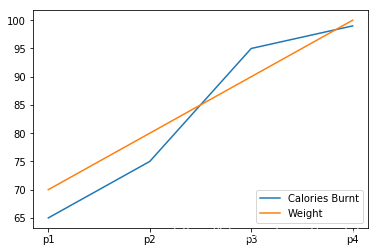
# draw the plot
plt.plot(calories_burnt)
plt.plot(weight)# add legend in the lower right part of the figure
plt.legend(labels=['Calories Burnt','Weight'], loc='lower right')#set labels int each of these persons
plt.xticks([0,1,2,3],['p1','p2','p3','p4']);#out<<
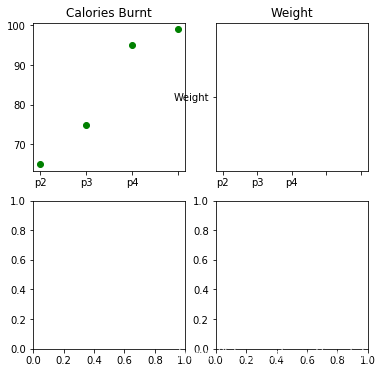
#create 4 plots
fig,ax = plt.subplots(nrowa =2,ncols =2,figsize =(6,6))#plot on 0 row and 0 column
ax[0,0].plot(calories_burnt,'go')#plot on 0 row and 0 column
ax[0,1].plot("Weight")#set titles for subplots
ax[0,0].set_title("Calories Burnt")
ax[0,1].set_title("Weight")#set labels for each of these persons
ax[0,0],set_xticklabels(labels =['p1','p2','p3','p4'])
ax[0,1].set_xticklabels(labels =['p1','p2','p3','p4'])#out<<
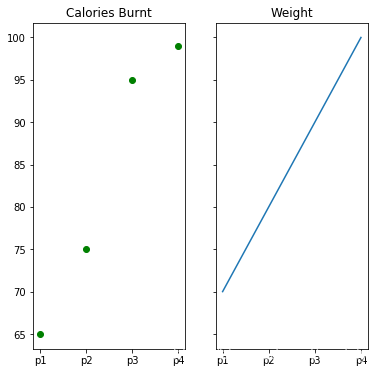
# create 2 plots
fig,ax = plt.subplots(nrow =1,ncols =2,figsize =(6,6),sharex =True,sharey =True)# plot on 0 row and 0 column
ax[0].plot(calories_burnt,'go')# plot on 0 row and 1 column
ax[1].plot(weight)# set titles for subplots
ax[0].set_title("Calories Burnt")
ax[1].set_title("Weight")# set ticks for each of these persons
ax[0].set_xticks([0,1,2,3]);
ax[1].set_xticks([0,1,2,3]);# set labels for each of these persons
ax[0].set_xticklabels(labels=['p1','p2','p3','p4']);
ax[1].set_xticklabels(labels=['p1','p2','p3','p4']);#out<<



 本文详细介绍使用Matplotlib进行数据可视化的步骤,包括环境搭建、基本绘图操作、多图展示及子图设置等,适合初学者快速掌握Matplotlib绘图技巧。





 扫一扫
扫一扫


 被折叠的 条评论
为什么被折叠?
被折叠的 条评论
为什么被折叠?
 到【灌水乐园】发言





