 Python爬虫获取研招网专业信息


 这段代码演示了如何使用Python爬虫从研招网获取特定专业的招生信息,包括招生单位、考试方式、学院、专业等详细数据,并将信息保存到txt文件中。请注意避免频繁运行以免对服务器造成压力。
本文主要描述了爬虫在研招网上的使用,请使用者不要频繁去运行代码,对服务器造成压力,否则后果自负。同时希望该代码可以帮助正在考研学子们可以筛选出自己喜欢的学校。
1.首先登陆研招网信息通过专业代码查询研招网上的专业代码。
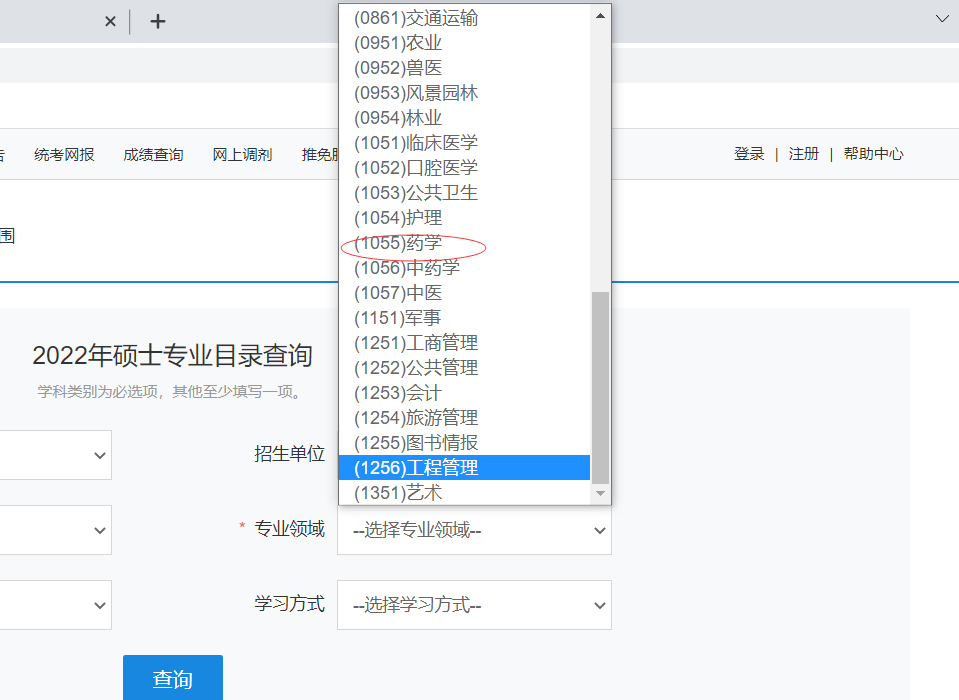
2.更改代码中学校的代码
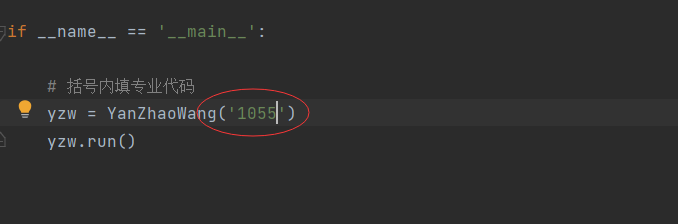
3.运行程序,代码附在下方。运行结束后会自动生成一个文本txt,你想要的信息就在里面。
import requestsfrom lxml import etreeimport redata ={"ssdm":"","dwmc":"","mldm":"zyxw","mlmc":"","yjxkdm":"","zymc":"","xxfs":"","pageno":""}class UniversityInfo:    def __init__(self):        # 招生单位、考试方式、院系所、专业、学习方式、研究方向、指导老师、拟招人数、备注、政治、外语、业务课一、业务课二        self.EnrollmentUnit = ""        self.ExaminationMethod = ""        self.CollegesDepartments = ""        self.Major = ""        self.learningStyle = ""        self.ResearchDirection = ""        self.Instructor = ""        self.Number = ""        self.Remarks = ""        self.Politics = ""        self.English = ""        self.BusinessClass1 = ""        self.BusinessClass2 = ""class YanZhaoWang:    def __init__(self,code):        self.url = "https://y 安徽党政培训 www.tjganxun.cn z.chsi.com.cn/zsml/queryAction.do?ssdm&dwmc&mldm=zyxw&mlmc&yjxkdm={}&zymc&xxfs&pageno={}".format(code)        self.data = data        self.data["yjxkdm"]=code        self.page = 1        self.schoolUrl = []        self.facultyUrl = []        self.schoolInfo = []    def GetFacultyUrl(self):        for i in self.schoolUrl:            response = requests.post("https://yz.chsi.com.cn"+i).text            response = etree.HTML(response)            url = response.xpath('//table/tbody//td[8]/a/@href')            for i in url:                print(i)                self.facultyUrl.append(i)    def GetSchoolInfo(self):        for i in self.facultyUrl:            response = requests.post("https://yz.chsi.com.cn/"+i).text            response = etree.HTML(response)            schoolinfo = UniversityInfo()            schoolinfo.EnrollmentUnit = response.xpath('//table[@class="zsml-condition"]/tbody/tr[1]/td[2]/text()')[0]            schoolinfo.ExaminationMethod = response.xpath('//table[@class="zsml-condition"]/tbody/tr[1]/td[4]/text()')[0]            schoolinfo.CollegesDepartments = response.xpath('//table[@class="zsml-condition"]/tbody/tr[2]/td[2]/text()')[0]            schoolinfo.Major = response.xpath('//table[@class="zsml-condition"]/tbody/tr[2]/td[4]/text()')[0]            schoolinfo.learningStyle = response.xpath('//table[@class="zsml-condition"]/tbody/tr[3]/td[2]/text()')[0]            schoolinfo.ResearchDirection = response.xpath('//table[@class="zsml-condition"]/tbody/tr[3]/td[4]/text()')[0]            schoolinfo.Instructor = response.xpath('//table[@class="zsml-condition"]/tbody/tr[4]/td[2]/text()')            schoolinfo.Number = response.xpath('//table[@class="zsml-condition"]/tbody/tr[4]/td[4]/text()')[0]            schoolinfo.Remarks = response.xpath('//table[@class="zsml-condition"]/tbody/tr[5]/text()')[0]            table = response.xpath('//tbody[@class="zsml-res-items"]')            for i in table:                schoolinfo.Politics = i.xpath('tr/td[1]/text()')[0]                schoolinfo.English = i.xpath('tr/td[2]/text()')[0]                schoolinfo.BusinessClass1 = i.xpath('tr/td[3]/text()')[0]                schoolinfo.BusinessClass1 = i.xpath('tr/td[4]/text()')[0]                self.schoolInfo.append(schoolinfo)    def GetSchoolUrl(self,url):        response = requests.post(url).text        response = etree.HTML(response)        page = response.xpath('//li[@class="lip lip-last"]/a/@onclick')        url = response.xpath('//*[@id="form3"]/a/@href')        for i in url:            self.schoolUrl.append(i)        print(page)        if page!=[]:            self.page += 1            self.GetSchoolUrl(self.url.format(self.page))    def WriteSchool(self):        with open("./text.txt",'a',encoding="utf-8")as f:            for i in self.schoolInfo:                print(i.EnrollmentUnit)                f.write(self.Tostring(i.EnrollmentUnit)+"	"+self.Tostring(i.ExaminationMethod)+"	"+self.Tostring(i.CollegesDepartments)+"	"+self.Tostring(i.Major)+"	"+self.Tostring(i.learningStyle)+"	"+self.Tostring(i.ResearchDirection)+"	"+self.Tostring(i.Instructor)+"	"+self.Tostring(i.Number)+"	"+self.Tostring(i.Remarks)+"	"+self.Tostring(i.Politics)+"	"+self.Tostring(i.English)+"	"+self.Tostring(i.BusinessClass1)+'	'+self.Tostring(i.BusinessClass2)+'
')    def Tostring(self,str):        str ="".join(str)        return re.sub("[
]+","",str)    def run(self):        self.GetSchoolUrl(self.url.format(self.page))        self.GetFacultyUrl()        self.GetSchoolInfo()        self.WriteSchool()if __name__ == '__main__':    # 括号内填专业代码    yzw = YanZhaoWang('1055')    yzw.run()
代码详细解释
代码运行过程中需要requests、lxml、re库
学校介绍是有UniversityInfo类以字典形式储存的
YanZhaoWang类主要负责实现代码的主要逻辑






 扫一扫
扫一扫


 4809
4809


 到【灌水乐园】发言



