



可以配置Feign内置ribbon配置项和hystrix熔断的Fallback配置(即Feign整合了ribbon,hystrix;且Feign主要作用是内部服务之间调用)
- 负载均衡
- 服务熔断
- 请求压缩
- 日志级别
Feign内置ribbon
consumer_demo服务的配置文件配置超时时间2s,超过2s直接报错。
application.yml
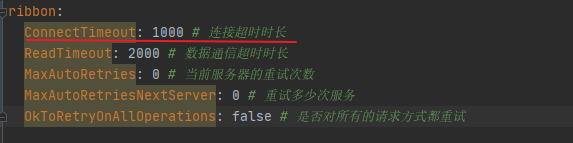
#Feign的ribbon配置
ribbon:
  ConnectTimeout: 1000 # 连接超时时长
  ReadTimeout: 2000 # 数据通信超时时长
  MaxAutoRetries: 0 # 当前服务器的重试次数
  MaxAutoRetriesNextServer: 0 # 重试多少次服务
  OkToRetryOnAllOperations: false # 是否对所有的请求方式都重试
user_service服务的配置文件配置睡眠时间2s
application.yml
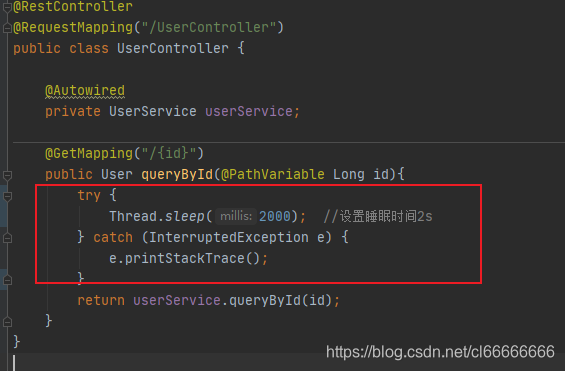
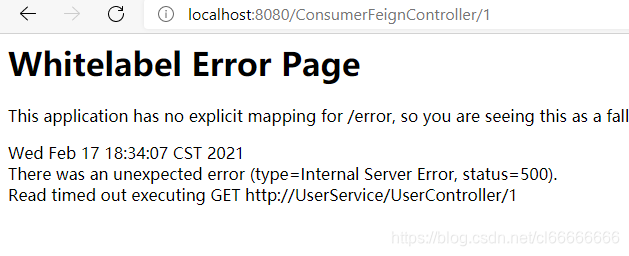
访问直接报错:超时
Feign主要作用:自动根据参数拼接http请求地址。
consumer-demo
导入坐标
- pom.xml
<?xml version="1.0" encoding="UTF-8"?>
<project xmlns="http://maven.apache.org/POM/4.0.0"
         xmlns:xsi="http://www.w3.org/2001/XMLSchema-instance"
         xsi:schemaLocation="http://maven.apache.org/POM/4.0.0 http://maven.apache.org/xsd/maven-4.0.0.xsd">
    <parent>
        <artifactId>springcloud_parent</artifactId>
        <groupId>li.chen.com</groupId>
        <version>1.0-SNAPSHOT</version>
    </parent>
    <modelVersion>4.0.0</modelVersion>

    <artifactId>consumer_demo</artifactId>

    <dependencies>
        <dependency>
            <groupId>org.springframework.boot</groupId>
            <artifactId>spring-boot-starter-web</artifactId>
        </dependency>
        <dependency>
            <groupId>org.springframework.cloud</groupId>
            <artifactId>spring-cloud-starter-netflix-eureka-client</artifactId>
        </dependency>
        <dependency>
            <groupId>org.springframework.cloud</groupId>
            <artifactId>spring-cloud-starter-netflix-hystrix</artifactId>
        </dependency>
        <dependency>
            <groupId>org.springframework.cloud</groupId>
            <artifactId>spring-cloud-starter-openfeign</artifactId>
        </dependency>
    </dependencies>
</project>
配置文件
- application.yml
spring:
  application:
    name: consumer_demo

eureka:
  client:
    service-url:
      defaultZone: http://127.0.0.1:10086/eureka

    # 获取服务地址列表间隔时间,默认30秒
    registry-fetch-interval-seconds: 10

#Feign的ribbon配置
ribbon:
  ConnectTimeout: 1000 # 连接超时时长
  ReadTimeout: 2000 # 数据通信超时时长
  MaxAutoRetries: 0 # 当前服务器的重试次数
  MaxAutoRetriesNextServer: 0 # 重试多少次服务
  OkToRetryOnAllOperations: false # 是否对所有的请求方式都重试
    #随机策略
  NFLoadBalancerRuleClassName: com.netflix.loadbalancer.RandomRule
springboot启动类
- ConsumerApplication
package li.chen.com.consumer;

import org.springframework.boot.SpringApplication;
import org.springframework.boot.autoconfigure.SpringBootApplication;
import org.springframework.cloud.client.discovery.EnableDiscoveryClient;
import org.springframework.cloud.client.loadbalancer.LoadBalanced;
import org.springframework.cloud.openfeign.EnableFeignClients;
import org.springframework.context.annotation.Bean;
import org.springframework.web.client.RestTemplate;

@EnableDiscoveryClient   //开启Eureka客户端发现功能
@SpringBootApplication
@EnableFeignClients  //开启Feign功能
public class ConsumerApplication {
    public static void main(String[] args) {
        SpringApplication.run(ConsumerApplication.class,args);
    }

    @Bean
    @LoadBalanced
    public RestTemplate restTemplate(){
        return new RestTemplate();
    }

}
各层文件
pojo层
- User
package li.chen.com.consumer.pojo;

import lombok.Data;

import java.util.Date;

/**
 * @ClassName: User
 * @Description 接收数据,不进行数据库交互,故不需要加user_service里的那些注解
 **/
@Data
public class User {

    private Integer id;

    private String userName;

    private String passWord;

    private Date birthday;
}
client层
package li.chen.com.consumer.client;

import li.chen.com.consumer.pojo.User;
import org.springframework.cloud.openfeign.FeignClient;
import org.springframework.web.bind.annotation.GetMapping;
import org.springframework.web.bind.annotation.PathVariable;

//声明当前类是一个Feign客户端,指定服务名为UserService
@FeignClient("UserService")
public interface UserClient {

    // http://UserService/1   拼接的路径--》是UserService服务提供的路径
    @GetMapping("/UserController/{id}")
    User queryById(@PathVariable Long id);

}
controller层
- ConsumerFeignController
package li.chen.com.consumer.controller;

import li.chen.com.consumer.client.UserClient;
import li.chen.com.consumer.pojo.User;
import org.springframework.beans.factory.annotation.Autowired;
import org.springframework.web.bind.annotation.GetMapping;
import org.springframework.web.bind.annotation.PathVariable;
import org.springframework.web.bind.annotation.RequestMapping;
import org.springframework.web.bind.annotation.RestController;

@RestController
@RequestMapping("ConsumerFeignController")
public class ConsumerFeignController {

    @Autowired
    private UserClient userClient;

    @GetMapping("/{id}")
    public User queryById(@PathVariable Long id){
        return userClient.queryById(id);
    }

}
user_service
修改UserController
package li.chen.com.user.controller;

import li.chen.com.user.pojo.User;
import li.chen.com.user.service.UserService;
import org.springframework.beans.factory.annotation.Autowired;
import org.springframework.web.bind.annotation.GetMapping;
import org.springframework.web.bind.annotation.PathVariable;
import org.springframework.web.bind.annotation.RequestMapping;
import org.springframework.web.bind.annotation.RestController;

@RestController
@RequestMapping("/UserController")
public class UserController {

    @Autowired
    private UserService userService;

    @GetMapping("/{id}")
    public User queryById(@PathVariable Long id){
        try {
            Thread.sleep(2000);  //设置睡眠时间2s
        } catch (InterruptedException e) {
            e.printStackTrace();
        }
        return userService.queryById(id);
    }
}
测试
启动UserApplication9090
启动 EurekaServerApplication
启动 ConsumerApplication
访问 http://localhost:8080/ConsumerFeignController/2
Feign内置hystrix配置项(服务降级)
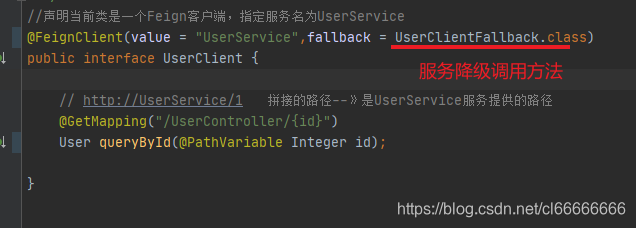
服务降级;增加降级调用方法UserClientFallback
application.yml ,UserClient, 有改动,其他与上面无变化(另id类型改为Integer)
application.yml

UserClient
consumer-demo
配置文件
- application.yml
spring:
  application:
    name: consumer_demo

eureka:
  client:
    service-url:
      defaultZone: http://127.0.0.1:10086/eureka

    # 获取服务地址列表间隔时间,默认30秒
    registry-fetch-interval-seconds: 10

hystrix:
  command:
    default:
      execution:
        isolation:
          thread:
            timeoutInMilliseconds: 2000
      circuitBreaker:
        errorThresholdPercentage: 50 # 触发熔断错误比例阈值,默认值50%
        sleepWindowInMilliseconds: 10000 # 熔断后休眠时长,默认值5秒
        requestVolumeThreshold: 10 # 熔断触发最小请求次数,默认值是20

#Feign的Hystrix配置
feign:
  hystrix:
    enabled: true # 开启Feign的熔断功能
springboot启动类
- ConsumerApplication
package li.chen.com.consumer;

import org.springframework.boot.SpringApplication;
import org.springframework.boot.autoconfigure.SpringBootApplication;
import org.springframework.cloud.client.discovery.EnableDiscoveryClient;
import org.springframework.cloud.client.loadbalancer.LoadBalanced;
import org.springframework.cloud.openfeign.EnableFeignClients;
import org.springframework.context.annotation.Bean;
import org.springframework.web.client.RestTemplate;

@EnableDiscoveryClient   //开启Eureka客户端发现功能
@SpringBootApplication
@EnableFeignClients  //开启Feign功能
public class ConsumerApplication {
    public static void main(String[] args) {
        SpringApplication.run(ConsumerApplication.class,args);
    }

    @Bean
    @LoadBalanced
    public RestTemplate restTemplate(){
        return new RestTemplate();
    }

}
各层文件
pojo层
- User
package li.chen.com.consumer.pojo;

import lombok.Data;

import java.util.Date;

/**
 * @ClassName: User
 * @Description 接收数据,不进行数据库交互,故不需要加user_service里的那些注解
 **/
@Data
public class User {

    private Integer id;

    private String userName;

    private String passWord;

    private Date birthday;
}
client层
package li.chen.com.consumer.client;

import li.chen.com.consumer.fallback.UserClientFallback;
import li.chen.com.consumer.pojo.User;
import org.springframework.cloud.openfeign.FeignClient;
import org.springframework.web.bind.annotation.GetMapping;
import org.springframework.web.bind.annotation.PathVariable;

//声明当前类是一个Feign客户端,指定服务名为UserService   //fallback 服务熔断调用方法
@FeignClient(value = "UserService",fallback = UserClientFallback.class)
public interface UserClient {

    // http://UserService/1   拼接的路径--》是UserService服务提供的路径
    @GetMapping("/UserController/{id}")
    User queryById(@PathVariable Integer id);

}
fallback层
- UserClientFallback
package li.chen.com.consumer.fallback;

import li.chen.com.consumer.client.UserClient;
import li.chen.com.consumer.pojo.User;
import org.springframework.stereotype.Component;

/**
 * @ClassName: UserClientFallback
 * @Description 服务降级调用的方法
 **/
@Component
public class UserClientFallback implements UserClient {

    @Override
    public User queryById(Integer id) {
        User user = new User();
        user.setId(id);
        user.setUserName("用户异常");
        return user;
    }
}
controller层
- ConsumerFeignController
package li.chen.com.consumer.controller;

import li.chen.com.consumer.client.UserClient;
import li.chen.com.consumer.pojo.User;
import org.springframework.beans.factory.annotation.Autowired;
import org.springframework.web.bind.annotation.GetMapping;
import org.springframework.web.bind.annotation.PathVariable;
import org.springframework.web.bind.annotation.RequestMapping;
import org.springframework.web.bind.annotation.RestController;

@RestController
@RequestMapping("ConsumerFeignController")
public class ConsumerFeignController {

    @Autowired
    private UserClient userClient;

    @GetMapping("/{id}")
    public User queryById(@PathVariable Long id){
        return userClient.queryById(id);
    }

}
user_service(服务提供者,设置超时)
修改UserController
package li.chen.com.user.controller;

import li.chen.com.user.pojo.User;
import li.chen.com.user.service.UserService;
import org.springframework.beans.factory.annotation.Autowired;
import org.springframework.web.bind.annotation.GetMapping;
import org.springframework.web.bind.annotation.PathVariable;
import org.springframework.web.bind.annotation.RequestMapping;
import org.springframework.web.bind.annotation.RestController;

@RestController
@RequestMapping("/UserController")
public class UserController {

    @Autowired
    private UserService userService;

    @GetMapping("/{id}")
    public User queryById(@PathVariable Long id){
        try {
            Thread.sleep(2000);  //设置睡眠时间2s
        } catch (InterruptedException e) {
            e.printStackTrace();
        }
        return userService.queryById(id);
    }
}
测试
启动UserApplication9090 (设置了休眠2s)
启动 EurekaServerApplication
启动 ConsumerApplication (设置超时时间2s)
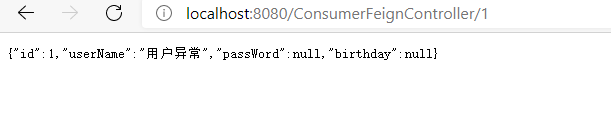
访问 http://localhost:8080/ConsumerFeignController/2
调用服务降级方法UserClientFallback
Feign内置hystrix配置项(请求压缩)
配置文件
- application.yml
spring:
  application:
    name: consumer_demo

eureka:
  client:
    service-url:
      defaultZone: http://127.0.0.1:10086/eureka

    # 获取服务地址列表间隔时间,默认30秒
    registry-fetch-interval-seconds: 10

#Feign的ribbon配置
ribbon:
  ConnectTimeout: 1000 # 连接超时时长
  ReadTimeout: 2000 # 数据通信超时时长
  MaxAutoRetries: 0 # 当前服务器的重试次数
  MaxAutoRetriesNextServer: 0 # 重试多少次服务
  OkToRetryOnAllOperations: false # 是否对所有的请求方式都重试

#Feign的Hystrix配置
feign:
  hystrix:
    enabled: true # 开启Feign的熔断功能
  compression:
    request:
      enabled: true # 开启请求压缩
      mime-types: text/html,application/xml,application/json # 设置压缩的数据类型
      min-request-size: 2048 # 设置触发压缩的大小下限
    response:
      enabled: true
Feign内置日志级别
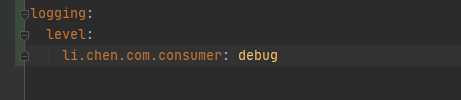
- application.yml 增加日志配置
- application.yml
spring:
  application:
    name: consumer_demo

eureka:
  client:
    service-url:
      defaultZone: http://127.0.0.1:10086/eureka

    # 获取服务地址列表间隔时间,默认30秒
    registry-fetch-interval-seconds: 10


#Feign的ribbon配置
ribbon:
  ConnectTimeout: 1000 # 连接超时时长
  ReadTimeout: 2000 # 数据通信超时时长
  MaxAutoRetries: 0 # 当前服务器的重试次数
  MaxAutoRetriesNextServer: 0 # 重试多少次服务
  OkToRetryOnAllOperations: false # 是否对所有的请求方式都重试
  #随机策略
  NFLoadBalancerRuleClassName: com.netflix.loadbalancer.RandomRule

#Feign的Hystrix配置
feign:
  hystrix:
    enabled: true # 开启Feign的熔断功能
  compression:
    request:
      enabled: true # 开启请求压缩
      mime-types: text/html,application/xml,application/json # 设置压缩的数据类型
      min-request-size: 2048 # 设置触发压缩的大小下限
    response:
      enabled: true

logging:
  level:
    li.chen.com.consumer: debug
FeignConfig 日志配置文件
package li.chen.com.consumer.config;

import feign.Logger;
import org.springframework.context.annotation.Bean;
import org.springframework.context.annotation.Configuration;

/**
 * @ClassName: FeignConfig
 * @Description 日志配置类
 **/
@Configuration
public class FeignConfig {
    @Bean
    Logger.Level feignLoggerLevel(){
        //记录所有请求和响应的明细
        return Logger.Level.FULL;
    }
}
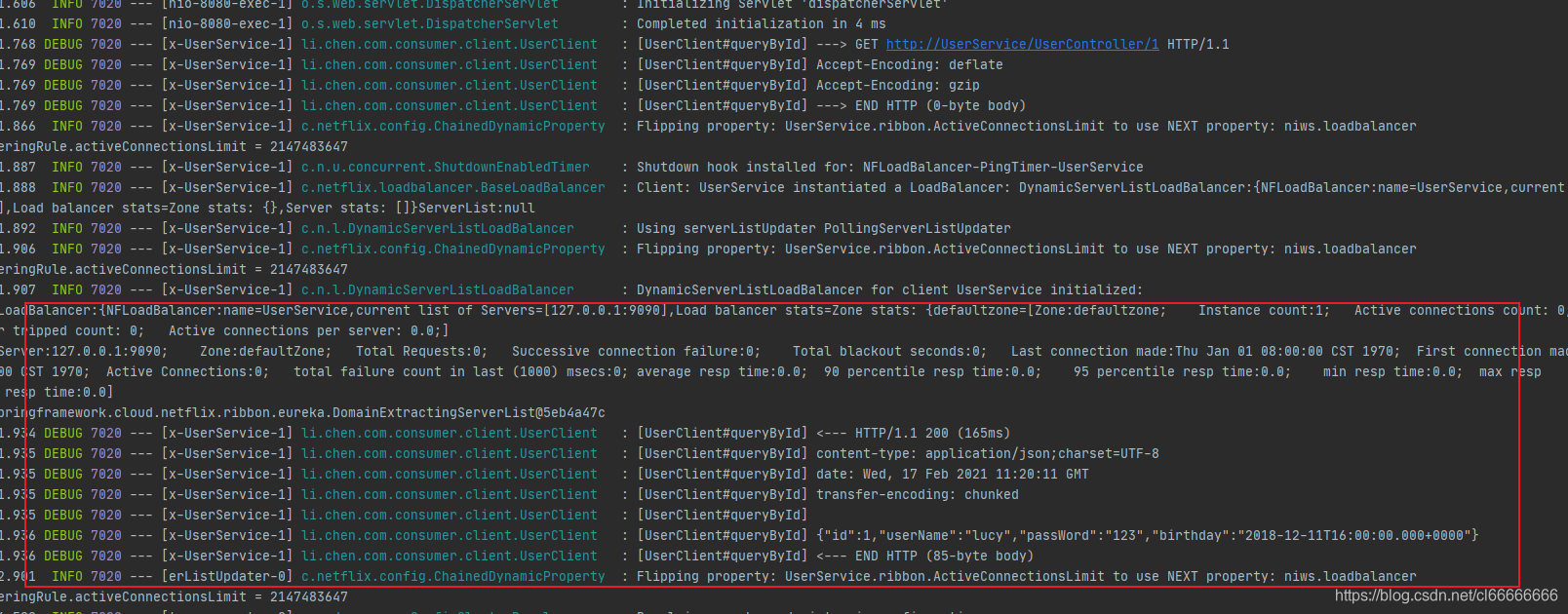
NONE:不记录任何日志信息,这是默认值。
BASIC:仅记录请求的方法,URL以及响应状态码和执行时间
HEADERS:在BASIC的基础上,额外记录了请求和响应的头信息
FULL:记录所有请求和响应的明细,包括头信息、请求体、元数据。
UserClient 添加日志文件配置
将日志文件配置到UserClient客户端
package li.chen.com.consumer.client;

import li.chen.com.consumer.config.FeignConfig;
import li.chen.com.consumer.fallback.UserClientFallback;
import li.chen.com.consumer.pojo.User;
import org.springframework.cloud.openfeign.FeignClient;
import org.springframework.web.bind.annotation.GetMapping;
import org.springframework.web.bind.annotation.PathVariable;

//声明当前类是一个Feign客户端,指定服务名为UserService
@FeignClient(value = "UserService",fallback = UserClientFallback.class,configuration = FeignConfig.class )
public interface UserClient {

    // http://UserService/1   拼接的路径--》是UserService服务提供的路径
    @GetMapping("/UserController/{id}")
    User queryById(@PathVariable Integer id);

}
启动UserApplication9090 (之前的服务休眠注释掉)
启动 EurekaServerApplication
启动 ConsumerApplication
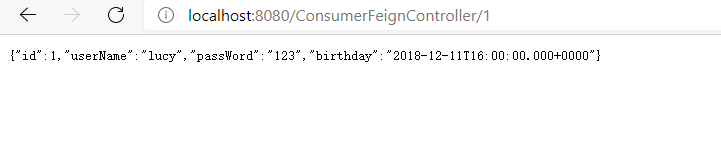
访问 http://localhost:8080/ConsumerFeignController/2
控制台打印的内容





 扫一扫
扫一扫


 1686
1686

 被折叠的 条评论
为什么被折叠?
被折叠的 条评论
为什么被折叠?
 到【灌水乐园】发言





