






 本文详细介绍了React Native中的网络请求实现,包括POST请求的封装与使用,以及如何结合FlatList展示网络数据,处理分页、无数据、无网络和加载中状态。
官网 https://reactnative.cn/
项目下载地址:https://github.com/hebiao6446/DemoProject
陆续更新中。。。
在移动端开发的时候,我们基本上都会用到列表,
| React native | iOS | Android |
|---|---|---|
| ListView | UITableView | RecyclerView |
说到列表,那么必然跟网络请求有关系,网络这块那么肯定,所以我们来搞一搞网络请求。。。。
1.react native的网络请求
网络请求这块,react native是比较良心的, 自带了网络请求框架
| React native | iOS | Android |
|---|---|---|
| fetch | AFNetworking | 这尼玛没统一 |
通常一个网络请求的三要素: 请求方式(GET,POST),请求地址,请求参数 (文件上传下载另说) 我们用react native来搞一搞网络请求一把。通常情况下,网络请求的三要素:请求方式(GET,POST等),请求地址,请求参数,大部分网络请求都是异步的,并且都是JSON格式的数据返回结果,那么这个就简单了。。。。 我们直接上代码,封装之后的代码
postHttp(url,postDic):Promise{
      return fetch(url,{
            method: 'POST',
            headers: {
                Accept: 'application/json',
                'Content-Type': 'application/json',
            },
            body: JSON.stringify(postDic),
        }).then((response) =>
        {
            return response.json()
        });
    }
上面是一个简单的POST请求,没什么好说的,使用的时候照抄就行了,但是我要说的是Promise (这里有介绍链接 https://www.jianshu.com/p/063f7e490e9a)多了就不解释了。。
来看代码
import BaseComponet from "./BaseComponet";
import {Image, StyleSheet, View} from "react-native";
import React from "react";
import {createStackNavigator} from "react-navigation-stack";
import HbColor from "../utils/HbColor";

class SecondView  extends BaseComponet{
    render(){
        return (
            <View style={styles.contain}>
            </View>
        );
    }
    componentDidMount(): void {
        this.getDaraFromUrl();
    }

    getDaraFromUrl():void{
        let url = "https://way.jd.com/jisuapi/get?appkey=cecba3ef670321c25c7246174f586113";
        let para = {
            start:1,
            num:20,
            channel:"头条"
        };
        this.postHttp(url,para).then((res)=>{
            console.log(res);
        }).catch((e)=>{
            console.log(e);
        });
    }

    postHttp(url,postDic):Promise{
          return fetch(url,{
              method: 'POST',
              headers: {
                  Accept: 'application/json',
                  'Content-Type': 'application/json',
              },
              body: JSON.stringify(postDic),
          }).then((response) =>
          {
              return response.json()
          });
    }
}
我们来看下重点的代码
getDaraFromUrl():void{
       let url = "https://way.jd.com/jisuapi/get?appkey=cecba3ef670321c25c7246174f586113";
        let para = {
            start:1,
            num:20,
            channel:"头条"
        };
        this.postHttp(url,para).then((res)=>{
            console.log(res);
        }).catch((e)=>{
            console.log(e);
        });
    }
这里面有个then 和 catch , 用一个最通俗的解释就是 请求成功用then ,请求失败用 catch
| 请求成功 | 请求失败,断网,超时,异常 |
|---|---|
| then | catch |
以上网络请求基本满足小厂的使用, 关于文件上传和下载,网络认证等 我会在后面讲到,文件上传和下载,认证跟简单的接口调用还是有点区别的
2.react native的列表使用(FlatList)
FlatList 是react native 良心自带的 https://reactnative.cn/docs/0.44/flatlist.html
| React native | iOS | Android |
|---|---|---|
| FlatList | UITableView | RecyclerView |
我们来搞一个从网络请求数据放在列表上显示的一个事情,我们先看看一个静态的效果
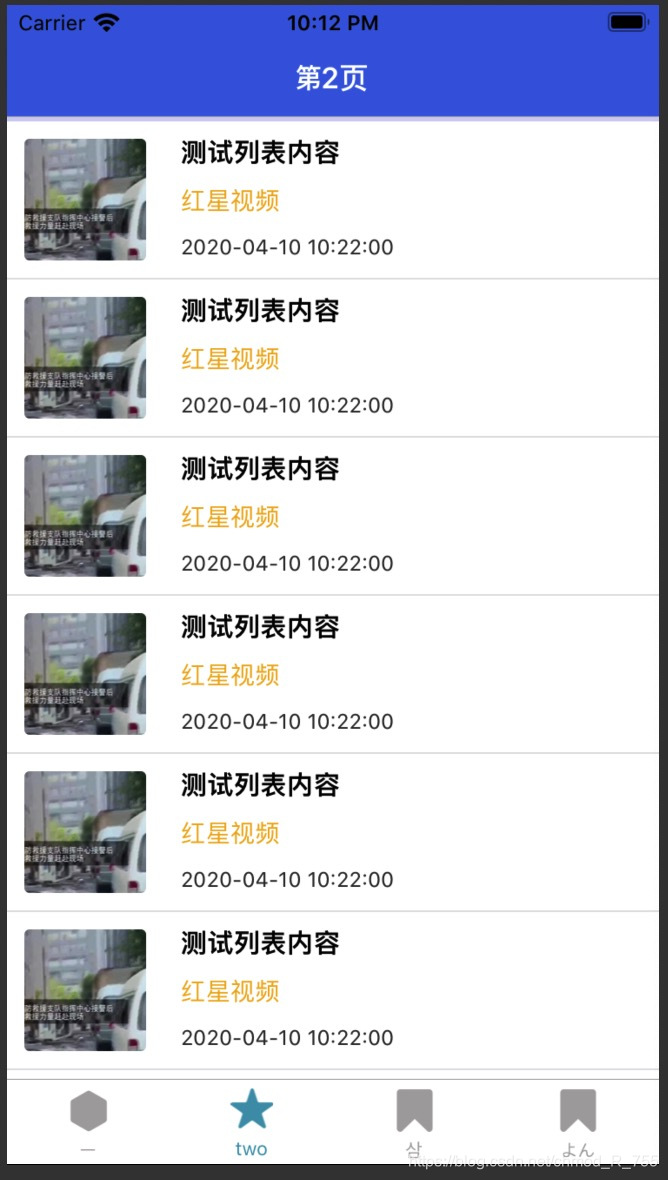
首先我们把列表对应的Cell(或者Item)布局贴出来
import {Image, StyleSheet, Text, TouchableOpacity, View} from "react-native";
import React, {Component} from "react";
export default class SecondViewCell extends Component{
    render(){
        let imgUrl = "https://p.ivideo.sina.com.cn/video/331/403/567/331403567.jpg";
        return (
            <TouchableOpacity onPress={()=>{
                this.props.onItemClick();
            }}>
                <View style={styles.container}>
                    <Image source={{uri:imgUrl}} style={{width:70,height:70,margin:10,borderRadius:3,}}/>
                    <View style={styles.container1}>
                        <Text style={{color:'#000000',fontSize:15,fontWeight:'900'}} >测试列表内容</Text>
                        <Text style={{color:'#efaf23',fontSize:14}} >红星视频</Text>
                        <Text style={{color:'#323232',fontSize:12}} >2020-04-10 10:22:00</Text>
                    </View>
                </View>
            </TouchableOpacity>
        );
    }
}
const styles = StyleSheet.create({
    container:{
        height:90,
        flex: 1,
        flexDirection:'row',
        justifyContent:'flex-start',
        backgroundColor: '#ffffff',
    },
    container1:{
        flex: 1,
        flexDirection: 'column',
        justifyContent: 'space-between',
        // backgroundColor:"#f2f2f2",
        margin:10
    },

});
然后我们来分析下FlatList的使用,这里我直接贴上Flatlist的代码并逐个讲解了
 <FlatList
                    data={this.state.arrList}  ////  数据源
                    renderItem={this.renderItemView}  //// 列表对应的单个Cell
                    keyExtractor={(item, index) => (index + '1')}  //// 列表对应的key属性,基本用不上
                    refreshControl={   /////// 列表对应的下拉刷新的组件
                        <RefreshControl
                            title={'加载中...'}
                            refreshing={this.state.isRefreshing}
                            onRefresh={this.refreshData.bind(this)}//因为涉及到this.state
                            colors={['#ff0000', '#00ff00','#0000ff','#3ad564']}
                            progressBackgroundColor="#ffffff"
                        />
                    }
                    onEndReachedThreshold={0.2}  ////  决定当距离内容最底部还有多远时触发onEndReached回调。
                    onScrollBeginDrag={()=>{
                        this.state.canLoadMore = false;  /// 防止onEndReachedThreshold 被重复调用
                    }}
                    onScrollEndDrag={()=>{
                        this.state.canLoadMore = true; /// 防止onEndReachedThreshold 被重复调用
                    }}
                    onMomentumScrollBegin={()=>{
                        this.state.canLoadMore = false; /// 防止onEndReachedThreshold 被重复调用
                    }}
                    onMomentumScrollEnd={()=>{
                        this.state.canLoadMore = true; /// 防止onEndReachedThreshold 被重复调用
                    }}
                    ListFooterComponent={()=>this.loadMoreView()}//上拉加载更多视图
                    ItemSeparatorComponent = {  //// 列表对应的分割线
                        ()=>{
                            return (<View style={{height: 1, width: '100%', backgroundColor: '#e2e2e2'}}/>)
                        }
                    }
                    onEndReached={()=>{
                        // 数据少
                        if (this.state.footerStatus != 1) return;
                        // if (!this.state.canLoadMore) return;
                        this.setState({
                            pageNow:this.state.pageNow+1,
                        },()=>{
                            this.getDaraFromUrl();
                        })

                    }}
                />
FlatList的基本属性我们已经说完了,我们现在进入实战阶段,从网络上获取数据
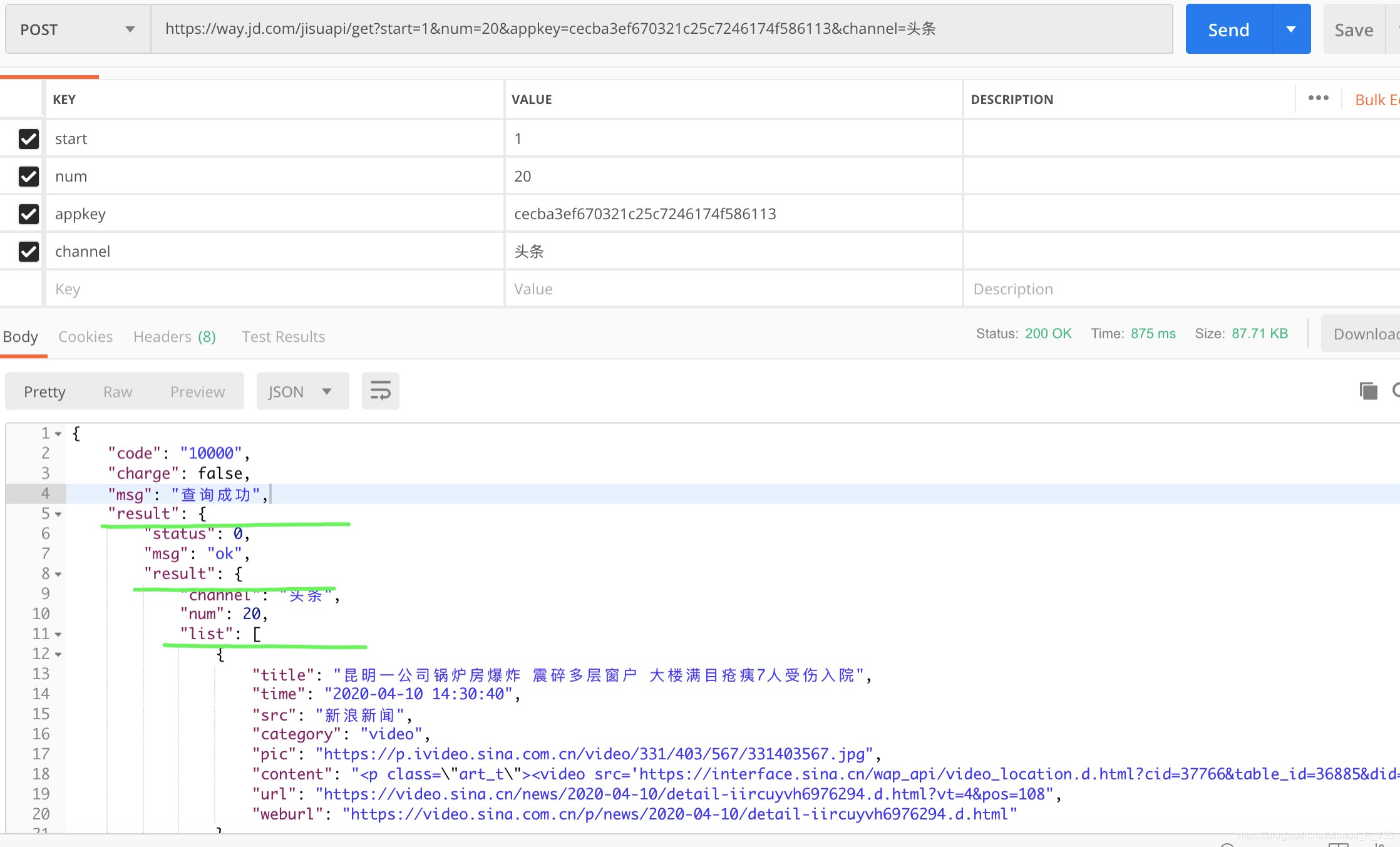
我们接如正式的数据看下效果 , 如下图

其实挺简单的,我们只需要把请求的数据跟 state 里面的数据关联起来就可以了。。。
getDaraFromUrl():void{
        let url = "https://way.jd.com/jisuapi/get?appkey=cecba3ef670321c25c7246174f586113";
        let para = {
            start:this.state.start,
            num:this.state.num,
            channel:"头条"
        };
        this.postHttp(url,para).then((res)=>{
            if (res.result.status == 0){
                let dataList = res.result.result.list;
                let newList  = this.state.arrList.concat(dataList);
                let ftStatus =  dataList.length == this.state.num ? 1:2;
                let ddList = this.state.start == 1 ? dataList : newList;
                this.setState({
                    arrList:ddList,
                    footerStatus:ftStatus,
                    isRefreshing:false,
                    netError:false,
                })
            }else {
                this.setState({
                    isRefreshing:false,
                    netError:false,
                })
            }

        }).catch((e)=>{
            this.setState({
                isRefreshing:false,
                netError:true,
            })
        });
    }
刚刚上面提到有个地方 ,需要重点说下
  this.setState({
           start:this.state.start+1,
 },   ()=>{
          this.getDaraFromUrl();
 })
分页请求在实际情况下是非常常见的,分页是的时候也就是页面+1就可以, 那么在 react native 里面,我要说的重点来了 this.setState设置属性的值是个异步的过程,也就是设置成功只有会有回调函数
这些都不重要了 。。。。
3. FlatList 无数据,无网络,加载中页面
目前市场上的APP都有这种需求 。。 这个就不解释了 。。。我先把这几个页面列出来
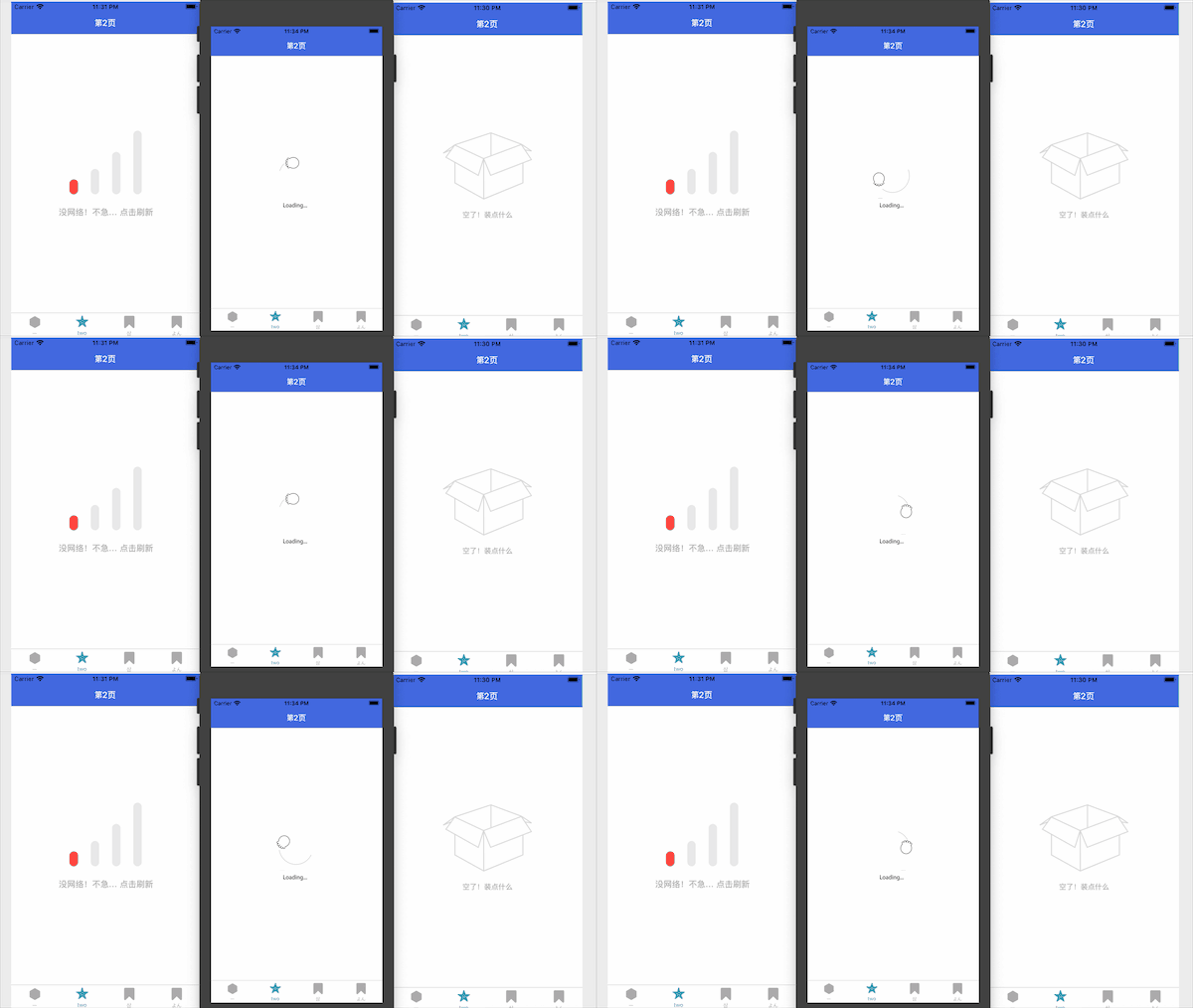
得出下面结论
| FlatList data为空 | FlatList data 不为空 | |
|---|---|---|
| 开始加载数据 | 显示加载动画页面 | 显示正常列表页面,提示加载中 |
| 加载数据完成 | 显示无数据页面 | 显示正常列表页面,提示加载完成 |
| 无网络请求失败 | 显示无网络页面 | 显示正常列表页面,提示网络错误 |
也就是只有当FlatList data为空的时候回出现不同的页面
直接上代码
render(){
        return (
            <View style={styles.contain}>

                {this.state.arrList.length > 0 ?
                <FlatList
                    data={this.state.arrList}
                    renderItem={this.renderItemView}
                    keyExtractor={(item, index) => (index + '1')}
                    refreshControl={
                        <RefreshControl
                            title={'加载中...'}
                            refreshing={this.state.isRefreshing}
                            onRefresh={this.refreshData.bind(this)}//因为涉及到this.state
                            colors={['#ff0000', '#00ff00','#0000ff','#3ad564']}
                            progressBackgroundColor="#ffffff"
                        />
                    }
                    onEndReachedThreshold={0.2}
                    onScrollBeginDrag={()=>{
                        this.state.canLoadMore = false;
                    }}
                    onScrollEndDrag={()=>{
                        this.state.canLoadMore = true;
                    }}
                    onMomentumScrollBegin={()=>{
                        this.state.canLoadMore = false;
                    }}
                    onMomentumScrollEnd={()=>{
                        this.state.canLoadMore = true;
                    }}
                    ListFooterComponent={()=>this.loadMoreView()}//上拉加载更多视图
                    ItemSeparatorComponent = {
                        ()=>{
                            return (<View style={{height: 1, width: '100%', backgroundColor: '#e2e2e2'}}/>)
                        }
                    }
                    onEndReached={()=>{
                        // 数据少
                        if (this.state.footerStatus != 1) return;
                        // if (!this.state.canLoadMore) return;
                        this.setState({
                            start:this.state.start+1,
                        },()=>{
                            this.getDaraFromUrl();
                        })
                    }}
                />: (this.state.netError ? <NetErrorView  onRefreshClick = {this.refreshData}/> : (this.state.isRefreshing ? <LoadDataView /> : <NodataView /> )) }
            </View>
        );
    }
4. 完整的网络请求 和 FlatList 无数据,无网络,加载中页面,列表点击item 代码
import BaseComponet from "./BaseComponet";
import {Image, StyleSheet, View,FlatList,RefreshControl,ActivityIndicator,Text} from "react-native";
import React from "react";
import {createStackNavigator} from "react-navigation-stack";
import HbColor from "../utils/HbColor";
import SecondViewCell from "./SecondViewCell";


import NetErrorView from "../subview/NetErrorView";
import LoadDataView from "../subview/LoadDataView";
import NodataView from "../subview/NodataView";

class SecondView  extends BaseComponet{
    constructor(props){
        super(props);
        this.state={
            start:1,
            num:10,
            arrList:[],
            netError:false,
            isRefreshing:false,
            footerStatus:0,
            canLoadMore:false,
        };
        this.refreshData = this.refreshData.bind(this);
    }
    refreshData():void{

        this.setState({
            start:1,
            isRefreshing:true,
        },()=>{
            this.getDaraFromUrl();
        });
    }
    render(){
        return (
            <View style={styles.contain}>

                {this.state.arrList.length > 0 ?
                <FlatList
                    data={this.state.arrList}
                    renderItem={this.renderItemView}
                    keyExtractor={(item, index) => (index + '1')}
                    refreshControl={
                        <RefreshControl
                            title={'加载中...'}
                            refreshing={this.state.isRefreshing}
                            onRefresh={this.refreshData.bind(this)}//因为涉及到this.state
                            colors={['#ff0000', '#00ff00','#0000ff','#3ad564']}
                            progressBackgroundColor="#ffffff"
                        />
                    }
                    onEndReachedThreshold={0.2}
                    onScrollBeginDrag={()=>{
                        this.state.canLoadMore = false;
                    }}
                    onScrollEndDrag={()=>{
                        this.state.canLoadMore = true;
                    }}
                    onMomentumScrollBegin={()=>{
                        this.state.canLoadMore = false;
                    }}
                    onMomentumScrollEnd={()=>{
                        this.state.canLoadMore = true;
                    }}
                    ListFooterComponent={()=>this.loadMoreView()}//上拉加载更多视图
                    ItemSeparatorComponent = {
                        ()=>{
                            return (<View style={{height: 1, width: '100%', backgroundColor: '#e2e2e2'}}/>)
                        }
                    }
                    onEndReached={()=>{
                        // 数据少
                        if (this.state.footerStatus != 1) return;
                        // if (!this.state.canLoadMore) return;
                        this.setState({
                            start:this.state.start+1,
                        },()=>{
                            this.getDaraFromUrl();
                        })
                    }}
                />: (this.state.netError ? <NetErrorView  onRefreshClick = {this.refreshData}/> : (this.state.isRefreshing ? <LoadDataView /> : <NodataView /> )) }


            </View>
        );
    }
    componentDidMount(): void {
        this.getDaraFromUrl();
    }

    renderItemView({item}) {
        return (
            <SecondViewCell item = {item}   onItemClick = {()=>{
                    console.log(item.title)
            }}  />
        );
    }


    loadMoreView(){
        if (this.state.footerStatus == 0 ){
            return null;
        }else if (this.state.footerStatus == 1){
            return (<View style={{alignItems:'center',height:70,width:'100%',}}>
                <ActivityIndicator
                    style={{
                        margin:10}}
                    size={'small'}
                    animating={true}
                />
                <Text>正在加载更多</Text>
            </View>);
        }else {
            return (<View style={{alignItems:'center',height:44,width:'100%',textAlign: 'center',justifyContent: 'center'  }}>
                <Text>没有更多数据</Text>
            </View>);
        }
    }
    getDaraFromUrl():void{
        let url = "https://way.jd.com/jisuapi/get?appkey=cecba3ef670321c25c7246174f586113";
        let para = {
            start:this.state.start,
            num:this.state.num,
            channel:"头条"
        };
        this.postHttp(url,para).then((res)=>{
            if (res.result.status == 0){
                let dataList = res.result.result.list;
                let newList  = this.state.arrList.concat(dataList);
                let ftStatus =  dataList.length == this.state.num ? 1:2;
                let ddList = this.state.start == 1 ? dataList : newList;
                this.setState({
                    arrList:ddList,
                    footerStatus:ftStatus,
                    isRefreshing:false,
                    netError:false,
                })


            }else {
                this.setState({
                    isRefreshing:false,
                    netError:false,
                })
            }

        }).catch((e)=>{
            this.setState({
                isRefreshing:false,
                netError:true,
            })
        });
    }

    postHttp(url,postDic):Promise{
          return fetch(url,{
              method: 'POST',
              headers: {
                  Accept: 'application/json',
                  'Content-Type': 'application/json',
              },
              body: JSON.stringify(postDic),
          }).then((response) =>
          {
              return response.json()
          });
    }
}
const styles = StyleSheet.create({
    contain:{
        backgroundColor:'#ffffff',
        flex:1,
    },
});

const SecondNavi = createStackNavigator({
    Second: {
        screen: SecondView,
        navigationOptions: {
            title: '第2页',
            headerStyle: {
                backgroundColor: HbColor.COLOR_BLUE,
            },
            headerTintColor: '#ffffff',
        },
    },
}, {
    navigationOptions: ({
                            navigation
                        }) => ({
        tabBarVisible: navigation.state.index > 0 ? false : true,
    })
});

export default SecondNavi;
5. Android 使用GIF需要注意的事项
这是一个关于Image使用的文章 https://www.hangge.com/blog/cache/detail_1542.html
(1)React Native 默认支持 JPG、PNG 格式。
(2)在 iOS 平台下,还支持 GIF、WebP 格式。
(3)在 Android 平台下,默认不支持 GIF、WebP 格式。可以通过修改 Android 工程设置让其支持这两种格式:
也就是 Android如果使用gif要导入一个库
dependencies {
  compile 'com.facebook.fresco:animated-gif:0.11.0'  //需要GIF动画支持添加本行语句
  compile 'com.facebook.fresco:webpsupport:0.11.0'  //需要WebP格式支持添加本行语句
  compile 'com.facebook.fresco:animated-webp:0.11.0'  //需要WebP动画支持添加本行语句
}
项目下载地址:https://github.com/hebiao6446/DemoProject
陆续更新中。。。





 扫一扫
扫一扫


 331
331

 被折叠的 条评论
为什么被折叠?
被折叠的 条评论
为什么被折叠?
 到【灌水乐园】发言





