


 本文通过两个实例展示了如何使用HTML和CSS实现特定的网页布局效果。第一个实例介绍了一个包含多种链接选项的右侧导航栏;第二个实例则展示了一个简洁的商品分类模块。
作业:
完成预览图:

代码:
<!DOCTYPE html>
<html>
<head>
<meta charset="UTF-8">
<title>Insert title here</title>
<style type="text/css">
	div{ float: right; text-align: center; }
	a{ text-decoration: none;  font-size: 15px; }
	.d_zt{ margin-right: 100px; margin-top: 70px;}
	.zc{ width: 50px; height: 30px; background-image: url("images/t2.gif");
		background-position: 3px -26px; }
	.bz{  width: 30px; height: 25px; background-image: url("images/t2.gif"); }
	.bzpink{ background-position: 90px -2px; }
	.bzred{ background-position: 130px -2px; }
	.bzyellow{ background-position: 170px -2px; }
	.bzblack{ background-position: 210px -2px; }
</style>
</head>
<body>
<div class="d_zt">
	<div class="zc"><a href="#">注册</a></div>
	<div class="zc"><a href="#">登录</a></div>
	<div><a href="#">设为首页</a></div>
	<div class="bz bzpink"></div>
	<div><a href="#">加入收藏</a></div>
	<div class="bz bzred"></div>
	<div><a href="#">帮助中心</a></div>
	<div class="bz bzyellow"></div>
	<div><a href="#">购物车</a></div>
	<div class="bz bzblack"></div>
</div>
</body>
</html>
选做题:
完成预览图:
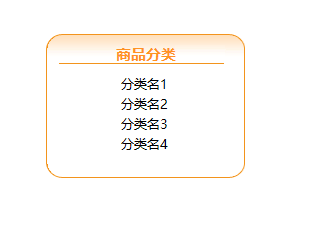
代码:
<!DOCTYPE html>
<html>
<head>
<meta charset="UTF-8">
<title>Insert title here</title>
<style type="text/css">
	div,p{ margin: 0px auto; background-repeat: no-repeat;  }
	.zt{ width: 300px; margin: 0px 0px;  }
	.top{ width: 200px;height: 40px; background-image: url("images/xz.gif");
	 	 background-position: 0px -50px; margin-top: 50px; }
	.top_bt{ width: 60px; font-family: 微软雅黑; font-weight: bold; font-size: 15px; color: #FF9224;
			 line-height: 40px; }
	.fl{ width: 200px; height: 20px; background-image: url("images/xz.gif"); background-position: 0px -80px; }
	.fl_wz{ width: 50px; font-family: 微软雅黑; font-size: 13px; line-height: 20px;}
	.bottom{ width: 200px; height: 25px; background-image: url("images/xz.gif"); background-position: 0px -90px; }
</style>
</head>
<body>
	<div class="zt">
		<div class="top">
			<p class="top_bt">商品分类</p>
		</div>
		<div class="fl"><div class="fl_wz">分类名1</div></div>
		<div class="fl"><div class="fl_wz">分类名2</div></div>
		<div class="fl"><div class="fl_wz">分类名3</div></div>
		<div class="fl"><div class="fl_wz">分类名4</div></div>
		<div class="bottom"></div>
	</div>
</body>
</html>





 扫一扫
扫一扫


 3098
3098

 被折叠的 条评论
为什么被折叠?
被折叠的 条评论
为什么被折叠?
 到【灌水乐园】发言





