


一、本文介绍在windows环境下unity与usb串口进行通信的代码
web版本的放在下一个文章
注:
1.我的硬件是检测磁阻液位,用到四字节十六进制浮点数,所以这里会直接转换到十进制。
2.我的硬件会返回9字节响应,所以我会限制响应长度,可以进行适当更改
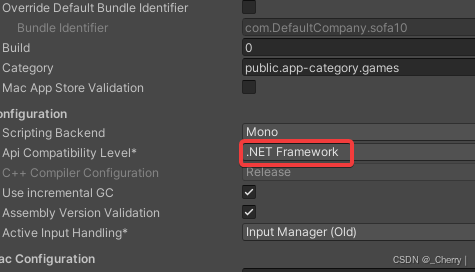
重要:再开始前一定要改为.NET 4.x,或者.NET Framework,因为.NET standard 2.0或者2.1不包括需要用到的using System.IO.Ports;更换路径为File/Build Setting/Player Settings.../Other Settings/Api Compatibility Level

二、脚本
using System;
using System.Collections;
using System.Collections.Generic;
using System.IO.Ports;
using System.Text;
using System.Threading;
using UnityEngine;

public class SerialPortCommunicationManager : MonoBehaviour
{
    private static SerialPortCommunicationManager _instance;
    public static SerialPortCommunicationManager Instance
    {
        get
        {

            if (_instance == null)
            {
                GameObject obj = new GameObject("SerialPortCommunicationManager");
                _instance = obj.AddComponent<SerialPortCommunicationManager>();
                DontDestroyOnLoad(obj);
            }
            return _instance;
        }
    }


    public string portName;// 串口号
    public int baudRate;// 波特率
    public int dataBit;//数据位
 最低0.47元/天 解锁文章






 扫一扫
扫一扫


 4965
4965

 被折叠的 条评论
为什么被折叠?
被折叠的 条评论
为什么被折叠?
 到【灌水乐园】发言





