



 本文详细介绍了在CentOS系统中使用yum源安装Nginx的过程,包括源配置、安装步骤、启动及检查运行状态的方法。同时,深入解析了Nginx的主配置文件nginx.conf和子配置文件default.conf的设置,涵盖了监听端口、域名配置、错误页面、日志记录等关键参数。最后,提供了如何通过重新加载配置来应用更改的指导。
注意:yum安装和解压安装位置不同,注意nginx和nginx.conf文件位置
一、yum内的Nginx源的配置
# 查看nginx信息
yum search nginx
yum list | grep
Nginx的yum源
官网http://nginx.org
# yum源配置地址
cd /etc/yum.repos.d/
# 创建Nginx配置文件
vi nginx.repo
# 文件内容 http://nginx.org/en/linux_packages.html#RHEL-CentOS
[nginx-stable]
name=nginx stable repo
baseurl=http://nginx.org/packages/centos/$releasever/$basearch/
gpgcheck=1
enabled=1
gpgkey=https://nginx.org/keys/nginx_signing.key
module_hotfixes=true

[nginx-mainline]
name=nginx mainline repo
baseurl=http://nginx.org/packages/mainline/centos/$releasever/$basearch/
gpgcheck=1
enabled=0
gpgkey=https://nginx.org/keys/nginx_signing.key
module_hotfixes=true
# 重新查看
yum search nginx
二、安装nginx并简单启动
yum -y install nginx
# 查看最新版本安装情况
nginx -v
```python
nginx 	# 启动nginx,可参考官网beginer guide
ps -aux | grep nginx	# 查看nginx运行情况
curl ip		# xshell查看欢迎页面
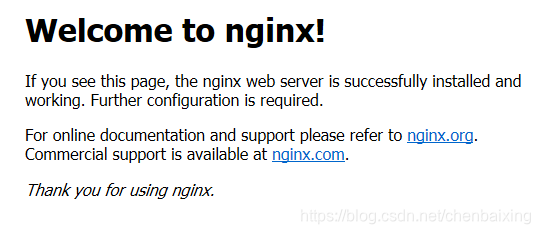
浏览器输入服务器ip,默认端口80,就可以看到欢迎页面啦
三、配置
主配置说明
cd /etc/nginx
ll
vi nginx.conf
四、Nginx的配置文件
查看nginx都安装到了哪些目录
whereis nginx
rpm -ql nginx
几个关键的位置:
/etc/nginx
/etc/nginx/conf.d
/etc/nginx/nginx.conf	# 主配置
1、nginx的主配置文件
输入命令行
cd /etc/nginx
vim nginx.conf
#运行用户,默认即是nginx,可以不进行设置
user  nginx;
#Nginx进程,一般设置为和CPU核数一样
worker_processes  1;
#错误日志存放目录
error_log  /var/log/nginx/error.log warn;
#进程pid存放位置
pid        /var/run/nginx.pid;

events {
    worker_connections  1024; # 单个后台进程的最大并发数
}

http {
    include       /etc/nginx/mime.types;   #文件扩展名与类型映射表
    default_type  application/octet-stream;  #默认文件类型
    #设置日志模式
    log_format  main  '$remote_addr - $remote_user [$time_local] "$request" '
                      '$status $body_bytes_sent "$http_referer" '
                      '"$http_user_agent" "$http_x_forwarded_for"';

    access_log  /var/log/nginx/access.log  main;

    sendfile        on;
    #tcp_nopush     on;

    keepalive_timeout  65;

    #gzip  on;

    include /etc/nginx/conf.d/*.conf;	# 子文件,默认有default.conf
}
2、子配置文件
cd /etc/nginx/conf.d/
vi default.conf
server {
    listen       80;	# 配置监听窗口
    server_name  localhost;		# 配置域名

    #charset koi8-r;
    #access_log  /var/log/nginx/host.access.log  main;

    location / {
        root   /usr/share/nginx/html;	# 服务默认启动目录
        index  index.html index.htm;	# 默认访问文件
    }

    #error_page  404              /404.html;	# 配置404页面

    # redirect server error pages to the static page /50x.html
    #
    error_page   500 502 503 504  /50x.html;	# 错误状态码的显示页面,配置后需要重启
    location = /50x.html {
        root   /usr/share/nginx/html;
    }

    # proxy the PHP scripts to Apache listening on 127.0.0.1:80
    #
    #location ~ \.php$ {
    #    proxy_pass   http://127.0.0.1;
    #}

    # pass the PHP scripts to FastCGI server listening on 127.0.0.1:9000
    #
    #location ~ \.php$ {
    #    root           html;
    #    fastcgi_pass   127.0.0.1:9000;
    #    fastcgi_index  index.php;
    #    fastcgi_param  SCRIPT_FILENAME  /scripts$fastcgi_script_name;
    #    include        fastcgi_params;
    #}

    # deny access to .htaccess files, if Apache's document root
    # concurs with nginx's one
    #
    #location ~ /\.ht {
    #    deny  all;
    #}
}
3、重新加载
配置好default.conf后,需要重启nginx
nginx -x reload






 扫一扫
扫一扫


 572
572

 被折叠的 条评论
为什么被折叠?
被折叠的 条评论
为什么被折叠?
 到【灌水乐园】发言





