



 本文详细介绍MyBatisPlus的特点及使用方法,包括无侵入、损耗小、强大的CRUD操作等特点,以及基本操作如增删改查、条件构造器Wrapper的使用技巧,内置插件配置等。
1.MyBatis Plus 概述
1.1.简介
官网:http://mp.baomidou.com/
参考教程:http://mp.baomidou.com/guide/
MyBatis-Plus(简称 MP)是一个 MyBatis 的增强工具,在 MyBatis 的基础上只做增强不做改变,为简化开发、提高效率而生。
1.2 特点
- 无侵入:只做增强不做改变,引入它不会对现有工程产生影响,如丝般顺滑
- 损耗小:启动即会自动注入基本 CURD,性能基本无损耗,直接面向对象操作
- 强大的 CRUD 操作:内置通用 Mapper、通用 Service,仅仅通过少量配置即可实现单表大部分 CRUD 操作,更有强大的条件构造器,满足各类使用需求
- 支持 Lambda 形式调用:通过 Lambda 表达式,方便的编写各类查询条件,无需再担心字段写错
- 支持多种数据库:支持 MySQL、MariaDB、Oracle、DB2、H2、HSQL、SQLite、Postgre、SQLServer2005、SQLServer 等多种数据库
- 支持主键自动生成:支持多达 4 种主键策略(内含分布式唯一 ID 生成器 - Sequence),可自由配置,完美解决主键问题
- 支持 XML 热加载:Mapper 对应的 XML 支持热加载,对于简单的 CRUD 操作,甚至可以无 XML 启动
- 支持 ActiveRecord 模式:支持 ActiveRecord 形式调用,实体类只需继承 Model 类即可进行强大的 CRUD 操作
- 支持自定义全局通用操作:支持全局通用方法注入( Write once, use anywhere )
- 支持关键词自动转义:支持数据库关键词(order、key…)自动转义,还可自定义关键词
- 内置代码生成器:采用代码或者 Maven 插件可快速生成 Mapper 、 Model 、 Service 、 Controller 层代码,支持模板引擎,更有超多自定义配置等您来使用
- 内置分页插件:基于 MyBatis 物理分页,开发者无需关心具体操作,配置好插件之后,写分页等同于普通 List 查询
- 内置性能分析插件:可输出 Sql 语句以及其执行时间,建议开发测试时启用该功能,能快速揪出慢查询
- 内置全局拦截插件:提供全表 delete 、 update 操作智能分析阻断,也可自定义拦截规则,预防误操作
- 内置 Sql 注入剥离器:支持 Sql 注入剥离,有效预防 Sql 注入攻击
2. 基本操作
2.1 常见API
BaseMapper 封装CRUD操作,泛型 T 为任意实体对象
- 增删改
| 方法名 | 描述 |
|---|---|
| int insert(T entity) | 插入一条记录,entity 为 实体对象 |
| int delete(Wrapper wrapper) | 根据 entity 条件,删除记录,wrapper 可以为 null |
| int deleteBatchIds(Collection idList) | 根据ID 批量删除 |
| int deleteById(Serializable id) | 根据 ID 删除 |
| int deleteByMap(Map<String, Object> map) | 根据 columnMap 条件,删除记录 |
| int update(T entity, Wrapper updateWrapper) | 根据 whereEntity 条件,更新记录 |
| int updateById(T entity); | 根据 ID 修改 |
- 查询
| 方法名 | 描述 |
|---|---|
| T selectById(Serializable id) | 根据 ID 查询 |
| T selectOne(Wrapper queryWrapper) | 根据 entity 条件,查询一条记录 |
| List selectBatchIds(Collection idList) | 根据ID 批量查询 |
| List selectList(Wrapper queryWrapper) | 根据 entity 条件,查询全部记录 |
| List selectByMap(Map<String, Object> columnMap) | 根据 columnMap 条件 |
| List<Map<String, Object>> selectMaps(Wrapper queryWrapper) | 根据 Wrapper 条件,查询全部记录 |
| List selectObjs( Wrapper queryWrapper) | 根据 Wrapper 条件,查询全部记录。注意: 只返回第一个字段的值 |
| IPage selectPage(IPage page, Wrapper queryWrapper) | 根据 entity 条件,查询全部记录(并翻页) |
| IPage<Map<String, Object>> selectMapsPage(IPage page, Wrapper queryWrapper) | 根据 Wrapper 条件,查询全部记录(并翻页) |
| Integer selectCount(@Param(Constants.WRAPPER) Wrapper queryWrapper) | 根据 Wrapper 条件,查询总记录数 |
2.2 添加
    @Test
    public void testInsert() {
        Customer customer = new Customer();
        customer.setCname("测试");

        customerMapper.insert(customer);
    }
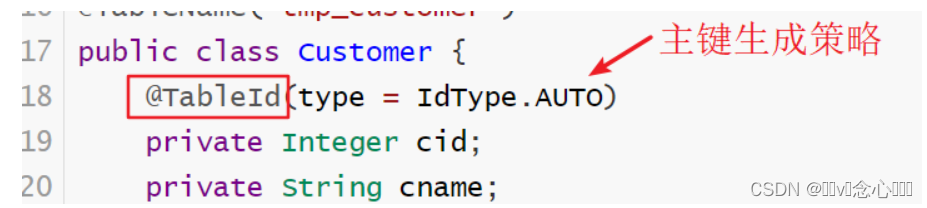
- 获得自动增长列信息
    @Test
    public void testInsert() {
        Customer customer = new Customer();
        customer.setCname("测试");
        customerMapper.insert(customer);
        System.out.println(customer);
    }
3.3 更新
- 通过id更新
    @Test
    public void testUpdate() {
        Customer customer = new Customer();
        customer.setCid(15);
        customer.setCname("测试777");
        customer.setPassword("777");

        // 需要给Customer设置@TableId
        customerMapper.updateById(customer);
    }
- 更新所有
	@Test
    public void testUpdate2() {
        Customer customer = new Customer();
        customer.setCname("测试777");
        customer.setPassword("777");
        // 更新所有
        customerMapper.update(customer,null);
    }
3.4 删除
- 根据id进行删除
@Test
    public void testDelete() {
        // 需要给Customer设置@TableId
        int i = customerMapper.deleteById(11);
        System.out.println(i);
    }
- 批量删除
    @Test
    public void testBatchDelete() {
        // 需要给Customer设置@TableId
        int i = customerMapper.deleteBatchIds(Arrays.asList(9,10));
        System.out.println(i);
    }
3 查询
3.1 Map条件
    @Test
    public void testMap(){
        Map map = new HashMap();
        map.put("cname","测试");
        map.put("password","123456");

        List list = customerMapper.selectByMap(map);
        list.forEach(System.out::println);
    }
3.2 QueryWrapper
3.2.1 wrapper介绍
-
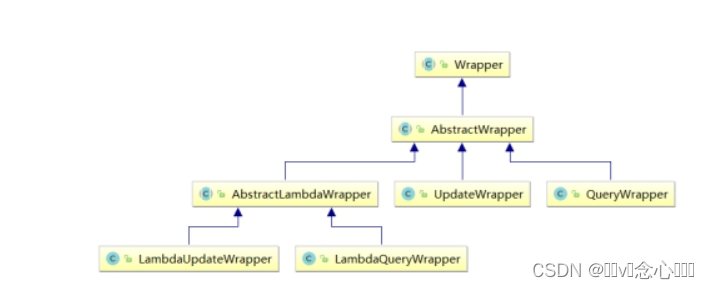
Wrapper : 条件构造抽象类,最顶端父类
- AbstractWrapper : 用于查询条件封装,生成 sql 的 where 条件
- QueryWrapper : Entity 对象封装操作类,不是用lambda语法
- UpdateWrapper : Update 条件封装,用于Entity对象更新操作
- AbstractLambdaWrapper : Lambda 语法使用 Wrapper统一处理解析 lambda 获取 column。
- LambdaQueryWrapper :看名称也能明白就是用于Lambda语法使用的查询Wrapper
- LambdaUpdateWrapper : Lambda 更新封装Wrapper
- AbstractWrapper : 用于查询条件封装,生成 sql 的 where 条件
-
如果想进行复杂条件查询,那么需要使用条件构造器 Wapper,涉及到如下方法
| 方法名 | 描述 |
|---|---|
| selectOne | |
| selectCount | |
| selectList | |
| selectMaps | |
| selectObjs | |
| update | |
| delete |
- 拼凑条件相关关键字
| 查询方式 | 说明 |
|---|---|
| setSqlSelect | 设置 SELECT 查询字段 |
| where | WHERE 语句,拼接 + WHERE 条件 |
| and | AND 语句,拼接 + AND 字段=值 |
| andNew | AND 语句,拼接 + AND (字段=值) |
| or | OR 语句,拼接 + OR 字段=值 |
| orNew | OR 语句,拼接 + OR (字段=值) |
| eq | 等于= |
| allEq | 基于 map 内容等于= |
| ne | 不等于<> |
| gt | 大于> |
| ge | 大于等于>= |
| lt | 小于< |
| le | 小于等于<= |
| like | 模糊查询 LIKE |
| notLike | 模糊查询 NOT LIKE |
| in | IN 查询 |
| notIn | NOT IN 查询 |
| isNull | NULL 值查询 |
| isNotNull | IS NOT NULL |
| groupBy | 分组 GROUP BY |
| having | HAVING 关键词 |
| orderBy | 排序 ORDER BY |
| orderAsc | ASC 排序 ORDER BY |
| orderDesc | DESC 排序 ORDER BY |
| exists | EXISTS 条件语句 |
| notExists | NOT EXISTS 条件语句 |
| between | BETWEEN 条件语句 |
| notBetween | NOT BETWEEN 条件语句 |
| addFilter | 自由拼接 SQL |
| last | 拼接在最后,例如:last(“LIMIT 1”) |
3.2.2 条件查询
- 基本多条件查询
	@Test
    public void testWrapper(){
        // 拼凑条件
        QueryWrapper<Customer> queryWrapper = new QueryWrapper();
        // 1)模糊查询
        queryWrapper.like("cname","测试");
        // 2)等值查询
        queryWrapper.eq("password","777");
        // 3)批量查询
        queryWrapper.in("cid",1,2,3,4);

        // 查询
        List<Customer> list = customerMapper.selectList(queryWrapper);
        list.forEach(System.out::println);
    }
- 条件判断
    @Test
    public void findCondition2() {
        Customer customer = new Customer();
        customer.setPassword("777");
        customer.setCname("888");
        customer.setIdList(Arrays.asList(2,3,4));
        customer.setCid(3);
        //条件查询
        QueryWrapper<Customer> queryWrapper = new QueryWrapper<>();
        // 1) 等值查询
        queryWrapper.eq( customer.getPassword()!=null ,"password", customer.getPassword());
        // 2) 模糊查询
        queryWrapper.like(customer.getCname() != null , "cname",customer.getCname());
        // 3) in语句
        queryWrapper.in(customer.getIdList() != null , "cid",customer.getIdList());
        // 4) 大于等于
        queryWrapper.ge(customer.getCid() != null , "cid" , customer.getCid());


        //查询
        List<Customer> list = customerMapper.selectList(queryWrapper);
        //list.forEach(customer-> System.out.println(customer));
        list.forEach(System.out::println);

    }
3.2.3 条件更新
- 基本更新
 	@Test
    public void testWrapperUpdate(){
        // 数据
        Customer customer = new Customer();
        customer.setCname("测试888");

        // 拼凑条件
        QueryWrapper<Customer> queryWrapper = new QueryWrapper();
        queryWrapper.in("cid",1,2,3,4);


        // 更新
        int result = customerMapper.update(customer, queryWrapper);
        System.out.println(result);
    }
3.3 分页
3.3.1 内置插件
- 主体插件: MybatisPlusInterceptor,该插件内部插件集:
- 分页插件: PaginationInnerInterceptor
- 多租户插件: TenantLineInnerInterceptor
- 动态表名插件: DynamicTableNameInnerInterceptor
- 乐观锁插件: OptimisticLockerInnerInterceptor
- sql性能规范插件: IllegalSQLInnerInterceptor
- 防止全表更新与删除插件: BlockAttackInnerInterceptor
3.3.2 配置类
package com.czxy.mp.config;

import com.baomidou.mybatisplus.annotation.DbType;
import com.baomidou.mybatisplus.autoconfigure.ConfigurationCustomizer;
import com.baomidou.mybatisplus.extension.plugins.MybatisPlusInterceptor;
import com.baomidou.mybatisplus.extension.plugins.inner.PaginationInnerInterceptor;
import org.springframework.context.annotation.Bean;
import org.springframework.context.annotation.Configuration;

/**
 * @author 桐叔
 * @email liangtong@itcast.cn
 */
@Configuration
public class MybatisPlusConfig {

    /**
     * 配置插件
     * @return
     */
    @Bean
    public MybatisPlusInterceptor mybatisPlusInterceptor(){

        MybatisPlusInterceptor mybatisPlusInterceptor = new MybatisPlusInterceptor();
        // 分页插件
        mybatisPlusInterceptor.addInnerInterceptor(new PaginationInnerInterceptor(DbType.MYSQL));

        return mybatisPlusInterceptor;
    }

    /**
     * 新的分页插件,一缓和二缓遵循mybatis的规则,需要设置 MybatisConfiguration#useDeprecatedExecutor = false 避免缓存出现问题(该属性会在旧插件移除后一同移除)
     * @return
     */
    @Bean
    public ConfigurationCustomizer configurationCustomizer() {
        return configuration -> configuration.setUseDeprecatedExecutor(false);
    }
}
3.3.3 分页
@Test
    public void testPage(){
        // 分页数据
        int pageNum = 1;
        int pageSize = 3;
        Page<Customer> page = new Page<>(pageNum , pageSize);
        page.setSearchCount(true);

        // 查询
        customerMapper.selectPage(page, null);

        // 分页数据
        System.err.println("当前页码:" + page.getCurrent());
        System.err.println("每页显示记录数:" + page.getSize());
        System.err.println("总页数:" + page.getPages());
        System.err.println("总记录数:" + page.getTotal());
        System.err.println("是否有下一页:" + page.hasNext());
        System.err.println("是否有上一页:" + page.hasPrevious());
        // 分页数据列表
        page.getRecords().forEach(System.err::println);
    }
4. 常见注解
4.1 表名注解:@TableName
| 属性 | 描述 |
|---|---|
| value | 表名 |
| keepGlobalPrefix | 是否保持使用全局的 tablePrefix 的值(如果设置了全局 tablePrefix 且自行设置了 value 的值) |
4.2 主键注解:@TableId
| 属性 | 描述 |
|---|---|
| value | 主键字段名 |
| type | 主键类型 IdType.ASSIGN_UUID ,分配UUID IdType.ASSIGN_ID ,分配ID(默认使用雪花算法) |
4.3 字段注解(非主键) : @TableField
| 属性 | 描述 |
|---|---|
| value | 数据库字段名 |
| fill | 字段自动填充策略 FieldFill.INSERT 插入时填充字段 FieldFill.UPDATE 更新时填充字段 FieldFill.INSERT_UPDATE 插入和更新时填充字段 |
5. 常见配置
mybatis-plus:
  configuration:
    log-impl: org.apache.ibatis.logging.stdout.StdOutImpl  #输出日志
    map-underscore-to-camel-case: true  #驼峰命名
  global-config:
    db-config:
      id-type: auto  #全局配置,id自动增强
      table-prefix: tmp_ #表名前缀
  type-aliases-package: com.czxy.mp.domain #别名包扫描路径
  mapper-locations: classpath*:/mapper/**/*.xml #映射文件位置





 扫一扫
扫一扫


 666
666

 被折叠的 条评论
为什么被折叠?
被折叠的 条评论
为什么被折叠?
 到【灌水乐园】发言





