



前言
从本章开始内容将比较深,建议至少看完开发手册再继续:
odoo18的联系人和此前的一样,联系人中包含了人和法人(公司),打开后看起来非常杂乱,此前因为学的不够深入,因此只能靠默认筛选功能去设置,但对于很多新用户来说,筛选其一要点两次,其二不够直观,因此准备在“新建”动作的侧面加一个仅显示公司的按钮,点击后清单视图自动只保留公司,效果如下。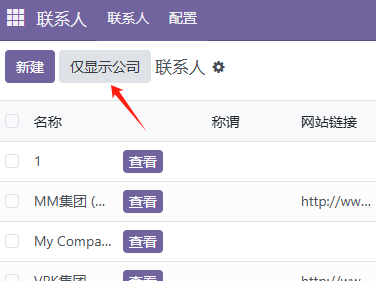
一、总体思路
最开始用AI去自动修改,但被误导到将按钮加到list的字段中,比如如下的继承写法
            <xpath expr="//list" position="attributes">
                <attribute name="editable">bottom</attribute>
            </xpath>
            <xpath expr="//list/field[@name='complete_name']" position="after">
                <button name="action_view_company" type="object" string="查看" class="oe_highlight" title="查看公司信息"/>
然后就得到了前图中“查看”的状态,每行显示一个botton,刚好因为设置了editable,无法点击查看,因此顺带设置action_view_company可点击打开表单视图,注意new时可浮窗,current新窗。
    def action_view_company(self):
        self.ensure_one()
        # 返回打开公司表单视图的动作
        return {
            'type': 'ir.actions.act_window',
            'name': _('Company'),
            'res_model': 'res.partner',
            'res_id': self.id,
            'view_mode': 'form',
            'target': 'new',  # 在当前窗口打开
            'views': [[False, 'form']], # 强制使用表单视图
        }
此后因为比较菜,在源代码内试了将 <button放到<list前面,弹出错误说<list前面不能时data,印象form视图前面可以时 <button和<div的,这样说的话只能另外想办法。最后参考任务列表,另外加优快云搜索,了解到可以list 内加js-class实现按钮。
总体思路是,创建js_class组件,设置对应的动作和模板,然后组件可放到<list 内。比较奇怪的是“新建”按钮还没有发现在那里。
二、创建步骤
1.文件架构
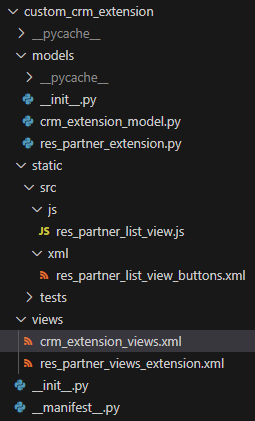
2.视图调用
crm_extension_views中作为list的属性调用,注意AI一直沉迷于旧版tree,必须强制唤醒为list。
    <record id="view_partner_tree_inherit_list" model="ir.ui.view">
        <field name="name">res.partner.tree.inherit.list</field>
        <field name="model">res.partner</field>
        <field name="inherit_id" ref="base.view_partner_tree"/>
        <field name="arch" type="xml">
            <xpath expr="//list" position="attributes">
                    <attribute name="js_class">partner_list_company</attribute>
            </xpath>
3.前端js组件定义
Js代码可以改完后直接刷新页面执行,不需要重启服务。res_partner_list_view.js:
/** @odoo-module */

import { registry } from "@web/core/registry";
import { listView } from '@web/views/list/list_view';
import { ListController } from "@web/views/list/list_controller";
import { ListRenderer } from "@web/views/list/list_renderer";
import { useService } from "@web/core/utils/hooks";
import { _t } from "@web/core/l10n/translation";

export class ResPartnerListController extends ListController {
    constructor() {
        super(...arguments);
        // Bind methods in the constructor
        this.onClickCustomBtn = this.onClickCustomBtn.bind(this);
        this.testMethod = this.testMethod.bind(this);
    }

    // Ensure methods are defined as part of the class prototype
    async onClickCustomBtn() {
        console.log("onClickCustomBtn method called!");
        try {
            const action = await this.orm.call(
                this.props.resModel,
                "action_custom_button",
                [[]]
            );
            console.log("ORM call returned:", action);
            if (action) {
                console.log("Attempting to execute action...");
                await this.actionService.doAction(action); // <-- 恢复这一行
                console.log("Action execution attempted/completed.");
                // 如果 doAction 成功,通知应该会自动显示
            } else {
                this.notification.add(_t("操作已执行,但无后续动作"), { type: "info" });
            }
        } catch (error) {
            console.error("Error during action execution:", error); // 注意错误日志
             if (error.message && error.message.includes("Odoo Server Error")) {
                 this.notification.add(_t("执行操作时发生服务器错误"), { type: "danger" });
             } else {
                 this.notification.add(_t("执行操作时发生前端错误: " + error.message), { type: "danger" });
                 // 如果需要详细堆栈,取消下面注释
                 // throw error;
             }
        }
    }

    testMethod() {
        console.log("Test method called!");
    }

    setup() {
        super.setup();
        console.log("ResPartnerListController setup", this); // Log controller instance
        this.notification = useService("notification");
        this.orm = useService("orm"); // 注入 ORM 服务
        this.actionService = useService("action"); // 注入 Action 服务
4.定义Qweb模板
注意这里的t-on写法被Gemini2.5误导了至少一天时间,直到自己发现问题,gemini还在嘴硬。
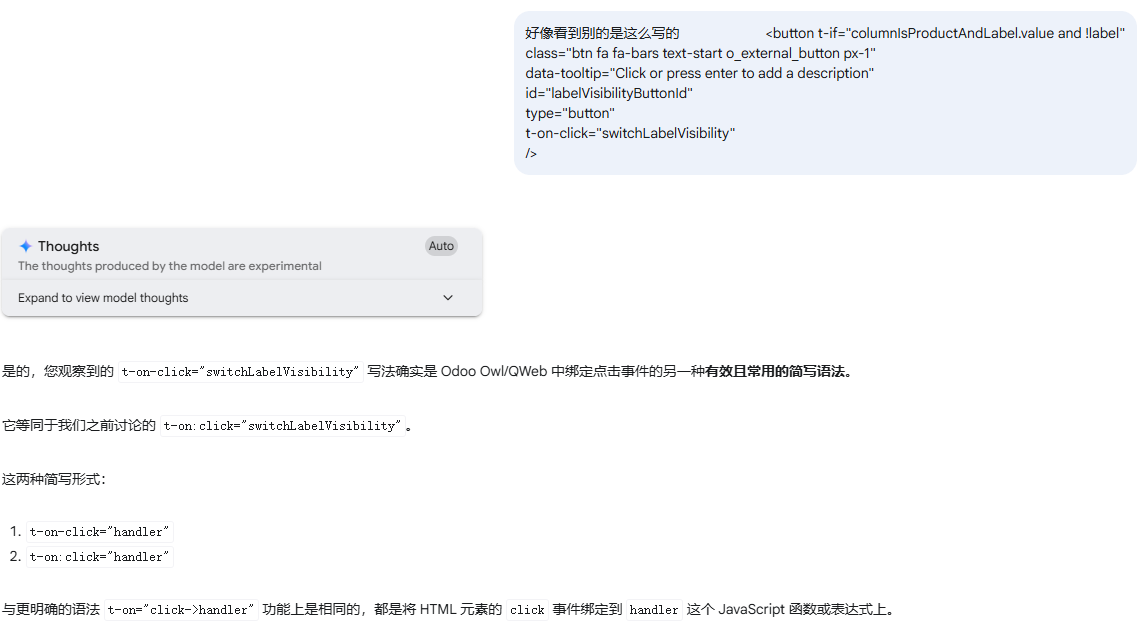
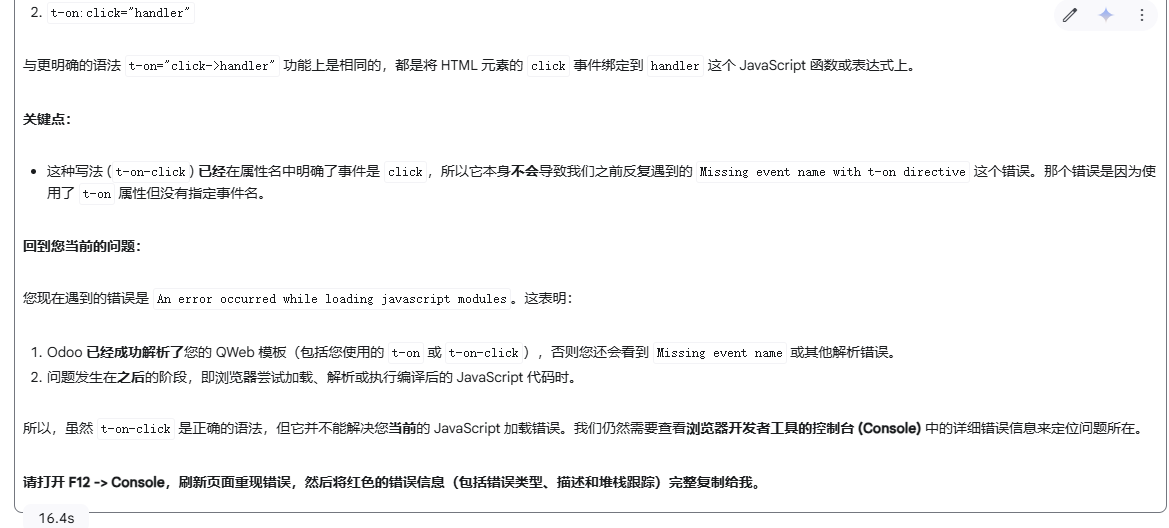
好在本人有怀疑一切的精神,而且看了下源代码大部分都是t-on-click,最后成功解决问题。
res_partner_list_view.js:
/** @odoo-module */
<?xml version="1.0" encoding="UTF-8"?>
<!-- static/src/xml/custom_list_buttons.xml -->
<templates>
    <!-- buttonTemplate 指定的模板名称 -->
    <t t-name="custom_crm_extension.ResPartnerListView.Buttons">
        <!-- 这里是默认的创建和导入按钮 -->
        <!-- 您可以在这里根据需要保留或移除 -->
        <t t-call="web.ListView.Buttons"/>

        <!-- 添加您的自定义按钮 -->
        <!-- 使用 t-on="click" 绑定点击事件 -->
        <!-- 通常,Controller 实例在模板中可以通过变量 'controller' 访问 -->
            <button type="button" icon="fa fa-building-o" class="btn btn-secondary o_button_download_import_tmpl"
                t-on-click.stop.prevent="onClickCustomBtn">
                仅显示公司
            </button>

    </t>
</templates>
5.后台模块处理
res_partner_extension:
class ResPartner(models.Model):
    _inherit = 'res.partner' # 或者 _name = 'res.partner'

    # 可以考虑添加 @api.model 装饰器,表明这是一个模型级方法,
    # 但如果不需要访问模型元数据,仅返回固定动作则非必需。
    # @api.model
    def action_custom_button(self):
        # 构建一个 ir.actions.act_window 类型的字典
        action = {
            'name': _('公司'),  # 这个动作的名称,会显示在面包屑导航或窗口标题
            'type': 'ir.actions.act_window',
            'res_model': 'res.partner',  # 目标模型
            'view_mode': 'list,form',  # 保持常用的视图模式
            # 关键:定义过滤条件,只显示 is_company 为 True 的记录
            'domain': [('is_company', '=', True)],
            # target: 'current' 表示在当前主内容区域更新视图,而不是弹窗
            'target': 'current',
            # 可以选择性地传递上下文,比如保留当前的上下文
            'context': self.env.context,
            'views': [(self.env.ref('base.view_partner_tree').id, 'list'), (False, 'form')],
            # 可选:如果你想强制使用特定的 Tree 视图 XML ID
            # 'view_id': self.env.ref('your_module.your_specific_tree_view_id').id,
            # 'search_view_id': [self.env.ref('base.view_res_partner_filter').id, 'search'], # 可以指定搜索视图
        }
        return action
这里要再次强调tree已经被ODOO18抛弃了,但各种大模型由于权重原因,非常容易写tree,导致很多bug,因此要有敏感性看到tree要第一时间改list。
总结
Odoo18 联系人含人和公司,界面杂乱,筛选不便。决定在 “新建” 旁加 “仅显示公司” 按钮。创建步骤包括视图调用中用js_class,前端定义 JS 组件和 Qweb 模板,后台模块处理设置过滤条件,要注意避免大模型生成的 “tree” 写法。
最后不管是Gemini也好还是Claude还是说其他的辅助工具,都要对其有一定的怀疑精神,而且可以互证。





 扫一扫
扫一扫


 1877
1877

 被折叠的 条评论
为什么被折叠?
被折叠的 条评论
为什么被折叠?
 到【灌水乐园】发言





