




Nacos学习与实践(一):Docker 部署 Nacos3.0 集群
引言
- Nacos最近新出了3.0版本,较2.0版本做出较大改动,架构升级了,推出了MCP Registry API,从传统的动态服务发现、配置管理和服务管理平台正在逐步向AI方向发展。
- 我所在公司正在搭建技术架构而且有AI方面的开发需求,Nacos3.x完全契合我现在的需求,打算部署一套Nacos3.0进行学习。
- 单机部署比较简单,目前容器化部署还是比较主流的,所以我直接选择docker集群部署,至于k8s集群部署后面有时间了再说。
- Nacos社区提供了一系列的docker compose文件,可以参考这些文件适配更多场景的Nacos部署。
准备工作
- 环境要求
- 准备了三台虚拟机作为集群节点,三台机器都需要安装Docker以及docker-compose,docker以及docker-compose安装教程这里不做赘述。
- 准备一台mysql服务器,mysql版本大于5.7,我这里用的是8.0。
- 网络互通配置,需要开通端口:8080,8848,7848,9848,9849。
- 镜像选择
- 官方 Nacos 镜像版本,我这里用的是3.0.1(
nacos/nacos-server:v3.0.1)。
- 官方 Nacos 镜像版本,我这里用的是3.0.1(
部署方式
Nacos官方提供了三种集成部署方式:
- 直连IP模式:
<http://ip:port/openAPI> - 挂载SLB模式:
<http://SLB:port/openAPI> - 域名+SLB模式:
<http://xxx.com:port/openAPI>(官方推荐)
Nacos 集群节点一览
| 节点ip | 主机名称 | 部署服务 |
|---|---|---|
| 10.116.66.71 | nacos1 | nacos |
| 10.116.66.104 | nacos2 | nacos |
| 10.116.66.115 | nacos3 | nacos |
| 10.116.66.70 | mysql | mysql |
开始部署(此流程为单节点流程,其余两个节点重复此流程即可)
- 创建挂载目录
mkdir -p /usr/local/nacos/logs
mkdir -p /usr/local/nacos/data
touch /usr/local/nacos/application.properties
touch /usr/local/nacos/cluster.conf
- 编写application.properties文件(源自Github,可自行下载)
#
# Copyright 1999-2025 Alibaba Group Holding Ltd.
#
# Licensed under the Apache License, Version 2.0 (the "License");
# you may not use this file except in compliance with the License.
# You may obtain a copy of the License at
#
#      http://www.apache.org/licenses/LICENSE-2.0
#
# Unless required by applicable law or agreed to in writing, software
# distributed under the License is distributed on an "AS IS" BASIS,
# WITHOUT WARRANTIES OR CONDITIONS OF ANY KIND, either express or implied.
# See the License for the specific language governing permissions and
# limitations under the License.
#

#--------------- Nacos Common Configurations ---------------#

#*************** Nacos port Related Configurations ***************#
### Nacos Server Main port
nacos.server.main.port=${NACOS_APPLICATION_PORT:8848}

#*************** Network Related Configurations ***************#
### If prefer hostname over ip for Nacos server addresses in cluster.conf:
# nacos.inetutils.prefer-hostname-over-ip=false

### Specify local server's IP:
# nacos.inetutils.ip-address=

#*************** Datasource Related Configurations ***************#
### nacos.plugin.datasource.log.enabled=true
spring.sql.init.platform=${SPRING_DATASOURCE_PLATFORM:}
### Count of DB:
# db.num=1

### Connect URL of DB:
db.num=${MYSQL_DATABASE_NUM:1}
db.url.0=jdbc:mysql://${MYSQL_SERVICE_HOST}:${MYSQL_SERVICE_PORT:3306}/nacos?${MYSQL_SERVICE_DB_PARAM:characterEncoding=utf8&connectTimeout=1000&socketTimeout=3000&autoReconnect=true&useSSL=false}
db.user.0=${MYSQL_SERVICE_USER}
db.password.0=${MYSQL_SERVICE_PASSWORD}

db.pool.config.connectionTimeout=${DB_POOL_CONNECTION_TIMEOUT:30000}
db.pool.config.validationTimeout=10000
db.pool.config.maximumPoolSize=20
db.pool.config.minimumIdle=2

#*************** Metrics Related Configurations ***************#
### Metrics for prometheus
management.endpoints.web.exposure.include=prometheus

### Metrics for elastic search
management.metrics.export.elastic.enabled=false
#management.metrics.export.elastic.host=http://localhost:9200

### Metrics for influx
management.metrics.export.influx.enabled=false
#management.metrics.export.influx.db=springboot
#management.metrics.export.influx.uri=http://localhost:8086
#management.metrics.export.influx.auto-create-db=true
#management.metrics.export.influx.consistency=one
#management.metrics.export.influx.compressed=true

#*************** Core Related Configurations ***************#

### set the WorkerID manually
# nacos.core.snowflake.worker-id=

### Member-MetaData
# nacos.core.member.meta.site=
# nacos.core.member.meta.adweight=
# nacos.core.member.meta.weight=

### MemberLookup
### Addressing pattern category, If set, the priority is highest
# nacos.core.member.lookup.type=[file,address-server]

## Set the cluster list with a configuration file or command-line argument
# nacos.member.list=192.168.16.101:8847?raft_port=8807,192.168.16.101?raft_port=8808,192.168.16.101:8849?raft_port=8809

## for AddressServerMemberLookup
# Maximum number of retries to query the address server upon initialization
# nacos.core.address-server.retry=5
## Server domain name address of [address-server] mode
# address.server.domain=jmenv.tbsite.net
## Server port of [address-server] mode
# address.server.port=8080
## Request address of [address-server] mode
# address.server.url=/nacos/serverlist

#*************** JRaft Related Configurations ***************#

### Sets the Raft cluster election timeout, default value is 5 second
# nacos.core.protocol.raft.data.election_timeout_ms=5000
### Sets the amount of time the Raft snapshot will execute periodically, default is 30 minute
# nacos.core.protocol.raft.data.snapshot_interval_secs=30
### raft internal worker threads
# nacos.core.protocol.raft.data.core_thread_num=8
### Number of threads required for raft business request processing
# nacos.core.protocol.raft.data.cli_service_thread_num=4
### raft linear read strategy. Safe linear reads are used by default, that is, the Leader tenure is confirmed by heartbeat
# nacos.core.protocol.raft.data.read_index_type=ReadOnlySafe
### rpc request timeout, default 5 seconds
# nacos.core.protocol.raft.data.rpc_request_timeout_ms=5000
### enable to support prometheus service discovery
#nacos.prometheus.metrics.enabled=true

#*************** Distro Related Configurations ***************#

### Distro data sync delay time, when sync task delayed, task will be merged for same data key. Default 1 second.
# nacos.core.protocol.distro.data.sync.delayMs=1000
### Distro data sync timeout for one sync data, default 3 seconds.
# nacos.core.protocol.distro.data.sync.timeoutMs=3000
### Distro data sync retry delay time when sync data failed or timeout, same behavior with delayMs, default 3 seconds.
# nacos.core.protocol.distro.data.sync.retryDelayMs=3000
### Distro data verify interval time, verify synced data whether expired for a interval. Default 5 seconds.
# nacos.core.protocol.distro.data.verify.intervalMs=5000
### Distro data verify timeout for one verify, default 3 seconds.
# nacos.core.protocol.distro.data.verify.timeoutMs=3000
### Distro data load retry delay when load snapshot data failed, default 30 seconds.
# nacos.core.protocol.distro.data.load.retryDelayMs=30000
### enable to support prometheus service discovery
#nacos.prometheus.metrics.enabled=true

#*************** Grpc Configurations ***************#

### Sets the maximum message size allowed to be received on the server.
#nacos.remote.server.grpc.sdk.max-inbound-message-size=10485760
### Sets the time(milliseconds) without read activity before sending a keepalive ping. The typical default is two hours.
#nacos.remote.server.grpc.sdk.keep-alive-time=7200000
### Sets a time(milliseconds) waiting for read activity after sending a keepalive ping. Defaults to 20 seconds.
#nacos.remote.server.grpc.sdk.keep-alive-timeout=20000
### Sets a time(milliseconds) that specify the most aggressive keep-alive time clients are permitted to configure. The typical default is 5 minutes
#nacos.remote.server.grpc.sdk.permit-keep-alive-time=300000
### cluster grpc(inside the nacos server) configuration
#nacos.remote.server.grpc.cluster.max-inbound-message-size=10485760
### Sets the time(milliseconds) without read activity before sending a keepalive ping. The typical default is two hours.
#nacos.remote.server.grpc.cluster.keep-alive-time=7200000
### Sets a time(milliseconds) waiting for read activity after sending a keepalive ping. Defaults to 20 seconds.
#nacos.remote.server.grpc.cluster.keep-alive-timeout=20000
### Sets a time(milliseconds) that specify the most aggressive keep-alive time clients are permitted to configure. The typical default is 5 minutes
#nacos.remote.server.grpc.cluster.permit-keep-alive-time=300000

#*************** Config Module Related Configurations ***************#

### the maximum retry times for push
nacos.config.push.maxRetryTime=50

#*************** Naming Module Related Configurations ***************#
### Data dispatch task execution period in milliseconds:

### If enable data warmup. If set to false, the server would accept request without local data preparation:
nacos.naming.data.warmup=true

### If enable the instance auto expiration, kind like of health check of instance:
# nacos.naming.expireInstance=true

nacos.naming.empty-service.auto-clean=true
nacos.naming.empty-service.clean.initial-delay-ms=50000
nacos.naming.empty-service.clean.period-time-ms=30000

#--------------- Nacos Web Server Configurations ---------------#

#*************** Nacos Web Server Related Configurations ***************#
### Nacos Server Web context path:
nacos.server.contextPath=${SERVER_SERVLET_CONTEXTPATH:/nacos}

#*************** Access Log Related Configurations ***************#
### If turn on the access log:
server.tomcat.accesslog.enabled=true

### accesslog automatic cleaning time
server.tomcat.accesslog.max-days=30

### The access log pattern:
server.tomcat.accesslog.pattern=%h %l %u %t "%r" %s %b %D %{User-Agent}i %{Request-Source}i

### The directory of access log:
server.tomcat.basedir=file:.

#*************** API Related Configurations ***************#
### Include message field
server.error.include-message=ALWAYS

### Enabled for open API compatibility
# nacos.core.api.compatibility.client.enabled=true
### Enabled for admin API compatibility
# nacos.core.api.compatibility.admin.enabled=false
### Enabled for console API compatibility
# nacos.core.api.compatibility.console.enabled=false

#--------------- Nacos Console Configurations ---------------#

#*************** Nacos Console Related Configurations ***************#
### Nacos Console Main port
nacos.console.port=${NACOS_CONSOLE_PORT:8080}
### Nacos Server Web context path:
nacos.console.contextPath=${NACOS_CONSOLE_CONTEXTPATH:}

### Nacos Server context path, which link to nacos server `nacos.server.contextPath`, works when deployment type is `console`
nacos.console.remote.server.context-path=${SERVER_SERVLET_CONTEXTPATH:/nacos}

#************** Console UI Configuration ***************#

### Turn on/off the nacos console ui.
nacos.console.ui.enabled=true

#--------------- Nacos Plugin Configurations ---------------#

#*************** CMDB Plugin Related Configurations ***************#
### The interval to dump external CMDB in seconds:
# nacos.cmdb.dumpTaskInterval=3600

### The interval of polling data change event in seconds:
# nacos.cmdb.eventTaskInterval=10

### The interval of loading labels in seconds:
# nacos.cmdb.labelTaskInterval=300

### If turn on data loading task:
# nacos.cmdb.loadDataAtStart=false

#*************** Auth Plugin Related Configurations ***************#
### The ignore urls of auth, will be deprecated in the future:
nacos.security.ignore.urls=${NACOS_SECURITY_IGNORE_URLS:/,/error,/**/*.css,/**/*.js,/**/*.html,/**/*.map,/**/*.svg,/**/*.png,/**/*.ico,/console-fe/public/**,/v1/auth/**,/v1/console/health/**,/actuator/**,/v1/console/server/**}

### The auth system to use, default 'nacos' and 'ldap' is supported, other type should be implemented by yourself:
nacos.core.auth.system.type=${NACOS_AUTH_SYSTEM_TYPE:nacos}

### If turn on auth system:
# Whether open nacos server API auth system
nacos.core.auth.enabled=true
# Whether open nacos admin API auth system
nacos.core.auth.admin.enabled=true
# Whether open nacos console API auth system
nacos.core.auth.console.enabled=true

### Turn on/off caching of auth information. By turning on this switch, the update of auth information would have a 15 seconds delay.
nacos.core.auth.caching.enabled=${NACOS_AUTH_CACHE_ENABLE:false}

### worked when nacos.core.auth.enabled=true
### The two properties is the white list for auth and used by identity the request from other server.
nacos.core.auth.server.identity.key=${NACOS_AUTH_IDENTITY_KEY:}
nacos.core.auth.server.identity.value=${NACOS_AUTH_IDENTITY_VALUE:}

### worked when nacos.core.auth.system.type=nacos or nacos.core.auth.console.enabled=true
### The token expiration in seconds:
nacos.core.auth.plugin.nacos.token.cache.enable=false
nacos.core.auth.plugin.nacos.token.expire.seconds=${NACOS_AUTH_TOKEN_EXPIRE_SECONDS:18000}
### The default token (Base64 string):
#nacos.core.auth.plugin.nacos.token.secret.key=VGhpc0lzTXlDdXN0b21TZWNyZXRLZXkwMTIzNDU2Nzg=
nacos.core.auth.plugin.nacos.token.secret.key=${NACOS_AUTH_TOKEN:}

### worked when nacos.core.auth.system.type=ldap?{0} is Placeholder,replace login username
#nacos.core.auth.ldap.url=ldap://localhost:389
#nacos.core.auth.ldap.basedc=dc=example,dc=org
#nacos.core.auth.ldap.userDn=cn=admin,${nacos.core.auth.ldap.basedc}
#nacos.core.auth.ldap.password=admin
#nacos.core.auth.ldap.userdn=cn={0},dc=example,dc=org
#nacos.core.auth.ldap.filter.prefix=uid
#nacos.core.auth.ldap.case.sensitive=true
#nacos.core.auth.ldap.ignore.partial.result.exception=false

#*************** Control Plugin Related Configurations ***************#
# plugin type
#nacos.plugin.control.manager.type=nacos

# local control rule storage dir, default ${nacos.home}/data/connection and ${nacos.home}/data/tps
#nacos.plugin.control.rule.local.basedir=${nacos.home}

# external control rule storage type, if exist
#nacos.plugin.control.rule.external.storage=

#*************** Config Change Plugin Related Configurations ***************#
# webhook
#nacos.core.config.plugin.webhook.enabled=false
# It is recommended to use EB https://help.aliyun.com/document_detail/413974.html
#nacos.core.config.plugin.webhook.url=http://localhost:8080/webhook/send?token=***
# The content push max capacity ,byte
#nacos.core.config.plugin.webhook.contentMaxCapacity=102400

# whitelist
#nacos.core.config.plugin.whitelist.enabled=false
# The import file suffixs
#nacos.core.config.plugin.whitelist.suffixs=xml,text,properties,yaml,html
# fileformatcheck,which validate the import file of type and content
#nacos.core.config.plugin.fileformatcheck.enabled=false

#*************** Istio Plugin Related Configurations ***************#
### If turn on the MCP server:
nacos.istio.mcp.server.enabled=false

#--------------- Nacos Experimental Features Configurations ---------------#

#*************** K8s Related Configurations ***************#
### If turn on the K8s sync:
nacos.k8s.sync.enabled=false

### If use the Java API from an application outside a kubernetes cluster
#nacos.k8s.sync.outsideCluster=false
#nacos.k8s.sync.kubeConfig=/.kube/config

#*************** Deployment Type Configuration ***************#

### Sets the deployment type: 'merged' for joint deployment, 'server' for separate deployment server only, 'console' for separate deployment console only.
nacos.deployment.type=merged
- 编写naocs-compose.yaml文件
version: "3.8"
services:
  nacos1:
    image: nacos/nacos-server:v3.0.1 #此处根据实际需求更换版本号
    container_name: nacos1 # 容器名称
    environment:
      - NACOS_SERVERS=10.116.66.104:8848 10.116.66.71:8848 10.116.66.115:8848 # 节点ip,中间用空格隔开
      - PREFER_HOST_MODE=host
      - SPRING_DATASOURCE_PLATFORM=mysql
      - MYSQL_SERVICE_HOST=10.116.66.70 # mysql服务器ip
      - MYSQL_SERVICE_DB_NAME=nacos
      - MYSQL_SERVICE_PORT=3306
      - MYSQL_SERVICE_USER=root
      - MYSQL_SERVICE_PASSWORD=root
      - MYSQL_SERVICE_DB_PARAM=characterEncoding=utf8&connectTimeout=1000&socketTimeout=3000&autoReconnect=true&useUnicode=true&useSSL=false&serverTimezone=Asia/Shanghai&allowPublicKeyRetrieval=true
      - NACOS_AUTH_IDENTITY_KEY=aaa
      - NACOS_AUTH_IDENTITY_VALUE=bbb
      - NACOS_AUTH_TOKEN=eGgvWVt3UD8jQGg6Uj1jRD41bXYsUypENHBLTlFTTllzPn03TVRHWg==
      - NACOS_AUTH_ENABLE=true
      - NACOS_AUTH_TOKEN_EXPIRE_SECONDS=18000
      - NACOS_AUTH_CACHE_ENABLE=true
    volumes:
      - /usr/local/nacos/application.properties:/home/nacos/conf/application.properties
      - /usr/local/nacos/cluster.conf:/home/nacos/conf/cluster.conf
      - /usr/local/nacos/data:/home/nacos/data
      - /usr/local/nacos/logs:/home/nacos/logs
    ports:
      - "8080:8080"
      - "8848:8848"
      - "9848:9848"
      - "9868:9848"
      - "9850:9849"
    restart: always
- 数据库初始化文件(源自GitHub,可自行下载)
/*
 * Copyright 1999-2018 Alibaba Group Holding Ltd.
 *
 * Licensed under the Apache License, Version 2.0 (the "License");
 * you may not use this file except in compliance with the License.
 * You may obtain a copy of the License at
 *
 *      http://www.apache.org/licenses/LICENSE-2.0
 *
 * Unless required by applicable law or agreed to in writing, software
 * distributed under the License is distributed on an "AS IS" BASIS,
 * WITHOUT WARRANTIES OR CONDITIONS OF ANY KIND, either express or implied.
 * See the License for the specific language governing permissions and
 * limitations under the License.
 */

/******************************************/
/*   表名称 = config_info                  */
/******************************************/
CREATE TABLE `config_info` (
                               `id` bigint(20) NOT NULL AUTO_INCREMENT COMMENT 'id',
                               `data_id` varchar(255) NOT NULL COMMENT 'data_id',
                               `group_id` varchar(128) DEFAULT NULL COMMENT 'group_id',
                               `content` longtext NOT NULL COMMENT 'content',
                               `md5` varchar(32) DEFAULT NULL COMMENT 'md5',
                               `gmt_create` datetime NOT NULL DEFAULT CURRENT_TIMESTAMP COMMENT '创建时间',
                               `gmt_modified` datetime NOT NULL DEFAULT CURRENT_TIMESTAMP COMMENT '修改时间',
                               `src_user` text COMMENT 'source user',
                               `src_ip` varchar(50) DEFAULT NULL COMMENT 'source ip',
                               `app_name` varchar(128) DEFAULT NULL COMMENT 'app_name',
                               `tenant_id` varchar(128) DEFAULT '' COMMENT '租户字段',
                               `c_desc` varchar(256) DEFAULT NULL COMMENT 'configuration description',
                               `c_use` varchar(64) DEFAULT NULL COMMENT 'configuration usage',
                               `effect` varchar(64) DEFAULT NULL COMMENT '配置生效的描述',
                               `type` varchar(64) DEFAULT NULL COMMENT '配置的类型',
                               `c_schema` text COMMENT '配置的模式',
                               `encrypted_data_key` varchar(1024) NOT NULL DEFAULT '' COMMENT '密钥',
                               PRIMARY KEY (`id`),
                               UNIQUE KEY `uk_configinfo_datagrouptenant` (`data_id`,`group_id`,`tenant_id`)
) ENGINE=InnoDB DEFAULT CHARSET=utf8 COLLATE=utf8_bin COMMENT='config_info';

/******************************************/
/*   表名称 = config_info  since 2.5.0                */
/******************************************/
CREATE TABLE `config_info_gray` (
                                    `id` bigint unsigned NOT NULL AUTO_INCREMENT COMMENT 'id',
                                    `data_id` varchar(255) NOT NULL COMMENT 'data_id',
                                    `group_id` varchar(128) NOT NULL COMMENT 'group_id',
                                    `content` longtext NOT NULL COMMENT 'content',
                                    `md5` varchar(32) DEFAULT NULL COMMENT 'md5',
                                    `src_user` text COMMENT 'src_user',
                                    `src_ip` varchar(100) DEFAULT NULL COMMENT 'src_ip',
                                    `gmt_create` datetime(3) NOT NULL DEFAULT CURRENT_TIMESTAMP(3) COMMENT 'gmt_create',
                                    `gmt_modified` datetime(3) NOT NULL DEFAULT CURRENT_TIMESTAMP(3) COMMENT 'gmt_modified',
                                    `app_name` varchar(128) DEFAULT NULL COMMENT 'app_name',
                                    `tenant_id` varchar(128) DEFAULT '' COMMENT 'tenant_id',
                                    `gray_name` varchar(128) NOT NULL COMMENT 'gray_name',
                                    `gray_rule` text NOT NULL COMMENT 'gray_rule',
                                    `encrypted_data_key` varchar(256) NOT NULL DEFAULT '' COMMENT 'encrypted_data_key',
                                    PRIMARY KEY (`id`),
                                    UNIQUE KEY `uk_configinfogray_datagrouptenantgray` (`data_id`,`group_id`,`tenant_id`,`gray_name`),
                                    KEY `idx_dataid_gmt_modified` (`data_id`,`gmt_modified`),
                                    KEY `idx_gmt_modified` (`gmt_modified`)
) ENGINE=InnoDB AUTO_INCREMENT=1 DEFAULT CHARSET=utf8 COMMENT='config_info_gray';

/******************************************/
/*   表名称 = config_tags_relation         */
/******************************************/
CREATE TABLE `config_tags_relation` (
                                        `id` bigint(20) NOT NULL COMMENT 'id',
                                        `tag_name` varchar(128) NOT NULL COMMENT 'tag_name',
                                        `tag_type` varchar(64) DEFAULT NULL COMMENT 'tag_type',
                                        `data_id` varchar(255) NOT NULL COMMENT 'data_id',
                                        `group_id` varchar(128) NOT NULL COMMENT 'group_id',
                                        `tenant_id` varchar(128) DEFAULT '' COMMENT 'tenant_id',
                                        `nid` bigint(20) NOT NULL AUTO_INCREMENT COMMENT 'nid, 自增长标识',
                                        PRIMARY KEY (`nid`),
                                        UNIQUE KEY `uk_configtagrelation_configidtag` (`id`,`tag_name`,`tag_type`),
                                        KEY `idx_tenant_id` (`tenant_id`)
) ENGINE=InnoDB DEFAULT CHARSET=utf8 COLLATE=utf8_bin COMMENT='config_tag_relation';

/******************************************/
/*   表名称 = group_capacity               */
/******************************************/
CREATE TABLE `group_capacity` (
                                  `id` bigint(20) unsigned NOT NULL AUTO_INCREMENT COMMENT '主键ID',
                                  `group_id` varchar(128) NOT NULL DEFAULT '' COMMENT 'Group ID,空字符表示整个集群',
                                  `quota` int(10) unsigned NOT NULL DEFAULT '0' COMMENT '配额,0表示使用默认值',
                                  `usage` int(10) unsigned NOT NULL DEFAULT '0' COMMENT '使用量',
                                  `max_size` int(10) unsigned NOT NULL DEFAULT '0' COMMENT '单个配置大小上限,单位为字节,0表示使用默认值',
                                  `max_aggr_count` int(10) unsigned NOT NULL DEFAULT '0' COMMENT '聚合子配置最大个数,,0表示使用默认值',
                                  `max_aggr_size` int(10) unsigned NOT NULL DEFAULT '0' COMMENT '单个聚合数据的子配置大小上限,单位为字节,0表示使用默认值',
                                  `max_history_count` int(10) unsigned NOT NULL DEFAULT '0' COMMENT '最大变更历史数量',
                                  `gmt_create` datetime NOT NULL DEFAULT CURRENT_TIMESTAMP COMMENT '创建时间',
                                  `gmt_modified` datetime NOT NULL DEFAULT CURRENT_TIMESTAMP COMMENT '修改时间',
                                  PRIMARY KEY (`id`),
                                  UNIQUE KEY `uk_group_id` (`group_id`)
) ENGINE=InnoDB DEFAULT CHARSET=utf8 COLLATE=utf8_bin COMMENT='集群、各Group容量信息表';

/******************************************/
/*   表名称 = his_config_info              */
/******************************************/
CREATE TABLE `his_config_info` (
                                   `id` bigint(20) unsigned NOT NULL COMMENT 'id',
                                   `nid` bigint(20) unsigned NOT NULL AUTO_INCREMENT COMMENT 'nid, 自增标识',
                                   `data_id` varchar(255) NOT NULL COMMENT 'data_id',
                                   `group_id` varchar(128) NOT NULL COMMENT 'group_id',
                                   `app_name` varchar(128) DEFAULT NULL COMMENT 'app_name',
                                   `content` longtext NOT NULL COMMENT 'content',
                                   `md5` varchar(32) DEFAULT NULL COMMENT 'md5',
                                   `gmt_create` datetime NOT NULL DEFAULT CURRENT_TIMESTAMP COMMENT '创建时间',
                                   `gmt_modified` datetime NOT NULL DEFAULT CURRENT_TIMESTAMP COMMENT '修改时间',
                                   `src_user` text COMMENT 'source user',
                                   `src_ip` varchar(50) DEFAULT NULL COMMENT 'source ip',
                                   `op_type` char(10) DEFAULT NULL COMMENT 'operation type',
                                   `tenant_id` varchar(128) DEFAULT '' COMMENT '租户字段',
                                   `encrypted_data_key` varchar(1024) NOT NULL DEFAULT '' COMMENT '密钥',
                                   `publish_type` varchar(50)  DEFAULT 'formal' COMMENT 'publish type gray or formal',
                                   `gray_name` varchar(50)  DEFAULT NULL COMMENT 'gray name',
                                   `ext_info`  longtext DEFAULT NULL COMMENT 'ext info',
                                   PRIMARY KEY (`nid`),
                                   KEY `idx_gmt_create` (`gmt_create`),
                                   KEY `idx_gmt_modified` (`gmt_modified`),
                                   KEY `idx_did` (`data_id`)
) ENGINE=InnoDB DEFAULT CHARSET=utf8 COLLATE=utf8_bin COMMENT='多租户改造';


/******************************************/
/*   表名称 = tenant_capacity              */
/******************************************/
CREATE TABLE `tenant_capacity` (
                                   `id` bigint(20) unsigned NOT NULL AUTO_INCREMENT COMMENT '主键ID',
                                   `tenant_id` varchar(128) NOT NULL DEFAULT '' COMMENT 'Tenant ID',
                                   `quota` int(10) unsigned NOT NULL DEFAULT '0' COMMENT '配额,0表示使用默认值',
                                   `usage` int(10) unsigned NOT NULL DEFAULT '0' COMMENT '使用量',
                                   `max_size` int(10) unsigned NOT NULL DEFAULT '0' COMMENT '单个配置大小上限,单位为字节,0表示使用默认值',
                                   `max_aggr_count` int(10) unsigned NOT NULL DEFAULT '0' COMMENT '聚合子配置最大个数',
                                   `max_aggr_size` int(10) unsigned NOT NULL DEFAULT '0' COMMENT '单个聚合数据的子配置大小上限,单位为字节,0表示使用默认值',
                                   `max_history_count` int(10) unsigned NOT NULL DEFAULT '0' COMMENT '最大变更历史数量',
                                   `gmt_create` datetime NOT NULL DEFAULT CURRENT_TIMESTAMP COMMENT '创建时间',
                                   `gmt_modified` datetime NOT NULL DEFAULT CURRENT_TIMESTAMP COMMENT '修改时间',
                                   PRIMARY KEY (`id`),
                                   UNIQUE KEY `uk_tenant_id` (`tenant_id`)
) ENGINE=InnoDB DEFAULT CHARSET=utf8 COLLATE=utf8_bin COMMENT='租户容量信息表';


CREATE TABLE `tenant_info` (
                               `id` bigint(20) NOT NULL AUTO_INCREMENT COMMENT 'id',
                               `kp` varchar(128) NOT NULL COMMENT 'kp',
                               `tenant_id` varchar(128) default '' COMMENT 'tenant_id',
                               `tenant_name` varchar(128) default '' COMMENT 'tenant_name',
                               `tenant_desc` varchar(256) DEFAULT NULL COMMENT 'tenant_desc',
                               `create_source` varchar(32) DEFAULT NULL COMMENT 'create_source',
                               `gmt_create` bigint(20) NOT NULL COMMENT '创建时间',
                               `gmt_modified` bigint(20) NOT NULL COMMENT '修改时间',
                               PRIMARY KEY (`id`),
                               UNIQUE KEY `uk_tenant_info_kptenantid` (`kp`,`tenant_id`),
                               KEY `idx_tenant_id` (`tenant_id`)
) ENGINE=InnoDB DEFAULT CHARSET=utf8 COLLATE=utf8_bin COMMENT='tenant_info';

CREATE TABLE `users` (
                         `username` varchar(50) NOT NULL PRIMARY KEY COMMENT 'username',
                         `password` varchar(500) NOT NULL COMMENT 'password',
                         `enabled` boolean NOT NULL COMMENT 'enabled'
);

CREATE TABLE `roles` (
                         `username` varchar(50) NOT NULL COMMENT 'username',
                         `role` varchar(50) NOT NULL COMMENT 'role',
                         UNIQUE INDEX `idx_user_role` (`username` ASC, `role` ASC) USING BTREE
);

CREATE TABLE `permissions` (
                               `role` varchar(50) NOT NULL COMMENT 'role',
                               `resource` varchar(128) NOT NULL COMMENT 'resource',
                               `action` varchar(8) NOT NULL COMMENT 'action',
                               UNIQUE INDEX `uk_role_permission` (`role`,`resource`,`action`) USING BTREE
);
- 数据库初始化(去上面文件指定数据库执行mysql-schema.sql即可)
- 执行naocs-compose.yaml文件
docker-compose -f nacos-compose.yaml up
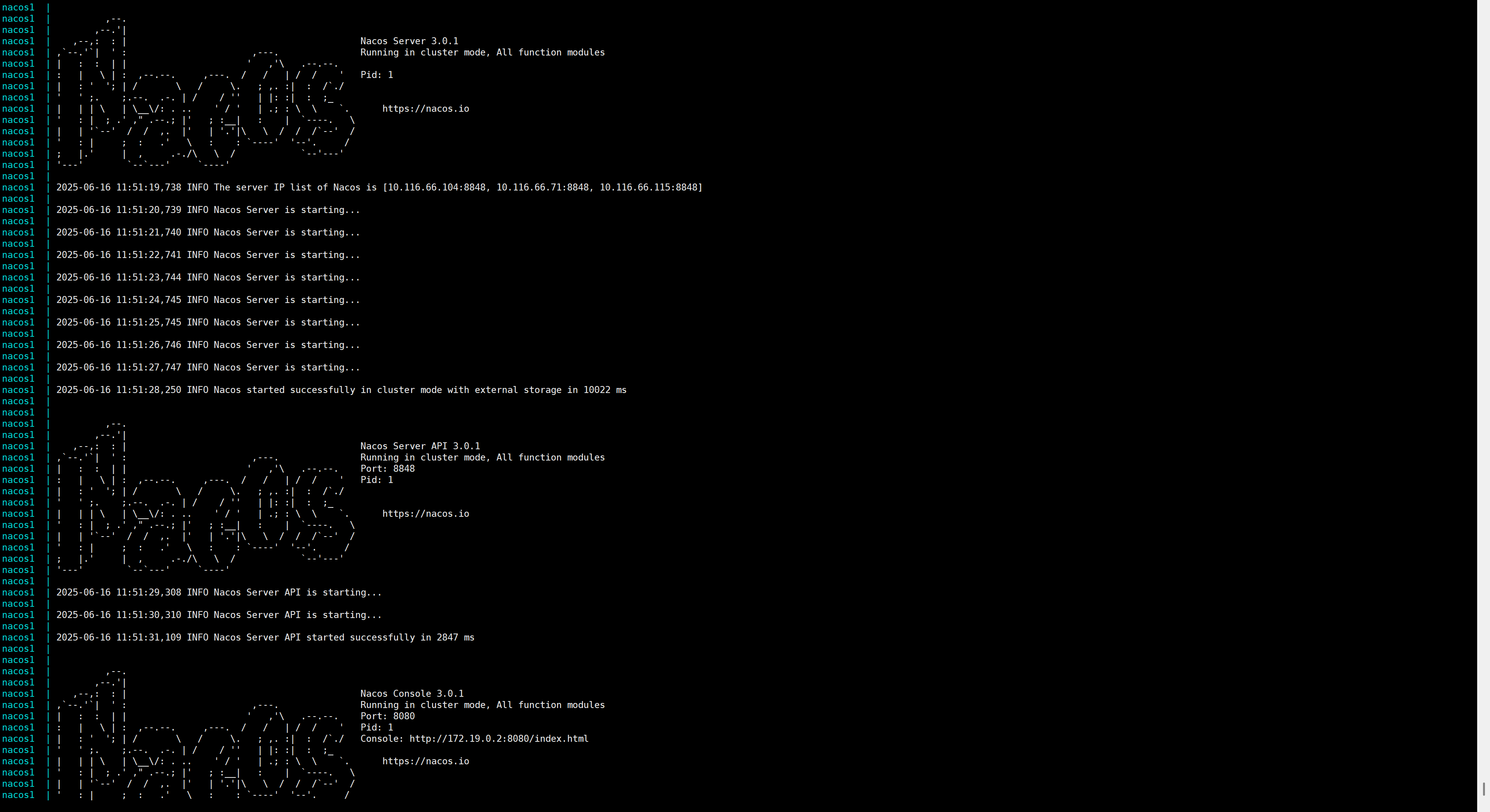
- 服务启动成功,其余节点按上述流程再走一遍即可
存在问题
虽然Nacos启动成功了,但我这里还有两个问题没有解决,这两个问题不影响Nacos的使用,如果有遇到相同问题并解决的大佬麻烦评论区留言告知一下,万分感谢。
- 第一点:用docker启动后,如上图所示,控制台的ip是172.19.0.2,这个IP如何更改?
- 第二点:在部署方式上,我本来计划选用的是官方推荐的第三种方式,即域名+SLB模式,拜托运维同事帮忙开通了域名以及SLB配置,用SLB的IP访问配置中心没有问题,切成域名访问就报错,就很奇怪,所以目前还是用的SLB的IP进行的部署。
附录
- 官方文档链接(
https://nacos.io/docs/latest/quickstart/quick-start-docker/)。 - 官方nacos-docker示例(
https://github.com/nacos-group/nacos-docker.git)。
 2016


 扫一扫


 被折叠的 条评论
为什么被折叠?
 到【灌水乐园】发言


