


1 监听滚动功能
想要监听页面滚动,初期设置一个滚动监听事件函数,箭头函数内部定义业务逻辑:
首先根据文档的几个位置参数判定到底,若true则拿取新数据来渲染,后续考虑到多次判断,可以利用underscore的节流函数处理:
#smallCoderWhite1 初始实现版本
  //防抖节流
  const scrollListenerHandler = () => {
      clientHeight.value = document.documentElement.clientHeight
      scrollTop.value = document.documentElement.scrollTop
      scrollHeight.value = document.documentElement.scrollHeight
      // console.log("1:", clientH, "2:", scrollT, "sum:", (clientH + scrollT), "3:", scrollH)
      if (clientHeight + scrollTop >= scrollHeight) {
          // console.log("到头了,load!!")
          // homeStore.fetchHouseListData()
          // callBackFn()

          // 2第二种方案
          console.log("到头了,要重新获取数据!第二种方法!")
          isReachBottom.value = true;
      }
  }

  const scrollListenerHandler = throttle(() => {
      clientHeight.value = document.documentElement.clientHeight
      scrollTop.value = document.documentElement.scrollTop
      scrollHeight.value = document.documentElement.scrollHeight
      // console.log("1:", clientH, "2:", scrollT, "sum:", (clientH + scrollT), "3:", scrollH)
      console.log("监听到滚动了!!")
      if (clientHeight.value+ scrollTop.value >= scrollHeight.value) {
          // console.log("到头了,load!!")
          // callBackFn()

          // 2第二种方案
          console.log("滚到到位置地下了,要重新获取数据!第二种方法!")
          isReachBottom.value = true;
      }
  },1000)
需要注意的是:
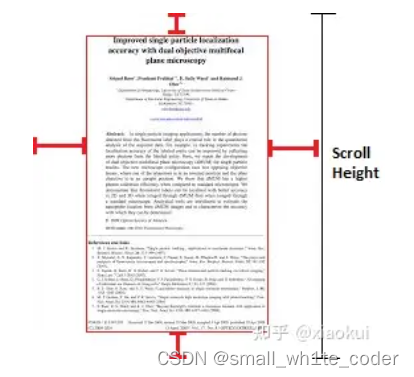
1.1.scrollHeight就是滚动的高度:
整个文档的高度而已
1.2.clientHeight 就是当前文档的高度
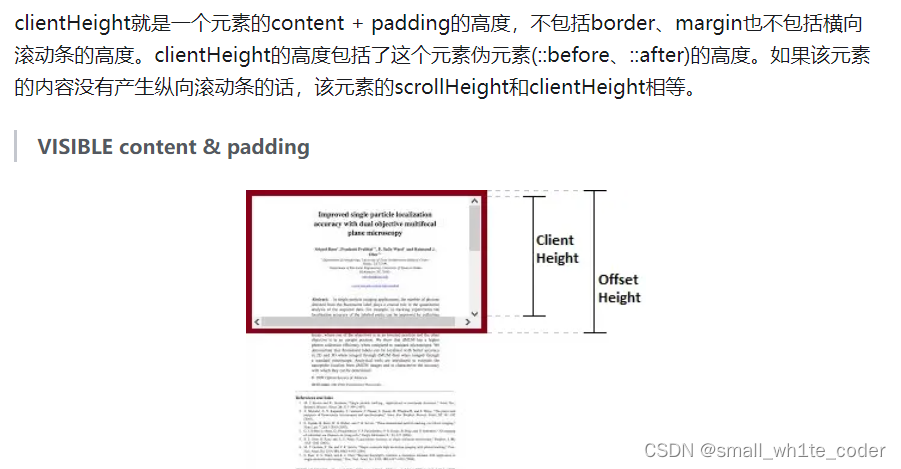
1.3 scrollTop 就是滚动的有效长度
其次,当滚动对象从首页的滚动条变为收藏夹栏时,需要考虑滚动内容应该为元素本身,可在home中增加ref="homeRef"标识,同时定义监听函数watch(Fn,{ ... })并及时更新页面,
  #smallCoderwhite3 :
  加入了对元素的通用监听功能之后,
  let el = window
  const scrollListenerHandler = throttle(() => {
    if (el === window) {
      clientHeight.value = document.documentElement.clientHeight
      scrollTop.value = document.documentElement.scrollTop
      scrollHeight.value = document.documentElement.scrollHeight
    } else {
      clientHeight.value = el.clientHeight
      scrollTop.value = el.scrollTop
      scrollHeight.value = el.scrollHeight
    }
    if (clientHeight.value + scrollTop.value >= scrollHeight.value) {
      console.log("滚动到底部了")
      isReachBottom.value = true
    }
  }, 50)

  onMounted(() => {
    if (elRef) el = elRef.value
    el.addEventListener("scroll", scrollListenerHandler)
  })

  onUnmounted(() => {
    el.removeEventListener("scroll", scrollListenerHandler)
  })

  return { isReachBottom, clientHeight, scrollTop, scrollHeight }

}
可以看到变化为home组件的监听,完整版:
export default function useScroll(elRef) {
let el = window
const isReachBottom = ref(false)
con 最低0.47元/天 解锁文章






 扫一扫
扫一扫


 3万+
3万+


 到【灌水乐园】发言



