



大纲
多副本维护是指,对一组在任何时候都处于运行状态的 Pod 副本的稳定集合进行维护。说的直白点,就是保证某种的Pod数量会被自动维持——增加了该类Pod会自动删除多余的,减少了该类Pod会自动新增以弥补,以保证Pod数量不变。
Kubernetes是一个一直在迭代更新的系统,其多副本维护方案也经历了几个版本大的改动。本文将采用最新的Deployment方案,而不是老版本的ReplicaSet和ReplicationController。
编写清单文件
在《研发工程师玩转Kubernetes——通过文件创建Service》一文中,我们通过两个不同的pod清单文件创建了两个Pod。
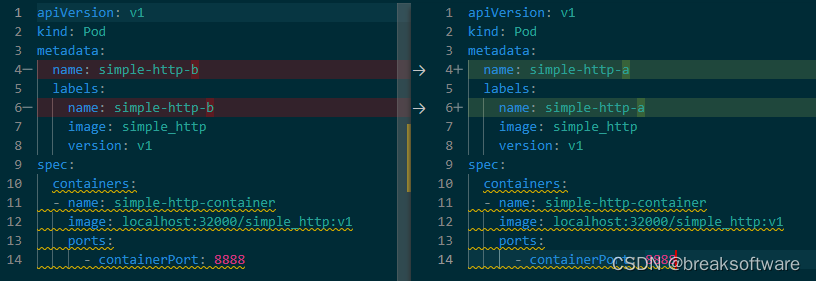
可以看到,它们只是name不同。
如果我们对name没有特别的要求,这样做起来就比较繁琐。比如我们要创建1000个Pod,难道要创建1000个清单文件才可以吗?而且它们的区别只有很小。
Deployment则帮我们解决了这个问题。如下面内容
# simple_http_deployment.yaml
apiVersion: apps/v1
kind: Deployment
metadata:
  name: simple-http-deployment
spec:
  replicas: 2
  selector:
    matchLabels:
      app: simple_http
  template:
    metadata:
      labels:
        app: simple_http
    spec:
      containers:
      - name: simple-http-container
        image: localhost:32000/simple_http:v1
        ports:
        - containerPort: 8888
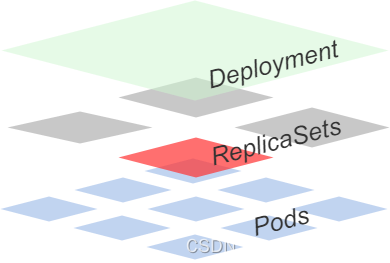
kind: Deployment表示该清单文件是用来描述Deployment组件的。它和Pod之间的关系如下图,即Deployment通过ReplicaSet来管理Pods。
metadata.name: simple-http-deployment用于描述该Deployment组件名。它还有一个重要作用,就是Pod的名字也是基于它生成的。
spec.replicas: 2表示我们将维持两个Pod的副本。
spec.selector.matchLabels.app: simple_http用于描述维持的Pod副本的匹配规则,即该Pod的app是simple_http。
template字段则是描述Pod的清单内容。它和《研发工程师玩转Kubernetes——通过文件创建Pod》的区别在于,前者不提供template.metadata.name字段。因为动态创建的Pod的名称如果需要指定,则需要在清单文件中写明。而在需要多副本维护的情况下,准确的Pod名没有太多意义。
template.metadata.labels.app和spec.selector.matchLabels.app相呼应,即Deployment维持的副本模板要强匹配app这个label。当然这个app不是必须的,我们可以改成其他的字段,因为它只是一个label。
提交部署
将上述yaml文件保存为simple_http_deployment.yaml ,并执行
kubectl apply -f simple_http_deployment.yaml
deployment.apps/simple-http-deployment created
查看Pod
kubectl describe pods
Name:             simple-http-deployment-5995f574dc-jrm8z
Namespace:        default
Priority:         0
Service Account:  default
Node:             fangliang-virtual-machine/172.30.45.36
Start Time:       Mon, 22 May 2023 17:07:36 +0800
Labels:           app=simple_http
                  pod-template-hash=5995f574dc
Annotations:      cni.projectcalico.org/containerID: 89f704ef7c1e19ee9e18e3d80c60fbf00e7c66690ea4bcd3f8bb18f7faa495bb
                  cni.projectcalico.org/podIP: 10.1.62.161/32
                  cni.projectcalico.org/podIPs: 10.1.62.161/32
Status:           Pending
IP:
IPs:              <none>
Controlled By:    ReplicaSet/simple-http-deployment-5995f574dc
Containers:
  simple-http-container:
    Container ID:
    Image:          localhost:32000/simple_http:v1
    Image ID:
    Port:           8888/TCP
    Host Port:      0/TCP
    State:          Waiting
      Reason:       ContainerCreating
    Ready:          False
    Restart Count:  0
    Environment:    <none>
    Mounts:
      /var/run/secrets/kubernetes.io/serviceaccount from kube-api-access-l4f4q (ro)
Conditions:
  Type              Status
  Initialized       True
  Ready             False
  ContainersReady   False
  PodScheduled      True
Volumes:
  kube-api-access-l4f4q:
    Type:                    Projected (a volume that contains injected data from multiple sources)
    TokenExpirationSeconds:  3607
    ConfigMapName:           kube-root-ca.crt
    ConfigMapOptional:       <nil>
    DownwardAPI:             true
QoS Class:                   BestEffort
Node-Selectors:              <none>
Tolerations:                 node.kubernetes.io/not-ready:NoExecute op=Exists for 300s
                             node.kubernetes.io/unreachable:NoExecute op=Exists for 300s
Events:
  Type    Reason     Age   From               Message
  ----    ------     ----  ----               -------
  Normal  Scheduled  2s    default-scheduler  Successfully assigned default/simple-http-deployment-5995f574dc-jrm8z to fangliang-virtual-machine
  Normal  Pulled     1s    kubelet            Container image "localhost:32000/simple_http:v1" already present on machine
  Normal  Created    1s    kubelet            Created container simple-http-container
  Normal  Started    0s    kubelet            Started container simple-http-container


Name:             simple-http-deployment-5995f574dc-zmczp
Namespace:        default
Priority:         0
Service Account:  default
Node:             fangliang-virtual-machine/172.30.45.36
Start Time:       Mon, 22 May 2023 17:07:36 +0800
Labels:           app=simple_http
                  pod-template-hash=5995f574dc
Annotations:      cni.projectcalico.org/containerID: 37d38e3883308d283e1f21bbd2d66cecdc0b1b52342b0fc31d833c692f2c5a85
                  cni.projectcalico.org/podIP: 10.1.62.153/32
                  cni.projectcalico.org/podIPs: 10.1.62.153/32
Status:           Pending
IP:
IPs:              <none>
Controlled By:    ReplicaSet/simple-http-deployment-5995f574dc
Containers:
  simple-http-container:
    Container ID:
    Image:          localhost:32000/simple_http:v1
    Image ID:
    Port:           8888/TCP
    Host Port:      0/TCP
    State:          Waiting
      Reason:       ContainerCreating
    Ready:          False
    Restart Count:  0
    Environment:    <none>
    Mounts:
      /var/run/secrets/kubernetes.io/serviceaccount from kube-api-access-82c7h (ro)
Conditions:
  Type              Status
  Initialized       True
  Ready             False
  ContainersReady   False
  PodScheduled      True
Volumes:
  kube-api-access-82c7h:
    Type:                    Projected (a volume that contains injected data from multiple sources)
    TokenExpirationSeconds:  3607
    ConfigMapName:           kube-root-ca.crt
    ConfigMapOptional:       <nil>
    DownwardAPI:             true
QoS Class:                   BestEffort
Node-Selectors:              <none>
Tolerations:                 node.kubernetes.io/not-ready:NoExecute op=Exists for 300s
                             node.kubernetes.io/unreachable:NoExecute op=Exists for 300s
Events:
  Type    Reason     Age   From               Message
  ----    ------     ----  ----               -------
  Normal  Scheduled  2s    default-scheduler  Successfully assigned default/simple-http-deployment-5995f574dc-zmczp to fangliang-virtual-machine
  Normal  Pulled     1s    kubelet            Container image "localhost:32000/simple_http:v1" already present on machine
  Normal  Created    1s    kubelet            Created container simple-http-container
  Normal  Started    0s    kubelet            Started container simple-http-container
我们观察Name字段,可以看到Deployment生成了名字叫simple-http-deployment-5995f574dc-jrm8z和simple-http-deployment-5995f574dc-zmczp的Pod。他们都是基于Deployment的name:simple-http-deployment自动生成的。
维护实验
手动删除Pod,Deployment自动增加
我们删除simple-http-deployment-5995f574dc-jrm8z
kubectl delete pod simple-http-deployment-5995f574dc-jrm8z
pod “simple-http-deployment-5995f574dc-jrm8z” deleted
然后查看Pod的状态
kubectl describe pods
Name:             simple-http-deployment-5995f574dc-zmczp
Namespace:        default
Priority:         0
Service Account:  default
Node:             fangliang-virtual-machine/172.30.45.36
Start Time:       Mon, 22 May 2023 17:07:36 +0800
Labels:           app=simple_http
                  pod-template-hash=5995f574dc
Annotations:      cni.projectcalico.org/containerID: 37d38e3883308d283e1f21bbd2d66cecdc0b1b52342b0fc31d833c692f2c5a85
                  cni.projectcalico.org/podIP: 10.1.62.153/32
                  cni.projectcalico.org/podIPs: 10.1.62.153/32
Status:           Running
IP:               10.1.62.153
IPs:
  IP:           10.1.62.153
Controlled By:  ReplicaSet/simple-http-deployment-5995f574dc
Containers:
  simple-http-container:
    Container ID:   containerd://9e4b29af865933cf876b8af1c9cc10a86b5ccbcc4fca2c184a56317b6a7ea097
    Image:          localhost:32000/simple_http:v1
    Image ID:       localhost:32000/simple_http@sha256:cbee584f83426593efb95a9e2213bb40143a1c86c3d217e65d30430033f846d4
    Port:           8888/TCP
    Host Port:      0/TCP
    State:          Running
      Started:      Mon, 22 May 2023 17:07:38 +0800
    Ready:          True
    Restart Count:  0
    Environment:    <none>
    Mounts:
      /var/run/secrets/kubernetes.io/serviceaccount from kube-api-access-82c7h (ro)
Conditions:
  Type              Status
  Initialized       True
  Ready             True
  ContainersReady   True
  PodScheduled      True
Volumes:
  kube-api-access-82c7h:
    Type:                    Projected (a volume that contains injected data from multiple sources)
    TokenExpirationSeconds:  3607
    ConfigMapName:           kube-root-ca.crt
    ConfigMapOptional:       <nil>
    DownwardAPI:             true
QoS Class:                   BestEffort
Node-Selectors:              <none>
Tolerations:                 node.kubernetes.io/not-ready:NoExecute op=Exists for 300s
                             node.kubernetes.io/unreachable:NoExecute op=Exists for 300s
Events:
  Type    Reason     Age   From               Message
  ----    ------     ----  ----               -------
  Normal  Scheduled  100s  default-scheduler  Successfully assigned default/simple-http-deployment-5995f574dc-zmczp to fangliang-virtual-machine
  Normal  Pulled     100s  kubelet            Container image "localhost:32000/simple_http:v1" already present on machine
  Normal  Created    100s  kubelet            Created container simple-http-container
  Normal  Started    99s   kubelet            Started container simple-http-container

Name:             simple-http-deployment-5995f574dc-46kk5
Namespace:        default
Priority:         0
Service Account:  default
Node:             fangliang-virtual-machine/172.30.45.36
Start Time:       Mon, 22 May 2023 17:08:57 +0800
Labels:           app=simple_http
                  pod-template-hash=5995f574dc
Annotations:      cni.projectcalico.org/containerID: b755b01f8ead112314377158b6a9520bec9a02f4be97edfdf906f715b6fd4a94
                  cni.projectcalico.org/podIP: 10.1.62.157/32
                  cni.projectcalico.org/podIPs: 10.1.62.157/32
Status:           Running
IP:               10.1.62.157
IPs:
  IP:           10.1.62.157
Controlled By:  ReplicaSet/simple-http-deployment-5995f574dc
Containers:
  simple-http-container:
    Container ID:   containerd://c0354e53cf916d8d826f5e8a2bf0a475c038b47bddb947b0fb7233be612f139f
    Image:          localhost:32000/simple_http:v1
    Image ID:       localhost:32000/simple_http@sha256:cbee584f83426593efb95a9e2213bb40143a1c86c3d217e65d30430033f846d4
    Port:           8888/TCP
    Host Port:      0/TCP
    State:          Running
      Started:      Mon, 22 May 2023 17:08:57 +0800
    Ready:          True
    Restart Count:  0
    Environment:    <none>
    Mounts:
      /var/run/secrets/kubernetes.io/serviceaccount from kube-api-access-wvsx8 (ro)
Conditions:
  Type              Status
  Initialized       True
  Ready             True
  ContainersReady   True
  PodScheduled      True
Volumes:
  kube-api-access-wvsx8:
    Type:                    Projected (a volume that contains injected data from multiple sources)
    TokenExpirationSeconds:  3607
    ConfigMapName:           kube-root-ca.crt
    ConfigMapOptional:       <nil>
    DownwardAPI:             true
QoS Class:                   BestEffort
Node-Selectors:              <none>
Tolerations:                 node.kubernetes.io/not-ready:NoExecute op=Exists for 300s
                             node.kubernetes.io/unreachable:NoExecute op=Exists for 300s
Events:
  Type    Reason     Age   From               Message
  ----    ------     ----  ----               -------
  Normal  Scheduled  20s   default-scheduler  Successfully assigned default/simple-http-deployment-5995f574dc-46kk5 to fangliang-virtual-machine
  Normal  Pulled     20s   kubelet            Container image "localhost:32000/simple_http:v1" already present on machine
  Normal  Created    20s   kubelet            Created container simple-http-container
  Normal  Started    20s   kubelet            Started container simple-http-container
可以看到simple-http-deployment-5995f574dc-zmczp没有变动,simple-http-deployment-5995f574dc-jrm8z被删除了(可能会处在Terminating中间状态),simple-http-deployment-5995f574dc-46kk5被新建出来。
手动调整副本
我们可以通过kubectl scale指令调整的大小,比如下面指令将副本数调整为1。
kubectl scale deployment simple-http-deployment --replicas=1
deployment.apps/simple-http-deployment scaled
查看现存的Pod
kubectl describe pod
Name:             simple-http-deployment-5995f574dc-zmczp
Namespace:        default
Priority:         0
Service Account:  default
Node:             fangliang-virtual-machine/172.30.45.36
Start Time:       Mon, 22 May 2023 17:07:36 +0800
Labels:           app=simple_http
                  pod-template-hash=5995f574dc
Annotations:      cni.projectcalico.org/containerID: 37d38e3883308d283e1f21bbd2d66cecdc0b1b52342b0fc31d833c692f2c5a85
                  cni.projectcalico.org/podIP: 10.1.62.153/32
                  cni.projectcalico.org/podIPs: 10.1.62.153/32
Status:           Running
IP:               10.1.62.153
IPs:
  IP:           10.1.62.153
Controlled By:  ReplicaSet/simple-http-deployment-5995f574dc
Containers:
  simple-http-container:
    Container ID:   containerd://9e4b29af865933cf876b8af1c9cc10a86b5ccbcc4fca2c184a56317b6a7ea097
    Image:          localhost:32000/simple_http:v1
    Image ID:       localhost:32000/simple_http@sha256:cbee584f83426593efb95a9e2213bb40143a1c86c3d217e65d30430033f846d4
    Port:           8888/TCP
    Host Port:      0/TCP
    State:          Running
      Started:      Mon, 22 May 2023 17:07:38 +0800
    Ready:          True
    Restart Count:  0
    Environment:    <none>
    Mounts:
      /var/run/secrets/kubernetes.io/serviceaccount from kube-api-access-82c7h (ro)
Conditions:
  Type              Status
  Initialized       True
  Ready             True
  ContainersReady   True
  PodScheduled      True
Volumes:
  kube-api-access-82c7h:
    Type:                    Projected (a volume that contains injected data from multiple sources)
    TokenExpirationSeconds:  3607
    ConfigMapName:           kube-root-ca.crt
    ConfigMapOptional:       <nil>
    DownwardAPI:             true
QoS Class:                   BestEffort
Node-Selectors:              <none>
Tolerations:                 node.kubernetes.io/not-ready:NoExecute op=Exists for 300s
                             node.kubernetes.io/unreachable:NoExecute op=Exists for 300s
Events:                      <none>
可以看到只有simple-http-deployment-5995f574dc-zmczp存在了。
查看Deployment
kubectl describe deployments.apps simple-http-deployment
Name:                   simple-http-deployment
Namespace:              default
CreationTimestamp:      Mon, 22 May 2023 17:07:36 +0800
Labels:                 <none>
Annotations:            deployment.kubernetes.io/revision: 1
Selector:               app=simple_http
Replicas:               1 desired | 1 updated | 1 total | 1 available | 0 unavailable
StrategyType:           RollingUpdate
MinReadySeconds:        0
RollingUpdateStrategy:  25% max unavailable, 25% max surge
Pod Template:
  Labels:  app=simple_http
  Containers:
   simple-http-container:
    Image:        localhost:32000/simple_http:v1
    Port:         8888/TCP
    Host Port:    0/TCP
    Environment:  <none>
    Mounts:       <none>
  Volumes:        <none>
Conditions:
  Type           Status  Reason
  ----           ------  ------
  Progressing    True    NewReplicaSetAvailable
  Available      True    MinimumReplicasAvailable
OldReplicaSets:  <none>
NewReplicaSet:   simple-http-deployment-5995f574dc (1/1 replicas created)
Events:          <none>
我们看到Deployment下有个字段NewReplicaSet,它是其管理的ReplicaSet的名字。
查看ReplicaSet
Deployment底层是通过ReplicaSet来实现的,我们可以通过下面指令看下rc
kubectl describe replicasets.apps
Name:           simple-http-deployment-5995f574dc
Namespace:      default
Selector:       app=simple_http,pod-template-hash=5995f574dc
Labels:         app=simple_http
                pod-template-hash=5995f574dc
Annotations:    deployment.kubernetes.io/desired-replicas: 1
                deployment.kubernetes.io/max-replicas: 2
                deployment.kubernetes.io/revision: 1
Controlled By:  Deployment/simple-http-deployment
Replicas:       1 current / 1 desired
Pods Status:    1 Running / 0 Waiting / 0 Succeeded / 0 Failed
Pod Template:
  Labels:  app=simple_http
           pod-template-hash=5995f574dc
  Containers:
   simple-http-container:
    Image:        localhost:32000/simple_http:v1
    Port:         8888/TCP
    Host Port:    0/TCP
    Environment:  <none>
    Mounts:       <none>
  Volumes:        <none>
Events:           <none>
可以看到这个RC的Name是simple-http-deployment-5995f574dc,而之前通过Deployment创建的Pod的名字是simple-http-deployment-5995f574dc-zmczp、simple-http-deployment-5995f574dc-jrm8z和simple-http-deployment-5995f574dc-46kk5——它们的名气都是RC的名字拼接上几个字符。即:
- ReplicaSet Name = Deployment Name + “-” +“some hash”
- Pod Name = ReplicaSet Name+ “-” +“some hash”
而且新创建的Pod都会带上label: pod-template-hash=5995f574dc。RC通过Selector中的指定pod-template-hash=5995f574dc来聚合这些Pod。
手动新增Pod,Deployment自动删除
我们已经洞悉上述Deployment使用RC simple-http-deployment-5995f574dc来维护副本,而RC使用了app=simple_http,pod-template-hash=5995f574dc来筛选Pod。如果我们手工创建一个符合这些label的Pod,看看什么效果。
# simple_http_c.yaml
apiVersion: v1
kind: Pod
metadata:
  name: simple-http-c
  labels:
    name: simple-http-c
    app: simple_http
    pod-template-hash: 5995f574dc
spec:
  containers:
  - name: simple-http-container
    image: localhost:32000/simple_http:v1
    ports:
      - containerPort: 8888
保存为simple_http_c.yaml,然后执行
kubectl create -f simple_http_c.yaml
pod/simple-http-c created
我们再查看rc
kubectl describe replicasets.apps
Name:           simple-http-deployment-5995f574dc
Namespace:      default
Selector:       app=simple_http,pod-template-hash=5995f574dc
Labels:         app=simple_http
                pod-template-hash=5995f574dc
Annotations:    deployment.kubernetes.io/desired-replicas: 1
                deployment.kubernetes.io/max-replicas: 2
                deployment.kubernetes.io/revision: 1
Controlled By:  Deployment/simple-http-deployment
Replicas:       1 current / 1 desired
Pods Status:    2 Running / 0 Waiting / 0 Succeeded / 0 Failed
Pod Template:
  Labels:  app=simple_http
           pod-template-hash=5995f574dc
  Containers:
   simple-http-container:
    Image:        localhost:32000/simple_http:v1
    Port:         8888/TCP
    Host Port:    0/TCP
    Environment:  <none>
    Mounts:       <none>
  Volumes:        <none>
Events:
  Type    Reason            Age   From                   Message
  ----    ------            ----  ----                   -------
  Normal  SuccessfulDelete  19s   replicaset-controller  Deleted pod: simple-http-c
可以看到刚刚创建的Pod被删除了。此时simple-http-c处于Terminating状态。
该RC还是维持着动态调整后的副本数。
删除
kubectl delete deployments.apps simple-http-deployment
deployment.apps “simple-http-deployment” deleted
此时我们看到这个Deployment创建的Pod也会被删除
kubectl describe pod
Name:                      simple-http-deployment-5995f574dc-zmczp
Namespace:                 default
Priority:                  0
Service Account:           default
Node:                      fangliang-virtual-machine/172.30.45.36
Start Time:                Mon, 22 May 2023 17:07:36 +0800
Labels:                    app=simple_http
                           pod-template-hash=5995f574dc
Annotations:               cni.projectcalico.org/containerID: 37d38e3883308d283e1f21bbd2d66cecdc0b1b52342b0fc31d833c692f2c5a85
                           cni.projectcalico.org/podIP: 10.1.62.153/32
                           cni.projectcalico.org/podIPs: 10.1.62.153/32
Status:                    Terminating (lasts <invalid>)
Termination Grace Period:  30s
IP:                        10.1.62.153
IPs:
  IP:           10.1.62.153
Controlled By:  ReplicaSet/simple-http-deployment-5995f574dc
Containers:
  simple-http-container:
    Container ID:   containerd://9e4b29af865933cf876b8af1c9cc10a86b5ccbcc4fca2c184a56317b6a7ea097
    Image:          localhost:32000/simple_http:v1
    Image ID:       localhost:32000/simple_http@sha256:cbee584f83426593efb95a9e2213bb40143a1c86c3d217e65d30430033f846d4
    Port:           8888/TCP
    Host Port:      0/TCP
    State:          Running
      Started:      Mon, 22 May 2023 17:07:38 +0800
    Ready:          True
    Restart Count:  0
    Environment:    <none>
    Mounts:
      /var/run/secrets/kubernetes.io/serviceaccount from kube-api-access-82c7h (ro)
Conditions:
  Type              Status
  Initialized       True
  Ready             True
  ContainersReady   True
  PodScheduled      True
Volumes:
  kube-api-access-82c7h:
    Type:                    Projected (a volume that contains injected data from multiple sources)
    TokenExpirationSeconds:  3607
    ConfigMapName:           kube-root-ca.crt
    ConfigMapOptional:       <nil>
    DownwardAPI:             true
QoS Class:                   BestEffort
Node-Selectors:              <none>
Tolerations:                 node.kubernetes.io/not-ready:NoExecute op=Exists for 300s
                             node.kubernetes.io/unreachable:NoExecute op=Exists for 300s
Events:
  Type    Reason   Age   From     Message
  ----    ------   ----  ----     -------
  Normal  Killing  27s   kubelet  Stopping container simple-http-container





 扫一扫
扫一扫


 561
561

 被折叠的 条评论
为什么被折叠?
被折叠的 条评论
为什么被折叠?
 到【灌水乐园】发言





