



文章目录
一、登录接口普通实现
import requests
resp = requests.post(url="http://ihrm-test.itheima.net/api/sys/login",
                     json={"mobile": "13800000002", "password": "123456"})
print(resp.json())

二、封装登录接口
1、api包:__ init __ 和 ihrm_login_api.py
2、common包:__ init __ 和 assert_tools.py和logging_use.py
3、report文件夹:
4、scripts包:__ init __ 和 test_ihrm_login.py
5、pytest.ini
2.1 api
2.1.1 ihrm_login_api.py
"""
ihrm 登录接口 对象层
"""
import requests


# 定义 ihrm 登录接口 类
class IhrmLoginApi(object):
    # 定义方法
    @classmethod
    def login(cls, req_data):
        resp = requests.post(url="http://ihrm-test.itheima.net/api/sys/login", json=req_data)
        return resp


# 测试 接口封装是否成功
if __name__ == '__main__':
    # 准备请求体数据
    data = {"mobile": "13800000002", "password": "123456"}
    resp = IhrmLoginApi.login(data)
    print("登录成功:", resp.json())
2.2 common
2.2.1 assert_tools.py
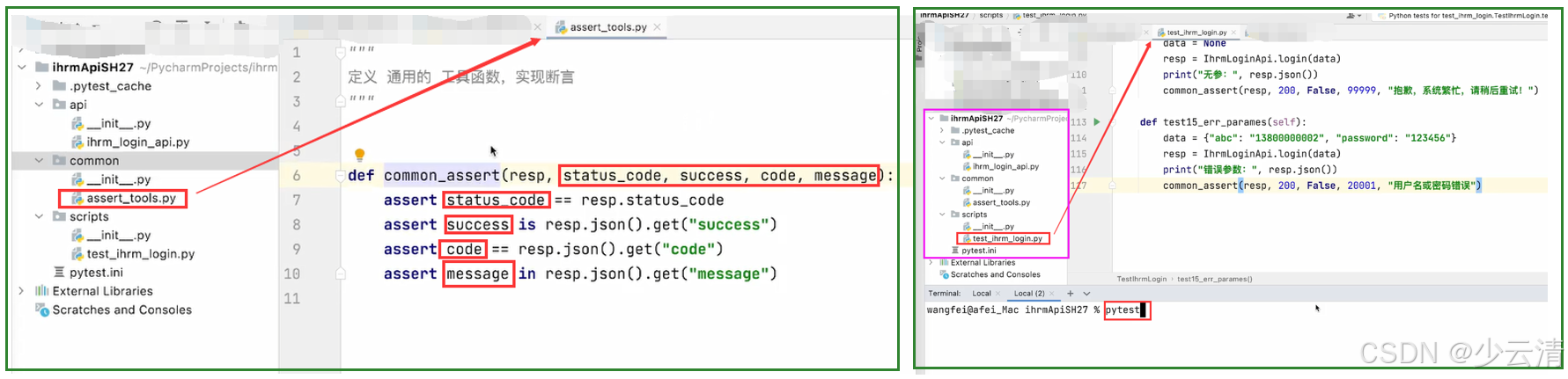
- 在项目目录下,创建 common 目录,添加 文件 assert_tools.py
- 在 文件 assert_tools.py 添加 通用的断言函数 common_assert()
- 实现 此函数。
"""
定义 通用的 工具函数,帮别人 实现断言(谁调用我,给我一个resp,帮你做断言 )
"""

def common_assert(resp, status_code, success, code, message):
    # 预期结果 ==实际结果
    assert status_code == resp.status_code
    assert success is resp.json().get("success")
    assert code == resp.json().get("code")
    assert message in resp.json().get("message")
- 在 测试脚本层中,需要断言的位置,使用 这个 断言函数来实现。
2.2.2 logging_use.py
-
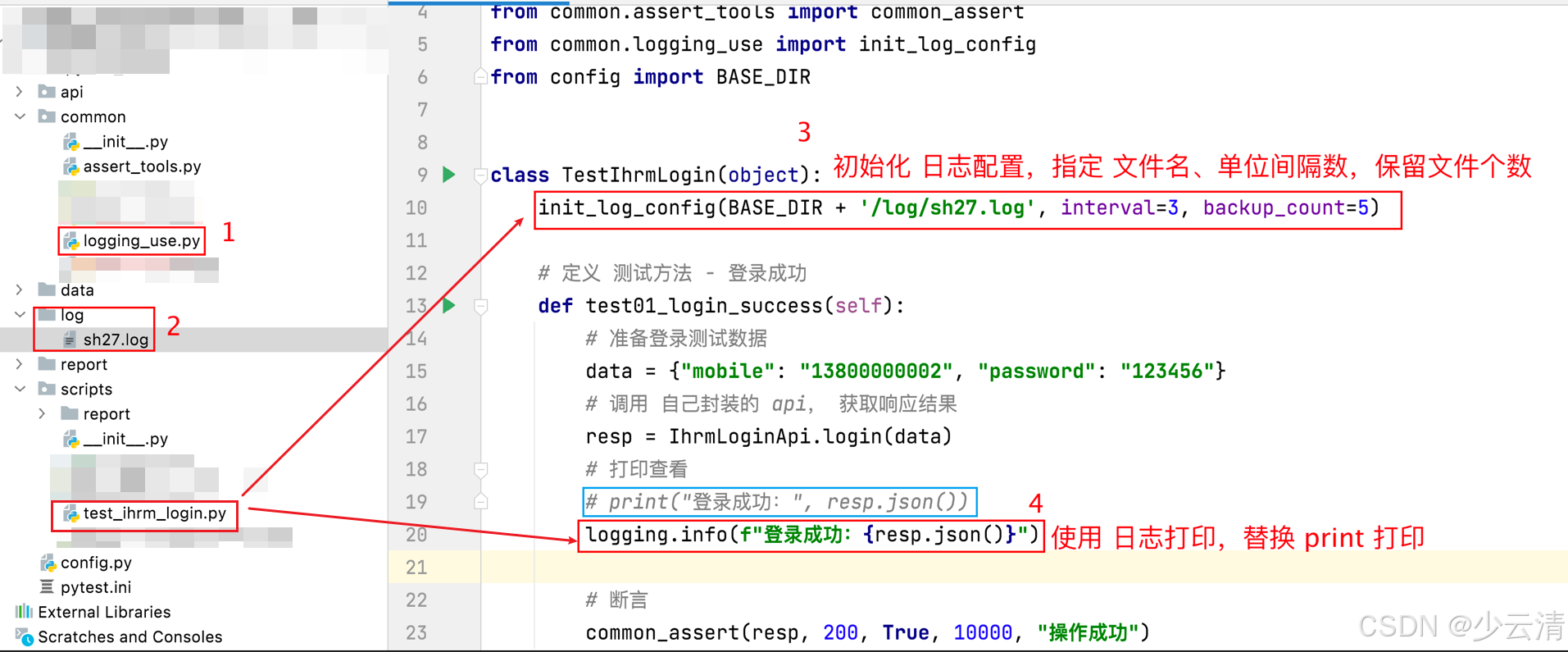
将 loggin_use.py 文件部署到项目中。 如:拷贝至 common/ 下。
-
在 项目下 创建 log/ 用来存放生成的 xxx.log 日志文件
-
在 项目中,使用日志之前,初始化日志信息,指定 日志文件名【必填】、单位、单位间隔、保留文件个数。
-
在 需要打印输出的位置,使用 logging.级别(“想要输出的信息”)
import logging.handlers
import logging
from config import BASE_DIR


def init_log_config(filename, when='midnight', interval=1, backup_count=7):
    """
    功能:初始化日志配置函数
    :param filename: 日志文件名
    :param when: 设定日志切分的间隔时间单位
    :param interval: 间隔时间单位的个数,指等待多少个 when 后继续进行日志记录
    :param backup_count: 保留日志文件的个数
    :return:
    """
    # 1. 创建日志器对象
    logger = logging.getLogger()

    # 2. 设置日志打印级别
    logger.setLevel(logging.DEBUG)
    # logging.DEBUG 调试级别
    # logging.INFO 信息级别
    # logging.WARNING 警告级别
    # logging.ERROR 错误级别
    # logging.CRITICAL 严重错误级别

    # 3. 创建处理器对象
    # 控制台对象
    st = logging.StreamHandler()
    # 日志文件对象
    fh = logging.handlers.TimedRotatingFileHandler(filename,
                                                   when=when,
                                                   interval=interval,
                                                   backupCount=backup_count,
                                                   encoding='utf-8')

    # 4. 日志信息格式
    fmt = "%(asctime)s %(levelname)s [%(filename)s(%(funcName)s:%(lineno)d)] - %(message)s"
    formatter = logging.Formatter(fmt)

    # 5. 给处理器设置日志信息格式
    st.setFormatter(formatter)
    fh.setFormatter(formatter)

    # 6. 给日志器添加处理器
    logger.addHandler(st)
    logger.addHandler(fh)


if __name__ == '__main__':
    # 初始化日志
    init_log_config(BASE_DIR + '/log/sh27.log', interval=3, backup_count=5)

    # 打印输出日志信息
    logging.debug('我是一个调试级别的日志')
    logging.info("AAA BBB CCC")
    logging.error("xxxx 错误。。")
2.3 report
1、修改 pytest.ini 文件,addopts 添加 参数。
–html=./report/报告名.html --self-contained-html
2、在项目目录下,终端执行 pytest 命令,自动生成测试报告,存入 report目录中
2.4 scripts
2.4.1 test_ihrm_login.py
import logging
import jsonschema

from api.ihrm_login_api import IhrmLoginApi
from common.assert_tools import common_assert
from common.logging_use import init_log_config
from config import BASE_DIR


class TestIhrmLogin(object):
    init_log_config(BASE_DIR + '/log/sh27.log', interval=3, backup_count=5)

    # 定义 测试方法 - 登录成功
    def test01_login_success(self):
        # 准备登录测试数据
        data = {"mobile": "13800000002", "password": "123456"}
        # 调用 自己封装的 api, 获取响应结果
        resp = IhrmLoginApi.login(data)
        # 打印查看
        print("登录成功:", resp.json())
        logging.info(f"登录成功:{resp.json()}")

        assert 200 == resp.status_code

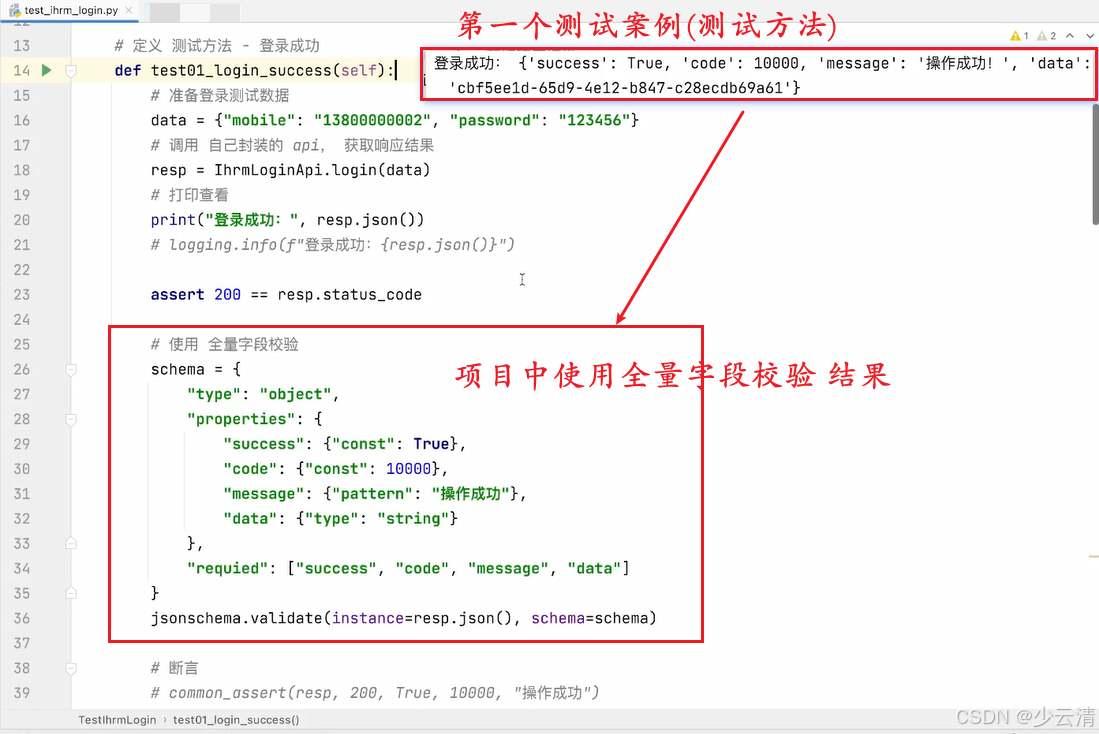
        # 使用 全量字段校验
        schema = {
            "type": "object",
            "properties": {
                "success": {"const": True},
                "code": {"const": 10000},
                "message": {"pattern": "操作成功"},
                "data": {"type": "string"}
            },
            "requied": ["success", "code", "message", "data"]
        }
        jsonschema.validate(instance=resp.json(), schema=schema)

        # 断言
        # common_assert(resp, 200, True, 10000, "操作成功")
        # assert 200 == resp.status_code
        # assert True is resp.json().get("success")
        # assert 10000 == resp.json().get("code")
        # assert "操作成功" in resp.json().get("message")

    # 定义 测试方法 - 手机号未注册
    def test02_mobile_not_register(self):
        # 准备登录测试数据
        data = {"mobile": "13874893701", "password": "123456"}
        # 调用 自己封装的 api, 获取响应结果
        resp = IhrmLoginApi.login(data)
        # 打印查看
        print("手机号未注册:", resp.json())

        # 断言
        common_assert(resp, 200, False, 20001, "用户名或密码错误")

    # 定义 测试方法 - 密码错误
    def test03_pwd_err(self):
        # 准备登录测试数据
        data = {"mobile": "13800000002", "password": "123456890"}
        # 调用 自己封装的 api, 获取响应结果
        resp = IhrmLoginApi.login(data)
        # 打印查看
        print("密码错误:", resp.json())

        # 断言
        common_assert(resp, 200, False, 20001, "用户名或密码错误")

    def test04_mobile_is_none(self):
        data = {"mobile": None, "password": "123456"}
        resp = IhrmLoginApi.login(data)
        print("手机号为空:", resp.json())
        common_assert(resp, 200, False, 20001, "用户名或密码错误")

    def test05_mobile_have_special_char(self):
        data = {"mobile": "1380abc#002", "password": "123456"}
        resp = IhrmLoginApi.login(data)
        print("手机号含有特殊字符:", resp.json())
        common_assert(resp, 200, False, 20001, "用户名或密码错误")

    def test06_10_mobile(self):
        data = {"mobile": "1380000000", "password": "123456"}
        resp = IhrmLoginApi.login(data)
        print("10位手机号:", resp.json())
        common_assert(resp, 200, False, 20001, "用户名或密码错误")

    def test07_12_mobile(self):
        data = {"mobile": "138000000034", "password": "123456"}
        resp = IhrmLoginApi.login(data)
        print("12位手机号:", resp.json())
        common_assert(resp, 200, False, 20001, "用户名或密码错误")

    def test08_pwd_none(self):
        data = {"mobile": "13800000002", "password": None}
        resp = IhrmLoginApi.login(data)
        print("密码为空:", resp.json())
        common_assert(resp, 200, False, 20001, "用户名或密码错误")

    def test09_pwd_have_special_char(self):
        data = {"mobile": "13800000002", "password": "abc#¥%"}
        resp = IhrmLoginApi.login(data)
        print("密码含有特殊字符:", resp.json())
        common_assert(resp, 200, False, 20001, "用户名或密码错误")

    def test10_pwd_1(self):
        data = {"mobile": "13800000002", "password": "1"}
        resp = IhrmLoginApi.login(data)
        print("密码1位:", resp.json())
        common_assert(resp, 200, False, 20001, "用户名或密码错误")

    def test11_pwd_100(self):
        data = {"mobile": "13800000002",
                "password": "1234567890123456789012345678901234567890123456789012345678901234567890123456789012345678901234567890"}
        resp = IhrmLoginApi.login(data)
        print("密码100位:", resp.json())
        common_assert(resp, 200, False, 20001, "用户名或密码错误")

    def test12_more_params(self):
        data = {"mobile": "13800000002", "password": "123456", "abc": "123"}
        resp = IhrmLoginApi.login(data)
        print("多参:", resp.json())
        common_assert(resp, 200, True, 10000, "操作成功")

    def test13_less_params(self):
        data = {"mobile": "13800000002"}
        resp = IhrmLoginApi.login(data)
        print("少参-password:", resp.json())
        common_assert(resp, 200, False, 20001, "用户名或密码错误")

    def test14_none_params(self):
        data = None
        resp = IhrmLoginApi.login(data)
        print("无参:", resp.json())
        common_assert(resp, 200, False, 99999, "抱歉,系统繁忙,请稍后重试!")

    def test15_err_parames(self):
        data = {"abc": "13800000002", "password": "123456"}
        resp = IhrmLoginApi.login(data)
        print("错误参数:", resp.json())
        common_assert(resp, 200, False, 20001, "用户名或密码错误")
2.5 pytest.ini
[pytest]
addopts = -s --html=./report/ihrmReport.html --self-contained-html
testpaths = ./scripts
python_files = test*.py
python_classes = Test*
python_functions = test*
三、参数化
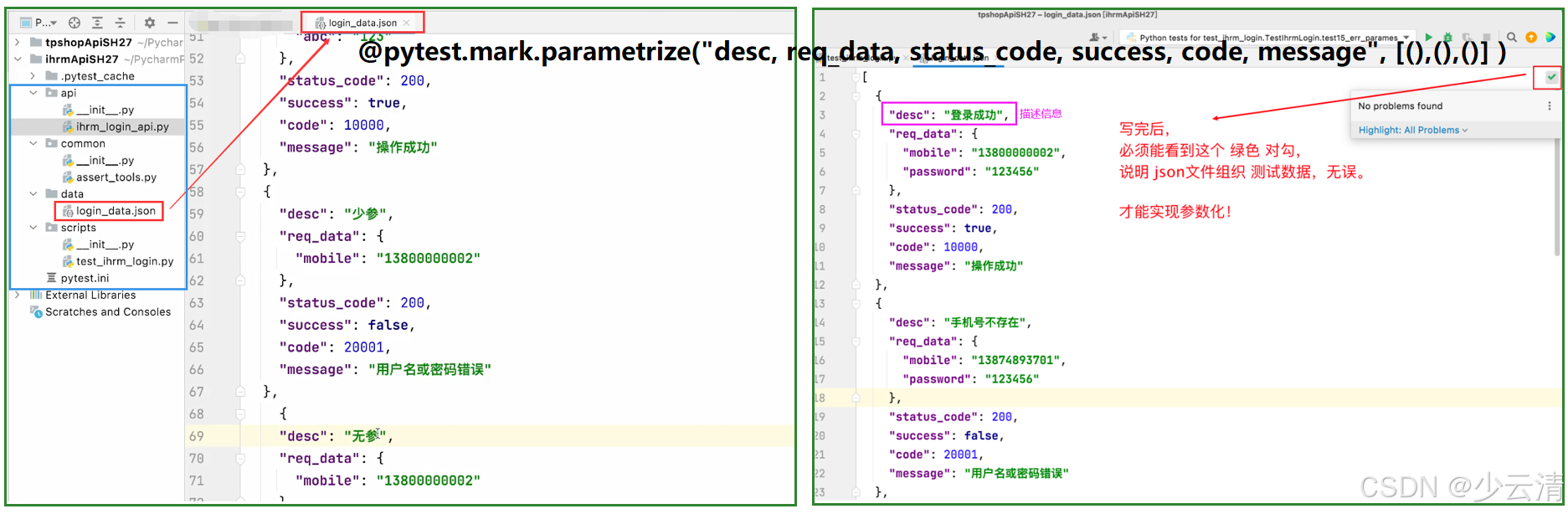
3.1 登录接口实现参数化时,使用的 json文件。
- 15个方法:数据不同,断言不同。
- —>15个方法用同一种形式调用起来。login_data.json
//  json应该对应15个测试用例,此代码只写了几个,并没有写全。

[
  {
    "desc": "登录成功",
    "req_data": {
      "mobile": "13800000002",
      "password": "123456"
    },
    "status_code": 200,
    "success": true,
    "code": 10000,
    "message": "操作成功"
  },
  {
    "desc": "手机号不存在",
    "req_data": {
      "mobile": "13874893701",
      "password": "123456"
    },
    "status_code": 200,
    "success": false,
    "code": 20001,
    "message": "用户名或密码错误"
  },
  {
    "desc": "密码错误",
    "req_data": {
      "mobile": "13800000002",
      "password": "123456890"
    },
    "status_code": 200,
    "success": false,
    "code": 20001,
    "message": "用户名或密码错误"
  },
  {
    "desc": "手机号为空",
    "req_data": {
      "mobile": null,
      "password": "123456"
    },
    "status_code": 200,
    "success": false,
    "code": 20001,
    "message": "用户名或密码错误"
  },
  {
    "desc": "手机号有特殊字符",
    "req_data": {
      "mobile": "1380abc#002",
      "password": "123456"
    },
    "status_code": 200,
    "success": false,
    "code": 20001,
    "message": "用户名或密码错误"
  },
  {
    "desc": "手机号10位",
    "req_data": {
      "mobile": "1380000000",
      "password": "123456"
    },
    "status_code": 200,
    "success": false,
    "code": 20001,
    "message": "用户名或密码错误"
  },
  {
    "desc": "多参",
    "req_data": {
      "mobile": "13800000002",
      "password": "123456",
      "abc": "123"
    },
    "status_code": 200,
    "success": true,
    "code": 10000,
    "message": "操作成功"
  },
  {
    "desc": "少参",
    "req_data": {
      "mobile": "13800000002"
    },
    "status_code": 200,
    "success": false,
    "code": 20001,
    "message": "用户名或密码错误"
  },
  {
    "desc": "无参",
    "req_data": null,
    "status_code": 200,
    "success": false,
    "code": 99999,
    "message": "抱歉,系统繁忙,请稍后重试!"
  }
]
四、小结





 扫一扫
扫一扫


 276
276

 被折叠的 条评论
为什么被折叠?
被折叠的 条评论
为什么被折叠?
 到【灌水乐园】发言





