


 本文对比了protobuf、protostuff和json在接口数据传输时的大小,并探讨了在nginx的gzip压缩后,三者文件大小的变化。实验结果显示,protostuff的数据大小约为json的一半,但在经过gzip压缩后,两者压缩比例相近,大小差异不大。
公司一个cs架构项目接口,使用json传输数据大小接近10M,简单的研究了一下protobuf 、protostuff,以及针对这个接口场景 使用protobuf 、protostuff、json序列化nginx的gzip压缩传输后文件大小的比较。
1.protobuf简单使用
下载protoc-3.5.1-win32.zip 和 protobuf-java-3.5.1.zip 分别解压
把 protoc-3.5.1-win32.zip里的protoc.exe拷贝到 E:\develop\protobuf-3.5.1\src (不考也行)
E:\develop\protobuf-3.5.1\src\protoc.exe 是protoc.exe 所在目录
E:\develop\protobuf-3.5.1\examples 是 .proto所在的目录
进入要编译的.proto文件目录(E:\develop\protobuf-3.5.1\examples) 执行一下命令
E:\develop\protobuf-3.5.1\examples>E:\develop\protobuf-3.5.1\src\protoc.exe --j
va_out=. addressbook.proto
会在当前目录生成AddressBookProtos.java

还可使用maven插件使每次打包的时候自动把.proto文件编译成.java文件
这里没有这么做,使用protocol buffer主要的工作是要另外编写.proto文件
对应现有系统改的比较大所以没有使用protobuffer方案。
.proto还是比较简单,可以自行学习
下面给出一下例子,只是为了忘记时候可以回忆一下,可以略过

syntax = "proto3";
option java_package = "com.*.*.*.*.rcp.protobuf";
option java_outer_classname = "XXXXProto";
import public "FltBookResult.proto";
import "ResultBase.proto";
message XXXXInfo {
/**
* <p>
* Description:航段唯一 ID 号
* </p>
*/
string soflSeqNr = 1;
.......
FltBookResult fltBookResult = 96;
ResultBase resultBase = 97;
}
2.prostostuff的使用
结合springmvc的Converter
import com.google.common.base.Stopwatch;
import io.protostuff.LinkedBuffer;
import io.protostuff.ProtobufIOUtil;
import io.protostuff.Schema;
import io.protostuff.runtime.RuntimeSchema;
import net.jpountz.lz4.LZ4BlockOutputStream;
import org.apache.commons.io.IOUtils;
import org.slf4j.Logger;
import org.slf4j.LoggerFactory;
import org.springframework.http.HttpInputMessage;
import org.springframework.http.HttpOutputMessage;
import org.springframework.http.MediaType;
import org.springframework.http.converter.AbstractHttpMessageConverter;
import org.springframework.http.converter.HttpMessageNotReadableException;
import org.springframework.http.converter.HttpMessageNotWritableException;
import org.xerial.snappy.SnappyOutputStream;
import java.io.IOException;
import java.io.InputStream;
import java.io.OutputStream;
import java.nio.charset.Charset;
import java.util.zip.GZIPOutputStream;
/**
* <p>
* An {@code HttpMessageConverter} that can read and write
* <a href="https://developers.google.com/protocol-buffers/">Google Protocol Buffer (Protobuf)</a> messages using the
* open-source <a href="http://http://www.protostuff.io">Protostuff library</a>. Its advantage over native Protobuf
* serialization and deserialization is that it can work with normal {@code POJO}s, as compared to the native
* implementation that requires the objects to implement the {@code Message} interface from the Protobuf Java library.
* This allows applications to use Protobuf with existing classes instead of having to re-generate them using the
* Protobuf compiler.
* </p>
* <p>
* Supports the {@code application/x-protobuf} media type. Regular Spring MVC application clients can use this as the
* media type for the {@code Accept} and {@code Content-Type} HTTP headers for exchanging information as Protobuf
* messages.
* </p>
*/
public class ProtostuffHttpMessageConverter extends AbstractHttpMessageConverter<Object> {
private Logger logger = LoggerFactory.getLogger(getClass());
public static final Charset DEFAULT_CHARSET = Charset.forName("UTF-8");
public static final MediaType MEDIA_TYPE = new MediaType("application", "x-protobuf", DEFAULT_CHARSET);
public static final MediaType MEDIA_TYPE_LZ4 = new MediaType("application", "x-protobuf-lz4", DEFAULT_CHARSET);
public static final MediaType MEDIA_TYPE_GZIP = new MediaType("application", "x-protobuf-gzip", DEFAULT_CHARSET);
public static final MediaType MEDIA_TYPE_SNAPPY = new MediaType("application", "x-protobuf-snappy",
DEFAULT_CHARSET);
/**
* Construct a new instance.
*/
public ProtostuffHttpMessageConverter() {
super(MEDIA_TYPE, MEDIA_TYPE_LZ4, MEDIA_TYPE_GZIP, MEDIA_TYPE_SNAPPY);
}
/**
* {@inheritDoc}
*/
@Override
public boolean canRead(final Class<?> clazz, final MediaType mediaType) {
return canRead(mediaType);
}
/**
* {@inheritDoc}
*/
@Override
public boolean canWrite(final Class<?> clazz, final MediaType mediaType) {
return canWrite(mediaType);
}
/**
* {@inheritDoc}
*/
@Override
protected Object readInternal(final Class<?> clazz, final HttpInputMessage inputMessage)
throws IOException, HttpMessageNotReadableException {
if (MEDIA_TYPE.isCompatibleWith(inputMessage.getHeaders().getContentType())) {
final Schema<?> schema = RuntimeSchema.getSchema(clazz);
final Object value = schema.newMessage();
try (final InputStream stream = inputMessage.getBody()) {
ProtobufIOUtil.mergeFrom(stream, value, (Schema<Object>) schema);
return value;
}
}
throw new HttpMessageNotReadableException(
"Unrecognized HTTP media type " + inputMessage.getHeaders().getContentType().getType() + ".");
}
/**
* {@inheritDoc}
*/
@Override
protected boolean supports(final Class<?> clazz) {
// Should not be called, since we override canRead/canWrite.
throw new UnsupportedOperationException();
}
/**
* {@inheritDoc}
*/
@Override
protected void writeInternal(final Object o, final HttpOutputMessage outputMessage)
throws IOException, HttpMessageNotWritableException {
if(logger.isDebugEnabled()){
logger.info("Current type: {}", outputMessage.getHeaders().getContentType());
}
Stopwatch stopwatch = Stopwatch.createStarted();
OutputStream stream = null;
try {
stream = outputMessage.getBody();
if (MEDIA_TYPE.isCompatibleWith(outputMessage.getHeaders().getContentType())) {
} else if (MEDIA_TYPE_GZIP.isCompatibleWith(outputMessage.getHeaders().getContentType())) {
stream = new GZIPOutputStream(stream);
} else if (MEDIA_TYPE_LZ4.isCompatibleWith(outputMessage.getHeaders().getContentType())) {
stream = new LZ4BlockOutputStream(stream);
} else if (MEDIA_TYPE_SNAPPY.isCompatibleWith(outputMessage.getHeaders().getContentType())) {
stream = new SnappyOutputStream(stream);
} else {
throw new HttpMessageNotWritableException(
"Unrecognized HTTP media type " + outputMessage.getHeaders().getContentType().getType() + ".");
}
ProtobufIOUtil.writeTo(stream, o, RuntimeSchema.getSchema((Class<Object>) o.getClass()),
LinkedBuffer.allocate());
stream.flush();
} finally {
IOUtils.closeQuietly(stream);
}
if (logger.isDebugEnabled()){
logger.info("Output spend {}", stopwatch.toString());
}
}
}
springmvc配置
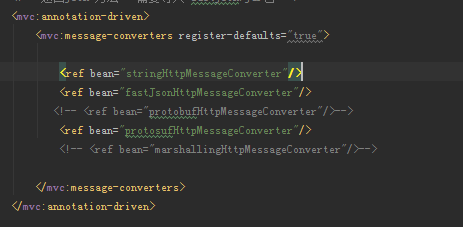
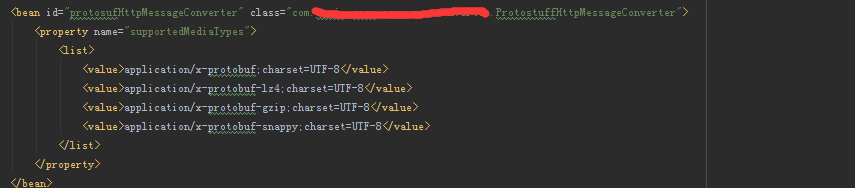
使用httpclient调用时候使用httpBase.addHeader("Accept","application/x-protobuf"); //

Schema<***Dto> schema = RuntimeSchema.getSchema(***Dto.class);
***Dto value = schema.newMessage();
ProtobufIOUtil.mergeFrom(result1, value, schema);
注意的地方,
1、服务不能直接返回map或者list,如果是map或者list要经过多层封装
2、不能返回带有泛型的实体如:DataGridBean<T> ,在服务器返回的时候没问题,
反序列化成实体时候报错,估计是
Schema<***Dto> schema = RuntimeSchema.getSchema(***Dto.class);
Schema<***Dto<T>> schema = RuntimeSchema.getSchema(***Dto<T>.class);//这里不能这样写,还没找到解决办法,所以只能另外写一个实体,不要使用泛型,把具体类型写进去
后来补充:对于上述问题静态已经解决了,要在声明Schema的时候使用Schema<? extends DataGridBean>
ProtobufIOUtil第三个参数schema强转一下(Schema<DataGridBean<XXXDto>>)schema如下:
// DataGridBean<XXXDto> o = new DataGridBean<XXXDto>();
// Schema<? extends DataGridBean> schema = RuntimeSchema.getSchema(o.getClass());
Schema<? extends DataGridBean> schema1 = RuntimeSchema.getSchema(DataGridBean.class);
DataGridBean<FlightGoccInfoDto> dataGridBean = schema1.newMessage();
ProtobufIOUtil.mergeFrom(result1, dataGridBean, (Schema<DataGridBean<XXXDto>>)schema1);
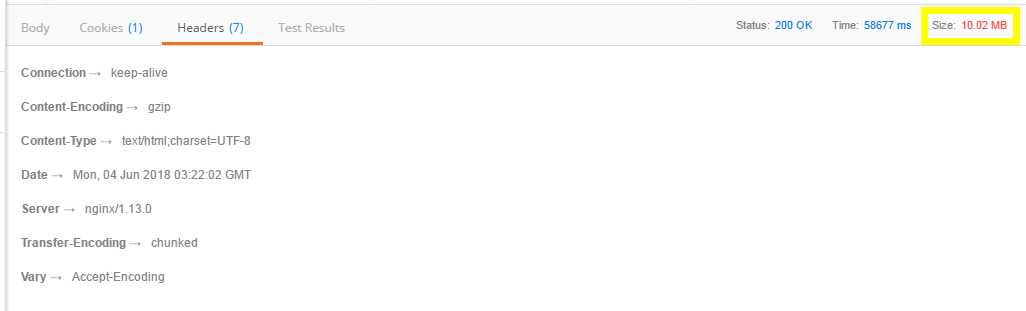
3.比较大小
只针对生产出现问题需要优化的一种常景
protostuff大小约为json的一半
protostuff

json
4.经过nginx gzip压缩后大小比较
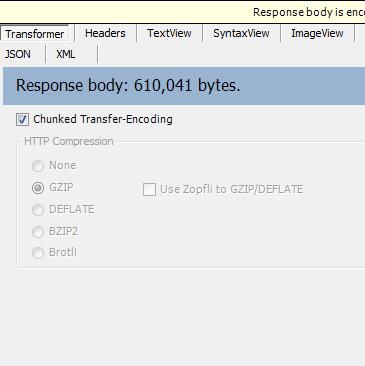
经过fiddler抓包后 发现经过gzip压缩后大小相差不是很大
protostuff 52k左右 压缩了将近10倍
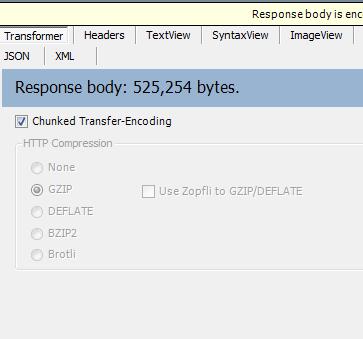
json 60k左右 压缩了将近20倍
5.在此过程中遇到到问题
5.1 使用postman调用接口的过程,postman显示的时候解压后的大小,还没找到压缩前的大小
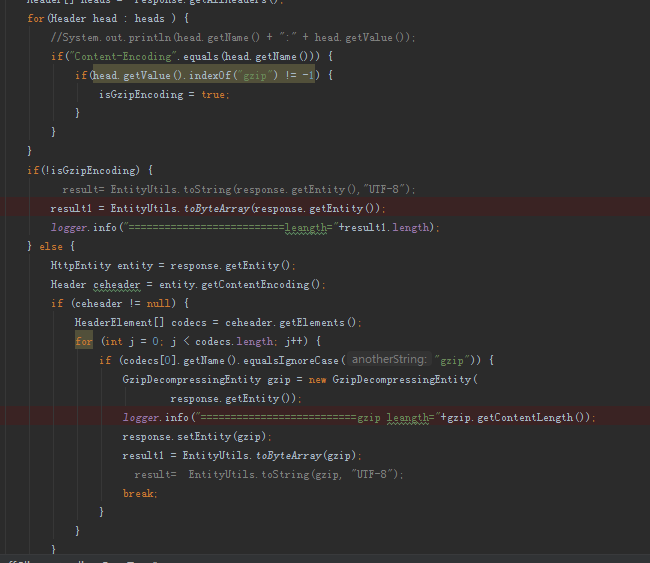
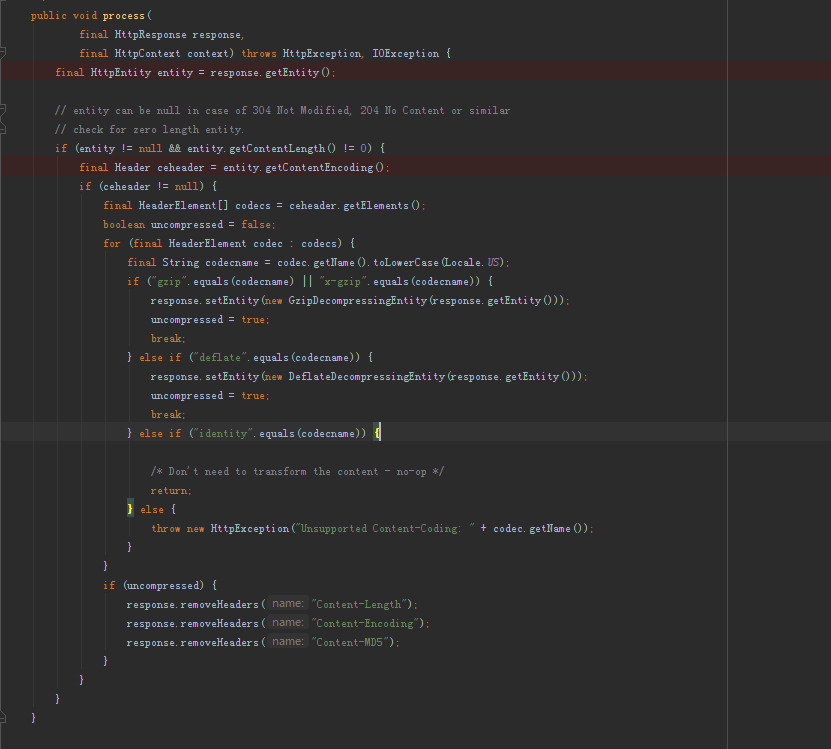
5.2 使用httpclient4.3 返回的response会把返回类型为gzip,x-gzip自动封装成GzipDecompressingEntity
然后remove Content-Encoding 导致使用旧的判断方法时候一直都是进入非gzip的分支
使我一度怀疑nginx的gzip不起效果
最后经过debug查看源码以及使用fildder4抓包的才确定确实有压缩
ResponseContentEncoding.java





 扫一扫
扫一扫


 393
393

 被折叠的 条评论
为什么被折叠?
被折叠的 条评论
为什么被折叠?
 到【灌水乐园】发言





