


 本文介绍如何在CMD下启动PowerShell并进行基本操作,包括变量定义、执行策略设置、脚本执行及循环控制等内容,并展示了如何调用Windows命令及Python脚本。
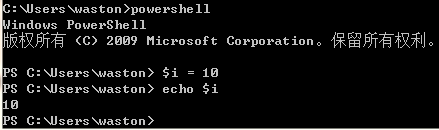
在cmd下执行powershell进入shell模式:
变量定义:$i = 10
$a = ifconfig | findstr "192"
Windows下的命令都可以执行如:
date  ping   ipconfig  shutdown -r
ipconfig | select-string -pattern 255
ipconfig | findstr "Address"
1、设置执行策略:
Dos窗口下执行powershell进入shell模式后执行Set-ExecutionPolicy RemoteSigned
2、执行脚本:
powershell devicelist.ps1
3、常用脚本:
while (1) {
date >>a.log
sleep 2
ping baidu.com >>a.log
}

for($i=0; $i -lt 100;$i=$i+1)
{Write-Host $i
echo "ee"
}

do {
Write-Host $i
$i++
}
while ($i -le 5)


if(1){echo "AAA"} else{echo "BBB"}

#行注释符使用井号(#);块注释符使用“<#”和 “#>”来引起一段注释
4、执行python脚本:
$i = 1
while (1) {
date >>20171103.log
echo "$i">>20171103.log
$i++
python devicelist.py
sleep 10
}
-le
-gt
-eq





 扫一扫
扫一扫


 1475
1475

 被折叠的 条评论
为什么被折叠?
被折叠的 条评论
为什么被折叠?
 到【灌水乐园】发言





