


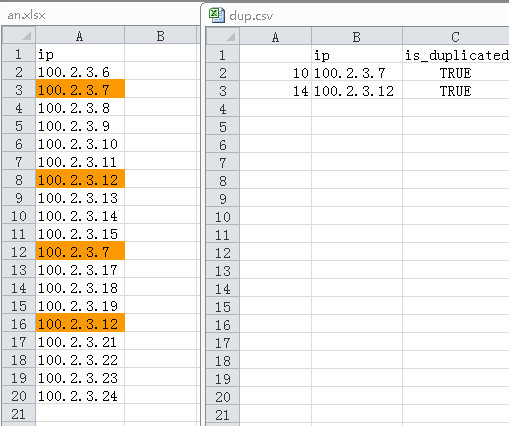
 本文介绍如何利用Python的Pandas库从Excel文件中读取数据,并找出重复的数据记录。通过增加一个布尔型的列来标识重复项,进而能够筛选并保存这些重复记录到CSV文件中。
pip install pandas
pip install xlrd
大量记录的时候,用EXCEL排序处理比较费劲,EXCEL程序动不动就无响应了,用pands完美解决。
# We will use data structures and data analysis tools provided in Pandas library
import pandas as pd

# Import retail sales data from an Excel Workbook into a data frame
# path = '/Documents/analysis/python/examples/2015sales.xlsx'
path = 'F:/python/an.xlsx'
xlsx = pd.ExcelFile(path)
df = pd.read_excel(xlsx, 'Sheet1')

# Let's add a new boolean column to our dataframe that will identify a duplicated order line item (False=Not a duplicate; True=Duplicate)
df['is_duplicated'] = df.duplicated(['ip'])

# We can sum on a boolean column to get a count of duplicate order line items
# df['is_duplicated'].sum()

# Get the records of duplicated, If you need non-dup just use False instead
df_dup = df.loc[df['is_duplicated'] == True]

# Finally let's save our cleaned up data to a csv file
df_dup.to_csv('dup.csv', encoding='utf-8')
ref:https://33sticks.com/python-for-business-identifying-duplicate-data/





 扫一扫
扫一扫


 被折叠的 条评论
为什么被折叠?
被折叠的 条评论
为什么被折叠?
 到【灌水乐园】发言





