


理解"文件"
狭义理解
• 文件在磁盘里(如果文件没有被打开,那么文件就在磁盘上,否则文件就会从磁盘加载到内存中。)
• 磁盘是永久性存储介质,因此文件在磁盘上的存储是永久性的
• 磁盘是外设(即是输出设备也是输入设备)
• 对于磁盘上的文件,文件的所有操作,都是对外设的输入和输出 简称 IO
广义理解
Linux 下一切皆文件(键盘、显示器、网卡、磁盘…… 这些都是抽象化的过程)
文件操作的归类认知
• 对于 0KB 的空文件是占用磁盘空间的,因为文件属性也需要空间
• 文件是文件属性(元数据)和文件内容的集合(文件 = 属性(元数据)+ 内容)
• 所有的文件操作本质是:对文件内容操作和文件属性操作
系统角度
• 对文件的操作本质是进程对文件的操作
• 磁盘的管理者是操作系统
• 文件的读写本质不是通过 C 语言 / C++ 的库函数来操作的(这些库函数只是为用户提供方便),而是通过文件相关的系统调用接口来实现的
回顾对文件操作的命令
在学习C语言的时候,我们就学习过对文件操作的函数。今天我们就来回顾一下。
#include <stdio.h>
FILE *fopen(const char *pathname, const char *mode); // 打开
int fclose(FILE *stream); // 关闭
size_t fread(void *ptr, size_t size, size_t nmemb, FILE *stream); // 读
size_t fwrite(const void *ptr, size_t size, size_t nmemb,FILE *stream); // 写
int feof(FILE *stream); // 判尾
对open.txt文件进行写入:
#include<string.h>
#include<stdio.h>
int main()
{
        FILE*fp=fopen("open.txt","a");
        if(fp==NULL)
        {
                perror("fopen");
                return 1;
        }
        const char*str="hello world!!\n";
        int n=strlen(str);
        while(n--)
        fwrite(str,strlen(str),1,fp);
        fclose(fp);
        return 0;
}

结果:
[slm@localhost d1]$ cat open.txt
hello world!!
hello world!!
hello world!!
hello world!!
hello world!!
hello world!!
hello world!!
hello world!!
hello world!!
hello world!!
hello world!!
hello world!!
hello world!!
hello world!!
读取open.txt文件:
#include<stdio.h>
#include<string.h>
int main()
{
        FILE* fp=fopen("open.txt","r");
        if(fp==NULL)
        {
                perror("fopen");
                return 1;
        }
        char buf[1024];
        const char *str="hello world!!\n";
        while(1)
        {
                size_t n=fread(buf,1,strlen(str),fp);
                if(n>0)
                {
                        buf[n]=0;
                        printf("%s",buf);
                }
                if(feof(fp))
                {
                        break;
                }

        }
        fclose(fp);
        return 0;
}
我们打开的open.txt文件在哪个路径下呢?系统怎么知道程序的当前路径在哪里呢?
可以使用ls /proc/【进程id】 -l命令查看当前正在运行进程的信息。
运行进程的同时,在另一个终端进行:
[slm@localhost d1]$ ps ajx| grep hello
5389 5439 5439 5299 pts/2 5439 S+ 1001 0:00 ./hello
5015 5441 5440 4912 pts/1 5440 S+ 1001 0:00 grep --color=auto hello
[slm@localhost d1]$ ls /proc/5439 -l
总用量 0
dr-xr-xr-x. 2 slm slm 0 9月 30 15:13 attr
-rw-r--r--. 1 slm slm 0 9月 30 15:13 autogroup
-r--------. 1 slm slm 0 9月 30 15:13 auxv
-r--r--r--. 1 slm slm 0 9月 30 15:13 cgroup
--w-------. 1 slm slm 0 9月 30 15:13 clear_refs
-r--r--r--. 1 slm slm 0 9月 30 15:12 cmdline
-rw-r--r--. 1 slm slm 0 9月 30 15:13 comm
-rw-r--r--. 1 slm slm 0 9月 30 15:13 coredump_filter
-r--r--r--. 1 slm slm 0 9月 30 15:13 cpuset
lrwxrwxrwx. 1 slm slm 0 9月 30 15:13 cwd -> /home/d1 //当前进程的工作目录
-r--------. 1 slm slm 0 9月 30 15:13 environ
lrwxrwxrwx. 1 slm slm 0 9月 30 15:13 exe -> /home/d1/hello //当前进程的绝对路径
dr-x------. 2 slm slm 0 9月 30 15:12 fd
dr-x------. 2 slm slm 0 9月 30 15:13 fdinfo
打开文件,本质是进程打开,所以,进程知道自己在哪里,即便文件不带路径,进程也知道。由此OS就能知道要创建的文件放在哪里。
stdin & stdout & stderr
• C默认会打开三个输入输出流,分别是stdin, stdout, stderr
• 仔细观察发现,这三个流的类型都是FILE*, 是fopen返回值类型,属于文件指针
#include <stdio.h>
extern FILE *stdin;
extern FILE *stdout;
extern FILE *stderr;
打开文件的方式
| mode | 读写方向 | 文件必须存在? | 是否清空原内容 | 读写位置 | 备注 |
| `"r" | 只读 | 是 | 不 | 文件头 | 最常用于读配置 |
| "w" | 只写 | 否 | 清空 | 文件头 | 文件不存在则创建 |
| "a" | 只写追加 | 否 | 保留 | 文件尾 | 每次写自动定位到 EOF |
| "r+" | 读写 | 是 | 不 | 文件头 | 可读可写,文件必须已存在 |
| "w+ | 读写 | 否 | 清空 | 文件头 | 创建+清空,然后随意读写 |
| "a+" | 读写追加 | 否 | 保留 | 文件尾 | 写总在尾,读可移动 |
系统文件I/O
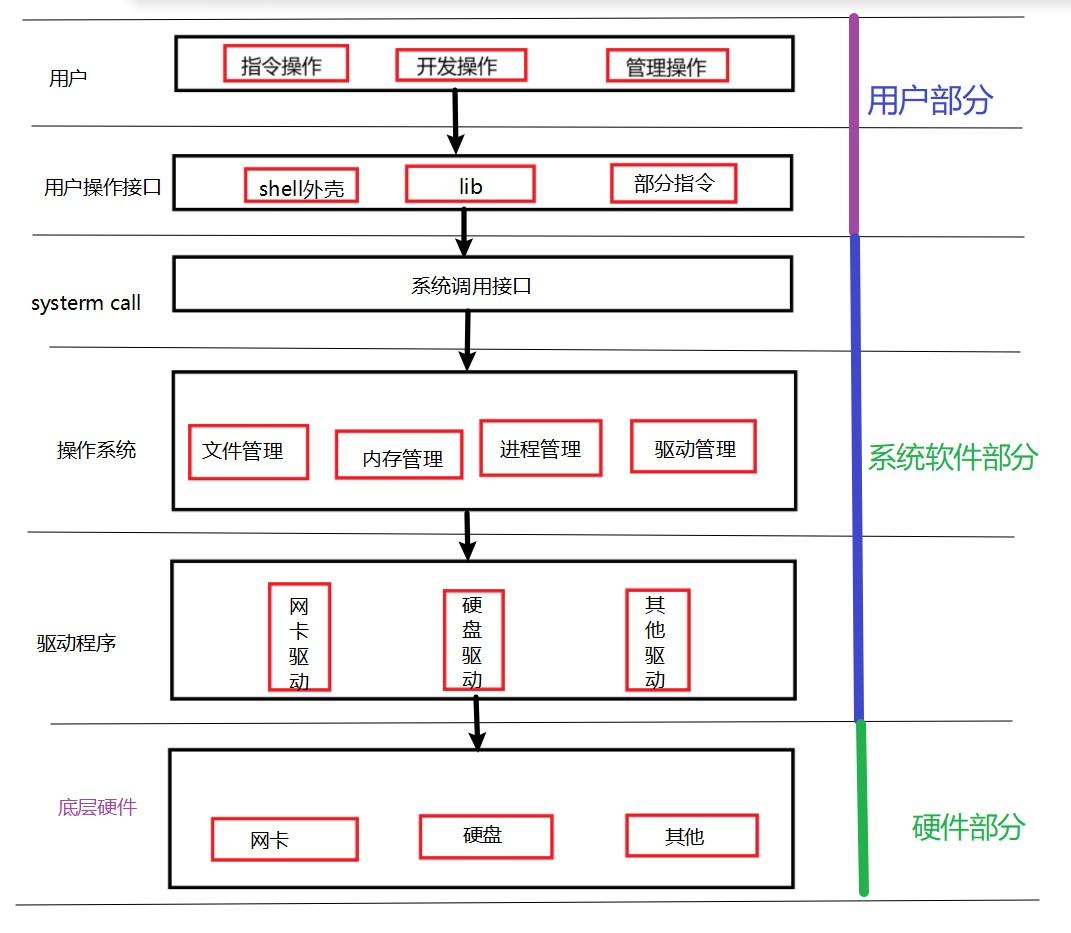
在上一篇文章中我们学习了exit函数和_exit函数,了解了exit函数是C语言库的函数,是用户调用的接口,而exit函数调用的时候,底层函数是_exit函数。对文件操作的fopen函数、fclose函数、fread函数、fwrite函数等也是一样的,他们都会调用自己的底层函数。
对系统调用函数进行封装变成了用户可以调用的函数(库函数)。
库函数(用户操作接口中的lib中)和系统调用函数(系统调用接口)的区别:
接口介绍
open、close、read、write
#include <sys/types.h>
#include <sys/stat.h>
#include <fcntl.h>int open(const char *pathname, int flags);
int open(const char *pathname, int flags, mode_t mode) //返回fd或-1
#include <unistd.h>
int close(int fd); // 返回 0 或 -1ssize_t read(int fd, void *buf, size_t count); // 返回读到的字节数,0 表示 EOF,-1 出错
ssize_t write(int fd, const void *buf, size_t count); // 返回已写的字节数,-1 出错
open的flags常见的组合有:
只读:O_RDONLY
只写:O_WRONLY|O_CREAT|O_TRUNC(删除原先的内容)
追加:O_WRONLY|O_CREAT|O_APPEND
只写但是不删除原来的内容:O_WRONLY|O_CREAT
O_CREAT:不存在就新建
O_TRUNC:删除原先的内容
注:flags中如果有O_CREAT,open的参数里面就要添加权限。
文件描述符fd
文件描述符就是一个小整数,如果open函数运行成功的话,open的返回值就是fd,是int类型。
每个文件都特有一个文件描述符,文件描述符就可以表示一个它所标识的文件。
0 & 1 & 2
运行下面代码:
#include<stdio.h>
#include<fcntl.h>
#include<unistd.h>
int main()
{
        int fd=open("open.txt",O_RDONLY);
        if(fd<0)
        {
                perror("open");
                return 1;
        }
        printf("fd=%d\n",fd);
        close(fd);
        return 0;
}
[slm@localhost d1]$ ./hello
fd=3
我们发现fd直接就等于三了,那么前面是不是还有1,2或者0、1 、2呢?它们有代表哪个文件呢?
• Linux进程默认情况下会有3个缺省打开的文件描述符,分别是标准输入0, 标准输出1, 标准错
误2.
• 0,1,2对应的物理设备⼀般是:键盘,显示器,显示器
所有输入输出可以表示:
#include<stdio.h>
#include<string.h>
#include<unistd.h>
int main()
{
        char buf[1024];
        ssize_t n=read(0,buf,sizeof(buf));//从键盘中获取字符串,写入buf数组中
        if(n>0)
        {
        buf[n]=0;
        write(1,buf,strlen(buf));//从buf数组中读取strlen(buf)个字节写到显示器上
        write(2,buf,strlen(buf));
        }
        return 0;
}
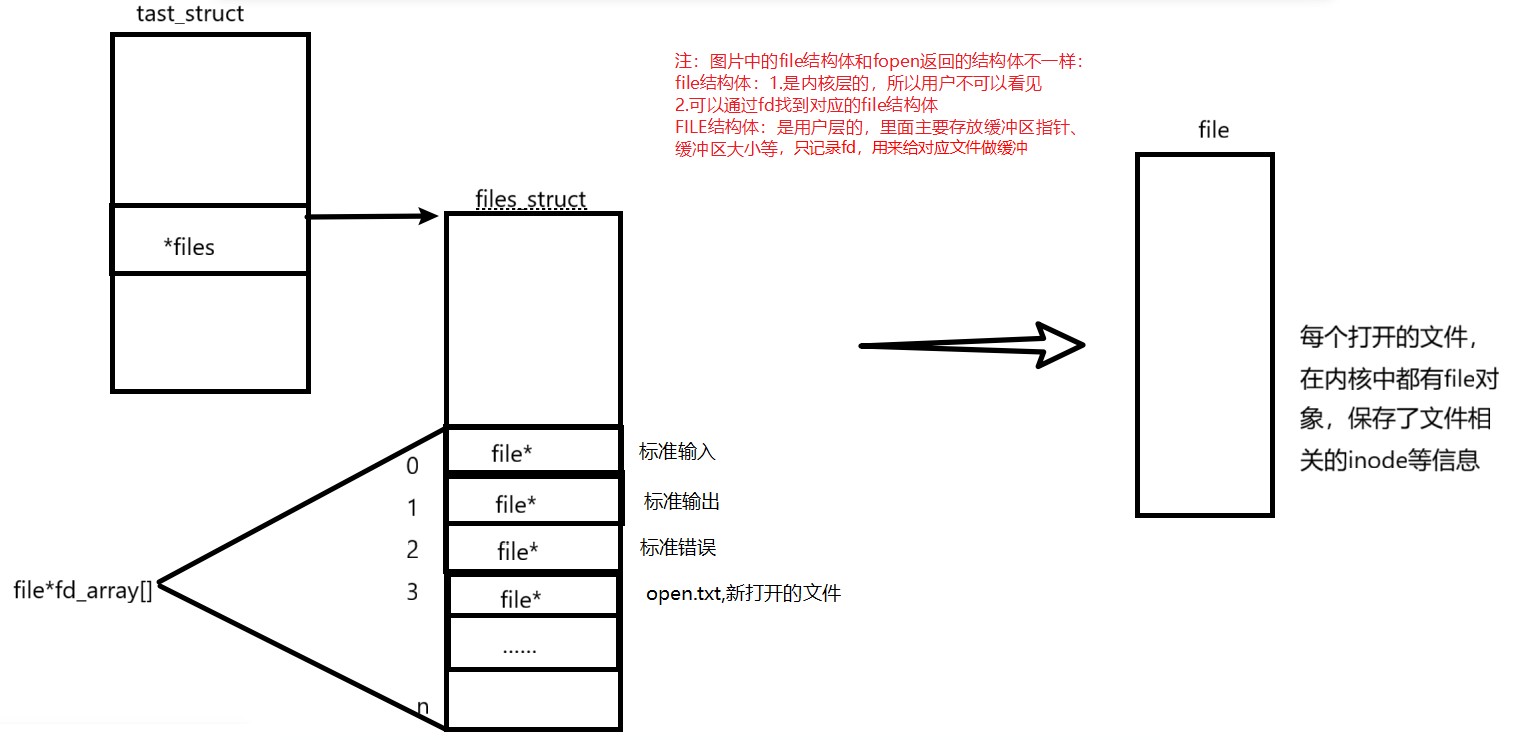
从图中可以看出来,文件描述符就是从0开始的小整数。当我们打开文件时,操作系统在内存中要创建相应的数据结构来描述目标文件。于是就有了file结构体。表示一个已经打开的文件对象。而进程执行open系统调用,所以必须让进程和文件关联起来。每个进程都有一个指针*files, 指向一张表files_struct,该表最重要的部分就是包含⼀个指针数组,每个元素都是一个指向打开文件的指针!所以,本质上,文件描述符就是该数组的下标。所以,只要拿着文件描述符,就可以找到对应的文件。
文件描述符的分配规则
当我们创建新文件的时候,我们会发现新文件的文件描述符等于3,文件描述符是怎么进行排序的?如果我们把前面0/1/2中任意一个文件关掉,那新文件的文件描述符会发生变化吗?
//当关掉标准输入(0)时
#include<stdio.h>
#include<fcntl.h>
#include<unistd.h>
int main()
{
        close(0);
        //close(1);
        //close(2);
        int fd=open("open.txt",O_RDONLY);
        if(fd<0)
        {
                perror("open");
                return 1;
        }
        printf("fd=%d\n",fd);
        close(fd);
        return 0;
}
结果:
//close(0)时
[slm@localhost d1]$ ./hello
fd=0
//close(1)时
[slm@localhost d1]$ ./hello
fd=1
//close(2)时
[slm@localhost d1]$ ./hello
fd=2
可见,文件描述符的分配规则:在files_struct数组当中,找到当前没有被使用的最小的一个下标,作为新的文件描述符。
重定向
当我们关掉文件描述符1(标准输出)时,运行下面代码:
#include<stdio.h>
#include<fcntl.h>
#include<unistd.h>
int main()
{
        close(1);
        int fd=open("open.txt",O_WRONLY| O_CREAT|O_TRUNC,00644);
        if(fd<0)
        {
                perror("open");
                return 1;
        }
        printf("fd=%d\n",fd);
        fflush(stdout);
        close(fd);
        return 0;
}
运行结果:
[slm@localhost d1]$ gcc -o hello hello.c
[slm@localhost d1]$ ./hello
[slm@localhost d1]$ cat open.txt
fd=1
我们会发现原本应该打印在显示器中的内容被打印到了open.txt文件中,其中open.txt文件描述符变成了1,这种现象叫做输出重定向。常见的重定向有: > , >> , <。
常见的重定向符号常常和cat搭配使用:
(只写)>: cat >open.txt,把open.txt文件变成fd=1。执行命令后,输入字符,按ctrl+d保存,如果文件存在,文件里原先的内容就清空。
(追加)>>:cat >> open.txt,把open.txt文件变成fd=1。执行命令后,输入字符,按ctrl+d保存,如果文件存在,就在文件里原先的内容后添加字符。
(只读)<:cat <open.txt,把open.txt文件变成fd=0。把文件里面的内容打印在显示器上。
运行实例:
[slm@localhost d1]$ cat >>open.txt
hello world
hello slm
[slm@localhost d1]$ cat open.txt
fd=1
hello world
hello slm
[slm@localhost d1]$ cat >open.txt
if(i==10)
[slm@localhost d1]$ cat open.txt
if(i==10)
[slm@localhost d1]$ cat <open.txt
if(i==10)
重定向的本质是什么呢?
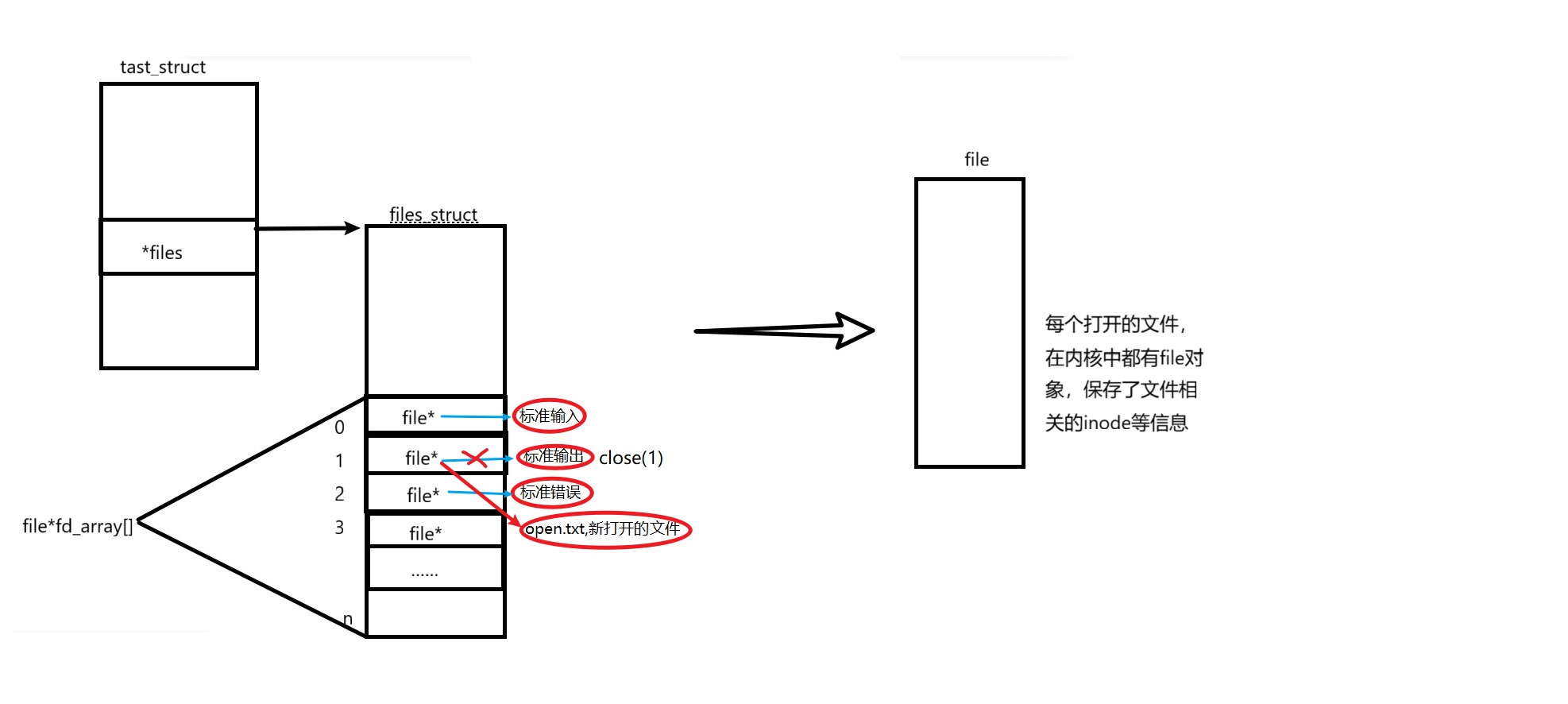
输入到标准输出文件(显示器)中的内容输入到了open.txt中。
使用 dup2 系统调用
函数原型:
#include <unistd.h>
int dup2(int oldfd, int newfd);
为什么要用dup2来重定向呢?在前面的学习中,我们通过直接关闭前面的文件,我们就可以拿到我们想要重定向的文件,但是当有其他文件已经重定位到了我们想要的文件时,那么我们新建的文件可能就会重定向到别的fd中了,这个是有不确定性的。但如果有了dup2系统调用,我们就要可以指定重定位的fd,这是可以预测的。所以我们也可以不用先关闭想要重定位的文件,打开之后在定向也可以。
#include<stdio.h>
#include<unistd.h>
#include<fcntl.h>
#include<sys/types.h>
#include<sys/stat.h>

int main()
{
        int  fd=open("open.txt", O_RDWR|O_TRUNC);
        if(fd<0)
        {
                perror("open");

                return 1;
        }
        close(1);
        dup2(fd,1);
        while(1)
        {
        char buf[1024];
        ssize_t ret=read(0,buf,sizeof(buf)-1);
        if(ret<=0)//按ctrl+d键时ret=0
        {
                perror("read");
                break;
        }
        buf[ret]='\0';
        printf("%s",buf);
        fflush(stdout);
        }
        close(fd);
        return 0;
}
运行结果:
[slm@localhost d1]$ gcc -o test_dup2 test_dup2.c
[slm@localhost d1]$ ./test_dup2
fahsfe
fdsahfiawe
read: Success
[slm@localhost d1]$ cat open.txt
fahsfe
fdsahfiawe
printf是C库当中的IO函数,一般往 stdout 中输出,但是stdout底层访问文件的时候,找的还是fd:1,
但此时,fd:1下标所表示内容,已经变成了open.txt的地址,不再是显示器文件的地址,所以,输出的任何消息都会往文件中写入,进而完成输出重定向。那追加和输入重定向如何完成呢?
完成myshell中重定向部分
黄色为新添内容
//myshell.cc
#include"myshell.h"
#define SEP " "
char pwd[1024];//保存当前shell进程的工作路径
char *gargv[ARGS]={NULL};
int gargc=0;
int lastcode=0;
#define NONE_REDIR 0 //不对文件进行操作
#define OUTPUT_REDIR 1//只读
#define APPEND_REDIR 2//追加
#define INPUT_REDIR 3 //只写
std::string filename;
int redir_type=NONE_REDIR;
std::string GetUser()
{
std::string user=getenv("USER");
return user.empty()?"None":user;
}
std::string GetHostName()
{
std::string host=getenv("HOSTNAME");
const std::string host_lable=".";
auto pos=host.rfind(host_lable);
if(pos==std::string::npos)
{
return "None";
}
host=host.substr(0,pos);
return host.empty()?"None":host;
}
std::string GetPwd()
{
//更新shell的环境变量pwd
char temp[1024];
getcwd(temp,sizeof(temp));//把当前工作目录传入到temp中
snprintf(pwd,sizeof(pwd),"pwd=%s",temp);//以pwd=“工作路径”的形式传入数组pwd中,该形式像新增的环境变量
putenv(pwd);//把pwd中新建的环境变量输入到环境变量中
//home/d1->d1
std::string pwd_lable=temp;
const std::string pathsep="/";
auto pos=pwd_lable.rfind(pathsep);
if(pos==std::string::npos){
return "None";
}
pwd_lable=pwd_lable.substr(pos+pathsep.size());
return pwd_lable.empty()?"/":pwd_lable;
}void GetCommandLine()
{
printf("[%s@%s %s]#",GetUser().c_str(),GetHostName().c_str(),GetPwd().c_str());
}
bool GetCommandString(char cmd_str_buff[],int len)
{
if(cmd_str_buff==NULL||len<=0)
{
return false;
}
char *res=fgets(cmd_str_buff,len,stdin);
//把结尾的“\n"变成”\0“
cmd_str_buff[strlen(cmd_str_buff)-1]='\0';
return strlen(cmd_str_buff)==0?false:true;
}
bool ParseCommandString(char cmd[])
{
if(cmd==NULL)
{
return false;
}
gargv[gargc++]=strtok(cmd,SEP);
while((bool)(gargv[gargc++]=strtok(NULL,SEP)));
gargc--;
return true;
}
//初始化gargv
void InitGlobal()
{
gargc=0;
memset(gargv,0,sizeof(gargv));
filename.clear();
redir_type=NONE_REDIR;//记得初始化,不然ls -l > open.txt命令不能实现。
}
#define TrimSpace(start) do {\
while(isspace(*start))\
{\
start++;\
}\
}while(0)//删除空格
void CheckRedir(char cmd[])
{
char *start=cmd;
char*end=cmd+strlen(cmd)-1;
while(start<end)
{
if((*start)=='>')
{
if(*(start+1)=='>')
{
redir_type=APPEND_REDIR;
*start='\0';
start+=2;
TrimSpace(start);
filename=start;
break;
}
else
{
redir_type=OUTPUT_REDIR;
*start='\0';
start++;
TrimSpace(start);
filename=start;
break;
}
}
else if((*start)=='<')
{
redir_type=INPUT_REDIR;
*start='\0';
start++;
TrimSpace(start);
filename=start;
break;
}
else
{
start++;
}
}
}
void ForkAndExec()
{
pid_t id=fork();
if(id<0)
{
perror("fork");
return ;
}
else if(id==0)
{
if(redir_type==APPEND_REDIR)
{
int apfd=open(filename.c_str(),O_WRONLY|O_CREAT|O_APPEND,0666);
(void)apfd;
dup2(apfd,1);
}
else if(redir_type==OUTPUT_REDIR)
{
int outfd=open(filename.c_str(),O_WRONLY|O_CREAT|O_TRUNC,0666);
(void)outfd;
dup2(outfd,1);
}
else if(redir_type==INPUT_REDIR)
{
int infd=open(filename.c_str(),O_RDONLY);
(void)infd;
dup2(infd,0);
}
else
{}
execvp(gargv[0],gargv);
exit(0);
}
else
{
int status=0;
pid_t ret=waitpid(-1,&status,0);
if(ret>0)
{
lastcode=(status>>8)&0xFF;
}
}
}std::string GetHomePath()
{
std::string homepath=getenv("HOME");
return homepath.empty()?"None":homepath;
}
bool BuildInCommandExec()
{
std::string cmd=gargv[0];
bool ret=false;
if(cmd=="cd")
{
if(gargc==2)
{
std::string target=gargv[1];
if(target=="~")
{
ret=true;
chdir(GetHomePath().c_str());
}
else{
ret=true;
chdir(gargv[1]);
}
}
else if(gargc==1)
{
ret=true;
chdir(GetHomePath().c_str());
}
else
{}
}
else if(cmd=="echo")
{
if(gargc==2)
{
std::string argc=gargv[1];
if(argc[0]=='$')
{
if(argc[1]=='?')
{
printf("%d\n",lastcode);
lastcode=0;
ret=true;
}
else
{
//提取环境变量
const char*name=&argc[1];
printf("%s\n",getenv(name));
lastcode=0;
ret=true;
}
}
else
{
printf("%s\n",gargv[1]);
ret=true;
}
}
}
return ret;
}//main.cc
#include"myshell.h"
#define SIZE 1024
char cmd_str_buff[SIZE];
int main()
{
while(1)
{
InitGlobal();
GetCommandLine();
if(!GetCommandString(cmd_str_buff,SIZE))
{
continue;
}
CheckRedir(cmd_str_buff);//位置不能错
ParseCommandString(cmd_str_buff);
if(BuildInCommandExec())
{
//自己执行
continue;
}
//子进程执行
ForkAndExec();
}
return 0;
}
//myshell.h
#pragma once
#include<stdio.h>
#include<string>
#include<stdlib.h>
#include<string.h>
#include<unistd.h>
#include<sys/types.h>
#include<sys/wait.h>
#include<sys/stat.h>
#include<fcntl.h>
#define ARGS 64
void InitGlobal();
void GetCommandLine();
bool GetCommandString(char cmd_str_buff[],int len);
bool ParseCommandString(char cmd[]);
//内建命令:cd/echo等
bool BuiltInCommandExec();
void ForkAndExec();void CheckRedir(char cmd[]);
bool BuildInCommandExec();
//makefilemyshell:myshell.cc test_shell.cc
g++ -o $@ $^ -std=c++11
.PHONY:clean
clean:
rm -f myshell
理解“一切皆文件”
首先,在windows中是文件的东西,它们在linux中也是文件;其次一些在windows中不是文件的东
西,比如进程、磁盘、显示器、键盘这样硬件设备也被抽象成了文件,你可以使用访问文件的方法访问它们获得信息;甚至管道,也是文件;将来我们要学习网络编程中的socket(套接字)这样的东西,使用的接口跟文件接口也是一致的。
这样做最明显的好处是,开发者仅需要使用一套 API 和开发工具,即可调取 Linux 系统中绝大部分的资源。举个简单的例子,Linux 中几乎所有读(读文件,读系统状态,读PIPE)的操作都可以用
read 函数来进行;几乎所有更改(更改文件,更改系统参数,写 PIPE)的操作都可以用 write 函
数来进行。
struct file中存在file_operation类型的指针,file_operation结构体就是把系统调用和驱动程序关联起来的关键数据结构,这个结构的每一个成员都对应着一个系统调用。读取 file_operation 中相应的函数指针,接着把控制权转交给函数,从而完成了Linux设备驱动程序的工作。
struct file_operations {
struct module *owner;
//指向拥有该模块的指针;
loff_t (*llseek) (struct file *, loff_t, int);
//llseek 方法用作改变文件中的当前读/写位置, 并且新位置作为(正的)返回值.
ssize_t (*read) (struct file *, char __user *, size_t, loff_t *);
//⽤来从设备中获取数据. 在这个位置的一个空指针导致 read 系统调用以 -
EINVAL("Invalid argument") 失败. ⼀个非负返回值代表了成功读取的字节数( 返回值是一个
"signed size" 类型, 常常是目标平台本地的整数类型).
ssize_t (*write) (struct file *, const char __user *, size_t, loff_t *);
//发送数据给设备. 如果 NULL, -EINVAL 返回给调用 write 系统调用的程序. 如果非负,
返回值代表成功写的字节数.
ssize_t (*aio_read) (struct kiocb *, const struct iovec *, unsigned long,
loff_t);
//初始化⼀个异步读 -- 可能在函数返回前不结束的读操作.
ssize_t (*aio_write) (struct kiocb *, const struct iovec *, unsigned
long, loff_t);
//初始化设备上的⼀个异步写.
int (*readdir) (struct file *, void *, filldir_t);
//对于设备文件这个成员应当为 NULL; 它用来读取目录, 并且仅对**文件系统**有用.
unsigned int (*poll) (struct file *, struct poll_table_struct *);
int (*ioctl) (struct inode *, struct file *, unsigned int, unsigned long);
long (*unlocked_ioctl) (struct file *, unsigned int, unsigned long);
long (*compat_ioctl) (struct file *, unsigned int, unsigned long);、……
}
该结构体里面都是函数指针。每个函数指针对应的系统调用的操作方法都不一样。
每个外设都可以有自己的read、write,但一定是对应着不同的操作方法!!但通过
struct file 下 file_operation 中的各种函数回调,让我们开发者只用file便可调取 Linux 系
统中绝大部分的资源!!这便是“linux下⼀切皆文件”的核心理解。
缓冲区
缓冲区定义
缓冲区是内存空间的一部分。也就是说,在内存空间中预留了一定的存储空间,这些存储空间用来缓冲输入或输出的数据,这部分预留的空间就叫做缓冲区。缓冲区根据其对应的是输入设备还是输出设备,分为输入缓冲区和输出缓冲区。
为什么要引入缓冲区机制
读写文件时,如果不开辟文件操作缓冲区,直接通过系统调用对磁盘进行读写,那么每次读写都要执行一次系统调用;每次系统调用都需从用户态切换到内核态,完成进程上下文切换,耗费 CPU 时间。频繁的磁盘访问会显著降低程序执行效率。
为避免频繁系统调用,可采用缓冲机制:
一次把大量数据从磁盘读入内存缓冲区,后续访问直接操作缓冲区,不必再陷核;缓冲区用完再去磁盘批量读取,减少磁盘 I/O 次数。内存操作速度远高于磁盘,因而能大幅提升运行速度。
同理,打印文档时,先把数据写入打印机缓冲区,让慢速打印机自行逐行打印,CPU 即可转去处理其他任务。缓冲区本质是内存区域,位于 I/O 设备与 CPU 之间,缓存数据,协调高速 CPU 与低速外设,避免外设长时间占用 CPU,使 CPU 得以高效工作。
缓冲类型
标准I/O提供了3种类型的缓冲区。
- 全缓冲区:填满整个缓冲区后才执行 I/O 系统调用;磁盘文件操作默认采用全缓冲。
- 行缓冲区:遇到换行符即执行系统调用;终端相关流(如 stdin、stdout)使用行缓冲。若缓冲区先被写满(默认 1024 字节),即使无换行符也会立即调用。
- 无缓冲区:不缓存,直接进行系统调用;标准错误流 stderr 通常无缓冲,以便错误信息立即显示。
除了上述列举的默认刷新方式,下列特殊情况也会引发缓冲区的刷新:
1. 缓冲区满时;
2. 执行fflush语句;
3. 进程结束
在上面的重定向部分中我们运行了一个代码,那个代码里面明明printf函数中已经有换行符了,但是下面还要执行fflush语句,如果没有fflush语句,内容就打印不在open.txt中。
#include<stdio.h>
#include<fcntl.h>
#include<unistd.h>
int main()
{
close(1);
int fd=open("open.txt",O_WRONLY| O_CREAT|O_TRUNC,00644);
if(fd<0)
{
perror("open");
return 1;
}
printf("fd=%d\n",fd);
fflush(stdout);
close(fd);
return 0;
}
运行结果:
[slm@localhost d1]$ gcc -o hello hello.c
[slm@localhost d1]$ ./hello
[slm@localhost d1]$ cat open.txt
fd=1
这是因为行刷新是在标准相关流中进行的,即使open.txt重定向到了stdout文件中,但是open.txt文件是磁盘文件,只能进行全刷新。
普通文件定位到strerr文件,strerr不需要缓冲就可以直接写入普通文件中。
#include<stdio.h>
#include<sys/types.h>
#include<sys/stat.h>
#include<fcntl.h>
int main()
{
        close(2);
        int fd=open("open.txt",O_WRONLY|O_CREAT|O_TRUNC,0666);
        if(fd<0)
        {
                perror("open");
                return 1;
        }
        perror("hello world");
        close(fd);
        return 0;
}
[slm@localhost d1]$ vim test_buff.c
[slm@localhost d1]$ gcc -o test_buff test_buff.c
[slm@localhost d1]$ ./test_buff
[slm@localhost d1]$ cat open.txt
hello world: Success
FILE
• 因为IO相关函数与系统调用接口对应,并且库函数封装系统调用,所以本质上,访问文件都是通
过fd访问的。
• 所以C库当中的FILE结构体内部,必定封装了fd。
FILE结构体typedef struct _IO_FILE FILE; 在/usr/include/stdio.h中,但详细定义在libio.h中
struct _IO_FILE {
int _flags; /* 状态标志(如读写模式、错误、EOF等) */
/* 读缓冲区相关 */
char* _IO_read_ptr; /* 当前读取位置 */
char* _IO_read_end; /* 读缓冲区结束位置 */
char* _IO_read_base; /* 读缓冲区起始地址 */
/* 写缓冲区相关 */
char* _IO_write_base; /* 写缓冲区起始地址 */
char* _IO_write_ptr; /* 当前写入位置 */
char* _IO_write_end; /* 写缓冲区结束位置 */
/* 缓冲区管理 */
char* _IO_buf_base; /* 缓冲区基地址(读写共享时使用) */
char* _IO_buf_end; /* 缓冲区结束地址 */
/* 底层文件描述符 */
int _fileno; /* 对应操作系统的文件描述符(如Linux的fd) */
/* 其他成员:锁、偏移量、错误码、函数指针等 */
...
};
运行以下代码:
#include<stdio.h>
#include<string.h>
int main()
{
        const char *msg0="hello printf\n";
        const char *msg1="hello fwrite\n";
        const char *msg2="hello write\n";
        printf("%s",msg0);
        fwrite(msg1,strlen(msg1),1,stdout);
        write(1,msg2,strlen(msg2));
        fork();
        return 0;
}

运行结果:
[slm@localhost libio]$ gcc -o test test.c
[slm@localhost libio]$ ./test
hello printf
hello fwrite
hello write
[slm@localhost libio]$ ./test > file
[slm@localhost libio]$ cat file
hello write
hello printf
hello fwrite
hello printf
hello fwrite
我们发现当打印到显示器上的时候,数据都是行刷新,但是当file文件重定向1文件时,write函数先刷新出来,而且printf和fwrite函数会运行两遍,这是为什么呢?
1.write系统调用没有带缓冲区。
2.printf和fwrite库函数有自带的缓冲区,当发生重定向到普通文件时,数据缓冲方式由行缓冲变成了全缓冲,而我们放在缓冲区中的数据,就不会立即被刷新出来,甚至fork之后。但是当进程结束的时候,会统一刷新缓冲区,写入文件里。但是fork的时候,父子数据会发生写时拷贝,所以当父进程准备刷新的时候,子进程也有一份同样的数据,随即产生两份数据。
注:我们这里说的缓冲区,都是用户级缓冲区。
简单设计libc库
//main.c
#include "mystdio.h"
int main()
{
        mFILE *fp = mfopen("file", "w");
        if(fp == NULL)
        {
                return 1;
        }
        int cnt = 10;
        while(cnt)
        {
                printf("write %d\n", cnt);
                char buffer[64];
                snprintf(buffer, sizeof(buffer),"hello message, number is : %d  ", cnt);
                cnt--;
                mfwrite(buffer, strlen(buffer), fp);
                mfflush(fp);
                sleep(1);
        }
        mfclose(fp);
}
//mystdio.c
#include"mystdio.h"
#define UMASK 0644
static void mfflush_core(mFILE*fp,int force);
mFILE*mfopen(const char*filename,const char*mode)
{
        int fd=-1;
        if(strcmp(mode,"w")==0)
        {
                fd=open(filename,O_WRONLY|O_CREAT|O_TRUNC,UMASK);
        }
        else if(strcmp(mode,"a")==0)
        {
                fd=open(filename,O_WRONLY|O_CREAT|O_APPEND,UMASK);
        }
        else if(strcmp(mode,"r")==0)
        {
                fd=open(filename,O_RDONLY);
        }
        else
        {}
        if(fd<0)
        {
                return NULL;
        }
        mFILE* fp=(mFILE*)malloc(sizeof(mFILE));
        if(!fp)
        {
                return NULL;
        }
        fp->fileno=fd;
        fp->flag=FLUSH_LINE;
        fp->outbuffer[0]=0;
        fp->curr=0;
        fp->cap=SIZE;
        return fp;
}
int mfwrite(const char *s,int size,mFILE*fp)
{
        //fwrite本质是把缓冲区的内容拷贝到文件中
        //把s拷贝到缓冲区的末尾
        memcpy(fp->outbuffer+fp->curr,s,size);
        fp->curr+=size;
        mfflush_core(fp,NORMAL);
        return size;

}
void mfclose(mFILE*fp)
{
        if(fp->fileno>=0)
        {
                mfflush(fp);//用户缓冲区刷新到内核缓冲区
                fsync(fp->fileno);//内核缓冲区刷新到磁盘中,通过强制要求磁盘的控制器刷新,把数据刷新到磁盘物理介质
                close(fp->fileno);
                free(fp);
        }
}
static void mfflush_core(mFILE*fp,int force)
{
        if(fp->curr<=0)
        {
                return ;
        }
        if(force=FORCE)
        {
                write(fp->fileno,fp->outbuffer,fp->curr);
                fp->curr=0;
        }
        else
        {
                if((fp->flag&FLUSH_LINE)&&fp->outbuffer[fp->curr-1]=='\n')
                {
                        write(fp->fileno,fp->outbuffer,fp->curr);
                        fp->curr=0;
                }
                else if((fp->flag& FLUSH_FULL)&&fp->curr==fp->cap)
                {

                        write(fp->fileno,fp->outbuffer,fp->curr);
                        fp->curr=0;
                }
                else
                {
                }
        }

}
void mfflush(mFILE*fp)
{
        mfflush_core(fp,FORCE);
}
//mystdio.h
#ifndef __MYSTDIO_H
#define _MYSTDIO_H

#include<stdio.h>
#include<stdlib.h>
#include<string.h>
#include<sys/types.h>
#include<sys/stat.h>
#include<fcntl.h>
#include<unistd.h>

#define FLUSH_NONE 1//无刷新
#define FLUSH_LINE 2//行刷新
#define FLUSH_FULL 4//全刷新

#define FORCE 1 //强制刷新
#define NORMAL 2 //正常

#define SIZE 1024
typedef struct _MY_IO_FILE
{
        int fileno;//文件描述符
        int flag;//刷新状态
        char outbuffer[SIZE];//缓冲区
        int curr;//缓冲区目前已经存入的大小
        int cap;//缓冲区的容量大小
}mFILE;

mFILE*mfopen(const char*filename,const char*mode);
int mfwrite(const char *s,int size,mFILE*fp);
void mfclose(mFILE*fp);
void mfflush(mFILE*fp);

#endif
在另一个终端执行cat file命令:
[root@localhost d1]# cat file
hello message, number is : 10 hello message, number is : 9 hello message, number is : 8 hello message, number is : 7 hello message, number is : 6 [root@localhost d1]# cat file
hello message, number is : 10 hello message, number is : 9 hello message, number is : 8 hello message, number is : 7 hello message, number is : 6 hello message, number is : 5 [root@localhost d1]# cat file
hello message, number is : 10 hello message, number is : 9 hello message, number is : 8 hello message, number is : 7 hello message, number is : 6 hello message, number is : 5 hello message, number is : 4 hello message, number is : 3 hello message, number is : 2





 扫一扫
扫一扫


 6335
6335

 被折叠的 条评论
为什么被折叠?
被折叠的 条评论
为什么被折叠?
 到【灌水乐园】发言





