


Tensorflow 第T3周:天气识别
- 🍨 本文为🔗365天深度学习训练营中的学习记录博客
- 🍖 原作者:K同学啊
本文将采用CNN实现多云、下雨、晴、日出四种天气状态的识别。较上篇文章,本文为了增加模型的泛化能力,新增了Dropout层并且将最大池化层调整成了平均池化层。
🚀 我的环境:
语言环境:Python3.11.9
编译器:jupyter notebook
深度学习环境:TensorFlow2.17.0
1. 设置GPU
如果使用的是CPU可以忽略这步
import tensorflow as tf

gpus = tf.config.list_physical_devices("GPU")

if gpus:
    gpu0 = gpus[0]                                        #如果有多个GPU,仅使用第0个GPU
    tf.config.experimental.set_memory_growth(gpu0, True)  #设置GPU显存用量按需使用
    tf.config.set_visible_devices([gpu0],"GPU")
2. 导入数据
import os,PIL,pathlib
import matplotlib.pyplot as plt
import numpy             as np
from tensorflow          import keras
from tensorflow.keras    import layers,models
data_dir = "../data/weather_photos/"

data_dir = pathlib.Path(data_dir)
3. 查看数据
数据集一共分为cloudy、rain、shine、sunrise四类,分别存放于weather_photos文件夹中以各自名字命名的子文件夹中。
image_count = len(list(data_dir.glob('*/*.jpg')))

print("图片总数为:",image_count)
👉 输出
图片总数为: 1125
roses = list(data_dir.glob('sunrise/*.jpg'))
PIL.Image.open(str(roses[0]))

二、数据预处理
1. 加载数据
使用image_dataset_from_directory方法将磁盘中的数据加载到tf.data.Dataset中
batch_size = 32
img_height = 180
img_width = 180
"""
关于image_dataset_from_directory()的详细介绍可以参考文章:https://mtyjkh.blog.youkuaiyun.com/article/details/117018789
"""
train_ds = tf.keras.preprocessing.image_dataset_from_directory(
    data_dir,
    validation_split=0.2,
    subset="training",
    seed=123,
    image_size=(img_height, img_width),
    batch_size=batch_size)
👉 输出
Found 1125 files belonging to 4 classes.
Using 900 files for training.
我们可以通过class_names输出数据集的标签。标签将按字母顺序对应于目录名称。
class_names = train_ds.class_names
print(class_names)
👉 输出
[‘cloudy’, ‘rain’, ‘shine’, ‘sunrise’]
2. 可视化数据
plt.figure(figsize=(20, 10))

for images, labels in train_ds.take(1):
    for i in range(20):
        ax = plt.subplot(5, 10, i + 1)

        plt.imshow(images[i].numpy().astype("uint8"))
        plt.title(class_names[labels[i]])

        plt.axis("off")
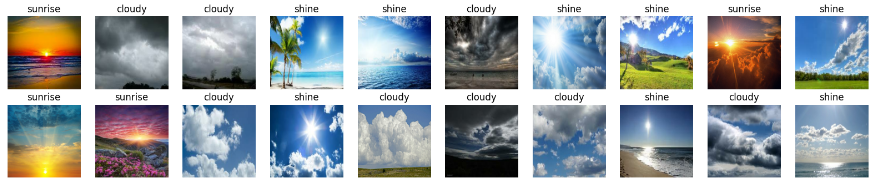
3. 再次检查数据
for image_batch, labels_batch in train_ds:
    print(image_batch.shape)
    print(labels_batch.shape)
    break
👉 输出
(32, 180, 180, 3)
(32,)
-
Image_batch是形状的张量(32,180,180,3)。这是一批形状180x180x3的32张图片(最后一维指的是彩色通道RGB)。 -
Label_batch是形状(32,)的张量,这些标签对应32张图片
4. 配置数据集
-
shuffle():打乱数据,关于此函数的详细介绍可
 最低0.47元/天 解锁文章






 扫一扫
扫一扫


 1163
1163

 被折叠的 条评论
为什么被折叠?
被折叠的 条评论
为什么被折叠?
 到【灌水乐园】发言





