


文章目录
- 概述
- 1. 建入口类断点调试
- 2. 读操作分析
- 1. 客户端打开文件流
- 1. DistributedFileSystem.open
- 2. DFSClient.open得到DFSInputStream
- 3. DFSInputStream构造器
- 4. DFSInputStream.openInfo()
- 5. DFSInputStream.fetchLocatedBlocksAndGetLastBlockLength()
- 6. 获取block信息DFSClient.getLocatedBlocks()
- 7. 远程RPC调用DFSClient.callGetBlockLocations()
- 8. RPC ClientProtocal.getBlockLocations 的实现ClientNamenodeProtocolTranslatorPB.getBlockLocations
- (namenode RPC获取block信息见其他)
- 2. 读操作--DFSInputStream实现
概述
参考:https://www.jianshu.com/p/3f93991b31da
hdfs读流程总体分为:
- 获取文件流(包括块发送RPC获得块信息等)
FSDataInputStream fsIn = FileSystem.open(“path”) - 读文件
fsIn.read(buf, off, toRead)
流程图如下:
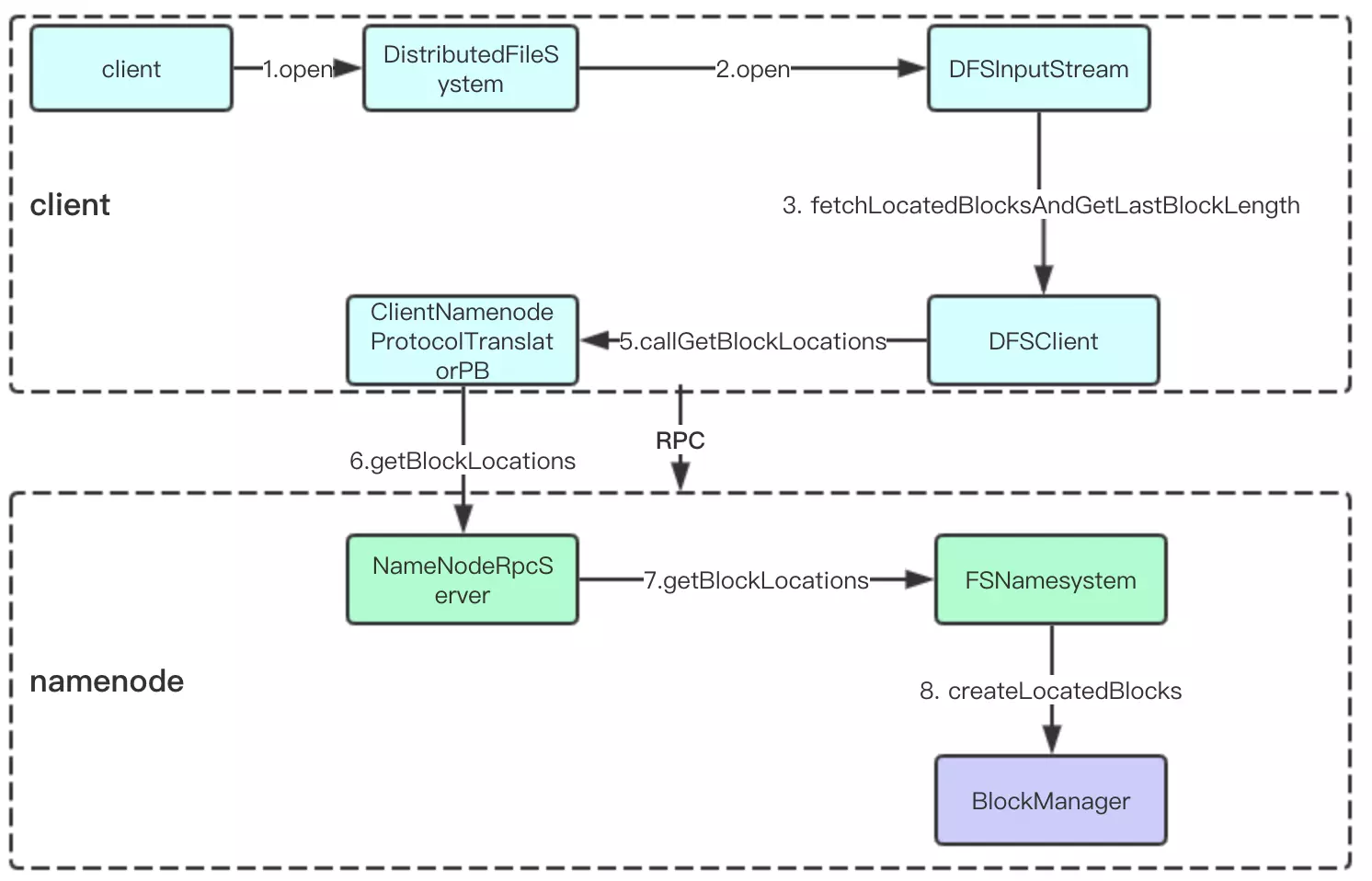
说明:
- 上述step3,目的是获得块信息,是通过调用dfsClient来完成的
1. 建入口类断点调试
加入hdfs依赖:
pom.xml
    ...
    <properties>
    	<hadoop.version>2.7.2-2323</hadoop.version>
    </properties>
    <dependencies>
        <dependency>
            <groupId>org.apache.hadoop</groupId>
            <artifactId>hadoop-common</artifactId>
            <version>${hadoop.version}</version>
        </dependency>
        <dependency>
            <groupId>org.apache.hadoop</groupId>
            <artifactId>hadoop-hdfs</artifactId>
            <version>${hadoop.version}</version>
        </dependency>
    </dependencies>
    ...
我们断点调试hdfs读数据过程,为了方便调试,写一个测试类:
public class FsShellTest {
    public static void main(String argv[]) throws Exception {

        FsShell shell = new FsShell();
        Configuration conf = new Configuration();
        conf.set("fs.defaultFS","hdfs://hadoop1:9000");
        conf.setQuietMode(false);
        shell.setConf(conf);

        String[] args = {"-text","/user/hello.txt"};   // 普通目录
        int res;
        try {
            res = ToolRunner.run(shell, args);
        } finally {
            shell.close();
        }
        System.exit(res);
    }
}
测试类中直接调用ToolRunner.run,后续过程同FsShell类调用过程。
我们先看一下 hadoop fs -text 的调用栈:
"main@1" prio=5 tid=0x1 nid=NA runnable
  java.lang.Thread.State: RUNNABLE
	  at org.apache.hadoop.hdfs.DistributedFileSystem.open(DistributedFileSystem.java:353)
	  at org.apache.hadoop.fs.FileSystem.open(FileSystem.java:837)
	  at org.apache.hadoop.fs.shell.Display$Cat.getInputStream(Display.java:114)
	  at org.apache.hadoop.fs.shell.Display$Text.getInputStream(Display.java:131)
	  at org.apache.hadoop.fs.shell.Display$Cat.processPath(Display.java:102)
	  at org.apache.hadoop.fs.shell.Command.processPaths(Command.java:319)
	  at org.apache.hadoop.fs.shell.Command.processPathArgument(Command.java:291)
	  at org.apache.hadoop.fs.shell.Command.processArgument(Command.java:273)
	  at org.apache.hadoop.fs.shell.Command.processArguments(Command.java:257)
	  at org.apache.hadoop.fs.shell.Command.processRawArguments(Command.java:203)
	  at org.apache.hadoop.fs.shell.Command.run(Command.java:167)
	  at org.apache.hadoop.fs.FsShell.run(FsShell.java:287)
	  at org.apache.hadoop.util.ToolRunner.run(ToolRunner.java:70)
	  at org.apache.hadoop.util.ToolRunner.run(ToolRunner.java:84)
	  at cn.whbing.hadoop.FsShellTest.main(FsShellTest.java:25)

我们看到处理流程:
ToolRunner.run --> FsShell.run --> Command.processPaths --> Display$Cat.processPath
至此参数解析完毕,通过传入的参数解析到为 read 操作。此后就是open等操作,可以看做 read 操作的开始,分析如下。
附:
对于读的断点调试,我们还可以直接在客户端调用open方法来测试,如:
    /**
     * 测试2:直接调用FileSystem的open方法来读
     */
    @Test
    public void testRead(){
        try {
            Configuration conf = new Configuration();
            conf.set("fs.defaultFS","hdfs://hadoop1:9000");
            FileSystem fs = FileSystem.get(conf);
            Path path = new Path("/user/hello.txt");
            FSDataInputStream in = fs.open(path);
            BufferedReader buff = new BufferedReader(new InputStreamReader(in));
            String str = null;
            while ((str = buff.readLine()) != null){
                System.out.println(str);
            }
            buff.close();
            in.close();
        } catch (Exception e){

        }
    }
2. 读操作分析
1. 客户端打开文件流
如直接使用上述java调用:对于 FSDataInputStream in = fs.open(path);断点调试,其调用栈为:
"main@1" prio=5 tid=0x1 nid=NA runnable
  java.lang.Thread.State: RUNNABLE
	  at org.apache.hadoop.hdfs.DistributedFileSystem.open(DistributedFileSystem.java:353)
	  at org.apache.hadoop.fs.FileSystem.open(FileSystem.java:837)
	  at cn.whbing.hadoop.FsShellTest.testRead(FsShellTest.java:57)
调用了DistributedFileSystem.open。
如使用shell调用:入口代码位于Display$Cat类中:
    protected InputStream getInputStream(PathData item) throws IOException {
      return item.fs.open(item.path);
    }
这里的fs就是DistributedFileSystem。可以看到java调用和shell调用,在这里重合,后续用同一套代码。
1. DistributedFileSystem.open
@Override
  public FSDataInputStream open(Path f, final int bufferSize)
      throws IOException {
    statistics.incrementReadOps(1);
    Path absF = fixRelativePart(f);
    return new FileSystemLinkResolver<FSDataInputStream>() {
      @Override
      public FSDataInputStream doCall(final Path p)
          throws IOException, UnresolvedLinkException {
        final DFSInputStream dfsis =
          dfs.open(getPathName(p), bufferSize, verifyChecksum);
        return dfs.createWrappedInputStream(dfsis);
      }
      @Override
      public FSDataInputStream next(final FileSystem fs, final Path p)
          throws IOException {
        return fs.open(p, bufferSize);
      }
    }.resolve(this, absF);
  }
上述的关键代码在于:
DFSInputStream dfsis =
          dfs.open(getPathName(p), bufferSize, verifyChecksum);
其调用了DFSClient.open,对于dfs.createWrappedInputStream(dfsis)得到的FSDataInputStream也只是包装类。真正操作的还是DFSInputStream。

hadoop封装了InputStream。
2. DFSClient.open得到DFSInputStream
  public DFSInputStream open(String src, int buffersize, boolean verifyChecksum)
      throws IOException, UnresolvedLinkException {
    //检查客户端读取文件是否关闭
    checkOpen();
    //    Get block info from namenode
    TraceScope scope = getPathTraceScope("newDFSInputStream", src);
    try {
      // 返回DFSInputStream的具体逻辑在构造器中
      return new DFSInputStream(this, src, verifyChecksum);
    } finally {
      scope.close();
    }
  }
可知,open的过程就是创建对象的过程。
3. DFSInputStream构造器
  DFSInputStream(DFSClient dfsClient, String src, boolean verifyChecksum,
                 LocatedBlocks locatedBlocks) throws IOException {
    this.dfsClient = dfsClient;
    this.verifyChecksum = verifyChecksum;
    this.src = src;
    synchronized (infoLock) {
      // 读缓存策略
      this.cachingStrategy = dfsClient.getDefaultReadCachingStrategy();
    }
    this.locatedBlocks = locatedBlocks;
    //读取block信息
    openInfo(false); //由info改成了info(false)
  }
上述使用的读缓存策略。
读缓存策略,readDropBehind和readahead两个参数控制读缓存策略,数据读取通常为磁盘操作,每次read将会读取一页数据(512b或者更大),这些数据加载到内存并传输给Client。
readDropBehind表示读后即弃,即数据读取后立即丢弃cache数据,这可以在多用户并发文件读取时有效节约内存,不过会导致更频繁的磁盘操作,
如果关闭此特性,read操作后数据会被cache在内存,对于同一个文件的多次读取可以有效的提升性能,但会消耗更多内存。readahead为预读,
如果开启,那么Datanode将会在一次磁盘读取操作中向前额外的多读取一定字节的数据,在线性读取时,这可以有效降低IO操作延迟。
这个特性需要在Datanode上开启Native libaries,否则不会生效。
4. DFSInputStream.openInfo()
/**
   * Grab the open-file info from namenode
   */
  void openInfo() throws IOException, UnresolvedLinkException {
    synchronized(infoLock) {
      // 获取block块信息,并获得最后一个block的长度
      lastBlockBeingWrittenLength = fetchLocatedBlocksAndGetLastBlockLength();
      int retriesForLastBlockLength = dfsClient.getConf().retryTimesForGetLastBlockLength;
      while (retriesForLastBlockLength > 0) {
        // Getting last block length as -1 is a special case. When cluster
        // restarts, DNs may not report immediately. At this time partial block
        // locations will not be available with NN for getting the length. Lets
        // retry for 3 times to get the length.
        if (lastBlockBeingWrittenLength == -1) {
          DFSClient.LOG.warn("Last block locations not available. "
              + "Datanodes might not have reported blocks completely."
              + " Will retry for " + retriesForLastBlockLength + " times");
          waitFor(dfsClient.getConf().retryIntervalForGetLastBlockLength);
          lastBlockBeingWrittenLength = fetchLocatedBlocksAndGetLastBlockLength();
        } else {
          break;
        }
        retriesForLastBlockLength--;
      }
      if (retriesForLastBlockLength == 0) {
        throw new IOException("Could not obtain the last block locations.");
      }
    }
  }
获取block块信息,并获得最后一个block的长度。
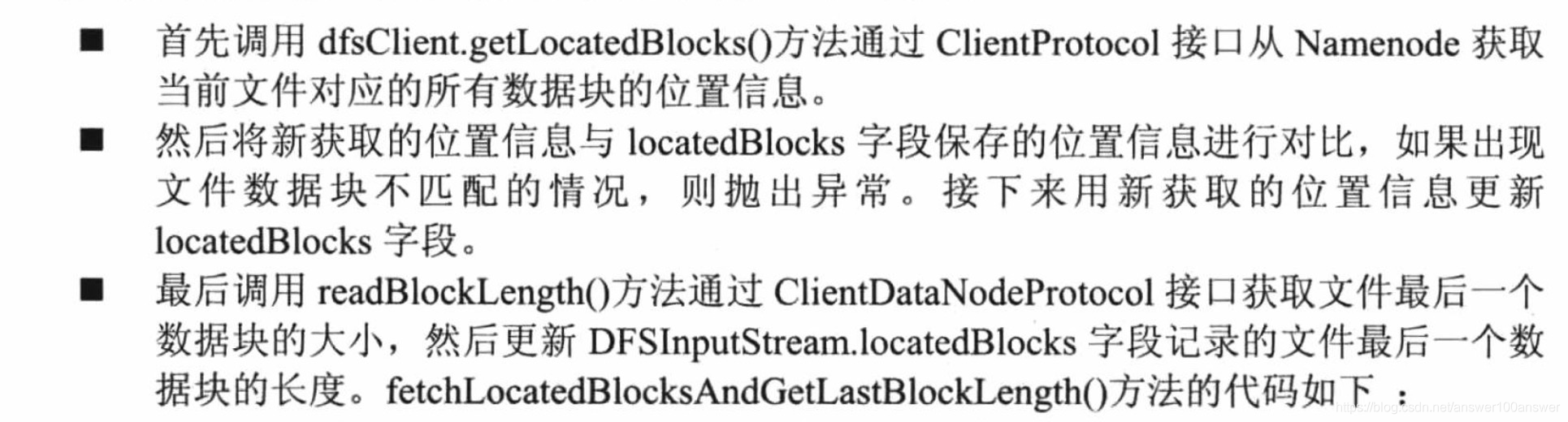

5. DFSInputStream.fetchLocatedBlocksAndGetLastBlockLength()
 private long fetchLocatedBlocksAndGetLastBlockLength() throws IOException {
    //客户端向namenode请求获取block信息,这里通过调用dfsClient的方法来执行
    final LocatedBlocks newInfo = dfsClient.getLocatedBlocks(src, 0);
    if (DFSClient.LOG.isDebugEnabled()) {
      DFSClient.LOG.debug("newInfo = " + newInfo);
    }
    if (newInfo == null) {
      throw new IOException("Cannot open filename " + src);
    }

    // 重试3次,在后边重试的3次中,确保数据一致,如果有改动抛出异常
    if (locatedBlocks != null) {
      Iterator<LocatedBlock> oldIter = locatedBlocks.getLocatedBlocks().iterator();
      Iterator<LocatedBlock> newIter = newInfo.getLocatedBlocks().iterator();
      while (oldIter.hasNext() && newIter.hasNext()) {
        if (! oldIter.next().getBlock().equals(newIter.next().getBlock())) {
          throw new IOException("Blocklist for " + src + " has changed!");
        }
      }
    }
    locatedBlocks = newInfo;
    long lastBlockBeingWrittenLength = 0;
    if (!locatedBlocks.isLastBlockComplete()) {
      final LocatedBlock last = locatedBlocks.getLastLocatedBlock();
      if (last != null) {
        if (last.getLocations().length == 0) {
          if (last.getBlockSize() == 0) {
            // if the length is zero, then no data has been written to
            // datanode. So no need to wait for the locations.
            return 0;
          }
          return -1;
        }
        final long len = readBlockLength(last);
        last.getBlock().setNumBytes(len);
        lastBlockBeingWrittenLength = len;
      }
    }

    fileEncryptionInfo = locatedBlocks.getFileEncryptionInfo();

    return lastBlockBeingWrittenLength;
  }
LocatedBlocks 数据结构在后续分析。
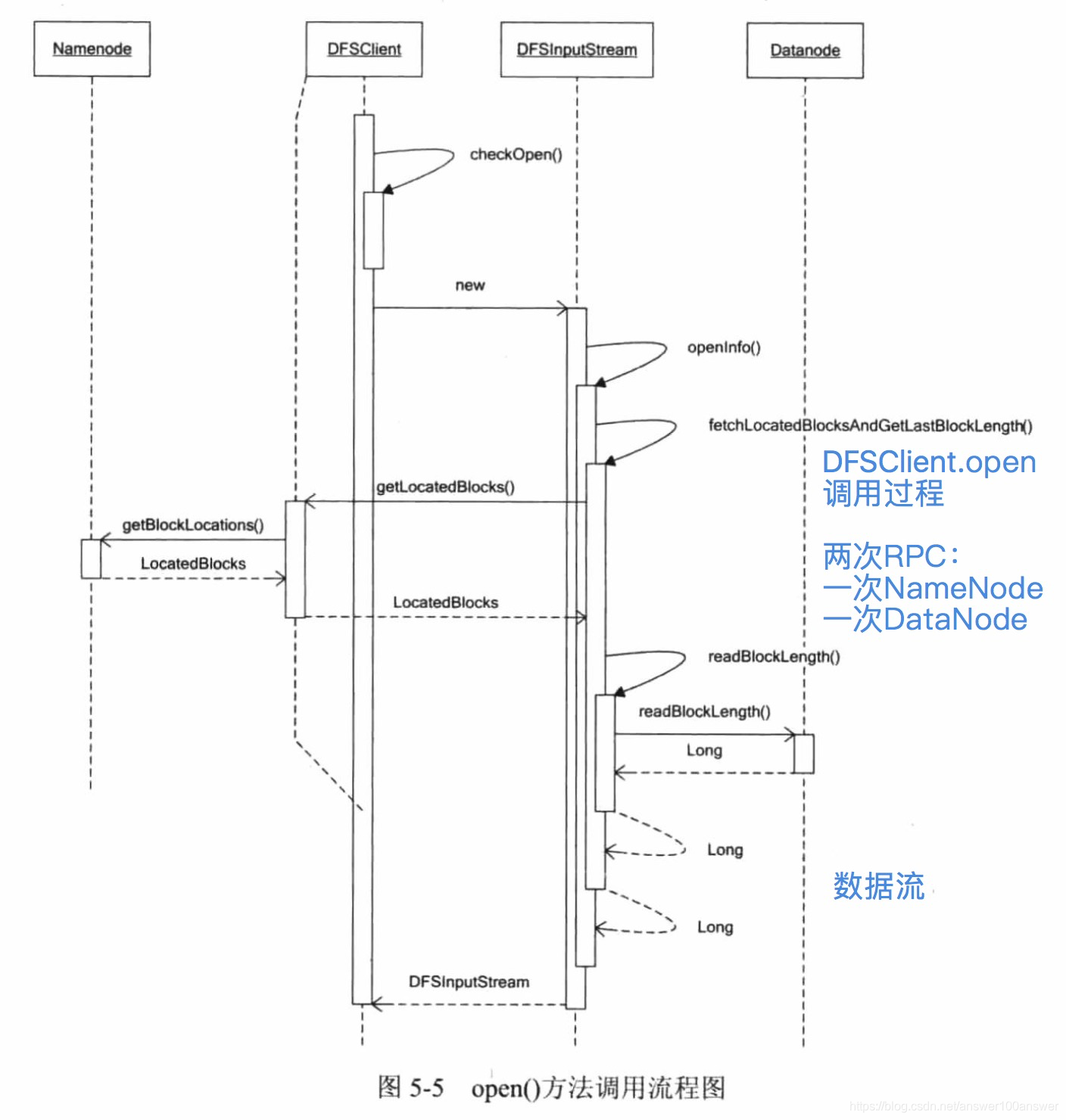
上述代码有两次RPC调用:
- 获取LocatedBlocks,并得到最后一个块信息。
- 获得块的长度


整个DFSClient.open调用过程如下:
6. 获取block信息DFSClient.getLocatedBlocks()
  public LocatedBlocks getLocatedBlocks(String src, long start)
      throws IOException {
    return getLocatedBlocks(src, start, dfsClientConf.prefetchSize);
  }
  public LocatedBlocks getLocatedBlocks(String src, long start, long length)
      throws IOException {
    TraceScope scope = getPathTraceScope("getBlockLocations", src);
    try {
      return callGetBlockLocations(namenode, src, start, length);
    } finally {
      scope.close();
    }
  }
7. 远程RPC调用DFSClient.callGetBlockLocations()
  /**
   * @see ClientProtocol#getBlockLocations(String, long, long)
   */
  static LocatedBlocks callGetBlockLocations(ClientProtocol namenode,
      String src, long start, long length)
      throws IOException {
    try {
      //通过ClientProtocol(ClientNamenodeProtocolTranslatorPB)的协议向namenode请求
      return namenode.getBlockLocations(src, start, length);
    } catch(RemoteException re) {
      throw re.unwrapRemoteException(AccessControlException.class,
                                     FileNotFoundException.class,
                                     UnresolvedPathException.class);
    }
  }
8. RPC ClientProtocal.getBlockLocations 的实现ClientNamenodeProtocolTranslatorPB.getBlockLocations
@Override
  public LocatedBlocks getBlockLocations(String src, long offset, long length)
      throws AccessControlException, FileNotFoundException,
      UnresolvedLinkException, IOException {
    GetBlockLocationsRequestProto req = GetBlockLocationsRequestProto
        .newBuilder()
        .setSrc(src)
        .setOffset(offset)
        .setLength(length)
        .build();
    try {
      // rpc调用暂时不分析了
      //调用NameNodeRpcServer.getBlockLocations
      //rpcProxy: localhost/127.0.0.1:51397, ProtobufRpcEngine, ClientNamenodeProtocolPB
      GetBlockLocationsResponseProto resp = rpcProxy.getBlockLocations(null,
          req);
      return resp.hasLocations() ?
        PBHelper.convert(resp.getLocations()) : null;
    } catch (ServiceException e) {
      throw ProtobufHelper.getRemoteException(e);
    }
  }
(namenode RPC获取block信息见其他)
本节内容鉴于篇幅,单独写。
2. 读操作–DFSInputStream实现
上述DFSClient.open后,返回了HdfsDataInputStream类型(继承了FSDataInputStream、DataInputStream),这是一个封装的类型。
实际操作的类型是DFSInputStream。
之后就可以调用HdfsDataInputStream.read进行读操作了。
通过shell调试获得客户端读操作的调用栈:
"main@1" prio=5 tid=0x1 nid=NA runnable
  java.lang.Thread.State: RUNNABLE
	  at org.apache.hadoop.hdfs.DFSInputStream.readWithStrategy(DFSInputStream.java:874)
	  - locked <0xacb> (a org.apache.hadoop.hdfs.DFSInputStream)
	  at org.apache.hadoop.hdfs.DFSInputStream.read(DFSInputStream.java:940)
	  at org.apache.hadoop.hdfs.DFSInputStream.read(DFSInputStream.java:741)
	  at java.io.DataInputStream.readShort(DataInputStream.java:312)
	  at org.apache.hadoop.fs.shell.Display$Text.getInputStream(Display.java:136)
	  at org.apache.hadoop.fs.shell.Display$Cat.processPath(Display.java:102)
	  at org.apache.hadoop.fs.shell.Command.processPaths(Command.java:319)
	  at org.apache.hadoop.fs.shell.Command.processPathArgument(Command.java:291)
	  at org.apache.hadoop.fs.shell.Command.processArgument(Command.java:273)
	  at org.apache.hadoop.fs.shell.Command.processArguments(Command.java:257)
	  at org.apache.hadoop.fs.shell.Command.processRawArguments(Command.java:203)
	  at org.apache.hadoop.fs.shell.Command.run(Command.java:167)
	  at org.apache.hadoop.fs.FsShell.run(FsShell.java:287)
	  at org.apache.hadoop.util.ToolRunner.run(ToolRunner.java:70)
	  at org.apache.hadoop.util.ToolRunner.run(ToolRunner.java:84)
	  at cn.whbing.hadoop.ReadWriteTest.read1(ReadWriteTest.java:43)
以下是shell方式调试,Display类获得DFSInputStream后的处理。
    @Override
    protected InputStream getInputStream(PathData item) throws IOException {
      FSDataInputStream i = (FSDataInputStream)super.getInputStream(item);

      // Handle 0 and 1-byte files
      short leadBytes;
      try {
        // readShort读取开头的两个字节,排列在高低位组成short
        leadBytes = i.readShort();
      } catch (EOFException e) {
        i.seek(0);
        return i;
      }

      // Check type of stream first
      switch(leadBytes) {
        case 0x1f8b: { // RFC 1952
          // Must be gzip
          i.seek(0);
          return new GZIPInputStream(i);
        }
        case 0x5345: { // 'S' 'E'
          // Might be a SequenceFile
          if (i.readByte() == 'Q') {
            i.close();
            return new TextRecordInputStream(item.stat);
          }
        }
        default: {
          // Check the type of compression instead, depending on Codec class's
          // own detection methods, based on the provided path.
          CompressionCodecFactory cf = new CompressionCodecFactory(getConf());
          CompressionCodec codec = cf.getCodec(item.path);
          if (codec != null) {
            i.seek(0);
            return codec.createInputStream(i);
          }
          break;
        }
        case 0x4f62: { // 'O' 'b'
          if (i.readByte() == 'j') {
            i.close();
            return new AvroFileInputStream(item.stat);
          }
          break;
        }
      }

      // File is non-compressed, or not a file container we know.
      i.seek(0);
      return i;
    }
  }
根据DataInputStream.readShort方法取到流的前两个字节,根据前两个字节来判断类型。如普通文本,会走到default中,default中会检查是否压缩。
- 如果压缩,seek(0)并返回解压缩。
- 如果不压缩,seek(0)并返回。
readShort:
    public final short readShort() throws IOException {
        int ch1 = in.read();
        int ch2 = in.read();
        if ((ch1 | ch2) < 0)
            throw new EOFException();
        return (short)((ch1 << 8) + (ch2 << 0));
    }
看子类read的实现,i的实际类型是 HdfsDataInputStream --> FSDataInputStream --> DataInputStream。
这是包装类,我们看DFSInputStream的read实现。
DFSInputStream.read:
  // 读一个字节
  public synchronized int read() throws IOException {
    if (oneByteBuf == null) {
      oneByteBuf = new byte[1];
    }
    int ret = read( oneByteBuf, 0, 1 );
    return ( ret <= 0 ) ? -1 : (oneByteBuf[0] & 0xff);
  }
  //
  @Override
  public synchronized int read(final byte buf[], int off, int len) throws IOException {
    // 使用字节数组作为容器
    ReaderStrategy byteArrayReader = new ByteArrayStrategy(buf);
    TraceScope scope =
        dfsClient.getPathTraceScope("DFSInputStream#byteArrayRead", src);
    try {
      return readWithStrategy(byteArrayReader, off, len);
    } finally {
      scope.close();
    }
  }
其中read方法调用 readWithStrategy
DFSInputStream.readWithStrategy
  private synchronized int readWithStrategy(ReaderStrategy strategy, int off, int len) throws IOException {
    dfsClient.checkOpen();
    if (closed.get()) {
      throw new IOException("Stream closed");
    }
    Map<ExtendedBlock,Set<DatanodeInfo>> corruptedBlockMap
      = new HashMap<ExtendedBlock, Set<DatanodeInfo>>();
    failures = 0;
    if (pos < getFileLength()) {
      int retries = 2;
      while (retries > 0) {
        try {
          // currentNode can be left as null if previous read had a checksum
          // error on the same block. See HDFS-3067
          if (pos > blockEnd || currentNode == null) {
            currentNode = blockSeekTo(pos);
          }
          int realLen = (int) Math.min(len, (blockEnd - pos + 1L));
          synchronized(infoLock) {
            if (locatedBlocks.isLastBlockComplete()) {
              realLen = (int) Math.min(realLen,
                  locatedBlocks.getFileLength() - pos);
            }
          }
          int result = readBuffer(strategy, off, realLen, corruptedBlockMap);

          if (result >= 0) {
            pos += result;
          } else {
            // got a EOS from reader though we expect more data on it.
            throw new IOException("Unexpected EOS from the reader");
          }
          if (dfsClient.stats != null) {
            dfsClient.stats.incrementBytesRead(result);
          }
          return result;
        } catch (ChecksumException ce) {
          throw ce;
        } catch (IOException e) {
          if (retries == 1) {
            DFSClient.LOG.warn("DFS Read", e);
          }
          blockEnd = -1;
          if (currentNode != null) { addToDeadNodes(currentNode); }
          if (--retries == 0) {
            throw e;
          }
        } finally {
          // Check if need to report block replicas corruption either read
          // was successful or ChecksumException occured.
          reportCheckSumFailure(corruptedBlockMap,
              currentLocatedBlock.getLocations().length);
        }
      }
    }
    return -1;
  }
private synchronized DatanodeInfo blockSeekTo(long target) 方法,
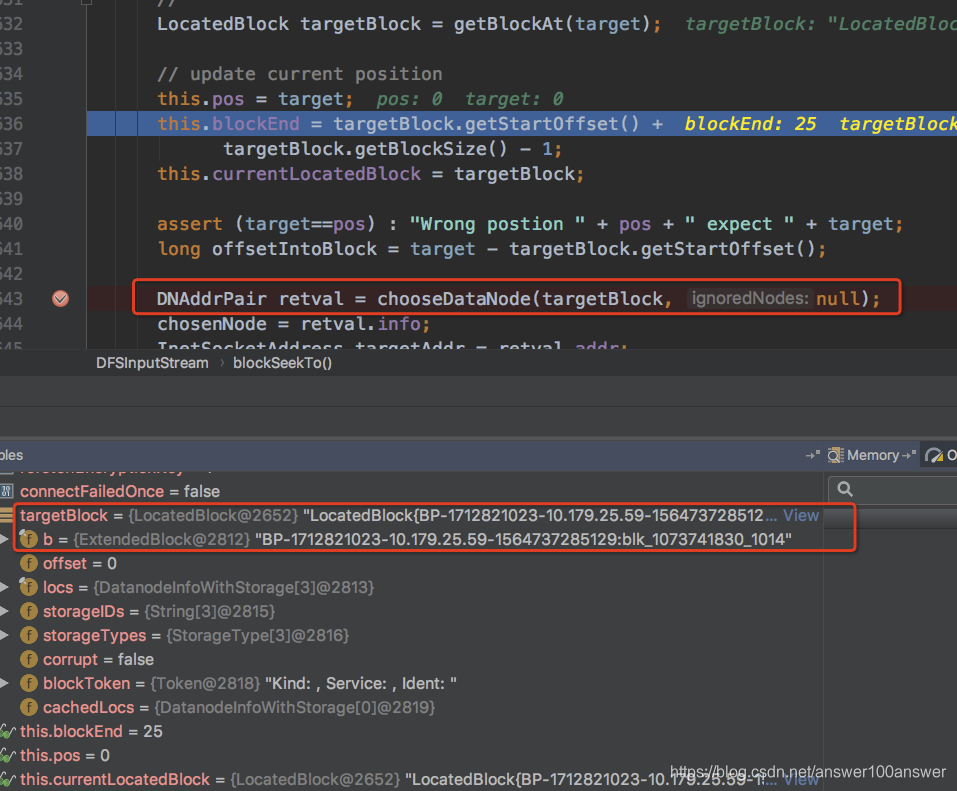
  private DNAddrPair chooseDataNode(LocatedBlock block,
      Collection<DatanodeInfo> ignoredNodes) throws IOException {
    while (true) {
      try {
        return getBestNodeDNAddrPair(block, ignoredNodes);
      } catch (IOException ie) {
        String errMsg = getBestNodeDNAddrPairErrorString(block.getLocations(),
          deadNodes, ignoredNodes);
        String blockInfo = block.getBlock() + " file=" + src;
        if (failures >= dfsClient.getMaxBlockAcquireFailures()) {
          String description = "Could not obtain block: " + blockInfo;
          DFSClient.LOG.warn(description + errMsg
              + ". Throwing a BlockMissingException");
          throw new BlockMissingException(src, description,
              block.getStartOffset());
        }
getBestNodeDNAddrPair 的方法如下:
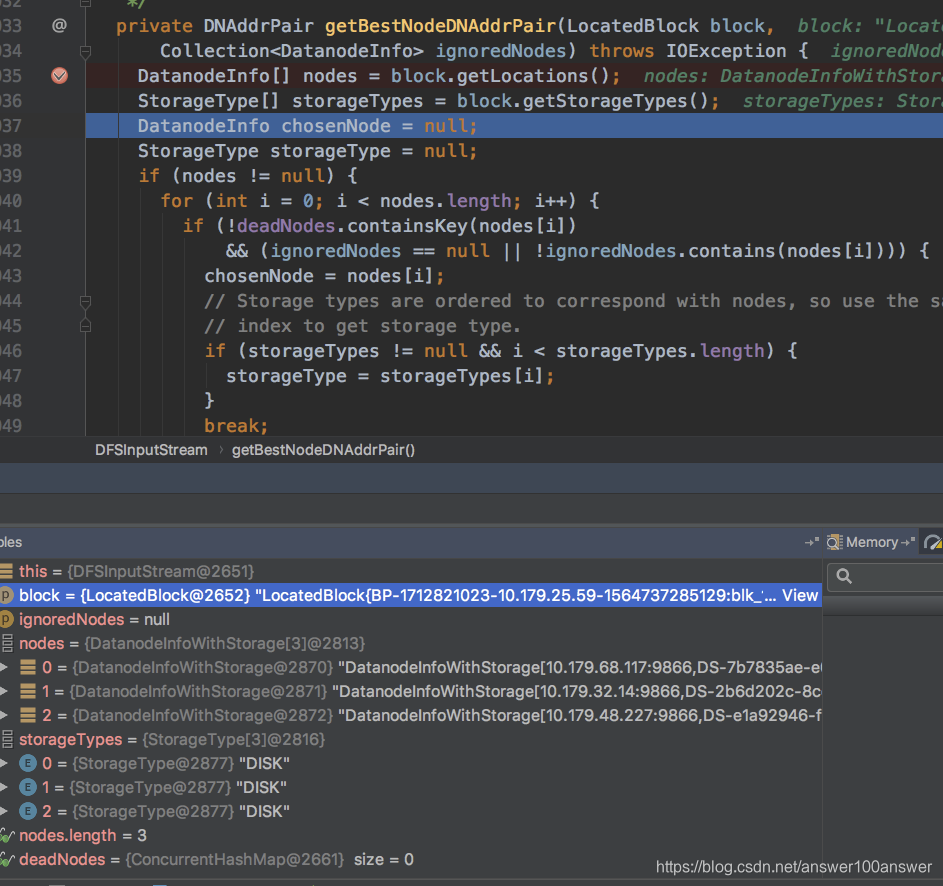
Q:
这个true 出不来怎么办?
private DNAddrPair chooseDataNode(LocatedBlock block,
Collection ignoredNodes) throws IOException {
while (true) {
try {
根据错误提示:
hadoop fs -text hdfs://hadoop1:9000/ec/t.log

19/08/14 17:24:08 WARN hdfs.DFSClient: Failed to connect to /10.179.17.22:9866 for block, add to deadNodes and continue. java.io.IOException: Got error, status message opReadBlock BP-1712821023-10.179.25.59-1564737285129:blk_-9223372036854775648_1019 received exception org.apache.hadoop.hdfs.server.datanode.ReplicaNotFoundException: Replica not found for BP-1712821023-10.179.25.59-1564737285129:blk_-9223372036854775648_1019, for OP_READ_BLOCK, self=/10.179.72.122:47858, remote=/10.179.17.22:9866, for file /ec/t.log, for pool BP-1712821023-10.179.25.59-1564737285129 block -9223372036854775648_1019
java.io.IOException: Got error, status message opReadBlock BP-1712821023-10.179.25.59-1564737285129:blk_-9223372036854775648_1019 received exception org.apache.hadoop.hdfs.server.datanode.ReplicaNotFoundException: Replica not found for BP-1712821023-10.179.25.59-1564737285129:blk_-9223372036854775648_1019, for OP_READ_BLOCK, self=/10.179.72.122:47858, remote=/10.179.17.22:9866, for file /ec/t.log, for pool BP-1712821023-10.179.25.59-1564737285129 block -9223372036854775648_1019
        at org.apache.hadoop.hdfs.protocol.datatransfer.DataTransferProtoUtil.checkBlockOpStatus(DataTransferProtoUtil.java:142)
        at org.apache.hadoop.hdfs.RemoteBlockReader2.checkSuccess(RemoteBlockReader2.java:456)
        at org.apache.hadoop.hdfs.RemoteBlockReader2.newBlockReader(RemoteBlockReader2.java:424)
        at org.apache.hadoop.hdfs.BlockReaderFactory.getRemoteBlockReader(BlockReaderFactory.java:818)
        at org.apache.hadoop.hdfs.BlockReaderFactory.getRemoteBlockReaderFromTcp(BlockReaderFactory.java:697)
        at org.apache.hadoop.hdfs.BlockReaderFactory.build(BlockReaderFactory.java:355)
        at org.apache.hadoop.hdfs.DFSInputStream.blockSeekTo(DFSInputStream.java:679)
        at org.apache.hadoop.hdfs.DFSInputStream.readWithStrategy(DFSInputStream.java:888)
        at org.apache.hadoop.hdfs.DFSInputStream.read(DFSInputStream.java:940)
        at org.apache.hadoop.hdfs.DFSInputStream.read(DFSInputStream.java:741)
        at java.io.DataInputStream.readShort(DataInputStream.java:312)
        at org.apache.hadoop.fs.shell.Display$Text.getInputStream(Display.java:136)
        at org.apache.hadoop.fs.shell.Display$Cat.processPath(Display.java:102)
        at org.apache.hadoop.fs.shell.Command.processPaths(Command.java:317)
        at org.apache.hadoop.fs.shell.Command.processPathArgument(Command.java:289)
        at org.apache.hadoop.fs.shell.Command.processArgument(Command.java:271)
        at org.apache.hadoop.fs.shell.Command.processArguments(Command.java:255)
        at org.apache.hadoop.fs.shell.Command.processRawArguments(Command.java:201)
        at org.apache.hadoop.fs.shell.Command.run(Command.java:165)
        at org.apache.hadoop.fs.FsShell.run(FsShell.java:287)
        at org.apache.hadoop.util.ToolRunner.run(ToolRunner.java:70)
        at org.apache.hadoop.util.ToolRunner.run(ToolRunner.java:84)
        at org.apache.hadoop.fs.FsShell.main(FsShell.java:340)
对于 BlockReader:
public interface BlockReader extends ByteBufferReadable {
	  int read(byte[] buf, int off, int len) throws IOException;
      long skip(long n) throws IOException;
      ...
}
getRemoteBlockReaderFromTcp
  private BlockReader getRemoteBlockReader(Peer peer) throws IOException {
    if (conf.useLegacyBlockReader) {
      return RemoteBlockReader.newBlockReader(fileName,
          block, token, startOffset, length, conf.ioBufferSize,
          verifyChecksum, clientName, peer, datanode,
          clientContext.getPeerCache(), cachingStrategy);
    } else {
      return RemoteBlockReader2.newBlockReader(
          fileName, block, token, startOffset, length,
          verifyChecksum, clientName, peer, datanode,
          clientContext.getPeerCache(), cachingStrategy);
    }
  }
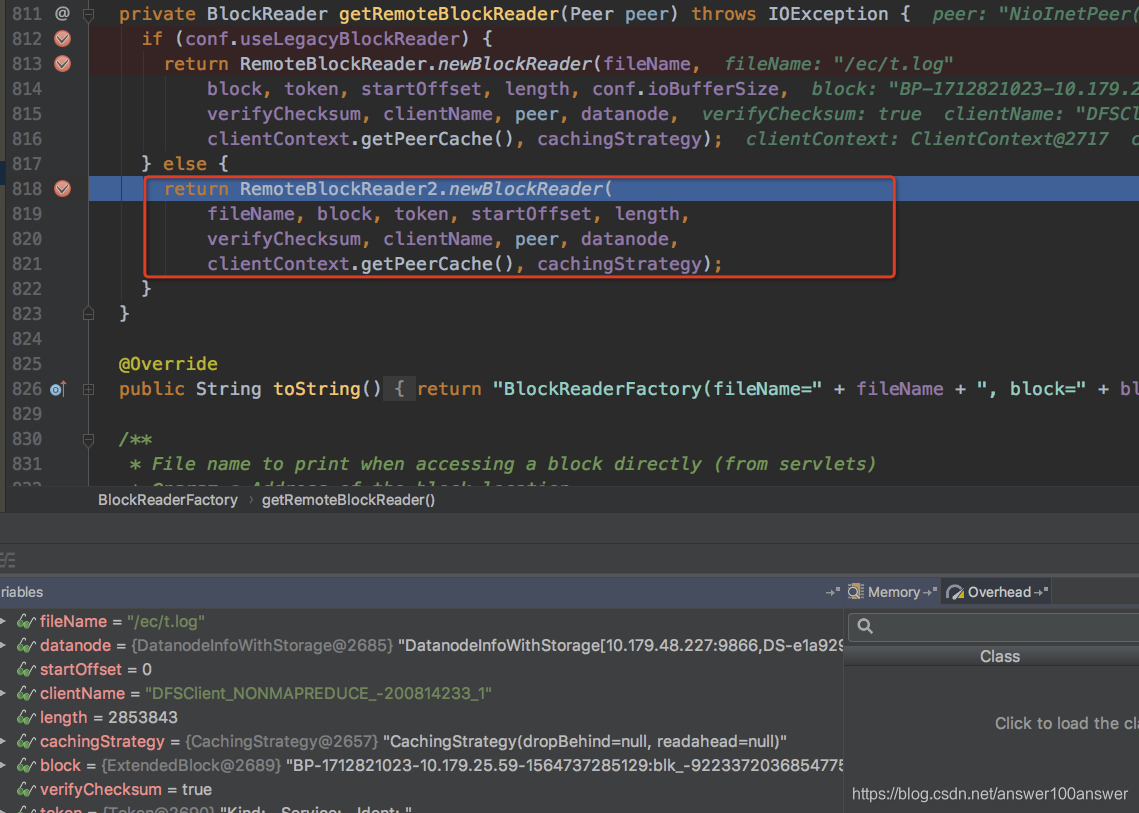
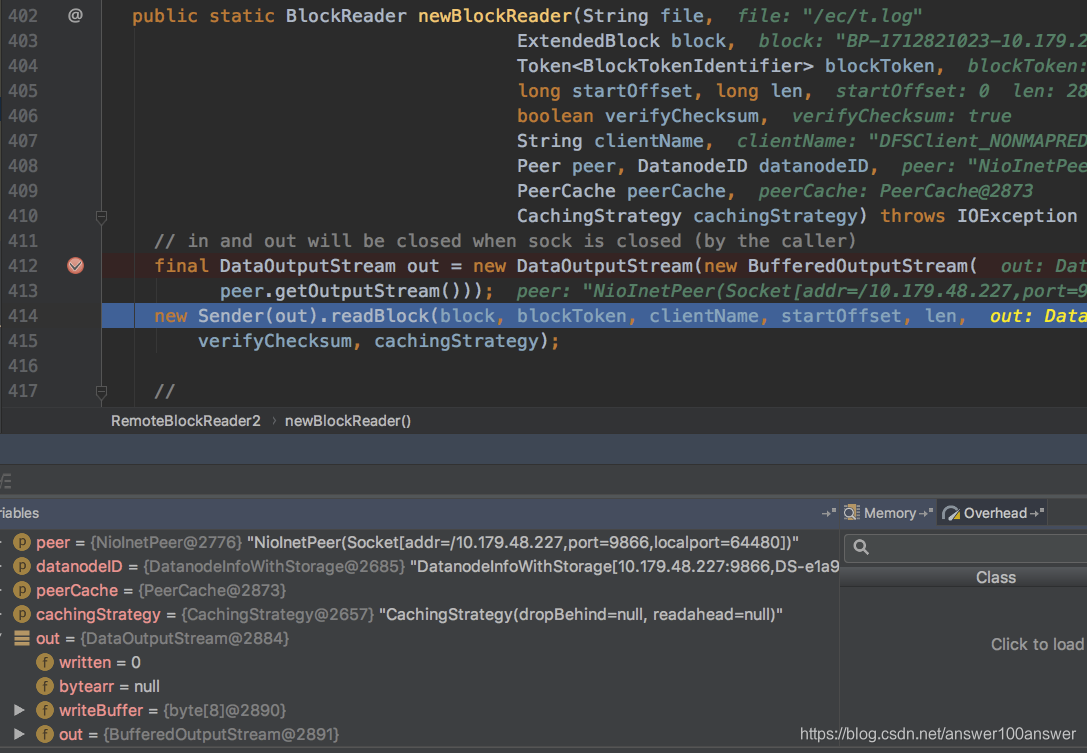
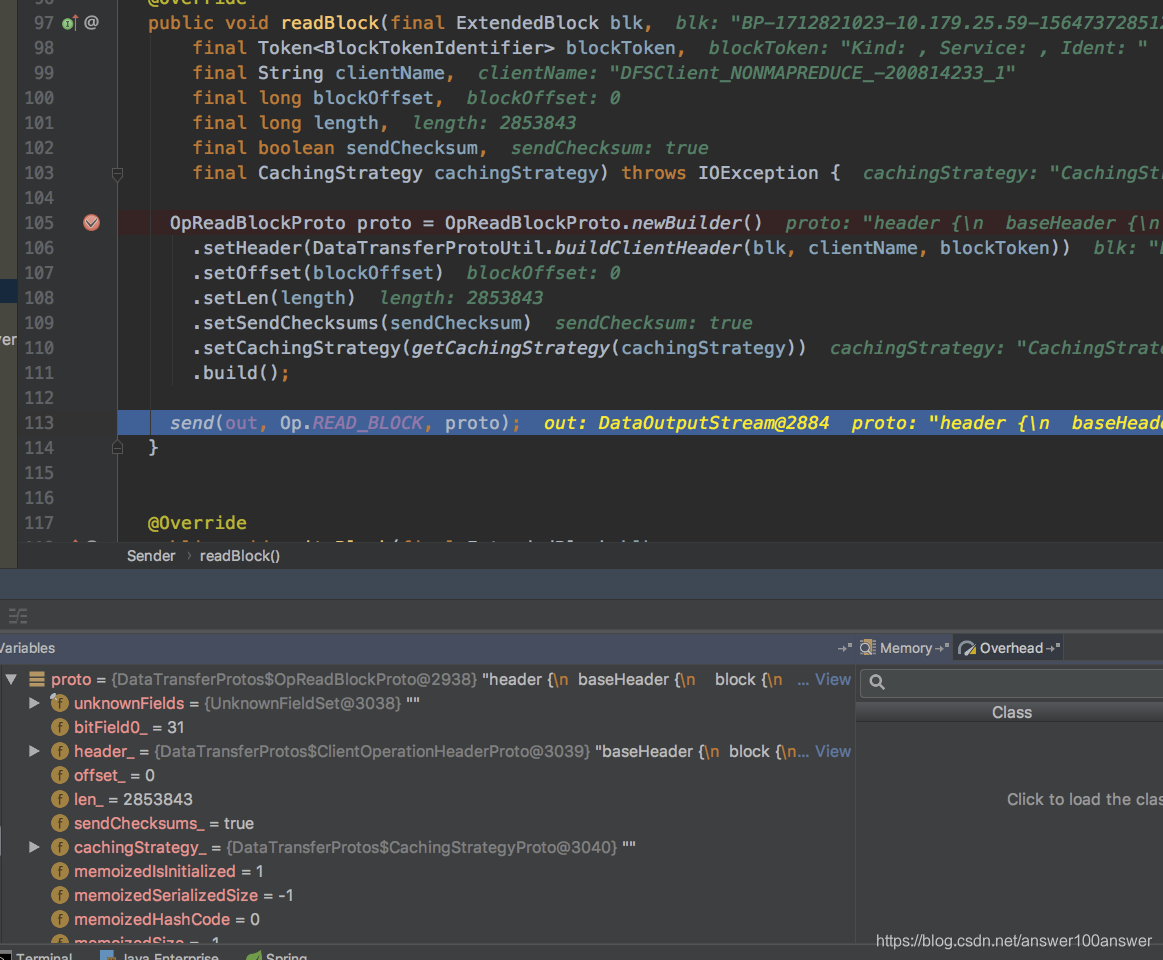
readBlock方法中,通过发送值为81的状态码org.apache.hadoop.hdfs.protocol.datatransfer.Op.READ_BLOCK 到DataXceiver中的peer服务。
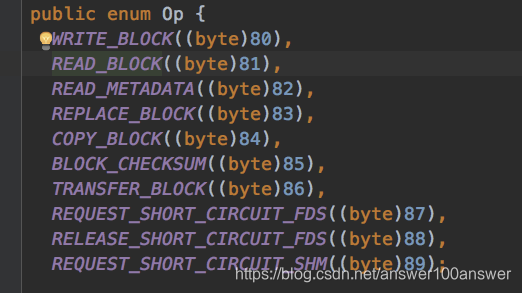
在这里我们看到把各个参数都set到了OpReadBlockProto对象里,然后发送出去,也就是发送到了初始化的DataXceiverServer服务.
这个时候服务端一直阻塞的socket线程将会收到操作码为81的读请求,然后就进行后续的处理
我们看下,其实其他的一些对于数据的操作,如copyBlock,writeBlock都是在Sender中完成的.
Sender的包是 public class Sender implements DataTransferProtocol
我们来看DataXceiverServer的run方法。
 public void run() {
    Peer peer = null;
    while (datanode.shouldRun && !datanode.shutdownForUpgrade) {
      try {
       //通过accept方法在这里一直阻塞,直到有请求过来,我们通过跟踪代码,看到内部其实是封装了java的serverSocket的accept方法.
        peer = peerServer.accept();

        // Make sure the xceiver count is not exceeded
        int curXceiverCount = datanode.getXceiverCount();
        if (curXceiverCount > maxXceiverCount.get()) {
          throw new IOException("Xceiver count " + curXceiverCount
              + " exceeds the limit of concurrent xcievers: "
              + maxXceiverCount.get());
        }

      //当有请求过来的时候,就通过DataXceiver.create创建了一个守护进程,并将其加到线程组里.
        new Daemon(datanode.threadGroup,
            DataXceiver.create(peer, datanode, this))
            .start();
      } catch (SocketTimeoutException ignored) {
        // wake up to see if should continue to run
      }
      ...
  }
通过 op = readOp();获取具体是什么操作,读、写、copy等,然后processOp(op);方法来处理具体的逻辑
在方法中,通过switch来具体的分发,让不同的方法执行不同的逻辑
protected final void processOp(Op op) throws IOException {
    switch(op) {
    case READ_BLOCK:
      opReadBlock();
      break;
    case WRITE_BLOCK:
      opWriteBlock(in);
      break;
    case REPLACE_BLOCK:
      opReplaceBlock(in);
      break;
    case COPY_BLOCK:
      opCopyBlock(in);
      break;
    case BLOCK_CHECKSUM:
      opBlockChecksum(in);
      break;
    case TRANSFER_BLOCK:
      opTransferBlock(in);
      break;
    case REQUEST_SHORT_CIRCUIT_FDS:
      opRequestShortCircuitFds(in);
      break;
    case RELEASE_SHORT_CIRCUIT_FDS:
      opReleaseShortCircuitFds(in);
      break;
    case REQUEST_SHORT_CIRCUIT_SHM:
      opRequestShortCircuitShm(in);
      break;
    default:
      throw new IOException("Unknown op " + op + " in data stream");
    }
  }
参考:
https://zhangjun5965.iteye.com/blog/2375278

 2192


 扫一扫


 被折叠的 条评论
为什么被折叠?
 到【灌水乐园】发言


