



 本文介绍了一种简单的方法来实现应用程序中所有未处理异常的集中式处理。通过在主线程和额外线程中设置异常处理程序,可以有效地捕获并处理这些异常,避免因未处理的错误导致的数据丢失。
Introduction
You might have been come across a situation when you may need your
application to Log all your application errors. This can be done using try
catch
blocks.
But what about unhandled exceptions. When your application comes across
an unhandled exception, your application will exit just showing an
error window. This may sometimes result in loss of data. To avoid this,
you need to handle all the unhandled exceptions from a centralized
method. This article explains a simple way of centralized exception
handling.
Using the Code
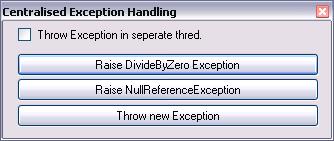
There are two sources where the exceptions are raised. Either the exception can be raised in the main thread or it can be raised in the additional threads used in the application. Let us now walk in to the code how to handle this.
static
 class
 Program

{

    [STAThread]

    static
 void
 Main()

    {

        //
 Add handler to handle the exception raised by main threads


        Application.ThreadException +=

        new
 System.Threading.ThreadExceptionEventHandler(Application_ThreadException);


        //
 Add handler to handle the exception raised by additional threads


        AppDomain.CurrentDomain.UnhandledException +=

        new
 UnhandledExceptionEventHandler(CurrentDomain_UnhandledException);


        Application.EnableVisualStyles();

        Application.SetCompatibleTextRenderingDefault(false
);

        Application.Run(new
 Form1());


        //
 Stop the application and all the threads in suspended state.


        Environment.Exit(-1);

    }


    static
 void
 Application_ThreadException

    	(object
 sender, System.Threading.ThreadExceptionEventArgs e)

    {//
 All exceptions thrown by the main thread are handled over this method


        ShowExceptionDetails(e.Exception);

    }


    static
 void
 CurrentDomain_UnhandledException

    	(object
 sender, UnhandledExceptionEventArgs e)

    {//
 All exceptions thrown by additional threads are handled in this method


        ShowExceptionDetails(e.ExceptionObject as
 Exception);


        //
 Suspend the current thread for now to stop the exception from throwing.


        Thread.CurrentThread.Suspend();

    }


    static
 void
 ShowExceptionDetails(Exception Ex)

    {

        //
 Do logging of exception details


        MessageBox.Show(Ex.Message, Ex.TargetSite.ToString(),

        		MessageBoxButtons.OK, MessageBoxIcon.Error);

    }

}
In the above class, we shall attach an event handler to two events. It is better to attach these events as soon as the main
method starts.
Application.ThreadException
- This event will be raised when an exception is thrown in the main
thread. If we add an event handler, then the exception is handled over the method.
AppDomain.CurrentDomain.UnhandledException
- This event
will be raised when an exception is thrown in the additional threads
used in the application. The worse scenario here is as soon as the
handlers' execution gets over, the exception is again thrown whereas
the application ends. This need to be handled. Here I have used a bit
of code to handle this situation and continue the execution of the
application without interruption.
The logic I have used to overcome this situation is just suspending
the thread in the event handler, so that the application continues to
work fine. Again a problem arises in suspending this thread. When the
main form is closed, the application normally needs to exit, but as the
thread is in suspended state, the application will still remain
running. So to exit the application completely and stop the process, Environment.Exit(-1
)
must be called before the ending of the main
method.
Points of Interest
This article enables you to handle any exceptions without forcing your application to end due to unhandled exceptions in any case.
History
- 20th October, 2009: Initial post
License
This article, along with any associated source code and files, is licensed under The Code Project Open License (CPOL)
About the Author
SHRIDHAR TL





 扫一扫
扫一扫


 246
246

 被折叠的 条评论
为什么被折叠?
被折叠的 条评论
为什么被折叠?
 到【灌水乐园】发言





