
ansible常用模块及playbook基础

本文详细介绍Ansible中常用模块的功能及用法,包括command、shell、copy、cron、fetch、file、hostname、yum、service、user和setup模块。通过具体示例,帮助读者理解如何使用这些模块来自动化运维任务。

ansible的常用模块:

  获取模块列表:

    ansible-doc -l

   command模块(省略):在远程主机运行命令;

   shell模块:在远程主机在shell进程下运行命令,支持shell特性,如管道等;

   copy模块:copies files to remote locations

         用法:

        (1) src =     dest =  

      (2) content =    dest =

      owner,group,mode  

  cron模块:Manage cron.d and crontab entries.

    minute=

    day=

    month=

    weekday=

    hour=

    job=

    *name=

    state=

      present:创建

      absent:删除

    例如  ansible all  -m cron  -a  "minute=*/5   job=' /sbin/ntpdate  172.18.0.1  &> /dev/null '  name=Synctime"

 

  fetch模块:从远程主机拉取文件

  file模块:Sets attributes of files

   用法:

    (1)创建链接文件:*path=   src=   state=link

    (2)修改属性:path=  owner=  mode=  group=

    (3)创建目录:path=  state=directory

  hostname模块:manage hostname

  yum模块:

    name=:程序包名称,可以带版本号;

    state=

      present,latest

      absent

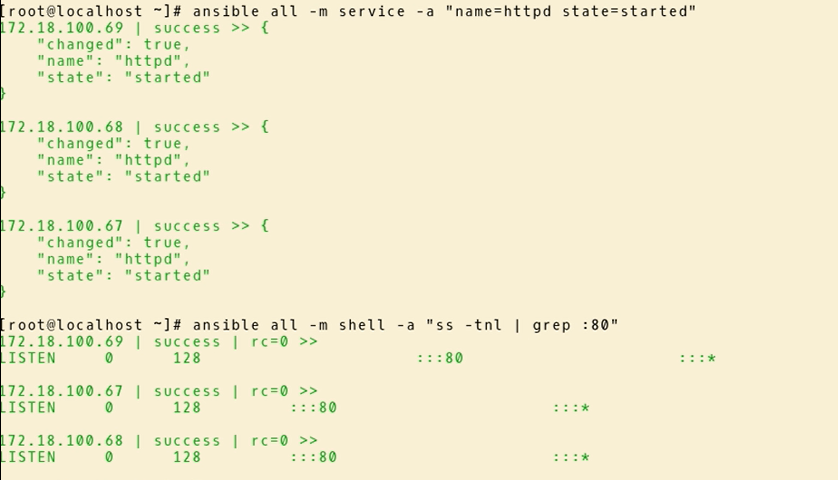
  service模块:管理服务

    *name=

    state=

      started

      stopped 

      restarted 

    enabled=

    runlevel=
             

  user模块:管理用户账号

    *name=

    system=

    uid=

    shell=

    group=

    groups=

    comment=

    home=


  setup模块:获取facts

++++++++++++++++++++++++++++++++++++++++++++++++++++++++++++++++++++

YAML:

Playbooks的主要作用:让我们能够把多个相关联的任务 通过读取YAML格式的配置文件 一次跑出来

Playbooks的核心元素:

  Tasks :任务

  Variables 变量

  Templates :包含了模板语法的文本文件;

  Handlers :由特定条件触发的任务;


  Roles


转载于:https://www.cnblogs.com/Cohen/p/8961721.html

### Ansible 常用模块 Ansible 提供了大量的内置模块,用于执行各种任务。以下是部分常用模块及其功能: #### 1. `copy` 模块模块的主要作用是将本地文件复制到远程主机上[^4]。 ```yaml - name: Copy file to remote server copy: src: /path/to/local/file dest: /path/to/remote/file owner: user group: group mode: '0644' ``` #### 2. `file` 模块模块可以创建、修改或删除文件、目录和链接等资源。 ```yaml - name: Create a directory file: path: /path/to/directory state: directory owner: user group: group mode: '0755' ``` #### 3. `yum` 和 `apt` 模块 这两个模块分别用于管理基于 RedHat/CentOS (YUM) 和 Debian/Ubuntu (APT) 系统中的软件包安装状态。 ```yaml - name: Install httpd using YUM yum: name: httpd state: present ``` #### 4. `service` 模块 通过这个模块可以启动、停止或者重启服务。 ```yaml - name: Restart Apache service service: name: httpd state: restarted ``` #### 5. `template` 模块 允许用户利用 Jinja2 模板引擎生成配置文件并将其部署至目标机器。 ```yaml - name: Template a file to /etc/foo.conf template: src: /templates/etc/foo.conf.j2 dest: /etc/foo.conf owner: root group: root mode: '0644' ``` --- ### Playbook 使用教程 Playbooks 是 YAML 文件形式的任务清单集合,它们描述了一组要运行的操作序列。 #### 创建第一个 Playbook 下面是一个简单的例子,展示如何编写一个基本的 Playbook 来更新服务器上的软件包缓存,并确保 Nginx 已经被安装且正在运行: ```yaml --- - hosts: all become: yes tasks: - name: Update apt cache and install nginx apt: update_cache: yes name: nginx state: latest - name: Start the nginx service service: name: nginx state: started enabled: yes ``` 保存上述内容为 `nginx.yml` 后可以通过如下命令执行: ```bash ansible-playbook -i inventory_file nginx.yml ``` 其中 `-i` 参数指定了库存文件的位置;如果没有指定,默认会查找当前工作目录下的 `hosts` 或 `/etc/ansible/hosts`. #### Tags 功能的应用 为了更灵活地控制哪些 task 执行,在定义 Task 的时候还可以加上标签(tag),这样就能单独挑选某些特定标记的任务来运行了[^1]: ```yaml - name: Ensure apache is at the latest version yum: name: httpd state: latest tags: - webserver ``` 之后只需加参数即可只跑带某 tag 的 job : ```bash ansible-playbook site.yml --tags "webserver" ``` #### Handler 的触发机制 Handlers 类似于 Tasks ,只是当某个条件满足时才会被执行一次 。比如监听器通常用来响应服务变化后的重新加载动作[^3]: ```yaml handlers: - name: restart apache service: name: httpd state: restarted tasks: - name: Configure something that needs restarting later... notify: restart apache ``` 一旦任何带有 `notify` 属性的任务完成了更改,则对应的 handler 将会被激活。 --- ### 结论 以上介绍了几个常见的 Ansible 模块以及 Playbook基础概念与实际应用案例。希望这些信息可以帮助您更好地理解和运用 Ansible 自动化工具!
评论
添加红包

请填写红包祝福语或标题

红包个数最小为10个

红包金额最低5元

当前余额3.43前往充值 >
需支付:10.00
成就一亿技术人!
领取后你会自动成为博主和红包主的粉丝 规则
hope_wisdom
发出的红包
实付
使用余额支付
点击重新获取
扫码支付
钱包余额 0

抵扣说明:

1.余额是钱包充值的虚拟货币,按照1:1的比例进行支付金额的抵扣。
2.余额无法直接购买下载,可以购买VIP、付费专栏及课程。

余额充值


