
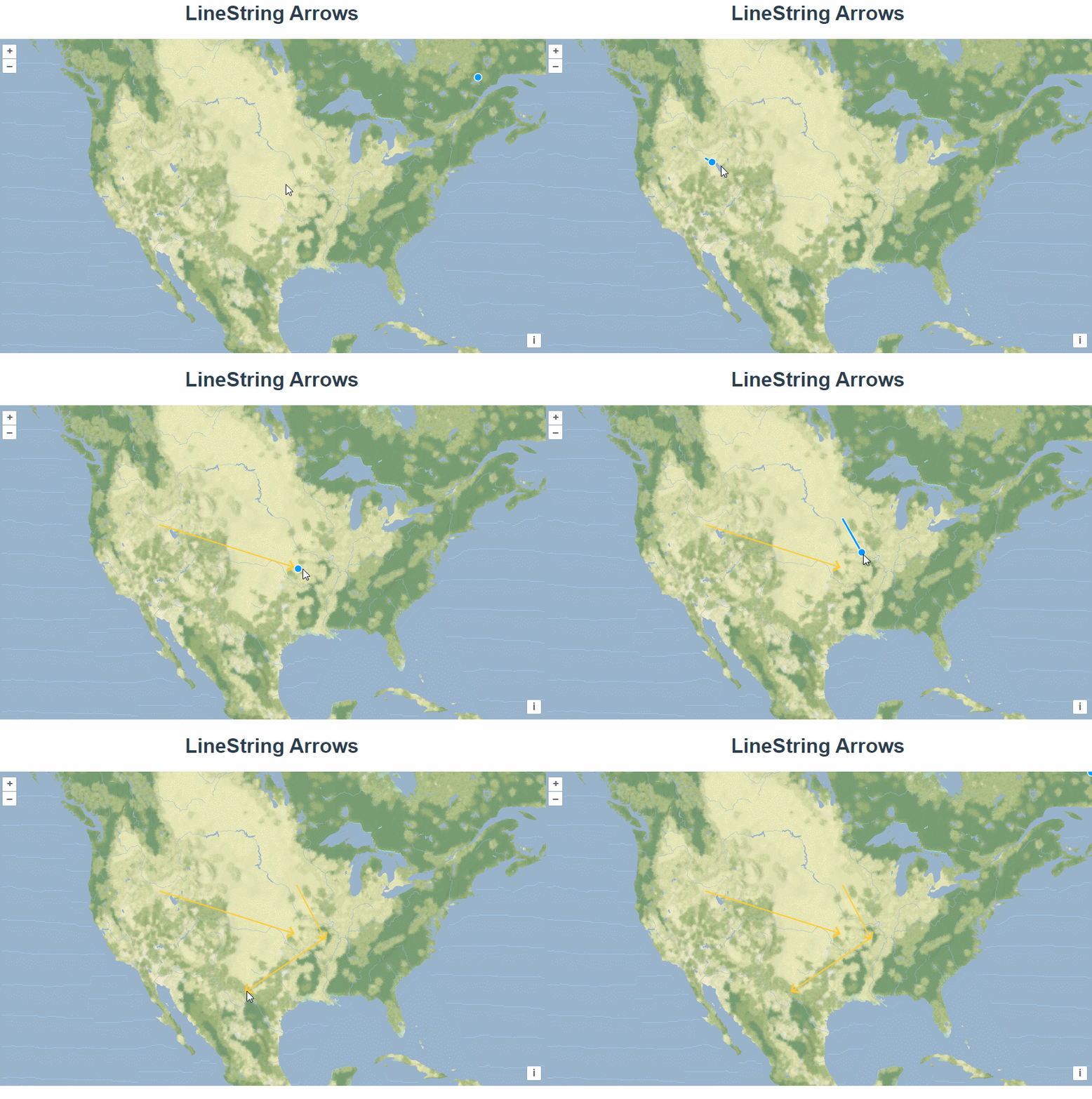
五十四、openlayers官网示例LineString Arrows解析——在地图上绘制箭头

官网demo地址:

LineString Arrows 

 这篇介绍了在地图上绘制箭头。

创建一个矢量数据源,将其绑定为draw的数据源并展示在矢量图层上。

  const source = new VectorSource();
  const vector = new VectorLayer({
      source: source,
      style: styleFunction,
   });
   map.addInteraction(
      new Draw({
        source: source,
        type: "LineString",
      })
    );

绘制直线时,通过style函数将直线的末端添加箭头图标。通过forEachSegment 函数拿到箭头的起点和终点坐标,使用 Math.atan2计算出箭头图标的旋转角度。 

const styleFunction = function (feature) {
      const geometry = feature.getGeometry();
      const styles = [
        new Style({
          stroke: new Stroke({
            color: "#ffcc33",
       
OpenLayers绘制轨迹并确定其行进方向,通常需要结合地理信息数据处理以及矢量图层的渲染。下面是一个简化的步骤说明: 1. **获取GPS点位集合**:首先要有一个包含时间戳、经纬度等信息的GPS点集合作为基础数据源。 2. **创建LineString几何对象**:利用上述的数据点按照采集的时间顺序依次连接起来形成线段(LineString),这将代表移动物体所经过的实际路径。 3. **设置样式以指示方向**: - 可以为这条线路添加箭头标记来直观显示前进的方向。 - 使用`ol/style/Style`, `ol/style/Icon`(对于小图标) 或者自定义SVG图形作为起点和终点的特殊标志物。 4. **动画效果模拟运动过程**(可选): 如果想要更生动地展示,则可以考虑加入一些简单的动画元素,在地图上逐步“播放”出整个行程路线的变化情况。 5. **计算方位角(Heading)** (如果需要数值化描述) 对于每一对相邻坐标点之间都可以通过数学公式算出它们之间的夹角即航向角度值heading = atan2(sin(lon2-lon1)*cos(lat2), cos(lat1)*sin(lat2)-sin(lat1)*cos(lat2)*cos(lon2-lon1)) * (180/Math.PI); 这样便能获得从一点到另一点的确切朝向了。 以下是简化版示例代码片段用于快速理解如何操作: ```javascript var vectorSource = new ol.source.Vector({ features: [ /* Feature objects with geometry LineStrings */ ] }); // Adding arrow symbols to represent direction at certain points along the path. vectorLayer.setStyle(function(feature){ var styleArray = []; // Apply default line styling here... styleArray.push(new ol.style.Style({ stroke: new ol.style.Stroke({color: 'blue', width: 3}) })); if(/* condition for adding arrows */) { let coordPairs = feature.getGeometry().getCoordinates(); // For example add an arrow every nth point on the route const interval = Math.floor(coordPairs.length / numberOfArrows); for(let i=0; i<coordPairs.length; i+=interval){ styleArray.push( new ol.style.Style({ geometry: new ol.geom.Point(coordPairs[i]), image:new ol.style.Icon({ anchor:[0.75, 0.5], src:'data:image/png;base64,iVBORw...' }) })); } } return styleArray; }); ``` 请注意以上只是一个大概框架性的指导,并未涉及具体的环境配置细节等内容;另外为了更好地适配特定应用场景下对精度的要求等因素,在实际项目开发过程中往往还需要进一步调整优化算法及视觉呈现方案。
评论
添加红包

请填写红包祝福语或标题

红包个数最小为10个

红包金额最低5元

当前余额3.43前往充值 >
需支付:10.00
成就一亿技术人!
领取后你会自动成为博主和红包主的粉丝 规则
hope_wisdom
发出的红包
实付
使用余额支付
点击重新获取
扫码支付
钱包余额 0

抵扣说明:

1.余额是钱包充值的虚拟货币,按照1:1的比例进行支付金额的抵扣。
2.余额无法直接购买下载,可以购买VIP、付费专栏及课程。

余额充值



