


 本文详细介绍了Git分支管理策略,包括在本地开发中使用分支、合并、冲突处理以及提交流程的最佳实践,强调了主分支保护和rebase/merge的区别,以及gitstash的暂存和恢复功能。
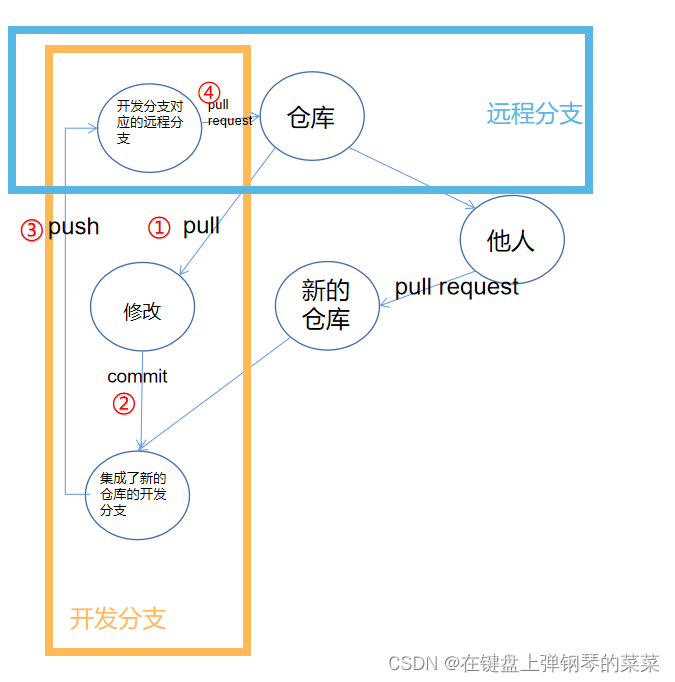
我们的所有改动都应在本地开发分支上进行并push到远程开发分支,本地主分支则应一直与远程代码仓库主分支的代码保持一致。不应在主分支上修改或commit,否则会给代码合并带来困难。最终的代码合并也是将主分支上的新提交merge到开发分支上(或rebase)
分支管理
- 删除本地分支
checkout another_branch_name
git branch -d delete_target_branch_name
- 拉取远程分支到本地
git remote -v
git checkout -b integration/PowerDDS remotes/origin/HEAD
3a. merge合并分支
应在开发分支,将主分支merge过来
git checkout dev/xxx
git merge integration
3b. rebase合并分支
应在主分支,将主分支rebase过去
git checkout integration
git rebase dev/xx
- 处理冲突
git status
git rm [files delete by others]
#ctrl+单击文件->左下角在冲突解决视图打开->解决冲突
git commit -m "handled conflicts"
5b. rebase继续
git branch --all
此时在变基分支,需要输入continue命令才能继续完成
git rebase --continue
- push
git push --set-upstream origin dev/PowerDDS/DDS-126
其他分支操作
- 新建分支
git branch --copy [new_branch_name]
git checkout -b [new_branch_name]
- 合并commit
在开发时,多次commit有助于备份和回退;但在提交到远程时,过多的commit会显得混乱。故在push到远程分支之前应将commit合并(在此之前应备份)
git rebase -i HEAD~7		#自己的所有commit
#随后进入nano编辑界面,ctrl+O保存;ctrl+X退出并执行
#第一个(最久远的)必须pick或record(重新输入commit message); 其余drop(删除注释),squash(将注释添加在一起)
- git分支重命名
git branch -m new_branch_name
git branch -m old_branch_name new_branch_name
- 显示上游分支
git remote -v

git remote show 会显示远程仓库信息,比如 origin 或者 upstream

git remote show origin

git remote show upstream
提交流程
- add
git add . 		#会把本地所有untrack的文件都加入暂存区,并且会根据.gitignore做过滤
git add * 		#会忽略.gitignore把任何文件都加入
- commit
日志管理
- 查看代码是谁修改的
git blame <filename>
# <起始行>, <结束行>用数据来表示
# 显示从起始行到结束行的数据
git blame -L <起始行>, <结束行> <filename>
# 显示从起始行到文件最后一行的数据
git blame -L <起始行>, <filename>
# 显示从文件开始到结束行的数据
git blame -L , <结束行> <filename>
- 查看历史提交
git log
暂存分支修改
git stash
#checkout xx
#do other work
#checkout back
git stash pop





 扫一扫
扫一扫


 9520
9520

 被折叠的 条评论
为什么被折叠?
被折叠的 条评论
为什么被折叠?
 到【灌水乐园】发言





