Route-4 - switch_vlan

本文详细介绍了一种利用三层核心交换机实现不同VLAN间IP互连的方法。配置包括创建VLAN、设置SVI接口及网关地址等关键步骤,并通过实际案例验证了配置的有效性。

直接上拓扑图:
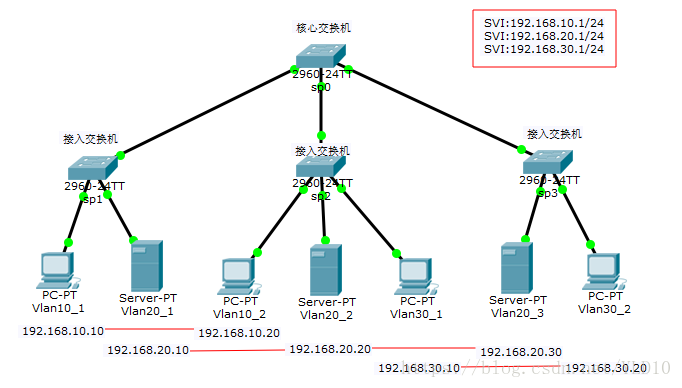
vlan 交换机拓扑图

目的:

3 个VLAN 对应的IP 子网分别为192.168.10.0/24 、192.168.20.0/24 、192.168.30.0/24,3 个VLAN 通过3 层核心交换机的IP 转发能力实现子网互连。

交换机配置

核心交换机配置
sp0 switch

config>> vlan 10  // 创建VLAN 10
config-vlan>> vlan 20  // 创建VLAN 20
config-vlan>> vlan 30  // 创建VLAN 30
config-vlan>> exit
config>> int range fast 0/1-3  // 配置该端口fa 0/1-3 都为trunk 口
config-if-range>> switch mode trunk
config-if-range>> exit
config>> int vlan 10  // 创建SVI 10
config-if>> ip add 192.168.10.1 255.255.255.0  // 配置vlan 10的网关地址
config-if>> int vlan 20  // 创建SVI 20
config-if>> ip add 192.168.20.1 255.255.255.0  // 配置vlan 20的网关地址
config-if>> int vlan 30  // 创建SVI 30
config-if>> ip add 192.168.30.1 255.255.255.0  // 配置vlan 30的网关地址
config-if>> end  // 退出到特权模式
sp0# wri  保存配置

sp1 switch

config>> vlan 10  // 创建 VLAN 10
config-vlan>> vlan 20  // 创建 VLAN 20
config-vlan>> exit
config>> int fast 0/2
config-if>> swi acc vl 10  // 将端口fa 0/2 分配给 VLAN 10
config-if>> int fast 0/3
config-if>> swi acc vl 20  // 将端口fa 0/3 分配给 VLAN 20
config-if>> exit
config>> int fast 0/1
config-if>> swi mo tr  // 指定上连核心交换机的trunk 口
config-if>> end
sp1# wri

sp2 switch

config>> vlan 10  // 创建 VLAN 10
config-vlan>> vlan 20  // 创建 VLAN 20
config-vlan>> vlan 30  // 创建 VLAN 30
config-vlan>> exit
config>> int fast 0/2
config-if>> swi acc vl 10  // 将端口fa 0/2 分配给 VLAN 10
config-if>> int fast 0/3
config-if>> swi acc vl 20  // 将端口fa 0/3 分配给 VLAN 20
config-if>> int fast 0/4
config-if>> swi acc vl 30  // 将端口fa 0/4 分配给 VLAN 30
config-if>> exit
config>> int fast 0/1
config-if>> swi mo tr  // 指定上连核心交换机的trunk 口
config-if>> end
sp2# wri

sp3 switch

config>> vlan 20  // 创建 VLAN 20
config-vlan>> vlan 30  // 创建 VLAN 30
config-vlan>> exit
config>> int fast 0/2
config-if>> swi acc vl 20  // 将端口fa 0/2 分配给 VLAN 20
config-if>> int fast 0/3
config-if>> swi acc vl 30  // 将端口fa 0/3 分配给 VLAN 30
config-if>> exit
config>> int fast 0/1
config-if>> swi mo tr  // 指定上连核心交换机的trunk 口
config-if>> end
sp3# wri

配置验证
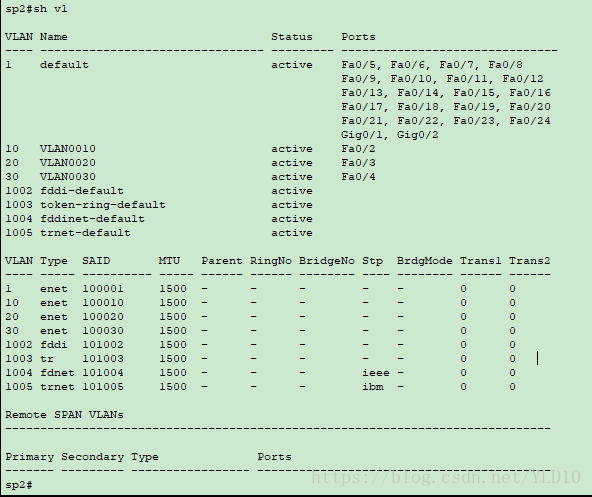
sp2 show vlan

结果验证

Vlan10_1 ping Vlan20_1
Vlan10_1 ping Vlan10_2
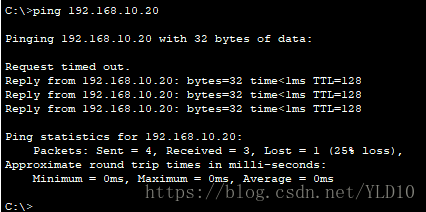
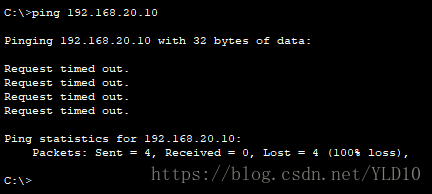
Vlan10_1 ping Vlan30_2
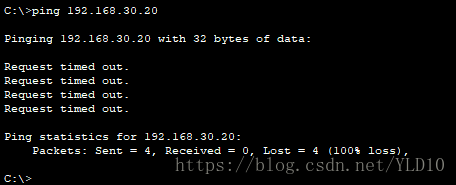

pkt 文件在我的 github 上:https://github.com/YLD10/Route

脚本名:S60mcsd,脚本代码:#!/bin/sh /etc/rc.common # Copyright (c) 2013-2016, 2019, 2021-2022 Qualcomm Technologies, Inc. # # All Rights Reserved. # Confidential and Proprietary - Qualcomm Technologies, Inc. # # 2013-2016 Qualcomm Atheros, Inc. # All Rights Reserved. # Qualcomm Atheros Confidential and Proprietary. START=60 #USE_PROCD=1 SERVICE_DAEMONIZE=1 SERVICE_PATH="/usr/sbin/mcsd" MCSD_CONFIG_FILE="/tmp/mcs.conf" WLAN_DEVICES= mcs_cfg_append() { echo "$1" >> "$MCSD_CONFIG_FILE.$$" } __mcs_get_switch_iface() { local loc_switch_iface="auto" local loc_switch_device_id="0" local implicit_vlan="0" local ref_design config_load mcsd config_get loc_switch_iface config SwitchInterface "" config_get loc_switch_device_id config SwitchDeviceId "0" if [ -z "$loc_switch_iface" ]; then eval "$1=''" return fi if [ "$loc_switch_iface" = "auto" ]; then ref_design=ap$(cat /tmp/sysinfo/board_name | awk -F 'ap' '{print $2}') # List of supported reference designs. For other designs # either add to cases, or setup SwitchInterface. case "$ref_design" in ap148|ap145|db149|ap160|ap161) # S17c switch loc_switch_iface="eth1" ;; ap-dk0*) loc_switch_iface="eth1" implicit_vlan="1" ;; ap135) # ap135 has S17 switch, which is not fully supported by # the multicast switch wrapper. Disable it for now until # support for S17 will be added. loc_switch_iface="" ;; ap-mp03.1*) #Maple uses S17 switch but its switch device id is 1. loc_switch_iface="eth1" loc_switch_device_id="1" ;; *) loc_switch_iface="" ;; esac fi local loc_switch_cpu_port mcs_get_switch_cpu_port loc_switch_cpu_port local lan_vid mcs_get_switch_lan_vid lan_vid if [ -z "$switch_cpu_port_tagged" -o "$implicit_vlan" = "1" ]; then eval "$1='$loc_switch_iface'" else eval "$1='${loc_switch_iface}.${lan_vid}'" fi eval "$2='$loc_switch_device_id'" } mcs_get_switch_lan_vid() { local loc_lan_vid config_load mcsd config_get loc_lan_vid config SwitchLanVid "" eval "$1='$loc_lan_vid'" } __mcs_get_switch_cpu_port_iterate() { config_get vlan "$1" "vlan" config_get ports "$1" "ports" if [ "${vlan}" = "$2" ]; then switch_cpu_port=`echo ${ports} |sed 's/t//g' |cut -f 1 -d " "` switch_cpu_port_tagged=`echo ${ports} |grep t` fi } mcs_get_switch_cpu_port() { local lan_vid mcs_get_switch_lan_vid lan_vid config_load network config_foreach __mcs_get_switch_cpu_port_iterate switch_vlan $lan_vid eval "$1='$switch_cpu_port'" } __mcs_get_wlan_devices() { local config="$1" local disabled devtype #Collect qca wifi radio information, assume all configuratoin should be ready #Before mcsd starts. config_get devtype "$config" type '' if [ "$devtype" = "qcawifi" ] || [ "$devtype" = "qcawificfg80211" ]; then WLAN_DEVICES="${WLAN_DEVICES}${WLAN_DEVICES:+","}${config}" fi } mcs_cfg_get_wifi_device() { config_load wireless config_foreach __mcs_get_wlan_devices wifi-device eval "$1='${WLAN_DEVICES}'" } mcs_cfg_add_interface() { local wifi_device local switch_device local switch_device_id local switch_lan_vid local switch_cpu_root_port local nonsnoopbridge local blockedinterface #mcs_cfg_get_wifi_device wifi_device mcs_cfg_append 'WifiDevice=wifi0,wifi1,wifi2' #__mcs_get_switch_iface switch_device switch_device_id mcs_cfg_append 'SwitchDevice='$switch_device mcs_cfg_append 'SwitchDeviceId='$switch_device_id # Get switch VLAN ID and CPU port #mcs_get_switch_lan_vid switch_lan_vid #mcs_get_switch_cpu_port switch_cpu_root_port mcs_cfg_append 'SwitchLanVid='"$switch_lan_vid" mcs_cfg_append 'SwitchCpuPort='"$switch_cpu_root_port" config_load mcsd # NonSnoopBridge seperated by comma ",", for example "br-lan, br-lan1" #config_get nonsnoopbridge config NonSnoopBridge "" mcs_cfg_append 'NonSnoopBridge='"$nonsnoopbridge" # BlockedInterface seperated by comma ",", for example "ath0, eth3" #config_get blockedinterface config BlockedInterface "" mcs_cfg_append 'BlockedInterface='"$blockedinterface" } mcs_create_config() { rm -f "$MCSD_CONFIG_FILE" mcs_cfg_append '; Automatically generated mcsd configuration file,do not change it.' mcs_cfg_append '[INTERFACE]' mcs_cfg_add_interface } #reload_service() { #stop #exescript=`ls /etc/hotplug.d/net/*mcsd* 2>&-` #[ -n "$exescript" ] || return # start with aggregation(background) #exescript="$exescript &" #eval $exescript #} reload() { restart } #service_triggers() { # procd_add_reload_trigger mcsd network wireless #} start() { local enabled #config_load 'mcsd' #config_get_bool enabled config 'Enable' '0' enabled=1 [ -f "$MCSD_RUN_FILE" ] && return touch $MCSD_RUN_FILE [ "$enabled" -gt 0 ] || { return 1; } mcs_create_config mv $MCSD_CONFIG_FILE.$$ $MCSD_CONFIG_FILE service_start ${SERVICE_PATH} -d -C "$MCSD_CONFIG_FILE" config_load sysmode config_get sysmode sysmode mode #RE, CLIENT, MSSID mode:TODO if [ "$sysmode" = "ap" ]; then #always assume router "wan" is the port to be connected to frond end in AP mode. local LANIF=$(uci get profile.@wan[0].wan_ifname -c "/etc/profile.d" -q) #firstly, let bridge forward igmp report. echo 2 > /sys/class/net/br-lan/brif/$LANIF/multicast_router #secondly, let mcs pass it instead of dropping it. mcsctl -s br-lan route specify $LANIF fi } stop() { service_stop ${SERVICE_PATH} rm -f $MCSD_CONFIG_FILE rm -f $MCSD_RUN_FILE }
最新发布
11-18
评论
成就一亿技术人!
拼手气红包6.0元
还能输入1000个字符
 
红包 添加红包
表情包 插入表情
 条评论被折叠 查看
添加红包

请填写红包祝福语或标题

红包个数最小为10个

红包金额最低5元

当前余额3.43前往充值 >
需支付:10.00
成就一亿技术人!
领取后你会自动成为博主和红包主的粉丝 规则
hope_wisdom
发出的红包
实付
使用余额支付
点击重新获取
扫码支付
钱包余额 0

抵扣说明:

1.余额是钱包充值的虚拟货币,按照1:1的比例进行支付金额的抵扣。
2.余额无法直接购买下载,可以购买VIP、付费专栏及课程。

余额充值