



1 文件大小配置
- application.yml
spring:
  profiles:
    active: dev
  servlet:
    multipart:
      max-file-size: 30MB
      max-request-size: 30MB
- application.properties
spring.servlet.multipart.max-file-size=30MB
spring.servlet.multipart.max-request-size=30MB
2 文件上传
2.1 单文件上传
package com.sb.controller;

import com.sb.po.PeopleInfos;
import com.sb.service.PeopleInfosService;
import java.util.Map;
import java.util.HashMap;
import java.util.List;
import javax.servlet.http.HttpServletRequest;
import javax.servlet.http.HttpServletResponse;
import java.io.File;
import java.io.IOException;
import java.io.UnsupportedEncodingException;
import java.io.FileInputStream;
import java.io.BufferedInputStream;
import java.io.OutputStream;
import java.io.ByteArrayOutputStream;
import java.io.IOException;
import java.net.URLEncoder;
import java.nio.ByteBuffer;

import org.springframework.beans.factory.annotation.Autowired;
import org.springframework.data.redis.core.RedisTemplate;
import org.springframework.data.redis.core.StringRedisTemplate;
import org.springframework.web.bind.annotation.RequestMapping;
import org.springframework.web.bind.annotation.RequestMethod;
import org.springframework.web.bind.annotation.RequestParam;
import org.springframework.web.bind.annotation.RequestBody;
import org.springframework.web.bind.annotation.ResponseBody;
import org.springframework.web.bind.annotation.CrossOrigin;
import org.springframework.web.bind.annotation.RestController;
import org.springframework.web.multipart.MultipartFile;
import org.springframework.web.multipart.MultipartHttpServletRequest;
import org.springframework.ui.Model;
import org.springframework.ui.ModelMap;
import org.springframework.stereotype.Controller;
import org.slf4j.Logger;
import org.slf4j.LoggerFactory;
import org.springframework.http.ResponseEntity;
import org.springframework.http.HttpHeaders;
import org.springframework.http.MediaType;
import org.springframework.http.HttpStatus;

@CrossOrigin(origins="*", maxAge=3600)
@Controller
@RequestMapping("/api/ui")
public class UIController{
    @Autowired
    private PeopleInfosService peopleInfosService;
    static Logger logger = LoggerFactory.getLogger(UIController.class);

    @RequestMapping(value="/single-file-upload", method=RequestMethod.POST)
    @ResponseBody
    public Map uploadSingleFile(@RequestParam("file") MultipartFile file){
        Map returnMap = new HashMap();
        if(file.isEmpty()){
            returnMap.put("code", 400);
            returnMap.put("infos", "上传失败,请选择文件");
            return returnMap;
        }
        String fileName = file.getOriginalFilename();
        String filePath = "/home/xdq/xinPrj/java/javaWebTest/pureBackendSB/javaAI/src/main/resources/upload/";
        File fileObj = new File(filePath+fileName);
        try{
            // 文件保存到指定路径
            file.transferTo(fileObj);
            returnMap.put("code", 200);
            returnMap.put("infos", "上传成功");
            return returnMap;
        }catch (IOException e){
            e.printStackTrace();
        }
        returnMap.put("code", 400);
        returnMap.put("infos", "上传失败,请选择文件");
        return returnMap;
    }
}
- 接口请求
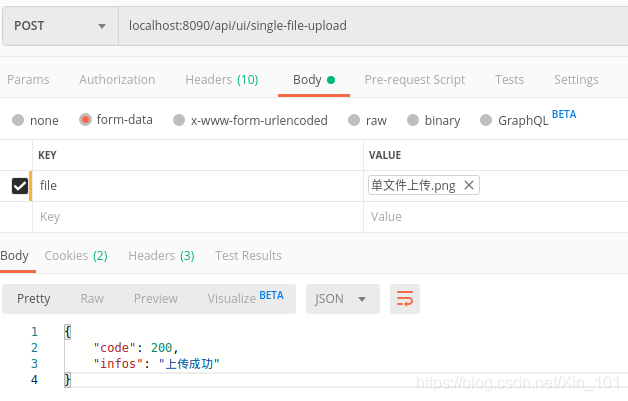
2.2 多文件上传
package com.sb.controller;

import com.sb.po.PeopleInfos;
import com.sb.service.PeopleInfosService;
import java.util.Map;
import java.util.HashMap;
import java.util.List;
import javax.servlet.http.HttpServletRequest;
import javax.servlet.http.HttpServletResponse;
import java.io.File;
import java.io.IOException;
import java.io.UnsupportedEncodingException;
import java.io.FileInputStream;
import java.io.BufferedInputStream;
import java.io.OutputStream;
import java.io.ByteArrayOutputStream;
import java.io.IOException;
import java.net.URLEncoder;
import java.nio.ByteBuffer;

import org.springframework.beans.factory.annotation.Autowired;
import org.springframework.data.redis.core.RedisTemplate;
import org.springframework.data.redis.core.StringRedisTemplate;
import org.springframework.web.bind.annotation.RequestMapping;
import org.springframework.web.bind.annotation.RequestMethod;
import org.springframework.web.bind.annotation.RequestParam;
import org.springframework.web.bind.annotation.RequestBody;
import org.springframework.web.bind.annotation.ResponseBody;
import org.springframework.web.bind.annotation.CrossOrigin;
import org.springframework.web.bind.annotation.RestController;
import org.springframework.web.multipart.MultipartFile;
import org.springframework.web.multipart.MultipartHttpServletRequest;
import org.springframework.ui.Model;
import org.springframework.ui.ModelMap;
import org.springframework.stereotype.Controller;
import org.slf4j.Logger;
import org.slf4j.LoggerFactory;
import org.springframework.http.ResponseEntity;
import org.springframework.http.HttpHeaders;
import org.springframework.http.MediaType;
import org.springframework.http.HttpStatus;

@CrossOrigin(origins="*", maxAge=3600)
@Controller
@RequestMapping("/api/ui")
public class UIController{
    @Autowired
    private PeopleInfosService peopleInfosService;
    static Logger logger = LoggerFactory.getLogger(UIController.class);

    @RequestMapping(value="/multi-file-upload", method=RequestMethod.POST)
    @ResponseBody
    public Map uploadMultiFile(HttpServletRequest req){
        Map returnMap = new HashMap();
        List<MultipartFile> files = ((MultipartHttpServletRequest) req).getFiles("file");
        String filePath = "/home/xdq/xinPrj/java/javaWebTest/pureBackendSB/javaAI/src/main/resources/upload/";
        for(int i=0;i<files.size();i++){
            MultipartFile file = files.get(i);
            if(file.isEmpty()){
                returnMap.put("code", 201);
                returnMap.put("infos", "上传第"+String.valueOf(i+1)+"个文件失败");
                return returnMap;
            }
            String fileName = file.getOriginalFilename();
            File fileObj = new File(filePath+fileName);
            try{
                file.transferTo(fileObj);
            }catch (IOException e){
                returnMap.put("code", 201);
                returnMap.put("infos", "上传第"+String.valueOf(i++)+"个文件失败");
                return returnMap;
            }
        }
        returnMap.put("code", 200);
        returnMap.put("infos", "上传文件失败");
        return returnMap;
    }
}
- 接口请求
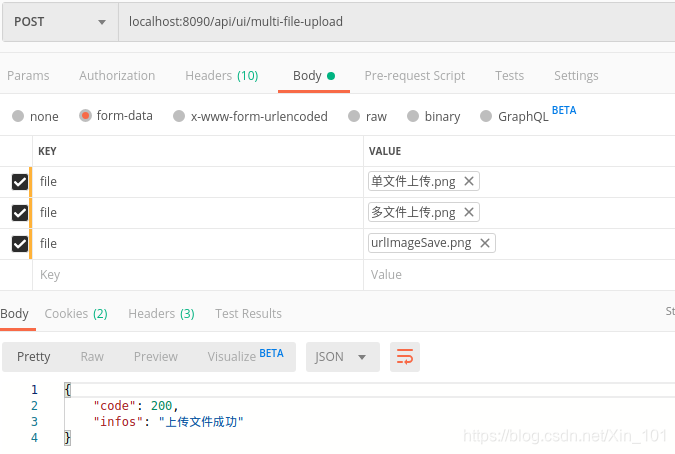
3 文件下载
3.1 java自带文件系统
package com.sb.controller;

import com.sb.po.PeopleInfos;
import com.sb.service.PeopleInfosService;
import java.util.Map;
import java.util.HashMap;
import java.util.List;
import javax.servlet.http.HttpServletRequest;
import javax.servlet.http.HttpServletResponse;
import java.io.File;
import java.io.IOException;
import java.io.UnsupportedEncodingException;
import java.io.FileInputStream;
import java.io.BufferedInputStream;
import java.io.OutputStream;
import java.io.ByteArrayOutputStream;
import java.io.IOException;
import java.net.URLEncoder;
import java.nio.ByteBuffer;

import org.springframework.beans.factory.annotation.Autowired;
import org.springframework.data.redis.core.RedisTemplate;
import org.springframework.data.redis.core.StringRedisTemplate;
import org.springframework.web.bind.annotation.RequestMapping;
import org.springframework.web.bind.annotation.RequestMethod;
import org.springframework.web.bind.annotation.RequestParam;
import org.springframework.web.bind.annotation.RequestBody;
import org.springframework.web.bind.annotation.ResponseBody;
import org.springframework.web.bind.annotation.CrossOrigin;
import org.springframework.web.bind.annotation.RestController;
import org.springframework.web.multipart.MultipartFile;
import org.springframework.web.multipart.MultipartHttpServletRequest;
import org.springframework.ui.Model;
import org.springframework.ui.ModelMap;
import org.springframework.stereotype.Controller;
import org.slf4j.Logger;
import org.slf4j.LoggerFactory;
import org.springframework.http.ResponseEntity;
import org.springframework.http.HttpHeaders;
import org.springframework.http.MediaType;
import org.springframework.http.HttpStatus;

@CrossOrigin(origins="*", maxAge=3600)
@Controller
@RequestMapping("/api/ui")
public class UIController{
    @Autowired
    private PeopleInfosService peopleInfosService;
    static Logger logger = LoggerFactory.getLogger(UIController.class);

    @RequestMapping(value="/download", method=RequestMethod.GET)
    @ResponseBody
    public Map downloadFile(HttpServletRequest req, HttpServletResponse res) throws UnsupportedEncodingException{
        Map returnMap = new HashMap();
        File fileDir = new File("/home/xdq/xinPrj/java/javaWebTest/pureBackendSB/javaAI/src/main/resources/upload/");
        File TrxFiles[] = fileDir.listFiles();
        logger.info("file path:{}\n", TrxFiles[0]);
        String fileName = TrxFiles[0].getName();
        logger.info("file name: {}\n", fileName);
        if(fileName != null){
            String realPath = "/home/xdq/xinPrj/java/javaWebTest/pureBackendSB/javaAI/src/main/resources/upload";
            File file = new File(realPath, fileName);
            if(file.exists()){
                res.setHeader("content-type", "application/octet-stream");
                res.setContentType("application/octet-stream");
                logger.info("文件存在\n");
                res.setContentType("application/force-download");
                res.setHeader("Content-Disposition", "attachment;filename="+URLEncoder.encode(fileName, "UTF-8"));
                // res.setHeader("Content-Disposition", "attachment;filename="+fileName);
                // res.setHeader("Content-Disposition", "attachment;filename="+fileName+";filename*=utf-8''");
                byte[] buffer = new byte[1024];
                FileInputStream fis = null;
                BufferedInputStream bis = null;
                try{
                    fis = new FileInputStream(file);
                    bis = new BufferedInputStream(fis);
                    OutputStream os = res.getOutputStream();
                    int i = bis.read(buffer);
                    while(i!=-1){
                        os.write(buffer, 0, i);
                        i = bis.read(buffer);
                    }
                    returnMap.put("code", 200);
                    returnMap.put("infos", "下载完成");
                    return returnMap;

                }catch(Exception e){
                    returnMap.put("code", 400);
                    returnMap.put("infos", "下载失败");
                    return returnMap;
                }finally{
                    if(bis!=null){
                        try{
                            bis.close();
                        }catch(IOException e){
                            e.printStackTrace();
                        }
                    }
                    if(fis!=null){
                        try{
                            fis.close();
                        }catch(IOException e){
                            e.printStackTrace();
                        }
                    }
                }
            }else{
                returnMap.put("code", 400);
                returnMap.put("infos", "文件不存在,下载失败");
                return returnMap;
            }
        }else{
            returnMap.put("code", 400);
            returnMap.put("infos", "文件夹不存在,下载失败");
            return returnMap;
        }

    }
}
3.2 springframework文件系统
SpringBoot有两种下载文件方式:
- 直接下载字节流
- 保存文件到文件服务器,通过公链接下载
3.2.1 字节流下载
package com.sb.controller;

import com.sb.po.PeopleInfos;
import com.sb.service.PeopleInfosService;
import java.util.Map;
import java.util.HashMap;
import java.util.List;
import javax.servlet.http.HttpServletRequest;
import javax.servlet.http.HttpServletResponse;
import java.io.File;
import java.io.IOException;
import java.io.UnsupportedEncodingException;
import java.io.FileInputStream;
import java.io.BufferedInputStream;
import java.io.OutputStream;
import java.io.ByteArrayOutputStream;
import java.io.IOException;
import java.net.URLEncoder;
import java.nio.ByteBuffer;

import org.springframework.beans.factory.annotation.Autowired;
import org.springframework.data.redis.core.RedisTemplate;
import org.springframework.data.redis.core.StringRedisTemplate;
import org.springframework.web.bind.annotation.RequestMapping;
import org.springframework.web.bind.annotation.RequestMethod;
import org.springframework.web.bind.annotation.RequestParam;
import org.springframework.web.bind.annotation.RequestBody;
import org.springframework.web.bind.annotation.ResponseBody;
import org.springframework.web.bind.annotation.CrossOrigin;
import org.springframework.web.bind.annotation.RestController;
import org.springframework.web.multipart.MultipartFile;
import org.springframework.web.multipart.MultipartHttpServletRequest;
import org.springframework.ui.Model;
import org.springframework.ui.ModelMap;
import org.springframework.stereotype.Controller;
import org.slf4j.Logger;
import org.slf4j.LoggerFactory;
import org.springframework.http.ResponseEntity;
import org.springframework.http.HttpHeaders;
import org.springframework.http.MediaType;
import org.springframework.http.HttpStatus;

@CrossOrigin(origins="*", maxAge=3600)
@Controller
@RequestMapping("/api/ui")
public class UIController{
    @Autowired
    private PeopleInfosService peopleInfosService;
    static Logger logger = LoggerFactory.getLogger(UIController.class);


    @RequestMapping(value="/download-with-filename", method=RequestMethod.POST)
    public ResponseEntity<byte[]> downloadFile() throws Exception{
        HttpHeaders headers = null;
        ByteArrayOutputStream baos = null;
        File fileDir = new File("/home/xdq/xinPrj/java/javaWebTest/pureBackendSB/javaAI/src/main/resources/upload");
        File fileLi[] = fileDir.listFiles();
        String fileName = fileLi[0].getName();
        if(fileName != null){
            String realPath = "/home/xdq/xinPrj/java/javaWebTest/pureBackendSB/javaAI/src/main/resources/upload";
            File file = new File(realPath, fileName);
            headers = new HttpHeaders();
            headers.setContentDispositionFormData("attachment", new String(fileName.getBytes("UTF-8"), "ISO-8859-1"));
            headers.setContentType(MediaType.APPLICATION_OCTET_STREAM);
            FileInputStream fis = null;
            BufferedInputStream bis = null;
            fis = new FileInputStream(file);
            // ByteBuffer byteBuffer = new ByteArrayBuffer();
            baos = new ByteArrayOutputStream();
            bis = new BufferedInputStream(fis);
            logger.info("buffered input stream:{}", bis);
            byte[] bytes = new byte[1024];
            logger.info("bytes: {}", bytes);
            int i = bis.read(bytes);
            while(i != -1){
                baos.write(bytes, 0, i);
                i = bis.read(bytes);
            }
        }
        return new ResponseEntity<byte[]>(baos.toByteArray(), headers, HttpStatus.CREATED);
    }
}
3.2.2 链接下载
自测使用项目下的resources/template作为文件服务器,使用Easy POI填充Excel实现如下:
- 路径配置
server:
  port: 8093

spring:
  profiles:
    active: dev
  application:
    name: ms-dataprocess #服务名称:注册中心server
  resources:
    static-locations: classpath:/resources/
  main:
    allow-bean-definition-overriding: true
- 配置静态文件拦截
package com.company.msdataprocess.config;

import org.springframework.context.annotation.Configuration;
import org.springframework.web.servlet.config.annotation.ResourceHandlerRegistry;
import org.springframework.web.servlet.config.annotation.WebMvcConfigurer;

/**
 * 静态资源读取配置
 * @author xindaqi
 * @since 2020-12-19
 */

@Configuration
public class StaticResourcesConfig implements WebMvcConfigurer {

    @Override
    public void addResourceHandlers(ResourceHandlerRegistry registry) {
        registry.addResourceHandler("/api/v1/download/**")
                .addResourceLocations("classpath:/resources/")
                .addResourceLocations("classpath:/template/");
    }
}
- 文件保存
package com.company.msdataprocess.util;

import cn.afterturn.easypoi.excel.ExcelExportUtil;
import cn.afterturn.easypoi.excel.entity.TemplateExportParams;
import com.company.msdataprocess.vo.UserInformationVO;
import org.apache.poi.ss.usermodel.Workbook;
import org.slf4j.Logger;
import org.slf4j.LoggerFactory;
import org.springframework.stereotype.Component;

import java.io.FileOutputStream;
import java.util.ArrayList;
import java.util.HashMap;
import java.util.List;
import java.util.Map;

/**
 * Excel处理工具
 * @author xindaqi
 * @since 2020-12-19
 */
@Component
public class ExcelProcessUtil {

    private static Logger logger = LoggerFactory.getLogger(ExcelProcessUtil.class);

    public void downloadTempalteAddRowUnderEasyPOI(Map<String, Object> map, String templatePath, String savePath) {
        TemplateExportParams paramsAddRow = new TemplateExportParams(templatePath);
        logger.info("Sheet name: {}", paramsAddRow.getSheetName());
        String filePath = "/Users/xindaqi/xinPrj/java/webStudy/microservice-framework/ms-dataprocess/src/main/resources/template/下载-用户信息.xlsx";
        Workbook workbook = ExcelExportUtil.exportExcel(paramsAddRow, map);
        try(FileOutputStream fos = new FileOutputStream(savePath)) {
            workbook.write(fos);
            logger.info("成功-下载Excel至Sheet{}", paramsAddRow.getSheetName());

        } catch(Exception e) {
            logger.info("下载异常:{}", e);
        } finally {
            try {
                workbook.close();
            } catch(Exception e) {
                logger.info("流关闭异常: {}", e);
            }

        }
    }
}
- 文件下载Implements
package com.company.msdataprocess.service.impl;


import com.company.msdataprocess.service.IDataProcessService;
import com.company.msdataprocess.util.ExcelProcessUtil;
import com.company.msdataprocess.vo.UserInformationVO;
import org.springframework.beans.factory.annotation.Autowired;
import org.springframework.stereotype.Service;

import javax.servlet.http.HttpServletRequest;
import java.util.ArrayList;
import java.util.HashMap;
import java.util.List;
import java.util.Map;

/**
 * 数据处理实现
 * @author xindaqi
 * @since 2020-12-19
 */

@Service
public class DataProcessServiceImpl implements IDataProcessService {

    @Autowired
    private ExcelProcessUtil excelProcessUtil;

    @Override
    public String downloadExcelUnderTemplate(HttpServletRequest request) {
        Map<String, Object> map = new HashMap<>(100);
        List<UserInformationVO> userInformationVOList = new ArrayList<>();
        UserInformationVO u1 = new UserInformationVO(1, "xiaoxiao", "黑龙江");
        UserInformationVO u2 = new UserInformationVO(2, "xiaohei", "安徽");
        UserInformationVO u3 = new UserInformationVO(3, "xiaohua", "辽宁");
        UserInformationVO u4 = new UserInformationVO(4, "xiaoer", "广东");
        userInformationVOList.add(u1);
        userInformationVOList.add(u2);
        userInformationVOList.add(u3);
        userInformationVOList.add(u4);
        map.put("list", userInformationVOList);
        String templatePath = "template/用户信息.xlsx";
        String savePath = "/Users/xindaqi/xinPrj/java/webStudy/microservice-framework/ms-dataprocess/src/main/resources/template/下载-用户信息.xlsx";
        excelProcessUtil.downloadTempalteAddRowUnderEasyPOI(map, templatePath, savePath);
        String downloadFilePath = request.getScheme() + "://" + request.getServerName() + ":" + request.getServerPort() + request.getRequestURI() + "/下载-用户信息.xlsx";

        return downloadFilePath;
    }
}
- 文件下载接口
package com.company.msdataprocess.controller;

import cn.afterturn.easypoi.excel.ExcelExportUtil;
import cn.afterturn.easypoi.excel.entity.TemplateExportParams;
import com.company.msdataprocess.service.IDataProcessService;
import com.company.msdataprocess.vo.SalesReportVO;
import org.apache.poi.ss.usermodel.Workbook;
import org.slf4j.Logger;
import org.slf4j.LoggerFactory;
import org.springframework.web.bind.annotation.CrossOrigin;
import org.springframework.web.bind.annotation.RestController;
import org.springframework.web.bind.annotation.RequestMapping;
import org.springframework.web.bind.annotation.RequestMethod;
import org.springframework.beans.factory.annotation.Autowired;
import io.swagger.annotations.Api;
import io.swagger.annotations.ApiOperation;
import com.alibaba.fastjson.JSON;

import javax.servlet.http.HttpServletRequest;
import javax.servlet.http.HttpServletResponse;
import java.io.File;
import java.io.FileOutputStream;
import java.util.ArrayList;
import java.util.HashMap;
import java.util.List;
import java.util.Map;

import com.company.msdataprocess.feign.IUserModuleFeign;

/**
 * DataProcess module test.
 * @author xindaqi
 * @since 2020-11-03
 */
@CrossOrigin(origins = "*", maxAge = 3600)
@RestController
@RequestMapping("/api/v1")
@Api(tags = "数据批处理")
public class DataProcessController {
    private static Logger logger = LoggerFactory.getLogger(DataProcessController.class);

    @Autowired
    private IDataProcessService dataProcessService;

    @RequestMapping(value = "/download", method = RequestMethod.GET)
    @ApiOperation("测试-下载")
    public void download(HttpServletRequest request, HttpServletResponse response) {
		try{
		    Map<String, String> respMap = new HashMap<>();
		    String fileLink = dataProcessService.downloadExcelUnderTemplate(request);
		    respMap.put("fileLink", fileLink);
		    String respBody = JSON.toJSONString(respMap);
            response.setCharacterEncoding("UTF-8");
            response.setLocale(new java.util.Locale("zh","CN"));
            response.setHeader("content-Type", "application/json");
            response.getWriter().write(respBody);
            logger.info("下载Excel成功");
        } catch(Exception e) {
            logger.info("下载Excel失败:{}", e);
        }

    }
}
- 接口测试
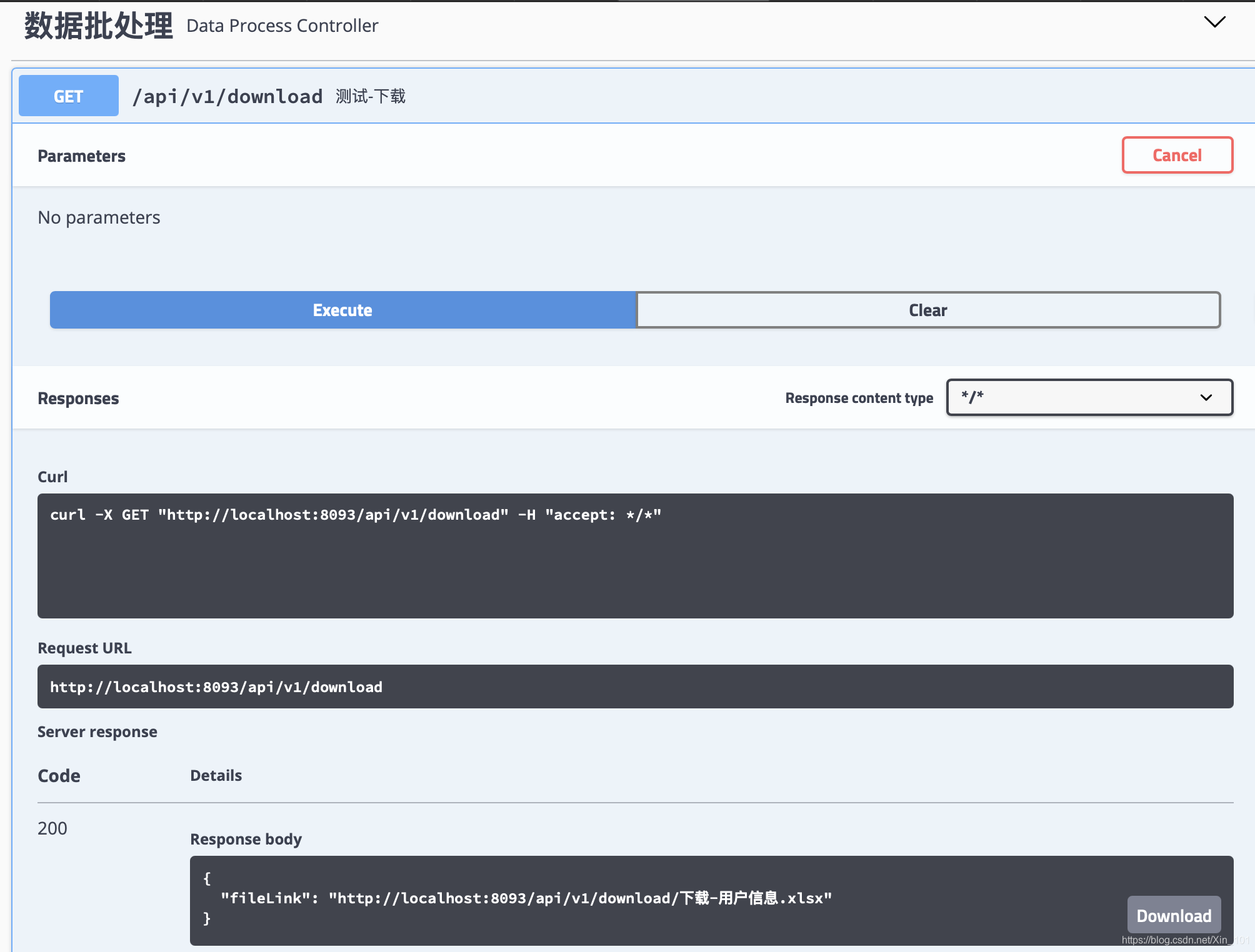
- 下载链接
http://localhost:8093/api/v1/download/下载-用户信息.xlsx
这里,Controller的接口虽然无返回值,即方法是void但是,使用了HttpServletResponse,实现结果返回。
4 web页面
- 源码
<!DOCTYPE html>
<html>
<head>
    <!-- <base href="<%=basePath%>"> -->
    <!-- <link rel="stylesheet" type="text/css" media="screen" th:href="@{/static/css/peopleInfos.css}"/> -->
    <meta http-equiv="Content-type" content="text/html; charset=UTF-8">
    <meta http-equiv="X-UA-Compatible" content="IE=edge,chrome=1"/>
    <title>文件上传</title>
</head>
<body>
    <h3>单文件上传</h3>
    <form method="post" action="/api/ui/single-file-upload" enctype="multipart/form-data">
        <input type="file" name="fileName"><br>
        <input type="submit" value="提交">
    </form>
    <h3>多文件上传</h3>
    <form method="post" action="/api/ui/multi-file-upload" enctype="multipart/form-data">
        <p>选择文件1:<input type="file" name="fileName"/></p>
        <p>选择文件2:<input type="file" name="fileName"/></p>
        <p>选择文件3:<input type="file" name="fileName"/></p>
        <p><input type="submit" value="提交"/></p>
    </form>
    <h3>文件下载</h3>
    <form method="post" action="/api/ui/download-with-filename" enctype="multipart/form-data">
        <input type="submit" value="下载">
    </form>
</body>
</html>
- 页面
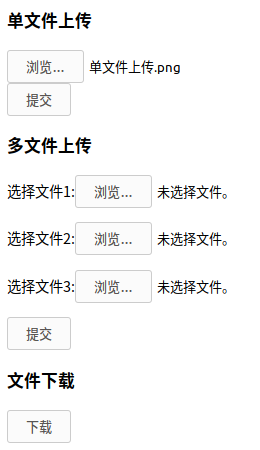
5 小结
- 下载文件两种方式:字节流直接下载和文件链接下载
- 文件链接下载,本地测试时,需要使用文件路径配置和静态文件拦截配置
- HttpServletResponse相应给浏览器或前端
【参考文献】
[1]https://www.cnblogs.com/jclian91/p/9277216.html
[2]https://www.jianshu.com/p/e678d7b362e1
[3]https://www.jianshu.com/p/be1af489551c
[4]https://blog.youkuaiyun.com/Tomwildboar/article/details/82959902





 扫一扫
扫一扫


 824
824

 被折叠的 条评论
为什么被折叠?
被折叠的 条评论
为什么被折叠?
 到【灌水乐园】发言





