



Hello everyone, here is the use document of colorconsole99
Next, I will introduce you how to use colorconsole 99 in detail:)
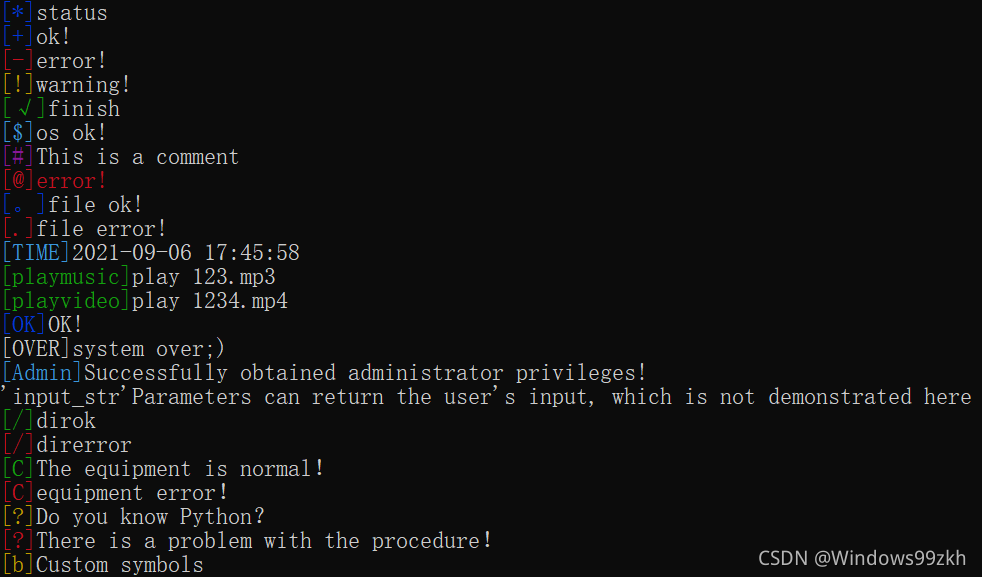
First of all, colorconsole99 is a command-line beautification program that can be run on Python 3 +. It can add a similar " [+] OK" before your command-line output. The following is the effect display diagram
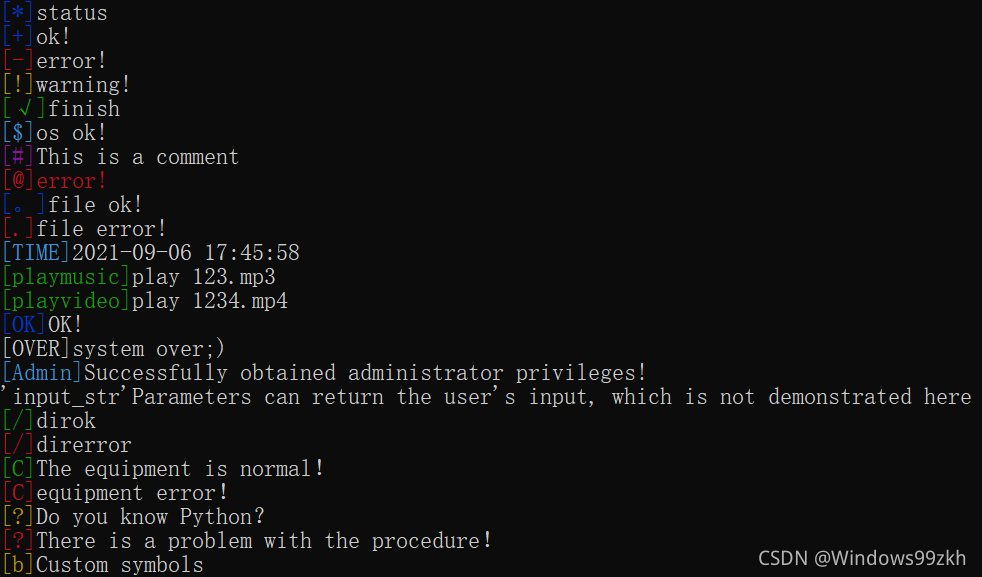
Their corresponding call code is like this
from colorconsole99 import *
colors.initsystem()
colors.print_status('status')
colors.print_good('ok!')
colors.print_error('error!')
colors.print_warning('warning!')
colors.print_finish('finish')
colors.print_os('os ok!')
colors.print_notrun('This is a comment')
colors.print_e('error!')
colors.print_fileok('file ok!')
colors.print_filerror('file error!')
colors.print_time()
colors.print_music('play 123.mp3')
colors.print_video('play 1234.mp4')
colors.print_ok('OK!')
colors.print_over('system over;)')
colors.print_admin('Successfully obtained administrator privileges!')
#colors.input_str('input:')
print("'input_str'Parameters can return the user's input, which is not demonstrated here")
colors.print_dirok('dirok')
colors.print_direrror('direrror')
colors.print_comok('The equipment is normal!')
colors.print_comerror('equipment error!')
colors.print_uquestion('Do you know Python?')
colors.print_cquestion('There is a problem with the procedure!')
def zidingyicolor(str):
    user_c = colors.user_color('[b]','YELLOW')
    print(user_c+str)
zidingyicolor('Custom symbols')
attention! When you use colorconsole 99, be sure to execute the initsystem method
Method introduction
initsystem()
This method is used to initialize symbols and must be executed first!
print_status(str,full=False)
This method can generate a prompt status symbol [*] , and full can set whether all text colors are colored
print_good(str,full=False)
This method can generate a prompt status symbol [+] , and ful can set whether all text colors are colored
print_error(str,full=False)
This method can generate prompt status symbols [-] , and full can set whether all text colors are colored
print_warning(str,full=False)
This method can generate a prompt status symbol [!], full can set whether all text colors are colored
print_finish(str,full=False)
This method can generate a prompt status symbol [√] , and full can set whether all text colors are colored
print_os(str,full=False)
This method can generate prompt status symbols [$] , and full can set whether all text colors are colored
print_notrun(str,full=False)
This method can generate a prompt status symbol [#] , and the full method can set whether all text colors are colored
print_e(str)
This method can generate the prompt status symbols [@] all coloring
print_fileok(str,full=False)
This method can generate a prompt status symbol [。], full can set whether all text colors are colored
print_filerror(str,full=False)
This method can generate prompt status symbols [.] , and full can set whether all text colors are colored
print_time(str,full=False)
This method can generate prompt status symbols [time] shijiangeshi can set the time format, follow the time module, title can set the position of the text (str) to be displayed, with front (front) before (back) middle (both sides), and full can set whether all text colors are colored
print_music(str,full=False)
This method can generate prompt symbols [music] , and full can set whether all text colors are colored
print_video(str,full=False)
This method can generate prompt symbols [Video] , and full can set whether all text colors are colored
print_ok(str,full=False)
This method can generate a prompt status symbol [OK] , and full can set whether all text colors are colored
print_over(str,full=False)
This method can generate prompt status symbols [over] , and full can set whether all text colors are colored
print_music(str,full=False)
This method can generate prompt status symbols [Admin] , and full can set whether all text colors are colored
input_str(str,full=False)
This method can get the user’s input [input] , and full can set whether all text colors are colored
print_dirok(str,full=False)
This method can generate a prompt status symbol [/] , and full can set whether all text colors are colored
print_direrror(str,full=False)
This method can generate a prompt status symbol [/] , and full can set whether all text colors are colored
print_comok(str,full=False)
This method can generate a prompt status symbol [C] , and full can set whether all text colors are colored
print_comerror(str,full=False)
This method can generate a prompt status symbol [C] , and full can set whether all text colors are colored
print_uquestion(str,full=False)
This method can generate a prompt status symbol [?], full can set whether all text colors are colored
print_music(str,full=False)
This method can generate a prompt status symbol [?], full can set whether all text colors are colored
user_color(title,color,full=False)
This method can generate custom prompt status symbols. Full can set whether all text colors are colored, as shown below
def zidingyicolor(str):
    user_c = colors.user_color('[b]','YELLOW')
    print(user_c+str)
zidingyicolor('Custom symbols')
This is all the tutorial documentation!
thank you!





 扫一扫
扫一扫


 1400
1400

 被折叠的 条评论
为什么被折叠?
被折叠的 条评论
为什么被折叠?
 到【灌水乐园】发言





