


In an era when wireless communication technology continues to set new records, IPQ9574 is undoubtedly a shining star, bringing disruptive changes to wireless networks. Let’s take a closer look at the excellence of IPQ9574 and how an outstanding product based on its technology was derived - DR9574.
Excellent performance of IPQ9574
1. Wi-Fi 6E technology leads the leap
IPQ9574 introduces the latest Wi-Fi 6E technology, expanding the communication frequency band to 6GHz, making the network faster and more stable. This technology allows users to experience a better wireless network connection, especially in scenarios with high load and high bandwidth requirements.
2. Advanced security
WPA3 encryption and advanced protection add a solid security foundation to IPQ9574. When users use the network built by IPQ9574, they can enjoy a higher level of privacy and data security without worrying about network threats.
3. Excellent multi-user performance
Supporting MU-MIMO technology, IPQ9574 enables multiple users to enjoy stable and high-speed network connections at the same time, making it suitable for multi-device environments such as homes and offices.
DR9574: An evolution based on IPQ9574
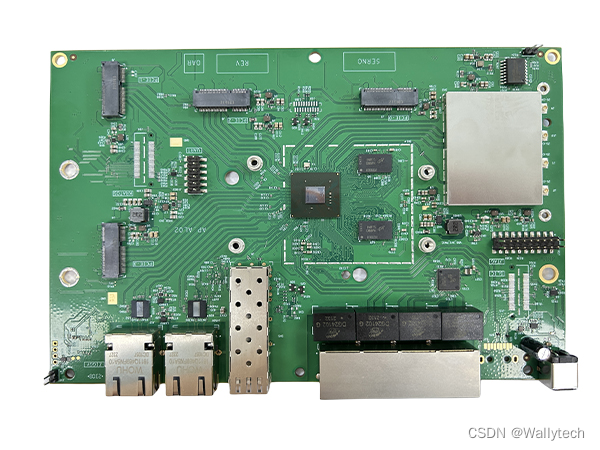
Based on IPQ9574, the highly anticipated DR9574 emerged at the historic moment, bringing users a more intelligent and comprehensive wireless network experience.
1. Extension of powerful performance
DR9574 has been deeply optimized based on the performance of IPQ9574, further improving the transmission speed and signal stability. This provides users with superior network connectivity performance.
2. Intelligent routing function
DR9574 not only inherits the high performance of IPQ9574, but also achieves more intelligent network management through intelligent routing algorithms. Users can control network traffic more flexibly to ensure intelligent and efficient network use.
3. User-friendly interface design
DR9574 has put great effort into the user interface design to make device configuration more intuitive and simple. Users, regardless of their technical level, can easily configure and manage their network.
End
IPQ9574 and DR9574, one is a leader in wireless communications, and the other is an evolution based on it. This combination provides users with an unparalleled network connectivity experience. In the digital age, we look forward to these innovative twin stars bringing more convenience and unknown surprises to our online life.
Now,you can see the IPQ9574 product DR9574 more information
' www.wallystech.com/Routerboard…
Symbol Parameter
Chipset:Qualcomm IPQ9574 Quad-Core ARM-A73 @ 2.2GHz processor ‘Alder’ Series
WLAN Host Interface:PCI Express 3.0 Interface
System Memory:2GB (2x1GB), DDR4 32-bit (2x16-bit) interface
Standard?Operating Voltage:12V
Operating Systems:QSDK
Host Interface:4 x M.2 E Key interface with PCIe 3.0
Antenna Cable / Port:4x U.FL Connectors
Frequency Range:2.4GHz: 2.412~2.472GHz
Data Rates for WLAN:2.4GHz 802.11b/g/n/ax, max 24dBm per chain
Channel Spectrum Widths for WLAN:Supports 20/40MHz at 2.4GHz
Modulation Techniques:OFDMA: BPSK, QPSK, DBPSK, DQPSK, 16-QAM, 64-QAM, 256-QAM,1024QAM, 4096QAM
Temperature Range:Operating: -20 °C to 70 °C, Storage: -40 °C to 90?°C
Humidity:Operating: 5% to 95%, Storage: Max. 90%
Certification:REACH & RoHS Compliance
Power Consumption:13W (Board only) 23W (with onboard WiFi, IPQ9574)
Dimensions (WxHxD):203mm x 139mm x 20mm
What sets us apart?
10+ years of QCA WiFi chip experience: Demonstrating our mastery of ar5414 and ar7161.
Special Protocols: We’ve developed protocols like TDMA over WiFi, Fast Roaming, Mesh, and more.
Tailored Solutions: Our expertise lies in hardware customization and seamless software integration.
Comprehensive Services: Enjoy a professional one-stop service coupled with long-term technical support.
Cutting-Edge Technology: Stay ahead with continuous improvements in full coverage and long-distance capabilities.
Future-Ready Solutions: Experience the latest in Wi-Fi 6E and Wi-Fi 7 technologies.
Innovative Designs: Explore the potential with DR6018 DR40X9 series WiFi 6 WiFi 7 Routers, featuring a remarkable 23KM long-distance transmission and support for Openwrt Openwifi.
Our systems are not just products; they are powerful enablers of scalable, flexible, and high-performance private networks, with seamless deployment capabilities. The effectiveness of our products is increasingly recognized in industries such as rail, maritime, and defense.
Clients: TIP,Facebook, Openwrt, etc.
BY:www.wallystech.com/
Attach:sales4@wallystech.com





 扫一扫
扫一扫


 781
781

 被折叠的 条评论
为什么被折叠?
被折叠的 条评论
为什么被折叠?
 到【灌水乐园】发言





