


 本文详细介绍了如何使用VS2019在Windows上编译QT5.9.5的x64版本。包括环境准备、配置选项、编译命令及解决常见问题,如路径过长、编译选项选择等。
1.将源码解压到磁盘根目录,
安装Qt的时候没有装到磁盘根目录,导致路径太长了,会莫名的报找不到文件或者ninja subcommand failed.
2.安装好
* Perl version 5.12 or later [http://www.activestate.com/activeperl/]
* Python version 2.7 or later [http://www.activestate.com/activepython/]
* Ruby version 1.9.3 or later [http://rubyinstaller.org/]
3打开
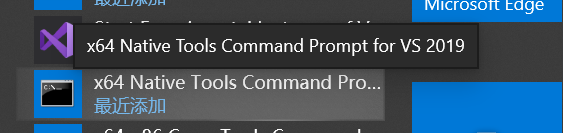
执行
Open a command prompt.
Ensure that the following tools can be found in the path:
* Supported compiler (Visual Studio 2012 or later,
MinGW-builds gcc 4.9 or later)
* Perl version 5.12 or later [http://www.activestate.com/activeperl/]
* Python version 2.7 or later [http://www.activestate.com/activepython/]
* Ruby version 1.9.3 or later [http://rubyinstaller.org/]
cd <path>\<source_package>
configure -prefix %CD%\qtbase <license> -nomake tests
nmake // jom // mingw32-make
Some relevant configure options (see configure -help):
-release Compile and link Qt with debugging turned off.
-debug Compile and link Qt with debugging turned on.
-nomake tests Disable building of tests to speed up compilation
-nomake examples Disable building of examples to speed up compilation
-confirm-license
 最低0.47元/天 解锁文章






 扫一扫
扫一扫


 2808
2808

 被折叠的 条评论
为什么被折叠?
被折叠的 条评论
为什么被折叠?
 到【灌水乐园】发言





